Questions
A MIDI controller for Photoshop
Yes, through an app that turns pads and knobs into Photoshop's shortcuts, because Photoshop has no MIDI settings: it listens to the keyboard and the pen. InputConfig, free on the Mac App Store, is that app, and it finds a class-compliant MIDI device over USB or Bluetooth MIDI with no driver.
Here is a deck for a pad controller with a few knobs and a sustain pedal, the Photoshop keys behind it, and the jobs that still need a plugin.
On this page: 8 sections
Steps
- Connect the MIDI controller over USB or Bluetooth MIDI.
- Add a row per pad in InputConfig, press Scan, hit the pad and pick the Photoshop key.
- Put knobs in Turn mode with a bracket key on each direction for brush size.
- Add Photoshop under Activate when these apps are in front, and activate the preset.
Build the pad deck
Pads and keys act as buttons and stay held while you hold them.
- You: Add a row per pad, press Scan, hit the pad, and pick the key from the table.
- InputConfig: Presses that key whenever the pad is hit.
- Check: Hit pad 1 in Photoshop and the Brush is selected.
| Pad, knob or pedal | Photoshop key | Job |
|---|---|---|
| Pad 1 | B | Brush |
| Pad 2 | E | Eraser |
| Pad 3 | V | Move |
| Pad 4 | L | Lasso |
| Pad 5 | Command Z | Undo, again to step further back |
| Pad 6 | Command Shift Z | Redo |
| Pad 7 | X | Swap foreground and background colors |
| Pad 8 | Command Shift N | New layer |
| Knob 1, Turn mode | ] clockwise, [ counterclockwise | Brush size |
| Knob 2, Turn mode | Shift ] clockwise, Shift [ counterclockwise | Brush hardness |
| Knob 3, Turn mode | Command Plus clockwise, Command Minus counterclockwise | Zoom |
| Sustain pedal | Space, held | Hand tool: pan with the pen while the pedal is down |
- Opacity. With a painting tool active, the number keys set it: 1 is 10 percent, 5 is 50, 0 is 100. Four spare pads on 2, 5, 7 and 0 give quick opacity steps.
- The eyedropper. A second pedal or pad held on Option turns the brush into the eyedropper while it is down.
A pedal on Space for the hand tool frees both hands for the pen and the pads.
 InputConfig is free on the Mac App Store. macOS 14 or later, no account, no tracking, open source.
Set the knobs: Turn, Dial and Switch
A knob can be read three ways:
- Turn. Fires a short nudge every few steps of rotation, clockwise for one row and counterclockwise for the other, which is how a knob becomes brush size: each nudge is one press of a bracket key. Turn Step sets how far you turn per press.
- Dial. Treats the center as zero, like a stick, and runs faster the further you turn, which suits scrolling a long layer panel with a Mouse Wheel output.
- Switch. Fires once past halfway, for pedals and buttons that send CC; a sustain pedal is read that way.
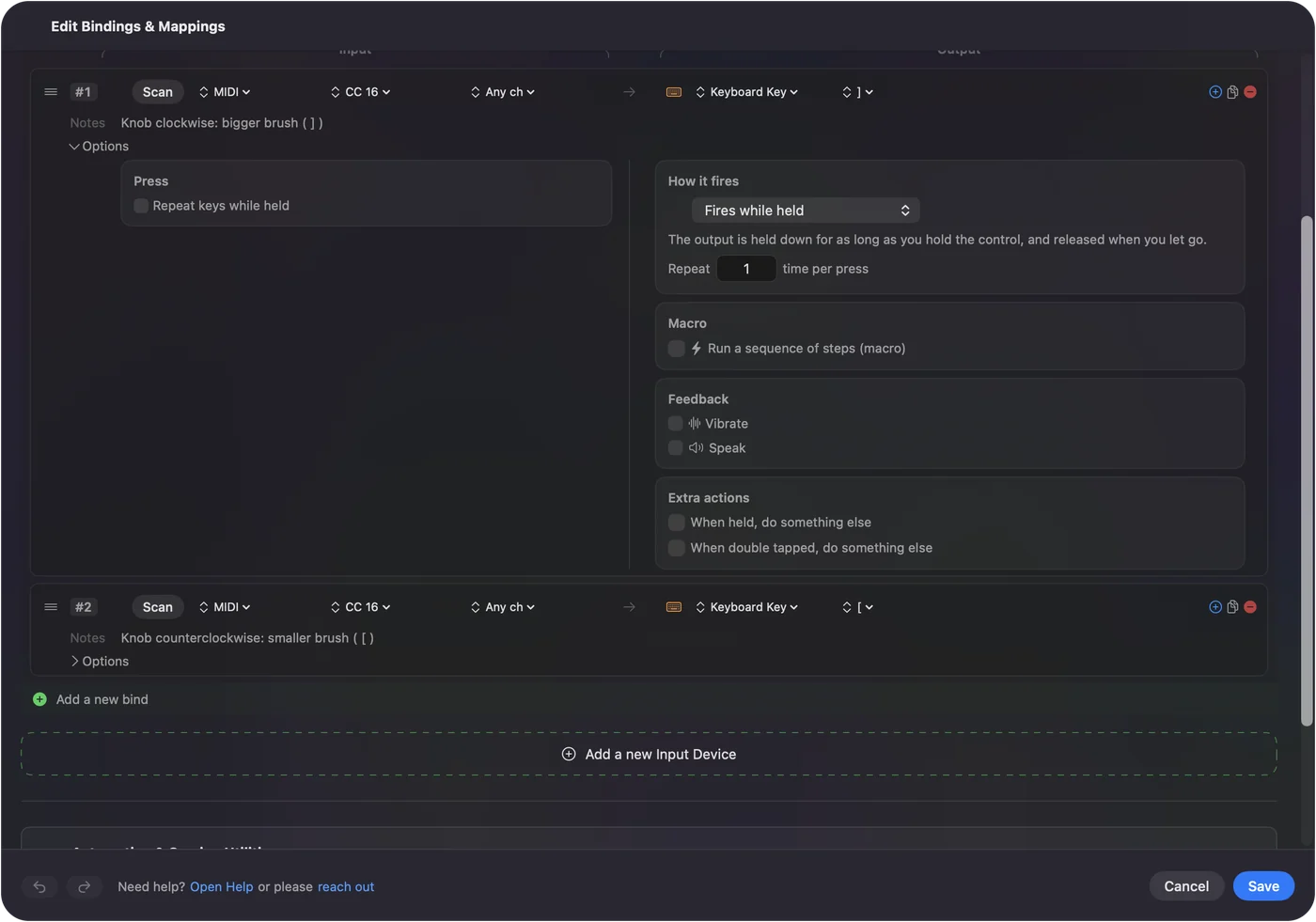
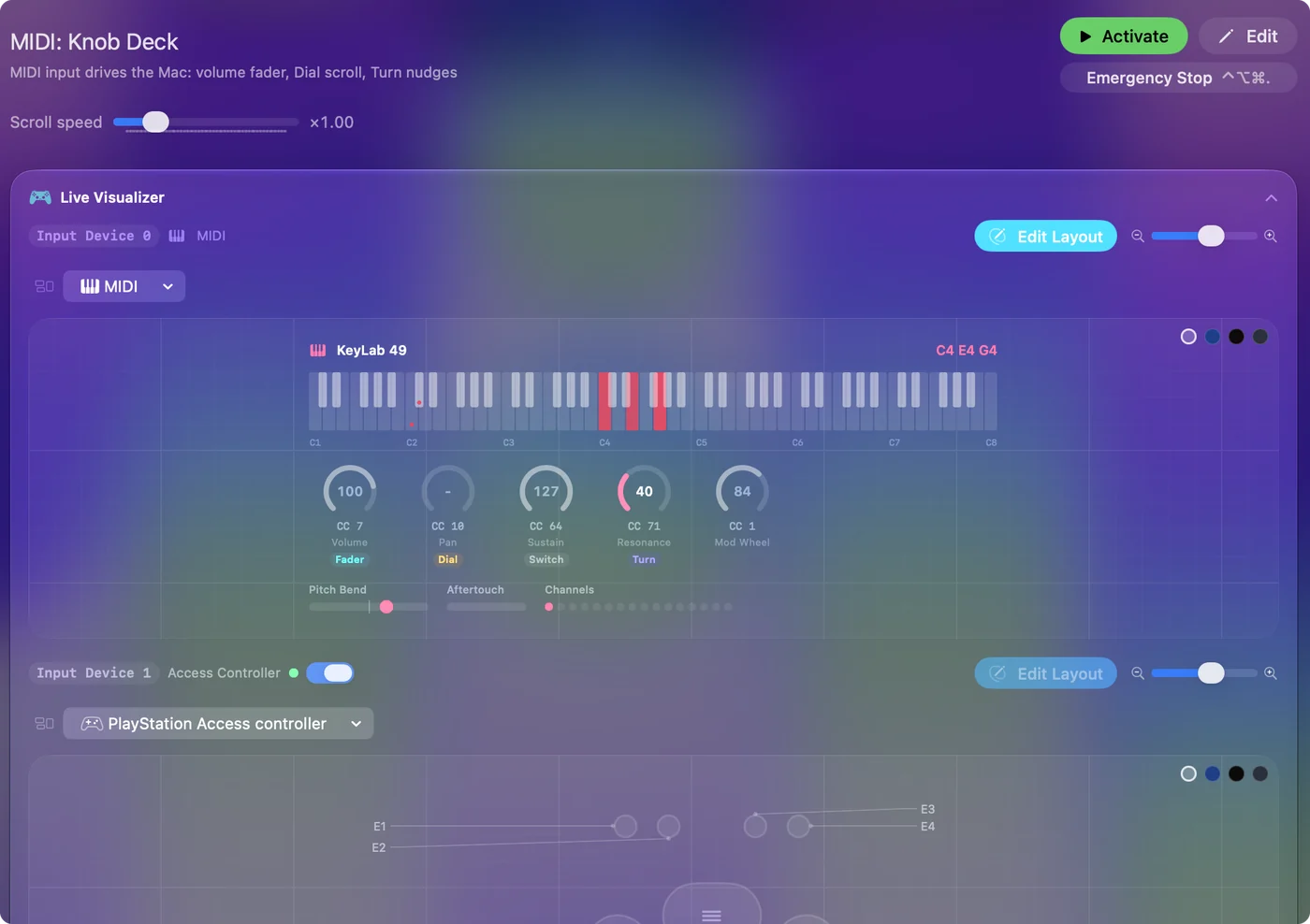
Knobs that send their position work in Turn mode, including endless encoders set to absolute mode. An encoder in a relative mode is not decoded, so set it to absolute in its own editor. To find what a knob sends, open the Live Visualizer's MIDI view and turn it.
Keep it to Photoshop, with the DAW still listening
- You: Give the deck's preset an auto-switch entry for Photoshop under Activate when these apps are in front, and turn on Switch presets when the front app changes in Settings, Advanced.
- InputConfig: Sends Photoshop keys from the pads only while Photoshop is in front.
- Check: Switch to another app; the same pads can do something else there.
InputConfig listens alongside other apps and never takes a MIDI message away. If a DAW is open with an armed track, it will also record the pads. Use a channel the DAW ignores, or disarm the track.
If a pad or knob does nothing
Climb this ladder, smallest step first:
- Watch the MIDI view. If nothing shows when you hit the pad, the Mac does not hear the controller.
- Set encoders to absolute. An encoder in a relative mode is not decoded.
- Bring Photoshop to the front. With auto-switch on, the deck runs only there.
- Check Photoshop's keys. If you changed a shortcut in Photoshop, the row has to send yours.
If it shows in the MIDI view, any row can use it.
What it cannot do
A keystroke mapper presses keys. It cannot set a slider to a value, so a knob that moves Photoshop's Hue slider or a Camera Raw slider directly needs software that talks to Photoshop itself. For Lightroom Classic's develop sliders, the free, open-source MIDI2LR is the tool people use.
If you do not own MIDI gear, a game controller in the off hand does the same job; the Photoshop controller layout is ready in the Smart Preset Maker, and MIDI rows and controller rows can live in one preset. For tools, brush size, zoom, undo, layers and the hand tool, shortcuts are all Photoshop needs.
The short version
- Pads. Tools, undo, redo and layers, one key each.
- Knobs. Turn mode with bracket keys for brush size and hardness.
- Pedal. Space held for the hand tool.
A pad controller you already own can be a Photoshop deck with no plugin at all.
Questions
Does Photoshop support MIDI controllers?
Not directly. It has no MIDI settings, so a MIDI controller needs an app that turns its pads and knobs into Photoshop's keyboard shortcuts, or a plugin that talks to Photoshop.
Can a MIDI knob change brush size in Photoshop?
Yes. Put the knob in Turn mode with the right bracket key on clockwise and the left bracket on counterclockwise, and each step of the knob is one size step.
Do I need a driver for my MIDI controller?
Not for a class-compliant USB or Bluetooth MIDI device, which is most of them.
Will the pad still play notes in my music app?
Yes. InputConfig listens alongside other apps, so a DAW listening to the same controller still hears the notes.
Related
Free. macOS 14 or later. No account, nothing leaves your Mac. Open source on GitHub.