Clip Studio Paint from a game controller
 The Clip Studio Paint layout is built into InputConfig, free on the Mac App Store. You don't have to make an account, there are no subscriptions, and nothing is locked. Optimized for Apple silicon.
On a Mac: Clip Studio Paint for Mac reads its default shortcuts from this layout. A pen tablet or a Sidecar iPad keeps working alongside it.
Yes, a PS5, Xbox or 8BitDo pad works as a left-hand remote for Clip Studio Paint on a Mac: brush and eraser on two face buttons, undo and redo on the other two, brush size on the bumpers. The layout sends Clip Studio's default shortcuts, and your pen tablet or a Sidecar iPad keeps working beside it. Mirror view sits on Share, because flipping the canvas is how you find the crooked eye.
The layout, control by control
How the layout thinks
- Draw. Brush (B) on the bottom face button, eraser (E) on the right. The right trigger paints.
- Fix. Undo on the left face button, redo on the top.
- Brush size. [ and ] on the bumpers.
- Pick a color. The left trigger holds Option for the color picker.
- Look again. Mirror view (M) on Back, Share or View, canvas only (Tab) on Start.
- Point and scroll. The left stick is the pointer, the right stick scrolls.
Tune it
- Rotate the canvas. Clip Studio's rotate keys behind a chord on the D-pad.
- Sub tools. Put pen, fill and lasso behind a chord on the face buttons.
- Brush size that keeps going. Turn on Repeat keys while held in the bumper rows' Options.
- Panel borders. Set a lower Pointer speed on the preset's page.
The pen stays in your drawing hand, and everything else moves to the other one.
How it compares with a Tabmate
The Tabmate is a handheld remote made for Clip Studio Paint, and its wheel is nicer for brush size. A controller does the same left-hand job for free, and the same pad can run a different layout in Photoshop or Krita. If you already own a controller, try it before you buy another remote.
Get it in two clicks
- Get InputConfig free on the Mac App Store, open it, and click Smart Preset Maker on the welcome screen.
- Search for Clip Studio Paint and pick it. The layout is created as a preset in your sidebar, named and ready.
- Press Activate. Every row can be changed afterwards: the editor's Scan button rebinds any control the moment you touch it.
Every binding, as a table
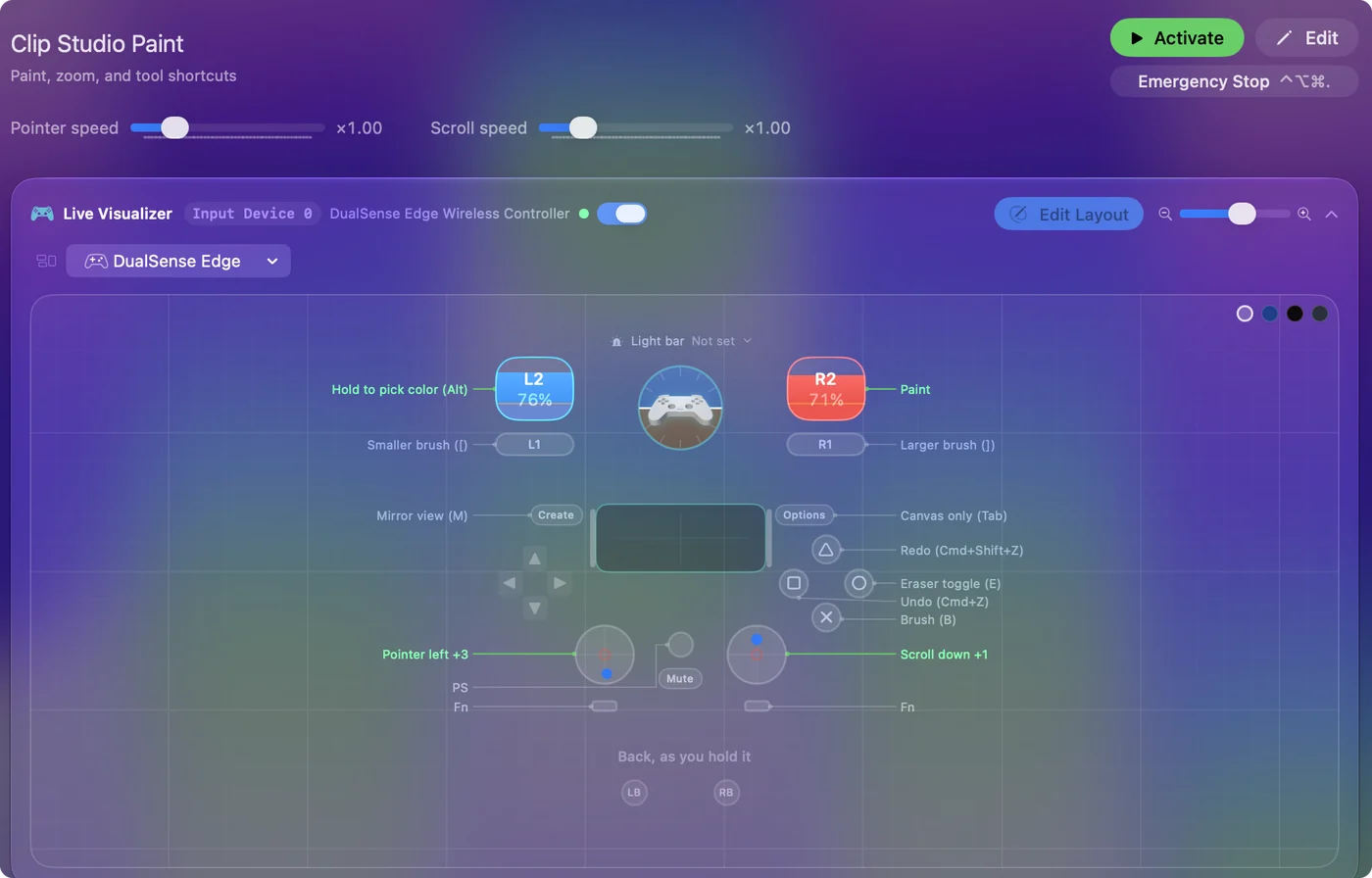
| Controller | Sends | What it does |
|---|---|---|
| Left stick left | Mouse motion left (speed 16) | Pointer left |
| Left stick right | Mouse motion right (speed 16) | Pointer right |
| Left stick up | Mouse motion up (speed 16) | Pointer up |
| Left stick down | Mouse motion down (speed 16) | Pointer down |
| Right stick down | Scroll down | Scroll down |
| Right stick up | Scroll up | Scroll up |
| Right trigger | Left click | Paint |
| Left trigger | Alt / Option (Left) | Hold to pick color (Alt) |
| A / Cross | B | Brush (B) |
| B / Circle | E | Eraser toggle (E) |
| X / Square | Command (Left), Z | Undo (Cmd+Z) |
| Y / Triangle | Command (Left), Shift (Left), Z | Redo (Cmd+Shift+Z) |
| LB / L1 | [ | Smaller brush ([) |
| RB / R1 | ] | Larger brush (]) |
| Back / Share / Select | M | Mirror view (M) |
| Start / Options | Tab | Canvas only (Tab) |
Button names follow the Xbox / PlayStation pair shown in the editor, so A / Cross is the bottom face button on either pad. On a Switch Pro Controller the bottom button is labeled B; the mapping still fires on position.
Questions
Does this replace a pen tablet?
No. It sits beside one and handles the other hand.
Is there a Tabmate alternative for Clip Studio Paint on a Mac?
A game controller is one, through InputConfig: a PS5, Xbox, 8BitDo or single Joy-Con. The Tabmate's wheel is the one thing it does better.
Related
Completely free. You don't have to make an account, there are no subscriptions, and nothing is locked. Optimized for Apple silicon. Open source on GitHub.
Updated