How to place blocks in Minecraft on a Mac without a mouse
 InputConfig is completely free on the Mac App Store. You don't have to make an account, there are no subscriptions, and nothing is locked. Optimized for Apple silicon.
Click the trackpad with two fingers. Placing a block is Use Item/Place Block, which Minecraft Java Edition puts on the right mouse button, and a two-finger click is the Mac's right click once Secondary click is set to Click or Tap with Two Fingers in System Settings, Trackpad. If that is awkward while you also look around, move Use Item/Place Block to a key in the game's Key Binds, or play with a controller. InputConfig, the free Mac app I make, puts placing on a controller's left trigger.
The default controls on this page come from the Minecraft Wiki's Controls page and its Options page, which I read on October 27, 2026. They are for Java Edition. Minecraft's own store page lists Java for Windows, macOS and Linux, and Bedrock for consoles, phones, Chromebook and Windows PCs, so Java is the edition on your Mac.
On this page: 11 sections
- Steps
- Place a block with a two-finger click
- Move Use Item/Place Block to a key
- Watch the Control key when you click
- Hold fewer keys while you build
- Place blocks with a controller trigger
- Put placing on a key with InputConfig
- If the block does not go down
- What InputConfig cannot do here
- The short version
- Questions
Steps
- Open System Settings, Trackpad, and set Secondary click to Click or Tap with Two Fingers.
- In Minecraft, pick the block in your hotbar with a number key from 1 to 9.
- Aim the crosshair at the face of a block next to where the new one should go, and click with two fingers.
- If the trackpad is awkward, open Options, Controls, Key Binds and move Use Item/Place Block to a key you can reach.
- For no mouse at all, pair a controller and activate InputConfig's built-in Minecraft preset, which places with the left trigger.
Place a block with a two-finger click
Minecraft never asks for a mouse by name. It asks for the right button, and macOS gives a trackpad one once you switch it on.
- You: Open System Settings, Trackpad, and under Point & Click set Secondary click to Click or Tap with Two Fingers.
- macOS: Sends a right click whenever two fingers click the pad, and with Tap to click on, when two fingers tap it.
- Check: In the game, hold a block in your hand, aim at the top or side of a block close to you, and click with two fingers. The new block appears on the face you aimed at.
A tap is fine for placing, because placing is one quick press. A real click, with the pad pressed down, is better for anything you have to hold, such as eating. Two fingers is the right mouse button on a MacBook, so it places blocks, opens chests and eats with no mouse plugged in.
Move Use Item/Place Block to a key
The awkward part of trackpad Minecraft is that the same fingers aim and click. Moving the click to the keyboard gives one hand the clicking and leaves the other on the trackpad to look.
- Open Options, then Controls, then Key Binds.
- Click Use Item/Place Block, which is on the right mouse button by default.
- Press the key you want. Pick one near W, A, S and D that the list does not already use for something you need.
- Do the same for Attack/Destroy if you want mining on a key too.
The wiki lists Use Item/Place Block as the one action behind placing blocks, using items, and working blocks and creatures. One new key places, opens chests and eats, because all three are the same action in Minecraft. If you get lost, the same Key Binds screen resets everything to the defaults.
Watch the Control key when you click
Sprint is Left Control in Java Edition, and on a Mac, Control held during a click counts as a right click. So sprinting and clicking at the same time can place a block where you meant to break one. The fix is in the game: move Sprint to a key that is not Control, or set Sprint to Toggle in Options, Controls, so you never hold Control at all. If blocks appear when you meant to mine, Control was held.
Hold fewer keys while you build
The wiki's Options page says that since Java 1.21.9, the Controls screen offers Hold or Toggle for four actions. Toggle means one press starts the action and the next press ends it.
- Sneak. Set it to Toggle and you stay crouched while you build along an edge, with no finger on Shift.
- Sprint. Toggle also clears the Control-click trap from the last section.
- Use Item/Place Block. I would leave this on Hold while building, because building is many short presses. Toggle suits eating, which needs the button held.
- Attack/Destroy. Toggle keeps you mining without a held click, which is the other hard part on a trackpad.
Older versions had Sneak and Sprint toggles under Accessibility Settings, and the wiki says those moved to Controls in the same update. Toggle Sneak and Toggle Attack/Destroy take most of the holding out of trackpad play.
Place blocks with a controller trigger
Minecraft Java Edition reads no controller, so InputConfig turns the controller into the mouse and keys the game already understands. Its built-in Minecraft preset sends a right click from the left trigger and a left click from the right trigger.
- You: Pair a PS5, PS4, Xbox or Switch Pro controller, click Minecraft in InputConfig's sidebar, and click Activate.
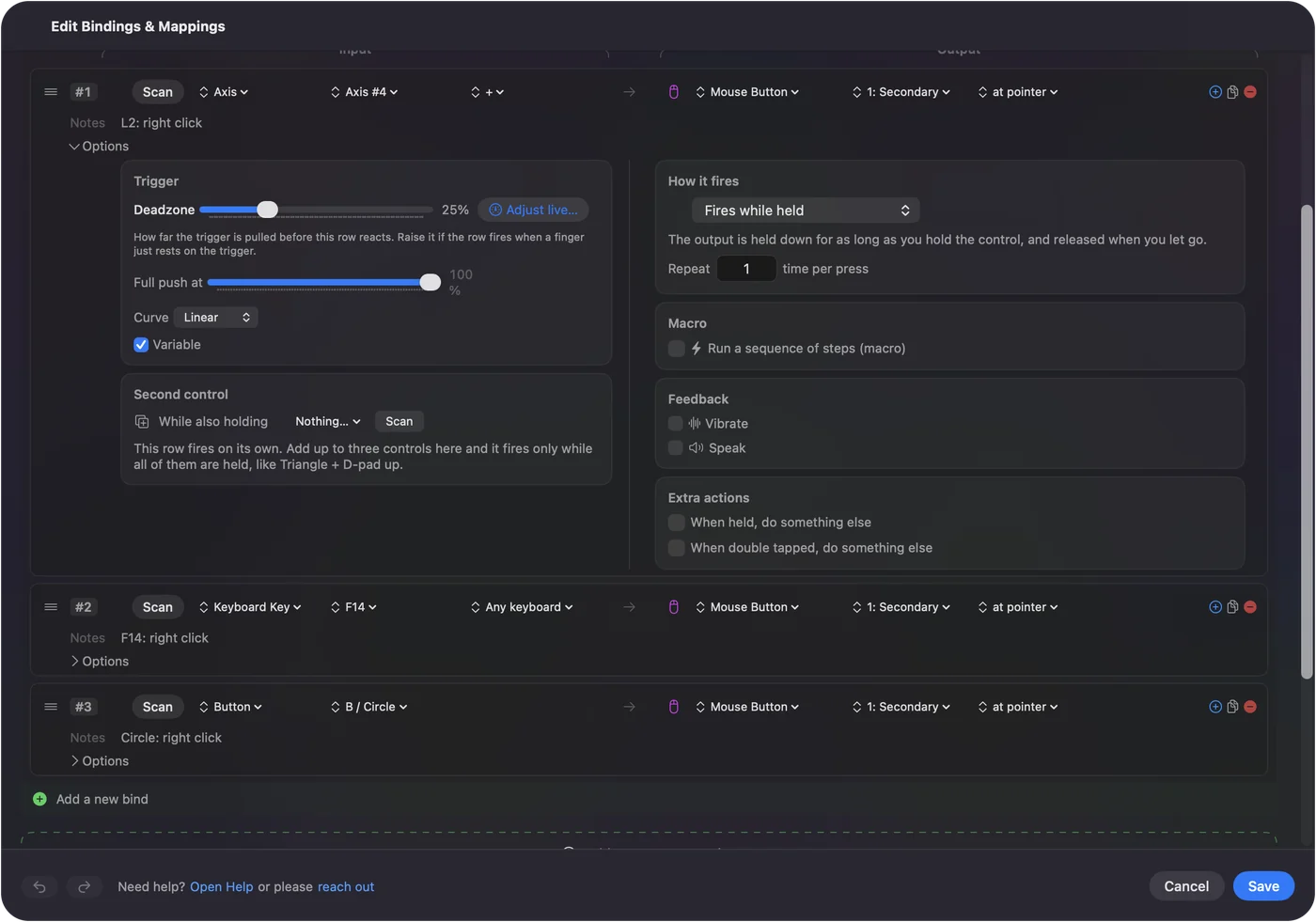
- InputConfig: Holds the right mouse button down for as long as you hold the left trigger, and lets go when you do. That is what the row's How it fires setting, Fires while held, means.
- Check: Pick a block with the D-pad, which selects hotbar slots 1 to 4, or with the bumpers, which scroll the hotbar. Pull the left trigger and the block goes down.
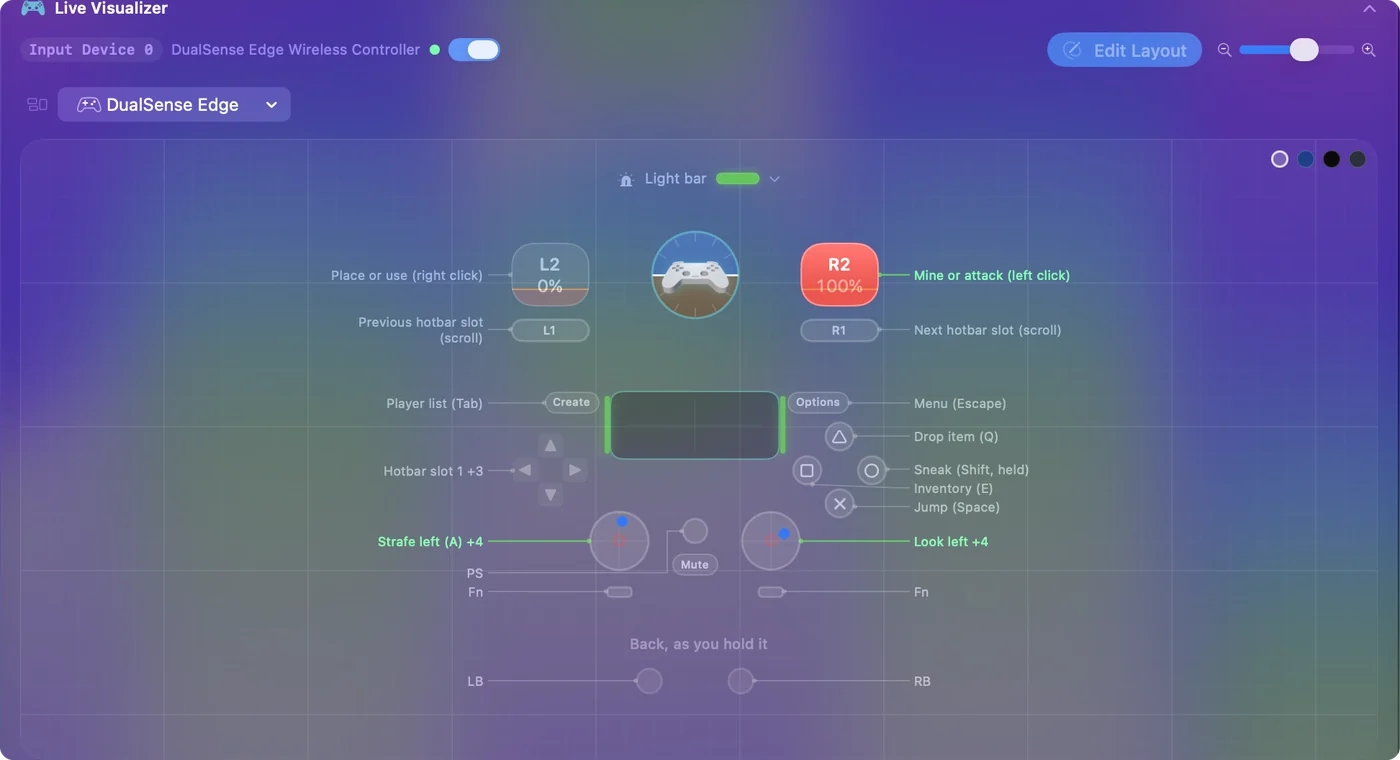
Sneak is B or Circle, held, and jump is A or Cross, so you can bridge out over a gap with your thumbs alone. The full layout is on the Minecraft preset page, and how to play Minecraft with a controller on a Mac covers pairing and tuning the camera.
Put placing on a key with InputConfig
The game's own Key Binds is the simplest way to place from a key. InputConfig is for when the key you want comes from somewhere the game does not read well, such as a foot pedal, a USB keypad or a switch interface that types a key. A Keyboard row can send a right click.
- You: Add a row, press Scan, press the key, and choose the output Mouse Button, 1: Secondary.
- InputConfig: Holds the right button while the key is down.
- Check: The key still types its own letter too, because InputConfig listens to the keyboard without blocking it. Use a key Minecraft does nothing with.
If the block does not go down
Climb this ladder, smallest step first:
- Check Secondary click. If two fingers do nothing anywhere on the Mac, the setting in System Settings, Trackpad is off. The right click test shows whether your Mac sends one.
- Check your hand. The selected hotbar slot has to hold a block. Press a number key to pick it.
- Aim closer. Point the crosshair at a solid block face near you, not at the sky.
- Let go of Control. Sprint held on Control changes what your clicks do.
- Check Key Binds. If you moved Use Item/Place Block, press the key you chose, or reset the binds.
- Check the preset. With a controller, the preset must be running and InputConfig switched on in System Settings, Privacy & Security, Accessibility. The menu bar icon turns orange while a running preset waits for that permission.
If a preset ever leaves a button held, Control Option Command period lets go of everything at once.
What InputConfig cannot do here
- Use force click in the game. InputConfig reads trackpad pressure and Deep Press only while its own window is in front, so a hard press cannot place blocks in Minecraft.
- Add controller support to Java. It sends mouse and keys. The game never knows a controller is there.
- Bring Bedrock to the Mac. There is no Mac release of Bedrock to bring.
- Answer for a server. A key bind is a key bind, but a repeating click can break a server's rules. The Minecraft auto clicker page covers that.
The short version
- Trackpad. Turn on two-finger Secondary click and click with two fingers.
- Keyboard. Move Use Item/Place Block to a key in Key Binds.
- Less holding. Set Sneak and Attack/Destroy to Toggle in Options, Controls.
- Controller. Activate InputConfig's Minecraft preset and pull the left trigger.
Try the two-finger click first, and move to a key or a controller when building gets long. For mining and the rest, playing Minecraft on a Mac without a mouse has the whole picture.
Questions
How do you place blocks in Minecraft on a Mac without a mouse?
Turn on Click or Tap with Two Fingers under Secondary click in System Settings, Trackpad, then click with two fingers while holding a block. You can also move Use Item/Place Block to a key in Options, Controls, Key Binds.
Why does my two-finger click not place a block?
Either Secondary click is off in System Settings, Trackpad, the selected hotbar slot holds no block, or you are aiming at nothing solid. If you sprint with Control, let go of it, because Control changes what a click does on a Mac.
Can I place blocks with the keyboard only?
Yes. In Options, Controls, Key Binds, click Use Item/Place Block and press a key. You still need the trackpad to look around unless you use a controller.
Can I place blocks with a controller on a Mac?
Yes, with a mapper, because Java Edition reads no controller. InputConfig's built-in Minecraft preset places blocks with the left trigger and mines with the right one.
Why do I start sprinting or placing when I Control-click?
Sprint is Left Control in Java Edition, and on a Mac a click with Control held counts as a right click. Move Sprint to another key or set it to Toggle in Options, Controls.
Related
This page in other languages: Deutsch, Español, Français, Italiano, 日本語, 한국어, Polski, Português, Русский, ไทย, 繁體中文, 简体中文
Completely free. You don't have to make an account, there are no subscriptions, and nothing is locked. Optimized for Apple silicon. Open source on GitHub.
Updated