How to right click in Minecraft on a Mac
 InputConfig is completely free on the Mac App Store. You don't have to make an account, there are no subscriptions, and nothing is locked. Optimized for Apple silicon.
Click the trackpad with two fingers, or hold Control and click. Either one is the Mac's right click, and in Minecraft Java Edition the right button is Use Item/Place Block: it places blocks, opens chests and doors, and eats when held. A two-finger click is the cleaner of the two, because Control is also Minecraft's sprint key. You can also move the action to a key, or use a controller with InputConfig, the free Mac app I make, which puts right click on the left trigger.
The game's controls on this page come from the Minecraft Wiki's Controls page, which I read on October 27, 2026. The Mac settings are from Apple's own right click article, read the same day.
On this page: 11 sections
- Steps
- Know what right click does in Minecraft
- Right click on a MacBook trackpad
- Right click with a Magic Mouse or Magic Trackpad
- Use Control-click, and know its sprint clash
- Open a chest without a mouse
- Rebind Use Item to a key
- Right click from a controller
- If right click does nothing in Minecraft
- The short version
- Questions
Steps
- Open System Settings, Trackpad, and set Secondary click to Click or Tap with Two Fingers.
- In Minecraft, aim at the chest, door or block face and click with two fingers.
- For a Magic Mouse, open System Settings, Mouse, turn on Secondary click, and click the right side.
- To right click from the keyboard, move Use Item/Place Block to a key in Options, Controls, Key Binds.
- For a controller, activate InputConfig's Minecraft preset and pull the left trigger.
Know what right click does in Minecraft
The wiki lists one action on the right button, Use Item/Place Block, and it does a different job depending on what you hold and where you aim.
| You want to | What to do |
|---|---|
| Place a block | Hold the block, aim at a face near you, right click once |
| Open a chest, furnace or crafting table | Aim at it and right click once |
| Open a door or press a button | Aim at it and right click once |
| Eat or drink | Hold the food and keep right click held until it finishes |
| Pick a block to copy | Not right click: that is Pick Block, the middle button |
Every way to right click on this page does all of these, because they are one action. Eating is the one that needs a hold, and it has a page of its own: how to eat in Minecraft without a mouse.
Right click on a MacBook trackpad
- You: Open System Settings, Trackpad, and under Point & Click set Secondary click to Click or Tap with Two Fingers.
- macOS: Sends a right click when two fingers click the pad, and when two fingers tap it if Tap to click is on.
- Check: In Minecraft, aim at a chest and click with two fingers. The chest opens.
Yes, you can play the whole game on a trackpad this way. One finger slides to look, a one-finger click is the left button, and two fingers are the right. The hard part is holding a click to mine while the same finger turns the view, and Minecraft on a Mac without a mouse has the fixes for that.
Right click with a Magic Mouse or Magic Trackpad
- Magic Mouse. Apple's article says to click the right side of the mouse. Turn on Secondary click in System Settings, Mouse first.
- Magic Trackpad. It uses the same Trackpad settings as a MacBook, so two fingers right click once Secondary click is set.
- Any two-button mouse. Its right button works with nothing to set up.
A Magic Mouse has no middle button, so Pick Block needs a key bind. More on its gestures is in Magic Mouse buttons.
Use Control-click, and know its sprint clash
On a Mac, holding Control while you click counts as a right click, and that works in Minecraft too. The trouble is that the wiki lists Left Control as Sprint. So Control-click places a block and makes you sprint, and sprinting while you mine can turn your left clicks into right clicks. Use the two-finger click for right click, and keep Control for sprinting, or move Sprint to another key. Setting Sprint to Toggle in Options, Controls also helps, because Control is then only tapped.
Open a chest without a mouse
- Walk up to the chest and aim the crosshair at it.
- Click with two fingers. The chest window opens.
- Move items with the pointer: the wiki says a left click picks up a whole stack and a right click picks up half of it, so on the trackpad that is one finger for the stack and two for half.
- Press E or Escape to close it.
With a controller, the Minecraft preset in InputConfig leaves the right stick moving the pointer while a chest or the inventory is open, because Minecraft only locks the mouse while you play. The right trigger is the left click and the left trigger the right click, so you can sort a chest from the couch.
Rebind Use Item to a key
In Options, Controls, Key Binds, click Use Item/Place Block and press a key you can reach. That key then does everything the right button did. It is the best fit when your hand is on the keyboard and the trackpad is only for looking. Placing blocks without a mouse goes through it, with the Toggle settings that cut down on holding.
Right click from a controller
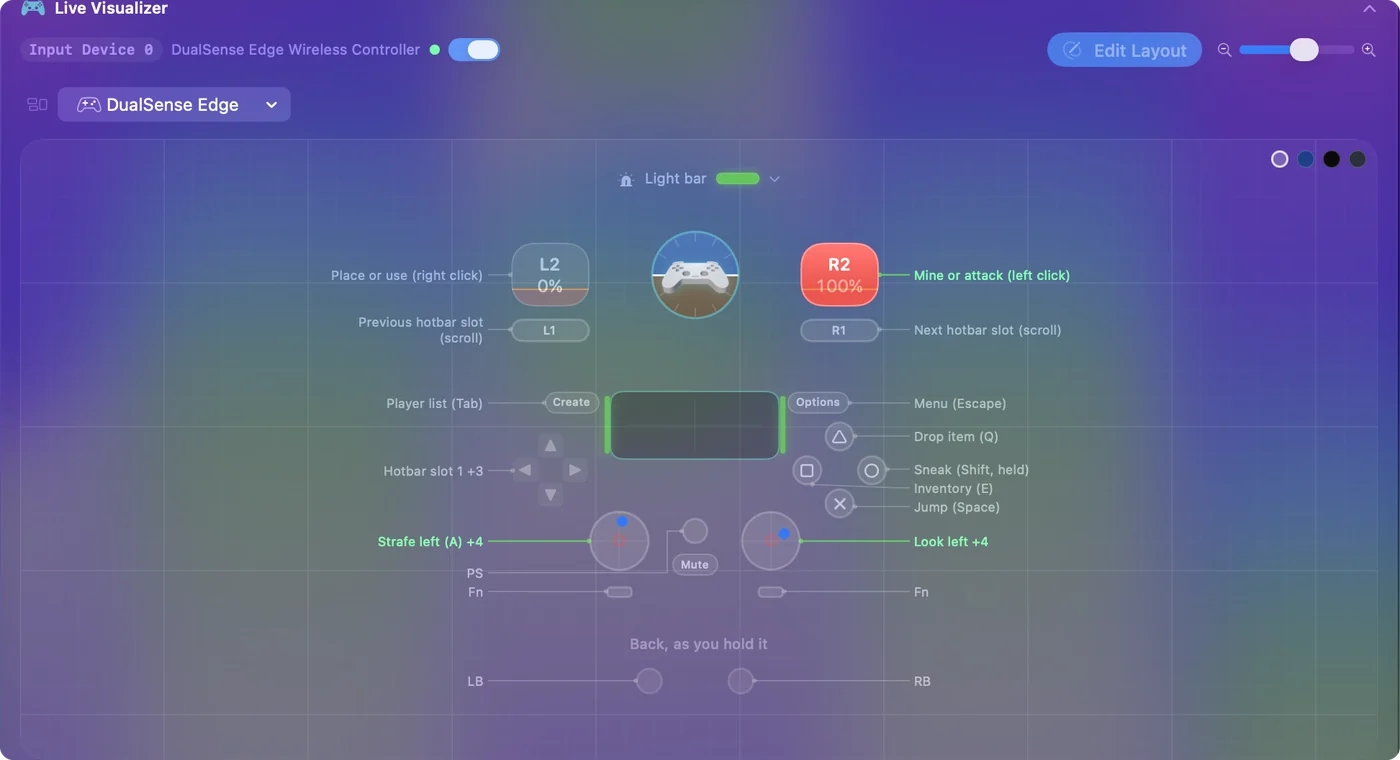
Minecraft Java Edition has no controller support of its own, so InputConfig sends the clicks. In its built-in Minecraft preset, the left trigger is the right mouse button and the right trigger is the left.
- You: Pair a PS5, PS4, Xbox or Switch Pro controller, click Minecraft in InputConfig's sidebar, and click Activate.
- InputConfig: Holds the right button while the left trigger is held, so a quick pull opens a chest and a long one eats.
- Check: The Live Visualizer labels the left trigger Place or use (right click), and it lights as you pull it.
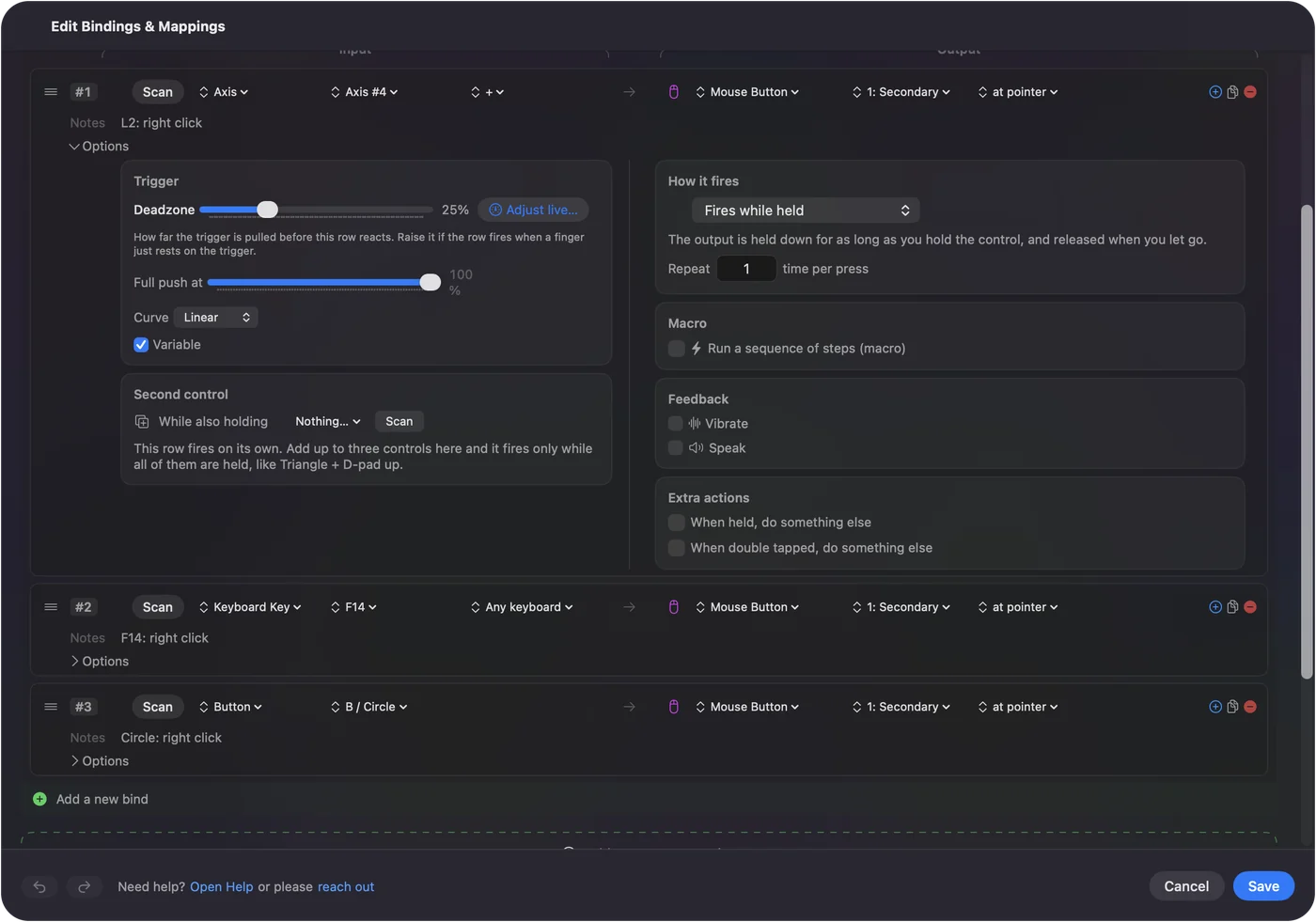
Right click can sit on any other button as well: a row with the output Mouse Button, 1: Secondary.
What it cannot do: InputConfig reads a trackpad force click only while its own window is in front, so a hard press is not a way to right click in the game.
If right click does nothing in Minecraft
Climb this ladder, smallest step first:
- Test it outside the game. Open the right click test. If nothing registers there, the Mac setting is off.
- Check Secondary click. System Settings, Trackpad, or Mouse for a Magic Mouse.
- Check Key Binds. If Use Item/Place Block was moved to a key, the right button no longer does it. Reset the binds if you are not sure.
- Check what you aim at. A block needs a solid face near you, and food needs you to aim away from chests and doors.
- Click into the game. Minecraft must be the window in front.
- Check the preset. With a controller, the preset must be running and InputConfig switched on in System Settings, Privacy & Security, Accessibility.
The short version
- Trackpad. Two fingers, after setting Secondary click.
- Magic Mouse. The right side, after turning on Secondary click.
- Control-click. It works, but Control is also sprint.
- Controller. The left trigger in InputConfig's Minecraft preset.
Right click places, opens and eats, so set up one comfortable way to do it and the rest of the game follows. Every other default key is on Minecraft controls on a Mac.
Questions
How do you right click in Minecraft on a Mac?
Click the trackpad with two fingers, once Secondary click is set to Click or Tap with Two Fingers in System Settings, Trackpad. Control-click works too, but Control is also the sprint key.
How do you open a chest in Minecraft on a Mac without a mouse?
Aim at the chest and click the trackpad with two fingers. Inside, a one-finger click picks up a whole stack and a two-finger click picks up half. Press E or Escape to close it.
Can you play Minecraft with a trackpad?
Yes. One finger looks, a click is the left button and a two-finger click the right. Mining is the awkward part, which Toggle for Attack/Destroy in Options, Controls, a key bind or a controller fixes.
Do you need a mouse to play Minecraft?
No. A Mac trackpad does every mouse job, and a controller with a mapper such as InputConfig replaces the mouse and keyboard entirely.
Why is right click not working in Minecraft on my Mac?
Usually Secondary click is off in System Settings, Trackpad, or Use Item/Place Block was moved to a key in Key Binds. Test the click outside the game first to see which.
Related
This page in other languages: Deutsch, Español, Français, Italiano, 日本語, 한국어, Polski, Português, Русский, ไทย, 繁體中文, 简体中文
Completely free. You don't have to make an account, there are no subscriptions, and nothing is locked. Optimized for Apple silicon. Open source on GitHub.
Updated