How to add macros and turbo to a PS4 controller on a Mac
 InputConfig is completely free on the Mac App Store. You don't have to make an account, there are no subscriptions, and nothing is locked. Optimized for Apple silicon.
The PS4's DualShock 4 has no macro or turbo button, so on a Mac both come from software. InputConfig, the free Mac app I make, reads a DualShock 4 with nothing to set up and lets any of its buttons run a macro, a timed chain of keys and clicks, or repeat a key or click as turbo while you hold it.
One limit decides whether this fits your game: the macro sends keyboard and mouse input, not controller buttons. It works in apps and in games you play with keys and a mouse, and the section on where a DualShock 4 macro works says where it does not.
On this page: 10 sections
Steps
- Pair the DualShock 4 by holding PS and Share until the light bar flashes, or plug in a micro-USB data cable.
- In an InputConfig preset, click Add a new bind, press Scan and press the button.
- For a macro, open Options, tick Run a sequence of steps (macro) and add each key or click with its wait.
- For turbo, set How it fires to Repeats while held and set Every in milliseconds.
- Click Save and Activate, and stop anything with Control Option Command period.
Know what the DualShock 4 does by itself
The DualShock 4 has Cross, Circle, Square and Triangle, the D-pad, L1 and R1, the analog L2 and R2, both stick clicks, Share, Options, the PS button and a touchpad that clicks. It has no macro button, no turbo switch and no back buttons, and nothing in macOS adds them. Controllers sold with turbo or macro buttons do it inside the pad, which is why a game sees those as real button presses.
A macro stored in a pad plays controller buttons, and a macro from a Mac app plays keys and clicks. If you also own a PS5 pad or an Xbox one, PS5 and Xbox controller macros covers those, including the DualSense Edge and the Elite.
Connect the DualShock 4
- You: Turn the pad off, then hold PS and Share until the light bar flashes quickly, and click Connect in System Settings, Bluetooth. Or plug in a micro-USB cable that carries data.
- macOS: Lists DUALSHOCK 4 Wireless Controller and connects it, with no driver.
- InputConfig: Shows the pad at the top of the sidebar with its battery level, and its Live Visualizer lights each button you press.
- Check: Press Cross and Options in the Live Visualizer. Both light.
If it will not pair, connecting a PS4 controller to a Mac has the fixes, starting with a charge-only cable.
Build a macro on a DualShock 4 button
A macro is a list of steps, and each step is an output with how long to wait before it fires and how long to hold it.
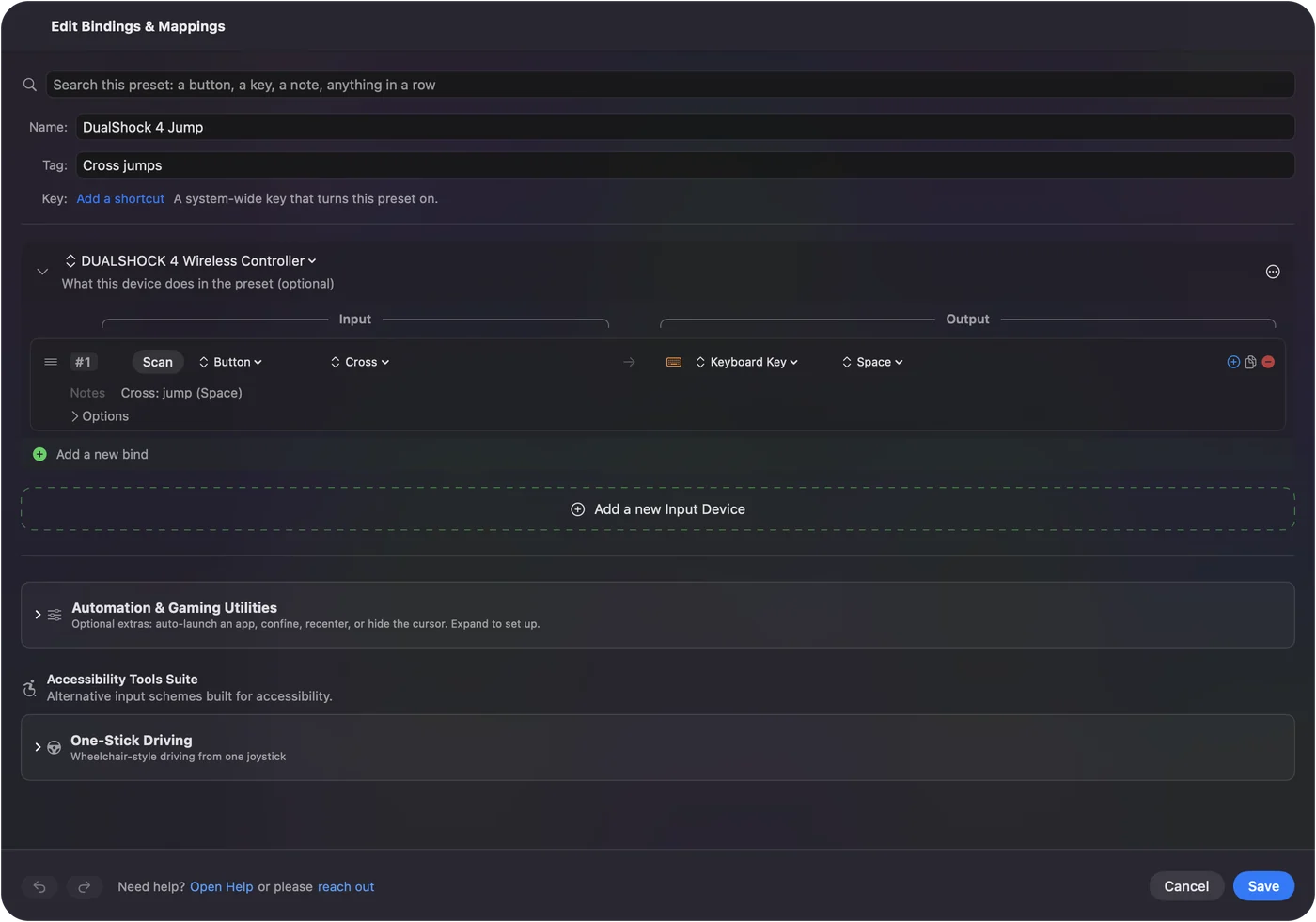
- You: In a preset, click Add a new bind, press Scan and press the button. Open the row's Options, tick Run a sequence of steps (macro), and click Add another step for each key or click.
- InputConfig: Plays the steps in order on every press. A step can Tap a key, Hold down a key while later steps run, Release it, or click a mouse button.
- Check: Click Save and Activate, put the cursor in an empty note, and press the button. The keys arrive in order.
Which buttons to give macros, on a pad you also play with:
| DualShock 4 control | Good for |
|---|---|
| Share and Options | Long macros you start on purpose, such as a menu path or a copy, switch app, paste |
| Touchpad press | One more macro button, because pressing the pad is an input of its own |
| Touchpad taps and swipes | Short jobs, since a one-finger tap, a two-finger tap and a double tap are separate inputs |
| L3 and R3 | A combo you need now and then, because a stick click is rarely pressed by accident |
| R1 and R2 | Turbo, below |
The built-in Macros & Turbo preset has two to copy: its Cross button copies, switches app and pastes, and Triangle moves down three items and presses Return. Every step and every wait stays visible, so a macro that misses is easy to fix.
Add turbo and rapid fire
- You: Open the row's Options, choose Repeats while held, and set Every, the gap in milliseconds, from 5 ms to a minute.
- InputConfig: Presses and releases the output over and over while you hold the button, and shows the rate the gap works out to.
- Check: Hold the button and watch the key repeat. Let go and it stops.
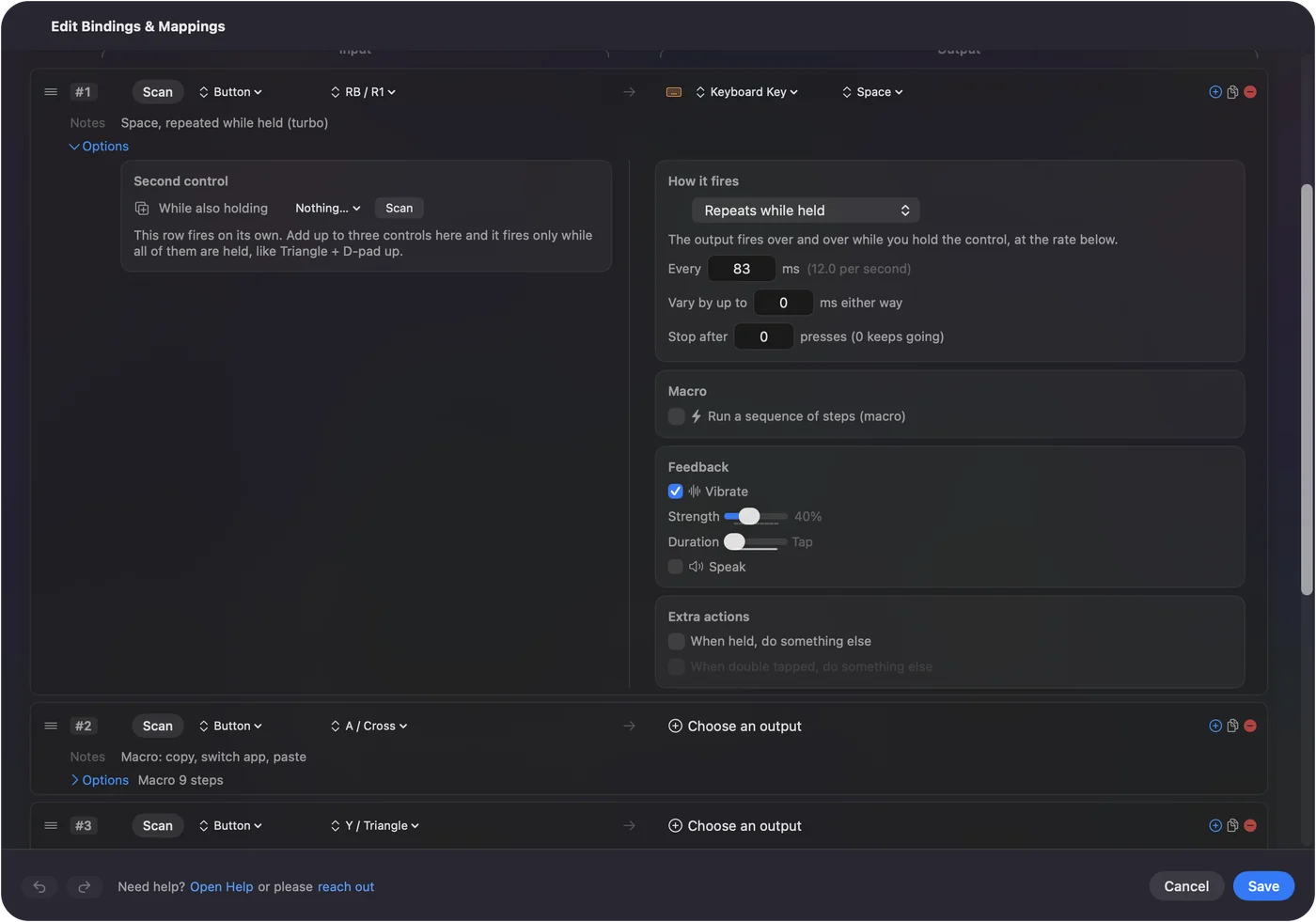
- Vary by up to. Adds a random plus or minus to each gap, so the rhythm is less mechanical.
- Stop after. Ends the run after a number of presses.
- Rapid fire on R2. Put a left click on R2 with Repeats while held, for a game that fires with the mouse.
- A buzz to confirm. With Vibrate on, the DualShock 4 rumbles once when a turbo row starts repeating, not on every repeat.
InputConfig sends at most one repeat per poll, so Settings, Advanced, Polling rate sets the ceiling, and Every stops at 5 ms. The CPS calculator turns presses per second into an Every value. Turbo repeats what InputConfig sends, not what the controller sends.
Toggle a repeat on and off
- Repeats until pressed again. One press starts the repeat, the next press ends it, so your thumb is free. With a Mouse Button output it is an auto clicker.
- Toggles on and off. One press holds a key or a mouse button down, the next lets it go. Good for a run key or a held aim.
- Different action when held. A tap sends one thing and a hold another, on a row with no macro.
A row with a macro has no hold action, so give a macro and a hold job separate rows. Pick the press mode first, then the output.
Know where a DualShock 4 macro works
- Apps and keyboard games. The macro arrives as ordinary key presses and clicks, so it works in any app, in browser games and in Mac games played with keys and a mouse.
- Games that read the controller. InputConfig does not send controller buttons, so it cannot make Cross fire faster inside a game that reads the pad itself, and a running preset would add keys on top of the pad. Turn the preset off there, or bind only buttons the game ignores.
- PS Remote Play. Sony's app reads the DualShock 4 itself, and InputConfig cannot stand in for a PlayStation controller there. I have not tested macros with Remote Play, so deactivate the preset while you play.
- Online and tournament play. Tournaments do not allow macros, and online play follows each game's rules.
Where macros help most is practice, and hands that cannot press two buttons at the same instant.
If the macro misses steps or never stops
Climb this ladder, smallest step first:
- Press the button again. That ends a toggle, a repeat or an auto clicker.
- Use the emergency stop. Control Option Command period releases every key and button the app is holding.
- Check the preset is on. While it is off, Activate is at the top of the editor. Choose it to try a row as you edit.
- Lengthen the wait. Most apps read a key held 30 to 50 ms with a 50 ms gap. Switching apps needs 300 to 500 ms before the next step.
- Check the front app. Keys go to the app in front, so click into the right window first.
If a macro drops a step, lengthen the wait before the step that misses.
The short version
- No macro button. The DualShock 4 has none, so the macro comes from a Mac app.
- A macro. Scan the button, tick Run a sequence of steps (macro), add the steps.
- Turbo. Repeats while held, with Every in milliseconds.
- The limit. Keys and clicks, not controller buttons.
If the game takes keyboard and mouse, any DualShock 4 button can run a macro or turbo on a Mac for free.
Questions
Does the PS4 controller have a macro button?
No. The DualShock 4 has no macro button, turbo switch or back buttons. On a Mac, a mapper such as InputConfig gives any of its buttons a macro or turbo.
Can I add turbo to a DualShock 4 on a Mac?
Yes. In InputConfig, set a row's How it fires to Repeats while held and choose the gap in milliseconds. The key or click repeats while you hold the button and stops when you let go.
Are macros allowed in online games?
Tournaments do not allow macros, and online play follows each game's rules, so check them first. Macros help most with practice and with hands that cannot press two buttons at once.
Can a macro press PS4 buttons inside a game?
Not from InputConfig. It sends keyboard and mouse input, so its macros work in apps and keyboard games. A game that reads the pad itself needs its own feature or a controller with turbo built in.
Is there free PS4 macro software for Mac?
InputConfig is free on the Mac App Store and open source. It reads the DualShock 4 over Bluetooth or USB and adds macros, turbo, toggles and auto clicks to any button.
Related
This page in other languages: Deutsch, Español, Français, Italiano, 日本語, 한국어, Polski, Português, Русский, ไทย, 繁體中文, 简体中文
Completely free. You don't have to make an account, there are no subscriptions, and nothing is locked. Optimized for Apple silicon. Open source on GitHub.
Updated