Gamepad to MIDI: a game controller as a MIDI instrument
 InputConfig is completely free on the Mac App Store. You don't have to make an account, there are no subscriptions, and nothing is locked. Optimized for Apple silicon.
A PS5, Xbox, Switch or 8BitDo controller can be a free MIDI controller on a Mac. InputConfig publishes a virtual MIDI port named InputConfig, so the controller can play Logic, Ableton, GarageBand or any app that takes MIDI input. Buttons play notes, sticks and triggers send pitch bend and CC that follow their position, and the same preset can still send keys and transport shortcuts.
A game controller is an expressive object: two sticks that spring back to center, two analog triggers, and a dozen buttons under the fingers. This guide sets it up as an instrument, not a remote, with a preset that puts a pentatonic scale on the face buttons and D-pad and expression on everything else. You will be playing in ten minutes.
On this page: 13 sections
- Steps
- Connect it to the DAW
- Play notes on the buttons
- Add expression on the sticks and triggers
- Map a stick to a knob in your DAW
- Use the gyro as a switch
- Add drums, transport and a pulse
- Cut the latency for playing
- Which controllers work, and two limits
- Other gamepad to MIDI tools on a Mac
- The short version
- Download
- Questions
Steps
- Start InputConfig. Its virtual MIDI source, named InputConfig, exists while the app runs.
- Enable InputConfig as a MIDI input in the DAW and arm a software instrument track.
- Add the Gamepad Synth preset from this page, activate it, and press a face button.
- Set the polling rate to 240 in Settings, Advanced, for playing.
- Map sticks and triggers to plugin controls with the DAW's own MIDI learn, one row at a time.
Connect it to the DAW
This part gets one note into a track.
Step 1: Enable the InputConfig port
- You: Start InputConfig, then enable InputConfig as a MIDI input in the DAW. Ableton needs Track and Remote switched on for it in Preferences, Link, Tempo and MIDI.
- InputConfig: Publishes a MIDI source named InputConfig while it runs, and keeps the same identity between launches, so a DAW that remembers its inputs finds it again.
- Check: GarageBand and Logic take all sources automatically. In other DAWs, InputConfig is listed among the MIDI inputs.
Step 2: Play a note
- You: Arm a software instrument track, activate the Gamepad Synth preset from this page, and press a face button.
- InputConfig: Sends the note on the InputConfig port the moment the poll sees the press.
- Check: The track meter moves and you hear the note.
No IAC Driver or virtual MIDI cable is needed, and there is nothing to switch on in Audio MIDI Setup. If InputConfig is running, the port exists.
Play notes on the buttons
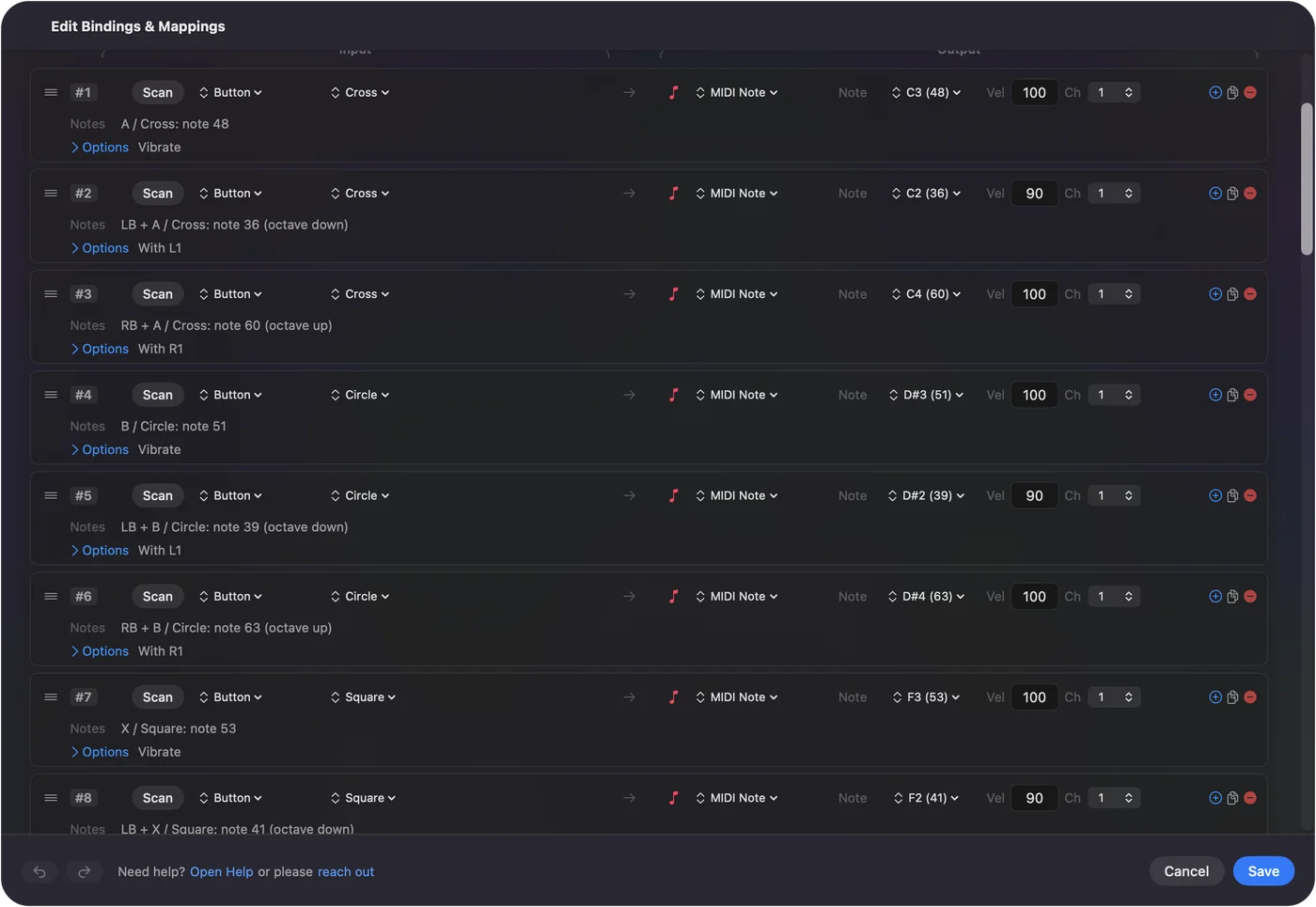
Eight buttons are easy to hit without looking: the four face buttons and the four D-pad directions. The Gamepad Synth preset maps them to a C minor pentatonic across one octave and a bit (C, Eb, F, G, Bb, C, Eb, F), so any combination sounds fine.
- Octave down. Hold LB and the same eight buttons play an octave lower, through chords.
- Octave up. Hold RB and they play an octave higher.
- A softer layer. Velocity is fixed per row, from 1 to 127. Set it lower on the D-pad rows.
A pentatonic scale means no wrong notes, which is the point of an instrument you pick up and play.
Add expression on the sticks and triggers
Sticks and analog triggers send values that follow their position:
- Right stick left and right
- Pitch bend, both directions, with Variable Sensitivity on so the bend follows the stick. Center is no bend.
- Right stick up
- CC 1, modulation, following the stick.
- Left trigger
- CC 11, expression, following the pull.
- Right trigger
- CC 74, filter cutoff, following the pull.
- Left stick
- CC 10 (pan) as the stick moves right, CC 7 (volume) as it moves up.
Any of these can be re-pointed at a different CC number in the row. The CC reference lists the conventional ones. Stick-driven CC reaches the full 0 to 127 range past the deadzone.
Map a stick to a knob in your DAW
The DAW sees InputConfig as one more MIDI keyboard, so the DAW's own MIDI learn does the mapping. Give the stick or trigger a CC in InputConfig first, then:
- Logic Pro
- Click the plugin or mixer control, choose Logic Pro, Control Surfaces, Learn Assignment, move the stick, then choose it again to finish.
- Ableton Live
- Switch on Remote for the InputConfig input in Settings (Preferences in older versions), Link, Tempo and MIDI. Press Command M for MIDI Map Mode, click the control, move the stick, and press Command M again.
- GarageBand
- There is no MIDI learn. GarageBand plays the notes and follows pitch bend and the modulation wheel (CC 1) like any keyboard, which is all the Gamepad Synth preset needs.
- FL Studio, Reaper, Bitwig and the rest
- Enable the InputConfig input in the MIDI settings, then use their MIDI learn the same way.
Learn one row at a time: if two rows share a CC number, the DAW learns whichever moved last. Each of these has a page of its own: Logic Pro and GarageBand, Ableton Live and FL Studio.
Use the gyro as a switch
On a DualSense, DualSense Edge or DualShock 4 the gyro can fire MIDI, but it acts like a switch, not a fader: a Gyro row sends the CC value you set while the controller is turning and 0 when it stops.
- Good for. A flick of the wrist to kick an effect on and off, or a note played with a shake.
- Not for. A smooth filter or wavetable sweep. Use a stick or a trigger, which follow their position. The right trigger already sends CC 74 in the preset.
- Keep it quiet. Put Pause Motion While Held on a paddle, so the gyro only fires when you mean it.
Add drums, transport and a pulse
Three extras round out the instrument:
- Drums. The built-in MIDI: Drum Pad preset puts kick, snare, closed hat, and open hat on the face buttons on channel 10 with turbo on, so holding a button rolls at the turbo rate. Set the rate to match the tempo: 8 presses a second is sixteenth notes at 120 BPM.
- Transport. In the Gamepad Synth preset, Start / Options sends MIDI Start, Back / Share sends Stop, R3 sends Continue, and L3 sends R as a keyboard shortcut to arm recording in Logic. Transport messages are real-time MIDI, so they work in any DAW that follows external transport. The keyboard shortcut is the fallback for ones that do not.
- A haptic metronome. A row can vibrate when it fires. A turbo row with no output at the tempo's rate, bound to a button you hold, makes the controller pulse on every beat. It does not replace the click, but it puts a physical downbeat in the hands while the monitors are off.
The light bar color is set per preset, not per event, so it cannot follow the beat; haptics can.
Cut the latency for playing
The note is sent the moment the poll sees the press. A faster poll sees the press sooner. Out of the box InputConfig polls at 120 Hz on the power adapter and 60 Hz on battery.
- You: Set both to 240 in Settings, Advanced, Polling rate.
- InputConfig: Reads the controller 240 times a second.
- Check: Fast repeated notes land where you play them.
Which controllers work, and two limits
Any controller InputConfig reads can play: DualSense, DualSense Edge, DualShock 4, Xbox Series, One, Elite and Adaptive, Switch Pro, Joy-Cons, 8BitDo, Stadia, the Steam Controller, and joysticks and wheels that show up as HID devices. Buttons play notes. Sticks, analog triggers and a joystick's axes send CC or pitch bend that follows their position. The Live Visualizer shows which controls the Mac is reading before you map anything.
- Buttons are not velocity sensitive. Each note row plays at the velocity you set in it, 1 to 127, so a softer layer is a second row with a lower number. For dynamics, put CC 11 on an analog trigger.
- Nintendo triggers are on or off. The Switch Pro and Joy-Con ZL and ZR are digital, so on a Nintendo pad put expression on a stick.
Each family has a page with its own button names and extras: Xbox, PS5 and PS4, Joy-Con and Switch Pro, and joysticks, wheels and other HID devices.
Other gamepad to MIDI tools on a Mac
I would rather you find the right tool than the wrong one, so here is what else does this on a Mac, checked in September 2026:
- Gamepad MIDI by Pounding Systems. A dedicated gamepad to MIDI app for Apple silicon Macs, Windows and Linux. It also maps the touchpad and accelerometer to MIDI and can send straight to a hardware MIDI port. If MIDI is all you want and you need those, look at it.
- Kaskobi Gamepad MIDI. A Max for Live device, so it lives inside Ableton Live and needs Max for Live.
- MIDITROL. An iPhone and iPad app: the controller pairs with the phone, and the phone sends MIDI to the Mac over USB or Wi-Fi.
- MidiHID and ControllerMate. Older Mac tools. MidiHID's code was archived in 2017, and ControllerMate's last version supports macOS Mojave at most.
What InputConfig adds is the rest of the Mac: the same preset can play notes into the DAW and send keys, clicks and transport shortcuts, it reads MIDI gear as input too, and it is free on the Mac App Store with no account.
The short version
- Enable the InputConfig port. It exists whenever the app runs. No IAC Driver needed.
- Start from Gamepad Synth. It has pentatonic notes, pitch bend, and CC on the triggers.
- Poll at 240. That is the setting I would use for playing, on the adapter and on battery.
- Learn in the DAW. Do it one row at a time.
Notes on the buttons, expression on the sticks: the controller already in your drawer is an instrument.
Download
- Gamepad Synth presetPentatonic notes on the face buttons and D-pad, pitch bend and modulation on the right stick, expression and cutoff on the triggers, pan and volume on the left stick, octave shifts on the bumpers, transport on the system buttons. 16 KB
To add a downloaded preset: drop the file on InputConfig's Dock icon, or click the … button next to any preset in the sidebar, choose Import Preset File, and pick the file. It lands in the sidebar, ready to activate or edit. Any launch target inside a preset file is cleared on import; add one yourself in the editor if you want it.
Questions
Can I use a MIDI keyboard and the controller at the same time?
The DAW sees two sources. The controller adds expression the keyboard does not have. Many people play notes on the keys and bend with the stick.
Does the DAW see the controller as a control surface?
It sees a MIDI source. Use the DAW's MIDI learn to map CCs to parameters, as with any generic controller.
Can the light bar follow the beat?
The light bar color is set per preset rather than per event, so no. Haptics can pulse per event.
Does it work with Ableton Live, FL Studio, or GarageBand?
While InputConfig runs, it publishes a MIDI source named InputConfig, and any Mac app that takes MIDI input can use it. Enable it as an input in the app's MIDI settings. GarageBand and Logic pick it up on their own.
Is there free software to turn a game controller into a MIDI controller on a Mac?
InputConfig is free and open source, with nothing paid. It sends notes, CC, pitch bend, program change and transport from any controller the Mac sees, and it can send keys and mouse at the same time.
Can a Switch Pro Controller or Joy-Cons be a MIDI controller on a Mac?
For buttons and sticks, they can: notes, CC and pitch bend work the same as on a PlayStation or Xbox pad. Their ZL and ZR triggers are digital, so they play notes or send a fixed CC rather than a sweep. Motion rows read the Switch Pro Controller's gyro, and a Joy-Con's when macOS reports it.
Do I need the IAC Driver or a virtual MIDI cable?
No. InputConfig creates its own MIDI source, named InputConfig, whenever it runs, and keeps the same identity between launches so a DAW that remembers its inputs finds it again. Nothing to switch on in Audio MIDI Setup and nothing else to install.
Can a joystick or racing wheel send MIDI?
If InputConfig reads it, yes. Flight sticks and wheels that show up as HID devices give axes that act like sticks, so they can send CC or pitch bend, and their buttons can play notes. Open the Live Visualizer and move each axis to see what the Mac is reading.
Are the buttons velocity sensitive?
No. A controller button is on or off, so each note row plays at the velocity you set in it, from 1 to 127. For dynamics, put CC 11 (expression) on an analog trigger, as the Gamepad Synth preset does, or give a second row on the same button a lower velocity behind a bumper.
Related
This page in other languages: العربية, Čeština, Dansk, Deutsch, Español, Suomi, Français, עברית, Magyar, Bahasa Indonesia, Italiano, 日本語, 한국어, Norsk, Nederlands, Polski, Português, Русский, Slovenčina, Svenska, ไทย, Türkçe, Українська, Tiếng Việt, 繁體中文, 简体中文
Completely free. You don't have to make an account, there are no subscriptions, and nothing is locked. Optimized for Apple silicon. Open source on GitHub.
Updated