MIDI CC list
 InputConfig is completely free on the Mac App Store.
These are the numbers you need while binding MIDI in InputConfig, in either direction: which CC a knob sends, which note a pad is, which program number recalls which General MIDI sound, and which drum sits on which note of channel 10.
Each list also has a page of its own with the full table: the MIDI note number chart, the General MIDI instrument list and the General MIDI drum map.
InputConfig names notes from C-1 (0) to G9 (127), so middle C is C4 = 60. Pitch bend: 0 is full down, 8192 is center, 16383 is full up. Program numbers in the app are 0 to 127; General MIDI lists the same sounds as 1 to 128.
| CC | Standard name | Name in InputConfig's visualizer |
|---|---|---|
| 0 | Bank Select (MSB) | Bank |
| 1 | Modulation Wheel | Mod Wheel |
| 2 | Breath Controller | Breath |
| 3 | Undefined | |
| 4 | Foot Controller | Foot |
| 5 | Portamento Time | Porta Time |
| 6 | Data Entry (MSB) | |
| 7 | Channel Volume | Volume |
| 8 | Balance | Balance |
| 9 | Undefined | |
| 10 | Pan | Pan |
| 11 | Expression | Expression |
| 12 | Effect Control 1 | |
| 13 | Effect Control 2 | |
| 14 | Undefined | |
| 15 | Undefined | |
| 16 | General Purpose 1 | |
| 17 | General Purpose 2 | |
| 18 | General Purpose 3 | |
| 19 | General Purpose 4 | |
| 20 | Undefined | |
| 21 | Undefined | |
| 22 | Undefined | |
| 23 | Undefined | |
| 24 | Undefined | |
| 25 | Undefined | |
| 26 | Undefined | |
| 27 | Undefined | |
| 28 | Undefined | |
| 29 | Undefined | |
| 30 | Undefined | |
| 31 | Undefined | |
| 32 | LSB for CC 0 | |
| 33 | LSB for CC 1 | |
| 34 | LSB for CC 2 | |
| 35 | LSB for CC 3 | |
| 36 | LSB for CC 4 | |
| 37 | LSB for CC 5 | |
| 38 | LSB for CC 6 | |
| 39 | LSB for CC 7 | |
| 40 | LSB for CC 8 | |
| 41 | LSB for CC 9 | |
| 42 | LSB for CC 10 | |
| 43 | LSB for CC 11 | |
| 44 | LSB for CC 12 | |
| 45 | LSB for CC 13 | |
| 46 | LSB for CC 14 | |
| 47 | LSB for CC 15 | |
| 48 | LSB for CC 16 | |
| 49 | LSB for CC 17 | |
| 50 | LSB for CC 18 | |
| 51 | LSB for CC 19 | |
| 52 | LSB for CC 20 | |
| 53 | LSB for CC 21 | |
| 54 | LSB for CC 22 | |
| 55 | LSB for CC 23 | |
| 56 | LSB for CC 24 | |
| 57 | LSB for CC 25 | |
| 58 | LSB for CC 26 | |
| 59 | LSB for CC 27 | |
| 60 | LSB for CC 28 | |
| 61 | LSB for CC 29 | |
| 62 | LSB for CC 30 | |
| 63 | LSB for CC 31 | |
| 64 | Sustain Pedal | Sustain |
| 65 | Portamento On/Off | Portamento |
| 66 | Sostenuto Pedal | Sostenuto |
| 67 | Soft Pedal | Soft Pedal |
| 68 | Legato Footswitch | |
| 69 | Hold 2 | |
| 70 | Sound Variation | |
| 71 | Resonance (Timbre) | Resonance |
| 72 | Release Time | Release |
| 73 | Attack Time | Attack |
| 74 | Brightness (Cutoff) | Cutoff |
| 75 | Decay Time | |
| 76 | Vibrato Rate | |
| 77 | Vibrato Depth | |
| 78 | Vibrato Delay | |
| 79 | Sound Controller 10 | |
| 80 | General Purpose 5 | |
| 81 | General Purpose 6 | |
| 82 | General Purpose 7 | |
| 83 | General Purpose 8 | |
| 84 | Portamento Control | Porta Ctl |
| 85 | Undefined | |
| 86 | Undefined | |
| 87 | Undefined | |
| 88 | High Resolution Velocity Prefix | |
| 89 | Undefined | |
| 90 | Undefined | |
| 91 | Reverb Send (Effects 1) | Reverb |
| 92 | Tremolo Depth (Effects 2) | |
| 93 | Chorus Send (Effects 3) | Chorus |
| 94 | Detune (Effects 4) | |
| 95 | Phaser Depth (Effects 5) | |
| 96 | Data Increment | |
| 97 | Data Decrement | |
| 98 | NRPN (LSB) | |
| 99 | NRPN (MSB) | |
| 100 | RPN (LSB) | |
| 101 | RPN (MSB) | |
| 102 | Undefined | |
| 103 | Undefined | |
| 104 | Undefined | |
| 105 | Undefined | |
| 106 | Undefined | |
| 107 | Undefined | |
| 108 | Undefined | |
| 109 | Undefined | |
| 110 | Undefined | |
| 111 | Undefined | |
| 112 | Undefined | |
| 113 | Undefined | |
| 114 | Undefined | |
| 115 | Undefined | |
| 116 | Undefined | |
| 117 | Undefined | |
| 118 | Undefined | |
| 119 | Undefined | |
| 120 | All Sound Off | All Sound Off |
| 121 | Reset All Controllers | |
| 122 | Local Control On/Off | |
| 123 | All Notes Off | All Notes Off |
| 124 | Omni Mode Off | |
| 125 | Omni Mode On | |
| 126 | Mono Mode On | |
| 127 | Poly Mode On |
Which CC for what
- Binding a knob as input: Scan tells you the number. Switch mode fires past 64, Dial mode treats 64 as rest, Turn mode nudges per step for endless encoders. The MIDI input page explains the three.
- Sending CC from a stick or trigger: 1 (modulation), 7 (volume), 11 (expression), 74 (cutoff), 71 (resonance), and 10 (pan) are the ones most instruments already listen to. Anything else, map in the DAW with MIDI learn.
- Pedals: a sustain pedal sends CC 64 as 0 or 127, which is why Switch mode suits it.
- Panic: 120 All Sound Off and 123 All Notes Off are what a DAW's panic button sends; InputConfig sends note-off for everything it holds when a preset stops.
Read a Control Change message
| Byte | Value | Meaning |
|---|---|---|
| Status | 0xB0 to 0xBF | Control Change, on channel 1 to 16 |
| Controller number | 0 to 127 | Which control, from the list above |
| Value | 0 to 127 | Where the control is |
Three bytes in all. Volume at 100 on channel 1 is B0 07 64 in hex: B0 is Control Change on channel 1, 07 is Channel Volume and 64 is 100. Every knob, fader and pedal on a MIDI device speaks in this one three-byte shape.
Know the controllers that come up most
- CC 1, the modulation wheel. Usually vibrato or a filter sweep.
- CC 7 and CC 11, volume and expression. CC 7 sets a channel's level, and CC 11 moves within it.
- CC 10, pan. 0 is left, 64 is center and 127 is right.
- CC 64, the sustain pedal. 64 and above is down. The sustain pedal page covers a pedal that works backwards.
- CC 74, brightness. Filter cutoff on most synths.
- CC 0 and CC 32, Bank Select. Sent before a Program Change.
- CC 120 to 127, channel mode. Not knobs: 123 is All Notes Off and 120 is All Sound Off.
Pitch bend is missing from the list on purpose. Pitch bend is its own message with a finer scale, not a CC. MIDI pitch bend explains it, and MIDI learn is how an app picks a CC up without you looking the number up.
How this fits with InputConfig
These pages read and send MIDI in the browser. In InputConfig, MIDI is also an input: a note, a pad or a knob becomes a key, a shortcut, a click or the volume, in any app on the Mac.
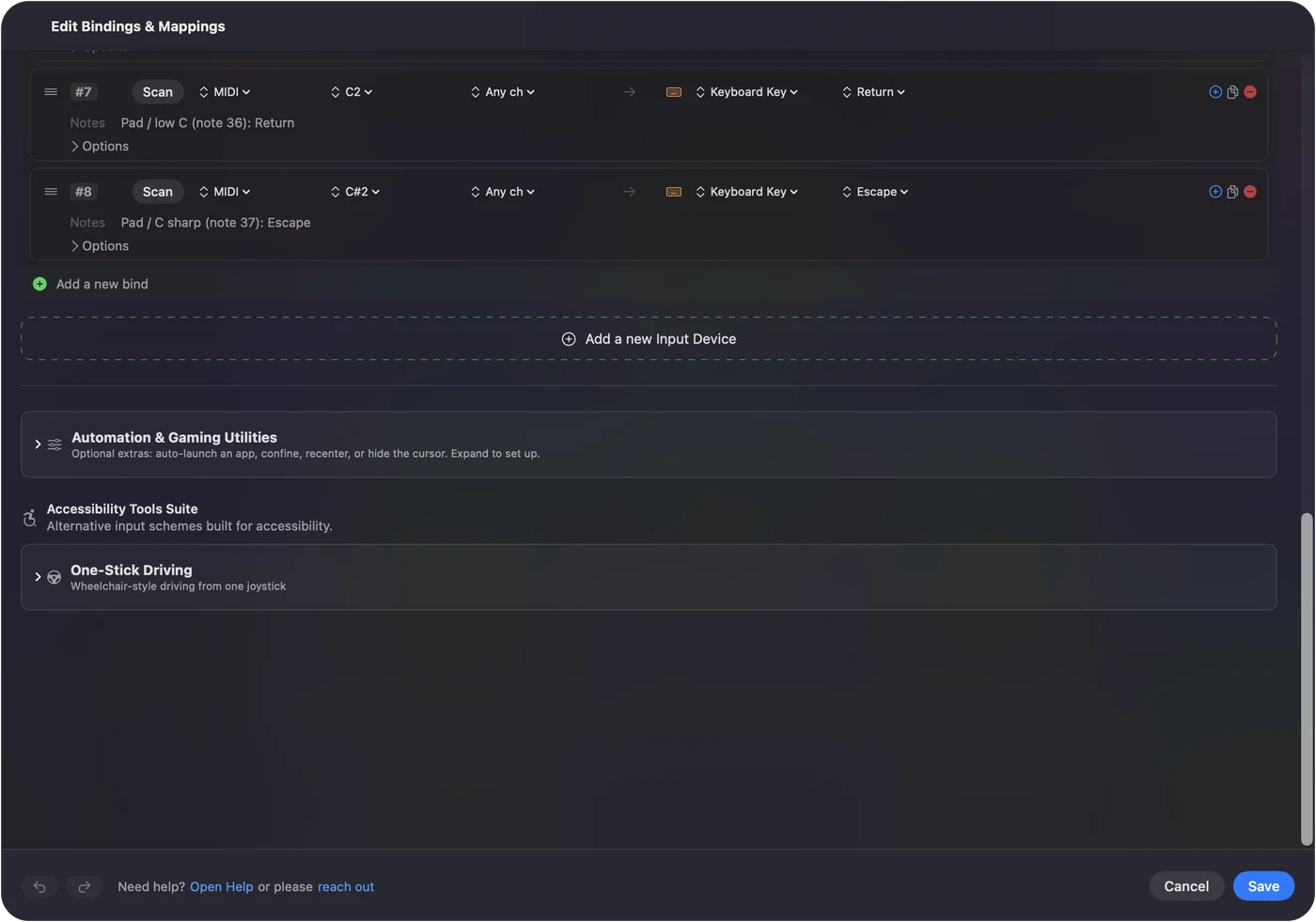
MIDI devices as input shows it step by step. InputConfig is free on the Mac App Store.
More midi tools
Questions
What is a MIDI CC?
A Control Change message. It carries a controller number from 0 to 127 and a value from 0 to 127, and it is what a knob, a fader, a pedal or a mod wheel sends.
Which MIDI CC is the sustain pedal?
CC 64. A value of 64 or more means the pedal is down, and a lower value means it is up.
Which MIDI CC is volume?
CC 7 is Channel Volume, and CC 11 is Expression, a second volume control within it. CC 1 is the modulation wheel and CC 10 is pan.
Which MIDI CC numbers are free to use?
The ones marked Undefined or General Purpose in the list, such as 16 to 19, 80 to 83 and 102 to 119. Many controllers send their knobs on those so they do not collide with a standard job.
Which MIDI CC is filter cutoff?
CC 74, named Brightness in the standard and used for cutoff by most synths. CC 71 is resonance.
What does MIDI CC 11 do?
CC 11 is Expression, a volume control inside the level set by CC 7. Players use it for swells and fades within a part, and it is the usual target for an expression pedal.
What is MIDI CC 123?
All Notes Off. It tells a device to release every note on that channel, which is the standard cure for a stuck note. CC 120, All Sound Off, cuts the sound at once.
Which MIDI CC is bank select?
CC 0 and CC 32, the coarse and fine halves of Bank Select. They are sent before a Program Change to choose which bank the program comes from.
What are the NRPN CC numbers?
CC 99 and CC 98 choose a non-registered parameter, and CC 6 and CC 38 then carry its value. Registered parameters use CC 101 and CC 100 the same way.
What values does a MIDI CC send?
0 to 127. A knob or fader sends every value as it moves. A switch such as a sustain pedal sends two, usually 0 and 127, and 64 or more counts as on.
Related
Completely free. You don't have to make an account, there are no subscriptions, and nothing is locked. Optimized for Apple silicon. Open source on GitHub.
Updated