Why your Anki controller is not detected or not working on a Mac
 InputConfig is completely free on the Mac App Store. You don't have to make an account, there are no subscriptions, and nothing is locked. Optimized for Apple silicon.
Almost every time, the remote is in the wrong mode, or nothing on the Mac is turning its buttons into Anki's keys. Anki on a Mac does not read a controller by itself. It needs the Contanki add-on, or a system-wide mapper such as InputConfig, the free app I make, which sends Anki ordinary key presses. Put the remote in a controller mode, pair it again, and use one of the two, never both.
This page is the fix list, symptom by symptom. For the layout itself, the Anki controller guide explains every button, and setting up an Anki remote covers a first pairing.
On this page: 11 sections
- Steps
- Match the symptom to the fix
- Put the remote in a controller mode
- Remove the remote and pair it again
- When Contanki says controller not detected
- See what the Mac hears in the Live Visualizer
- Turn on the Anki preset and keep it on
- If the Mac restarts or the remote keeps dropping
- What InputConfig cannot do
- The short version
- Questions
Steps
- Turn the remote off and set it to a controller mode: D on an 8BitDo Micro, or A and Start held together on a Zero 2.
- Remove the old entry in System Settings, Bluetooth, and pair the remote again.
- Open InputConfig's Live Visualizer and press every button to see what reaches the Mac.
- Activate the built-in Anki preset and turn on Switch presets when the front app changes.
- If Contanki is installed, turn it off while InputConfig runs, or the other way round.
Match the symptom to the fix
| What you see | Usual cause | Fix |
|---|---|---|
| Contanki says Controller not detected | The remote is in keyboard mode, or the add-on does not see the pad | A controller mode, or a system-wide mapper |
| The remote types letters or scrolls the card | Keyboard mode, K on a Micro | Switch to D and pair again |
| Bluetooth says connected and Anki ignores it | Nothing is mapping it | Contanki, or InputConfig's Anki preset |
| Every press counts twice | Two mappers at once | Turn one off |
| One button never does anything | The pad keeps it, such as Star on a Micro in D mode | Use another button |
| It works on the iPad and not the Mac | AnkiMobile has its own controller support | A mapper on the Mac |
| It stopped after a macOS update | Reported with Contanki, no confirmed fix | Check it in the Live Visualizer, then try a system-wide mapper |
Find your row first, because the mode, the pairing and the mapper are three different problems.
Put the remote in a controller mode
Most Anki remotes are a small 8BitDo pad, and it is a different device in each mode:
- 8BitDo Micro. The switch on its bottom edge has S, D and K. D is a plain gamepad that InputConfig reads, S makes it a Switch controller, and K makes it a Bluetooth keyboard that types fixed letters.
- 8BitDo Zero 2. It has no switch. Turn it on with A and Start held together for its macOS mode, which pairs as Wireless Controller. R and Start turns it on as a keyboard instead.
- Other 8BitDo pads. D on a Pro 2. An SN30 Pro or SN30 Pro+ is turned on with B and Start held together.
Keyboard mode is not wrong for Anki, it is a different route: the letters it types are 8BitDo's choice, and they rarely match Anki's Space and 1 to 4. For your own layout, use a controller mode, and set it before you pair.
Remove the remote and pair it again
A remote that was paired in one mode shows up as a new device in another, and the old entry gets in the way.
- You: Open System Settings, Bluetooth, remove the remote, turn it on in the mode you chose and put it in pairing mode. Hold Pair for three seconds on a Micro, or Select for three seconds on a Zero 2.
- macOS: Lists the remote with a Connect button.
- Check: It shows as connected, and the light on the remote stops blinking.
If it still will not pair, charge it, keep it close to the Mac, and make sure it is not still paired to a Switch or a phone nearby. An older pad may need a firmware update from 8BitDo's Upgrade Tool. The Zero 2's USB port only charges it and updates its firmware, so it connects over Bluetooth only. Forget the old entry every time you change the mode.
When Contanki says controller not detected
Contanki is a free add-on that reads a controller from inside Anki, and when it cannot find one it says Controller not detected. The Anki forum has several reports of this on Macs. One Zero 2 thread from September 8, 2025 was a remote paired in keyboard mode. Another, from September 28, 2025, was a Zero 2 on a MacBook after resetting the add-on and buying a new remote. A third, from September 29, 2025, was a PS5 controller that stopped being detected after a macOS update. When I read them on October 27, 2026, none had a confirmed fix beyond setup guides and contacting the add-on's author.
There are two ways out:
- Give Contanki a controller. A remote in keyboard mode is a keyboard, so the add-on has nothing to detect. Switch to a controller mode and pair again.
- Skip detection inside Anki. A system-wide mapper reads the controller and sends Anki ordinary key presses, so Anki only ever sees a keyboard. That is how InputConfig works, and the same pad then runs the deck list, a browser and the rest of the Mac.
If you try InputConfig, turn Contanki off for that session. Two mappers at once answer every press twice, which looks like a broken remote.
See what the Mac hears in the Live Visualizer
Before changing anything else, find out whether the remote's presses reach the Mac at all.
- You: Open the Anki preset in InputConfig and press every button on the remote with the Live Visualizer open.
- InputConfig: Lights each control that arrives, on a drawing of the pad.
- Check: A control that never lights is not reaching the Mac, so check the connection and the mode switch. If the remote is not in the sidebar at all, tick it under InputConfig, Devices in the menu bar.
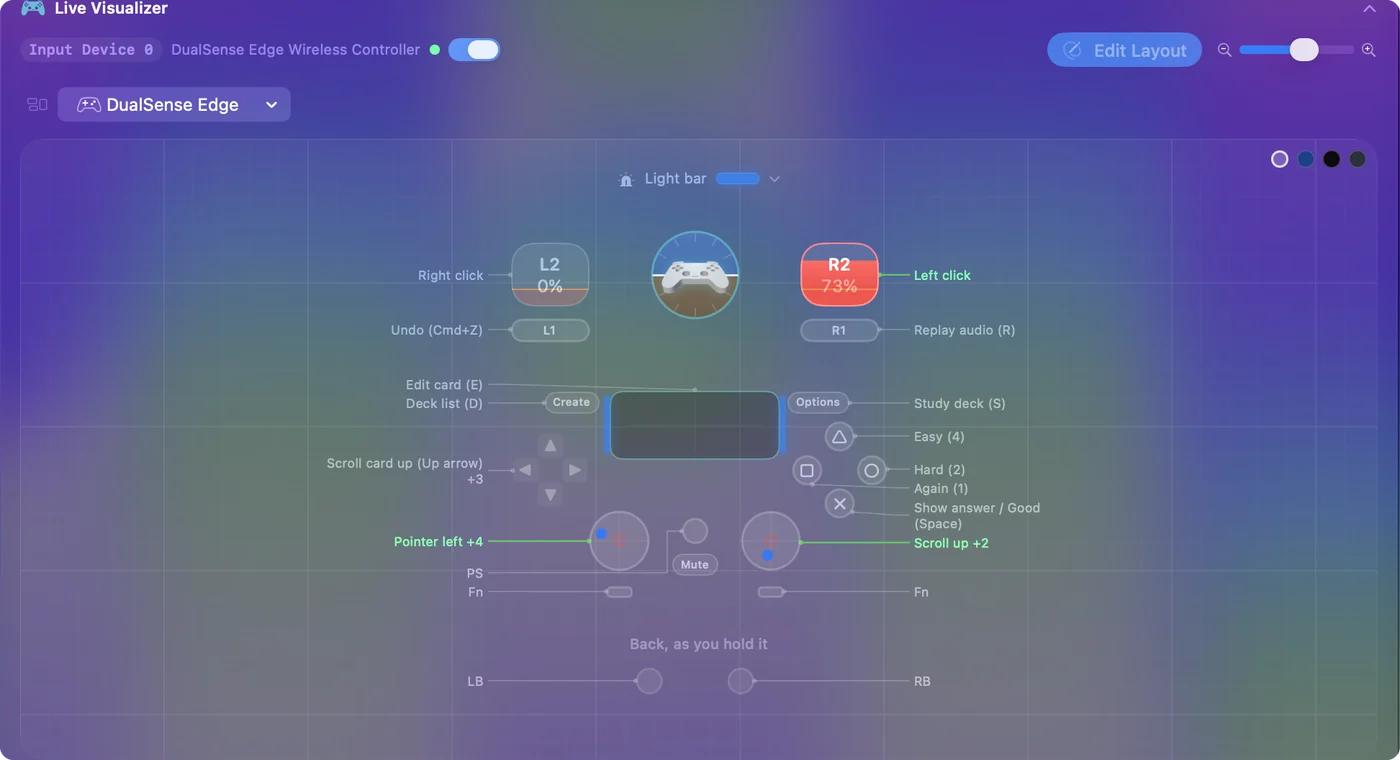
A Micro in D mode keeps its Star button for itself, as its own turbo key, so Star never lights and cannot be bound. That is the pad, not a fault. Whatever lights up can be bound, and whatever does not is a connection or mode problem.
Turn on the Anki preset and keep it on
InputConfig ships a built-in Anki preset, under Built-in Presets, Desktop & Productivity. A / Cross sends Space, which shows the answer and then rates Good. X / Square sends 1 for Again, B / Circle sends 2 for Hard, Y / Triangle sends 4 for Easy, the left bumper undoes and the right bumper replays audio.
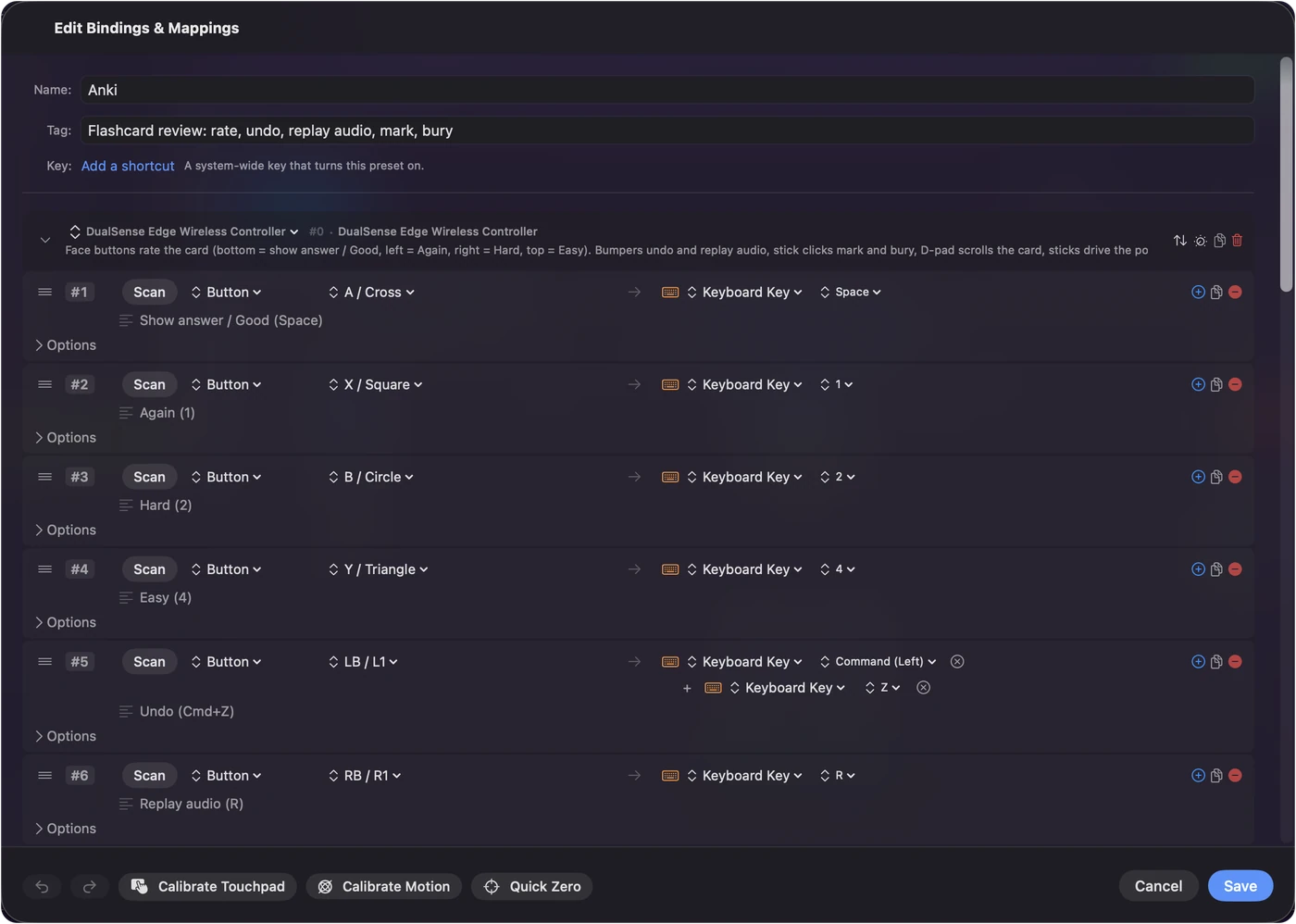
Climb this ladder if the remote lights up but Anki does not react, smallest step first:
- Bring Anki to the front. The keys go to the app in front, so a review window behind another app gets nothing.
- Check the preset is running. The button on the preset's page reads Deactivate while it runs. Turn on Switch presets when the front app changes in Settings, Advanced, and Anki, already on the preset's list, turns it on by itself.
- Check the permission. InputConfig needs Accessibility in System Settings, Privacy & Security. An orange menu bar icon means the preset is waiting for it.
- Check Anki's own keys. If you changed Anki's answer shortcuts, Scan those rows again and press your new keys.
To make the big button mean Hard or Again instead of Good, the free Anki Spacebar Binder add-on changes what Space does on the answer side.
If the Mac restarts or the remote keeps dropping
A remote that drops out is usually the battery, another device it is still paired to, or the pad switching itself off after a while with no input, which looks like a drop when you pause on a hard card. Charge it, unpair it from anything else nearby, and pair it again.
A Mac that restarts is different. One forum thread from August 2025 describes a MacBook Air M3 on macOS 15.6.1 restarting whenever an 8BitDo Micro was connected over Bluetooth in D mode, with the crash logs pointing at an Apple process that handles input devices. A firmware update did not stop it, and the thread had no confirmed fix when I read it. A mapper cannot cure that, because it happens below any app. Try the pad by cable if it connects that way, try another controller, and report the crash to Apple with the logs. A PS5, PS4, Xbox or Switch Pro controller, or a single Joy-Con, runs the same Anki preset while you sort it out.
What InputConfig cannot do
- Stop a keyboard-mode remote's letters. It listens to the keyboard and does not block or remap a key, so in keyboard mode every letter still reaches Anki. Use a controller mode with InputConfig.
- Read a button the pad keeps. Star on a Micro in D mode is never reported to the Mac.
- Run on an iPad. InputConfig is a Mac app. On the iPad, AnkiMobile has its own controller support.
- Fix a Bluetooth crash. A restart caused below the apps is for Apple and the pad's maker.
The short version
- Mode. D on a Micro, A and Start on a Zero 2, then forget and pair again.
- Check. Press every button in the Live Visualizer. A control that never lights is not reaching the Mac.
- Map. Activate the built-in Anki preset and turn on automatic switching.
- One mapper. Contanki or InputConfig, never both.
Start with the mode switch, because it explains most Anki remotes that seem dead.
Questions
Why does Anki say controller not detected?
That message comes from the Contanki add-on. The usual cause is a remote paired in keyboard mode, which is a keyboard to the Mac, so there is no controller to detect. Switch it to a controller mode and pair again, or use a system-wide mapper such as InputConfig, which sends Anki ordinary key presses.
Why does my remote type letters instead of rating cards?
It is in keyboard mode, K on an 8BitDo Micro, and types 8BitDo's letters. Switch it to D, pair it again, and activate InputConfig's Anki preset, which sends Space and 1 to 4.
Do I need Karabiner-Elements?
Only if you keep the remote in keyboard mode and want to change the letters it types. In a controller mode, InputConfig or Contanki does the mapping and Karabiner-Elements is not involved.
Does an Anki remote work on iPad with InputConfig?
No. InputConfig is a Mac app. AnkiMobile on the iPad has its own controller support, which is why a remote can work there and not on the Mac.
Do I need an add-on?
No. InputConfig sends ordinary key presses, which is all Anki needs. Contanki is the add-on route, and either one works, but not both at once.
Related
This page in other languages: Deutsch, Español, Français, Italiano, 日本語, 한국어, Polski, Português, Русский, ไทย, 繁體中文, 简体中文
Completely free. You don't have to make an account, there are no subscriptions, and nothing is locked. Optimized for Apple silicon. Open source on GitHub.
Updated