Questions
8BitDo back buttons on a Mac
Yes, and they reach a Mac in one of two ways. With the pad in the mode for a Mac and no profile changing them, the Pro 2's and the Ultimate's P1 and P2 can arrive as buttons of their own, which InputConfig 1.6, the free mapper I make, reads and names as P1 and P2. With a profile that assigns them to another button, they send a copy of that button, and the Mac cannot tell the difference.
The Ultimate 2C's L4 and R4 are not back buttons at all but small extra bumpers on the top edge. Pressing Scan in InputConfig tells you which case you have in a second.
On this page: 10 sections
Steps
- Put the pad in its mode for a Mac, D mode on a Pro 2 or D-input on an Ultimate.
- In InputConfig, open a preset, click Edit and press Scan on a row.
- Press the back button and read what fills the row.
- If it reads P1 or P2, pick an output for it and Save.
Check which pads have them
| Pad | Extra buttons | What reaches the Mac |
|---|---|---|
| Pro 2 | P2 on the left grip, P1 on the right, as you hold it | In D mode: their own buttons, through macOS or read directly. With a profile from 8BitDo's software: a copy of the assigned button |
| Ultimate (2.4G, Bluetooth, Wired) | P1 and P2 on the back | In D-input mode: their own buttons, read directly, and through macOS when it lists them. In X-input mode: nothing of their own |
| Ultimate 2C | L4 and R4, tucked under the bumpers on the top edge | Over Bluetooth, read directly: their own buttons. In X mode over USB or its receiver: no signal of their own |
| SN30 Pro+, SN30 Pro, Lite 2 | None | Nothing to map; a chord gives any button a second job |
The Star button and the Profile button never reach the Mac on the Pro 2: Star sets turbo inside the pad, and Profile switches the pad's own profiles. The mode decides whether a back button is its own button or nothing at all.
Check yours in ten seconds
- You: In InputConfig, open a preset, click Edit, press Scan on any row and press the back button.
- InputConfig: Fills the row with whatever the pad sent.
- Check: Read the row against the list below.
- P1 or P2 (L4 or R4 on an Ultimate 2C). It arrived as a button of its own. Bind it to anything.
- A, a stick click, or another button. The pad is copying that button. Binding the row binds the real button too.
- Nothing. The pad sends nothing for it in this mode. Check the mode, then the profile.
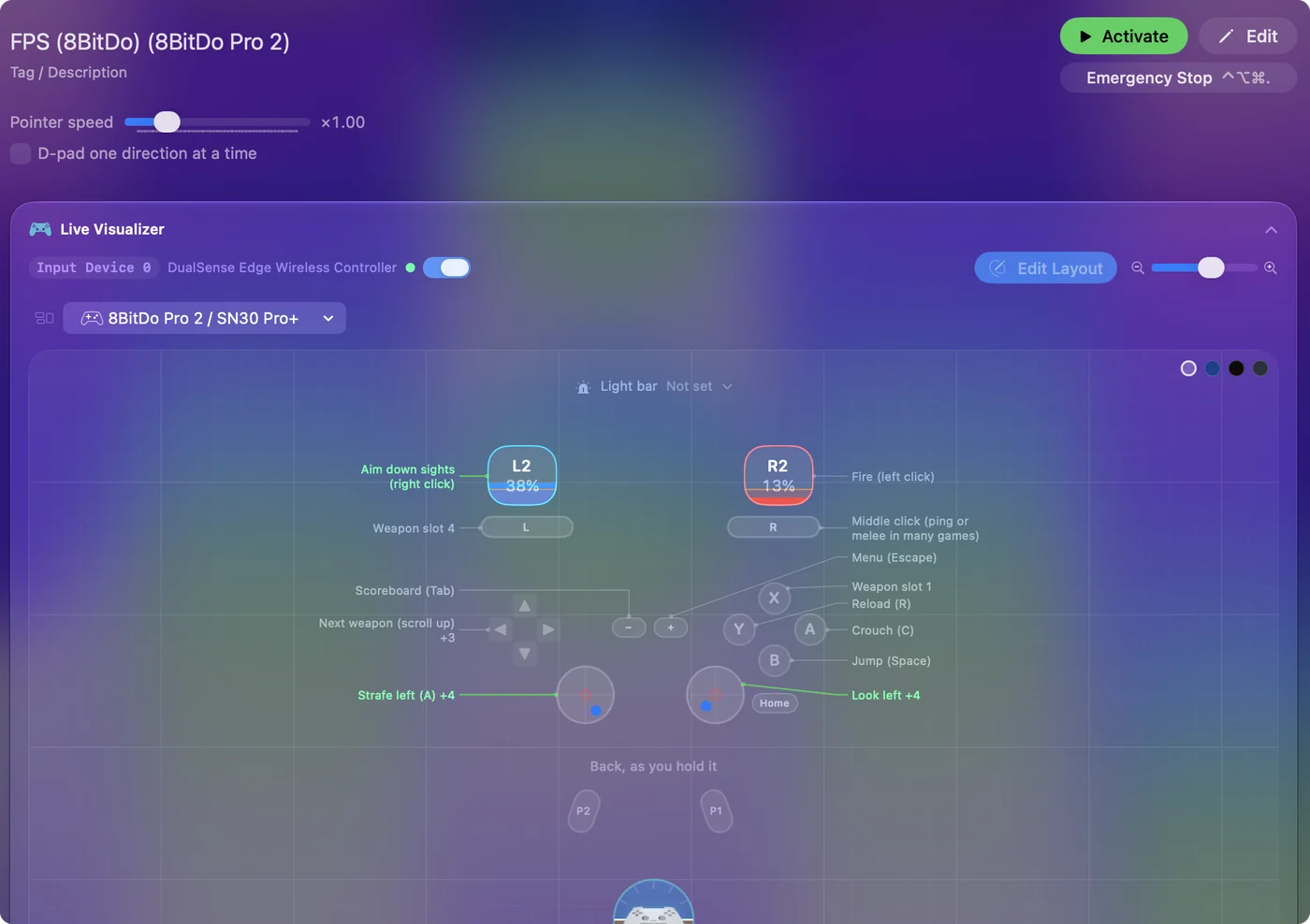
The Live Visualizer shows the same thing without binding anything: it draws the Pro 2, the Ultimate and the Ultimate 2C with their extra buttons, and lights the control that arrives. With no app at all, System Settings, Game Controllers lights each button macOS sees. Scan answers the question before you change any setting.
 InputConfig is free on the Mac App Store. macOS 14 or later, no account, no tracking, open source.
Move rows made before 1.6
Earlier versions read an 8BitDo pad's two back buttons as a DualSense Edge's Fn buttons. 1.6 reads them as back buttons, and also fixes the Pro 2's back buttons and the wired Pro 2 when they are read over USB. Rows recorded on the back buttons before 1.6 used other numbers and no longer fire.
- You: Connect the pad for the first time in 1.6.
- InputConfig: Asks: Update 8BitDo back button rows in older presets?
- Check: Tick the presets you made on that controller and click Move in Ticked Presets.
If you said no and change your mind, Check Older Presets Again in Settings offers it once more.
Make a copying back button useful
If your pad copies a button, set the back button to copy one you can spare in what you are doing, such as a stick click, then bind that button in InputConfig.
- Where to assign it. 8BitDo assigns back buttons with its Ultimate Software on a Mac, or on the controller itself on the Ultimate 2C.
- Check after you change it. 8BitDo says that software does not support the pad's Mac mode, so an assignment made in another mode may not carry over. Scan after you change it.
- Avoid Select or View. Held with Start for three seconds, it is InputConfig's emergency stop by default.
Copy a button you never use in that game, so the back button does not double up.
Put something useful on them
- A chord modifier. Hold P1 and every other button gets a second job, with a chord.
- A frequent key. A key a keyboard-only game needs often: jump, reload, the map, push to talk.
- A macro or a pair of jobs. A macro, turbo, or toggle, or a hold and double tap pair.
- A system function. A system function: a screenshot, volume, Mission Control.
The Smart Preset Maker's option to fill back paddles is offered for the DualSense Edge, the Xbox Elite and the Steam Controller, not for 8BitDo pads. The built-in FPS (8BitDo) preset leaves them free for you. Add 8BitDo back button rows by hand with Scan.
If a game ignores the back buttons
A game with controller support reads the pad through macOS, which offers the standard buttons, and most Mac games do not use extra back buttons even when macOS lists them. Bind P1 or P2 in InputConfig to the keyboard key the game uses for that action, and the key arrives alongside the controller.
What it cannot do
- Rumble and motion. 8BitDo says they are not supported on Apple devices, so a back button cannot trigger a vibration on these pads.
- Star and Profile. They never reach the Mac on the Pro 2.
- X-input mode back buttons. The Ultimate sends nothing of its own for them in that mode.
Use the pad's Mac mode, and the back buttons are ordinary buttons you can bind.
The short version
- Mode first. D mode on a Pro 2, D-input on an Ultimate, Bluetooth on an Ultimate 2C.
- Then Scan. P1 or P2 means bind it. Another button means it is a copy.
- Old rows. Accept the offer to move them, or use Check Older Presets Again.
One Scan tells you everything: what the pad sends is what you can bind.
Questions
Do 8BitDo back buttons work on a Mac?
Yes. On a Pro 2 or Ultimate in the mode for a Mac they can arrive as buttons of their own, which InputConfig 1.6 names P1 and P2. If a profile assigns them to another button, the Mac receives that button instead. Scan tells you which.
Why do my 8BitDo back buttons do nothing on my Mac?
Usually the mode or the profile: in X-input mode the Ultimate sends nothing for them, and a profile can leave them unassigned. If they worked in an older InputConfig and stopped in 1.6, accept the offer to move those rows, or use Check Older Presets Again in Settings.
Are the Ultimate 2C's L4 and R4 back buttons?
No. They are small extra bumpers under LB and RB on the top edge. Over Bluetooth InputConfig reads them as buttons of their own; in X mode over USB or the receiver they send nothing of their own.
Can I map 8BitDo back buttons to keyboard keys on a Mac?
Yes. In InputConfig, press Scan on a row, press the back button, and pick a key, a shortcut, a click or a macro. InputConfig is free on the Mac App Store.
Related
Free. macOS 14 or later. No account, nothing leaves your Mac. Open source on GitHub.