OpenEmu controls not working on a Mac: what to fix, in order
 InputConfig is completely free on the Mac App Store. You don't have to make an account, there are no subscriptions, and nothing is locked. Optimized for Apple silicon.
When OpenEmu ignores your keyboard or controller, the cause is nearly always one of three things: OpenEmu has no Input Monitoring permission, a wireless controller has no Bluetooth permission, or the console you are playing has no controls assigned. OpenEmu's own input troubleshooting page, which I read on October 27, 2026 and which was last edited in January 2022, names the first two and a list of apps that block its input. This page tells you which case you have and climbs the fixes in order, smallest first.
If you already know it is only the keyboard, OpenEmu keyboard not working goes deeper, and OpenEmu controller not working covers each pad. I make InputConfig, a free Mac app that maps controllers to keys. It comes last here, as the fallback, because OpenEmu reads most controllers by itself.
On this page: 11 sections
- Steps
- Pick your case
- Allow Input Monitoring, then quit and reopen OpenEmu
- Allow Bluetooth for a wireless controller
- Turn the permission off and on again
- Check the Controls pane for that console
- Close the apps that take the input
- Check the controller is one OpenEmu can read
- If it still fails, map the pad to keys with InputConfig
- The short version
- Questions
Steps
- Open System Settings, Privacy & Security, Input Monitoring, and switch OpenEmu on.
- For a wireless controller, switch OpenEmu on in Privacy & Security, Bluetooth too.
- Quit OpenEmu with Command Q and open it again.
- In OpenEmu's settings, open Controls, choose the console you play, choose your keyboard or controller, and assign the buttons.
- If it still fails, quit Steam, Chrome, Terminal and any key remapper, and test with only OpenEmu open.
- If OpenEmu will not take your controller at all, set its input to the keyboard and map the pad to those keys with InputConfig.
Pick your case
The symptom points at the fix, so start with the line that matches yours:
- No key works in any game. Input Monitoring is off. Go to allow Input Monitoring.
- A wireless pad shows in Controls but does nothing. The Bluetooth permission is off. OpenEmu's page says controllers still appear in its Controls preferences without it, which is why this one fools people.
- It works in one console and not another. Controls are stored per console. That console has nothing assigned.
- It worked before an update. The permission switch may belong to the old copy of the app. Turn it off and on.
- It works after a restart with nothing else open. Another app was holding the device.
Most OpenEmu input problems are a permission switch, so check the two permissions before anything else.
Allow Input Monitoring, then quit and reopen OpenEmu
OpenEmu reads input devices directly instead of through Apple's controller framework, and since macOS Mojave that needs Input Monitoring. OpenEmu's page says this permission covers every kind of input, keyboards and wired and wireless controllers alike, whatever the settings window seems to say.
- You: Open System Settings, Privacy & Security, Input Monitoring. Switch OpenEmu on, or add it with the plus button if it is not listed.
- macOS: Lets OpenEmu read the keyboard and controllers, even while another window is in front.
- Check: Quit OpenEmu with Command Q, open it again, start a game and press a key you assigned in Controls.
OpenEmu's page also answers the obvious worry: macOS does not hand OpenEmu anything typed into a password field, permission or not.
Allow Bluetooth for a wireless controller
Since macOS Monterey, OpenEmu needs a second permission for wireless pads. In System Settings, Privacy & Security, Bluetooth, switch OpenEmu on, or add it with the plus button. Then quit and reopen it. A cable sidesteps this one, so plugging the controller in is a quick test: if it works wired and not wireless, this switch is the reason. A pad listed in OpenEmu's Controls can still be blocked, because the Bluetooth permission decides whether its presses get through.
Turn the permission off and on again
A switch that is already on can still be stale, for example after OpenEmu was updated or moved. OpenEmu's page does not cover this, so this is the order I would try:
- Switch it off and on. In Input Monitoring, and in Bluetooth for a wireless pad.
- Remove and add it. Select OpenEmu, remove it with the minus button, then add it again with the plus button from the Applications folder.
- Quit and reopen. Command Q, then open OpenEmu again so it starts with the permission in place.
Check the Controls pane for that console
- You: Open OpenEmu's settings and go to Controls. Choose the console at the top, the player, and your keyboard or controller in the input menu.
- OpenEmu: Fills in a controller it recognizes. For a keyboard or an unknown pad, you click each button on the picture and press the key or button you want.
- Check: Each control shows the key or button beside it, and the game for that console responds.
Two more causes from OpenEmu's page. Since version 2.2, sticks calibrate themselves, which can make them oversensitive or stuck: turn each stick through a full circle before you play. And a controller on a USB hub can be unreliable, so plug it straight into the Mac. Mappings do not carry between consoles, so a pad set up for one system is blank in the next.
Close the apps that take the input
Some apps open a device for themselves alone, and then OpenEmu gets nothing from it. OpenEmu's page names these and says the list is not complete:
- Apps to close while you play. Google Chrome, DOSBox, iTerm2, Keybase and Steam. After quitting Steam, reconnect the controller.
- Secure Keyboard Entry. Terminal and Webroot Antivirus turn it on, and it keeps keystrokes away from other apps on purpose. Those are the security apps the page names. I have not checked others.
- Input changers. Karabiner, USB Overdrive, ControllerMate, Enjoyable, Joystick Mapper, GamePad Companion, SteelSeries Engine and a few more should be closed or removed. In USB Overdrive, the page says to turn off Any Gaming, Any Application.
- Remote desktop apps. Splashtop, Synergy and TeamViewer cannot deliver input to OpenEmu.
The page's last resort is to restart the Mac and open only OpenEmu. If it works then, open your other apps one at a time to find the one that was in the way.
Check the controller is one OpenEmu can read
OpenEmu reads standard USB and Bluetooth controllers. Its page warns that controllers made for consoles are often only partly standard, and that some adapters are not standard at all, naming the GameCube adapter for Wii U as one that does not work. First make sure the Mac sees the pad: open Game Controllers in the System Settings sidebar and press a button, or use the gamepad tester. If the Mac lists nothing, the problem is the connection, not OpenEmu, and controller not recognized on a Mac is the place to start.
If it still fails, map the pad to keys with InputConfig
This route helps when the keyboard works in OpenEmu but a controller does not, because it turns the controller into keys. InputConfig can often read pads OpenEmu passes over, since it also opens controllers as raw HID devices.
- You: In OpenEmu's Controls, set that player's input to the keyboard and assign keys. In InputConfig, start from the Emulator / Arcade layout and give each button the key you assigned.
- InputConfig: Holds each key down for as long as you hold the button, the same as a real key.
- Check: With OpenEmu in front, press the D-pad and the game moves.
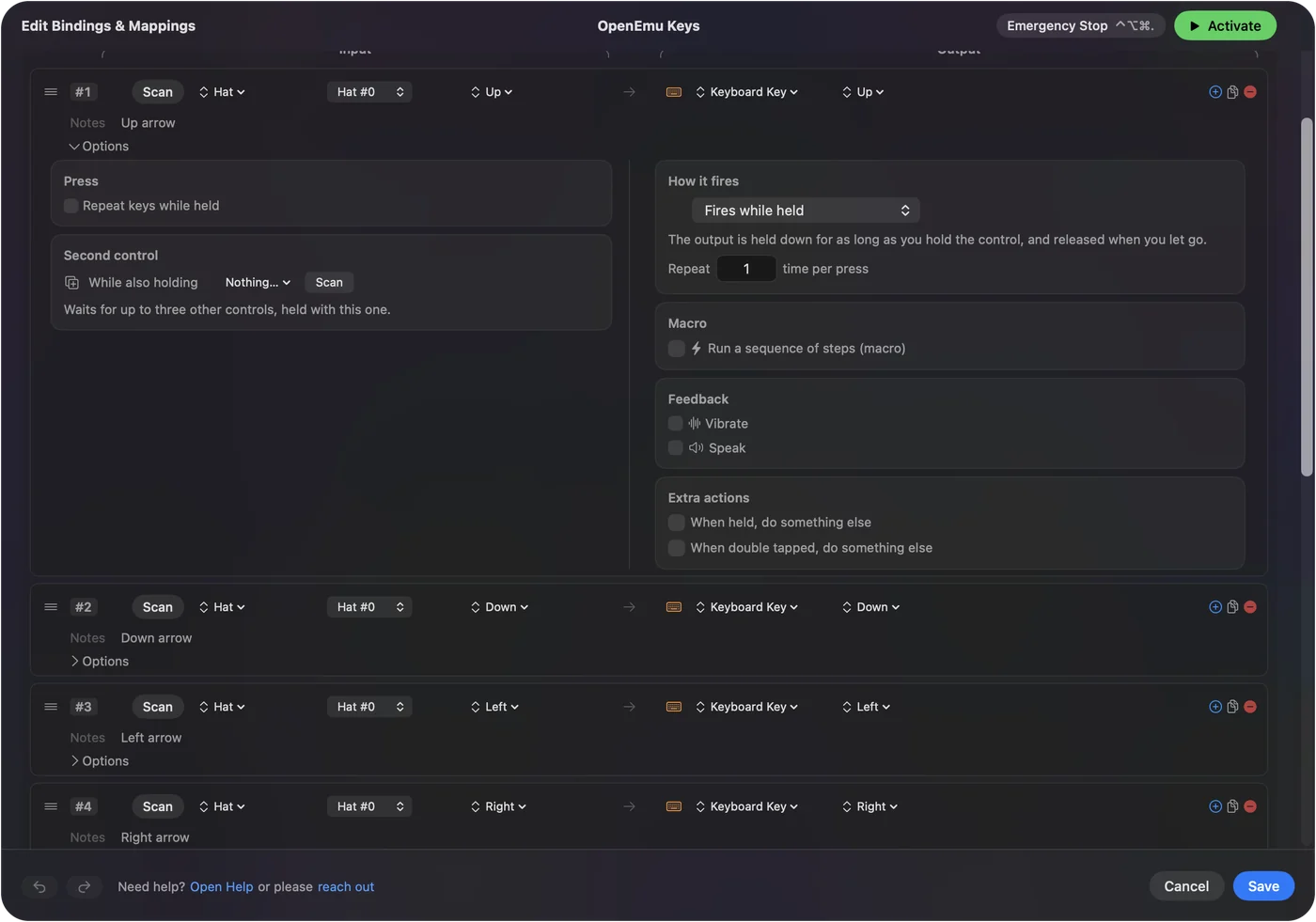
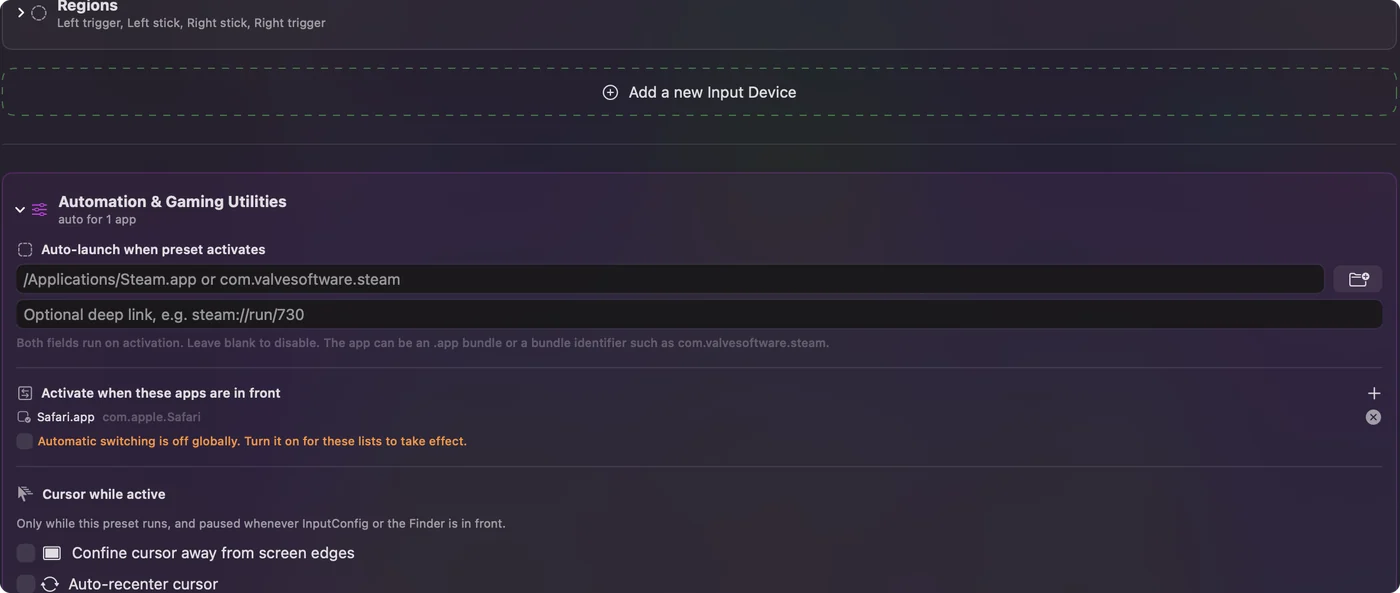
Two cautions. If OpenEmu cannot read the keyboard, these keys will not reach it either, so fix Input Monitoring first. And while OpenEmu still reads the pad itself, every press arrives twice, as the pad and as a key, so keep that player on the keyboard. List OpenEmu under Automation & Gaming Utilities, in Activate when these apps are in front, and the layout runs only while OpenEmu is in front.
Control Option Command period stops any preset at once, which is the first thing to press if keys start doubling.
The short version
- Input Monitoring. Switch OpenEmu on, then quit and reopen it.
- Bluetooth. Switch OpenEmu on for wireless pads, since Monterey.
- Controls. Assign the keyboard or pad for each console separately.
- Other apps. Quit Steam, Chrome, terminals and key remappers while you test.
Check the permissions, then the console's Controls, then other apps, because that order finds the cause fastest.
Questions
Why are my OpenEmu controls not working on a Mac?
Usually OpenEmu is missing the Input Monitoring permission, or for a wireless pad the Bluetooth permission, in System Settings, Privacy & Security. Switch it on, quit and reopen OpenEmu, then check that the console you play has controls assigned.
Why is OpenEmu not recognizing my keyboard?
OpenEmu cannot read the keyboard without Input Monitoring. If it is already on, an app with Secure Keyboard Entry, such as Terminal or Webroot Antivirus, may be holding the keystrokes.
Do I need to allow Input Monitoring for OpenEmu?
Yes. OpenEmu reads devices directly, and its own troubleshooting page says Input Monitoring covers the keyboard and every wired and wireless controller.
Why does my controller work in one console and not another?
OpenEmu stores controls per console and per player. Open Controls, choose the console that fails, choose your controller and assign its buttons.
Can InputConfig play OpenEmu games with a controller?
It can map a controller to the keys you assign in OpenEmu's Controls, which helps when OpenEmu will not read a pad. Set that player to the keyboard so presses do not arrive twice.
Related
This page in other languages: Deutsch, Español, Français, Italiano, 日本語, 한국어, Polski, Português, Русский, ไทย, 繁體中文, 简体中文
Completely free. You don't have to make an account, there are no subscriptions, and nothing is locked. Optimized for Apple silicon. Open source on GitHub.
Updated