Can you play League of Legends with a controller on a Mac?
 InputConfig is completely free on the Mac App Store. You don't have to make an account, there are no subscriptions, and nothing is locked. Optimized for Apple silicon.
Partly, and the answer changed in April 2026. League of Legends went nearly twenty years with no controller input at all. Riot's WASD movement mode now also accepts a controller, and Riot describes it as an accessibility feature for players who cannot use a mouse and keyboard comfortably, not as full controller support. It has said it has no plans to support controllers broadly for now. The reports of the change name Xbox and PlayStation pads and the Xbox Adaptive Controller. I have not seen it confirmed for the Mac client, so treat it as something to try first, not a promise.
The route that works on any Mac, with any controller macOS sees, is the older one: map the pad to the mouse and keys League has always read, with InputConfig. It is free, and it is how some people with limited hand use play at all. It is playable in normals and ARAM. It is not going to win ranked.
On this page
Steps
- Turn on WASD movement in League's settings, connect the controller and press a button.
- If the champion moves from the stick, play with League's own support.
- If nothing happens, open InputConfig and activate the League of Legends layout.
- In League, turn on smart cast for every ability, attack move and camera lock.
- Put the keys League shows for your abilities on the face buttons.
Try League's own controller support first
If League reads your pad on the Mac, that is the simplest way to play, with nothing in between.
- You: Turn on WASD movement in League's settings, connect the controller, and press a button.
- Check: If the champion moves from the stick, the game is reading your pad. If nothing happens, open Game Controllers in the System Settings sidebar and press a few buttons: if the Mac does not list the pad there, no game will see it (how to test a controller on a Mac).
Two limits Riot has been clear about: this is positioned for accessibility, and it rides on WASD mode, so it inherits WASD's key layout. If the game ignores your pad on the Mac, the mapper route always works, because League only ever sees a mouse and a keyboard.
Set three League options before you map anything
- Smart cast on every ability. A button press casts at the pointer without a second click.
- Attack move on the trigger. Moving and attacking stay on one control.
- Camera locked or on a stick. Never on the mouse edge, where a stick pointer would drag it around.
Those three settings in League's options matter more than anything in the mapper.
Map the pad with the League layout
The League of Legends layout in the app is ready to load. By job:
- Point and move. The pointer is on the left stick. The right trigger right-clicks, which is move and attack. The left trigger left-clicks.
- Fight. Abilities Q, W, E and R on the face buttons, summoner spells D and F on the bumpers.
- Items and recall. Items 1 to 3 on the D-pad, with recall on D-pad down.
- Menus. The scoreboard on Share or View, Escape on Options or Menu.
- Camera. Left to League: turn camera lock on.
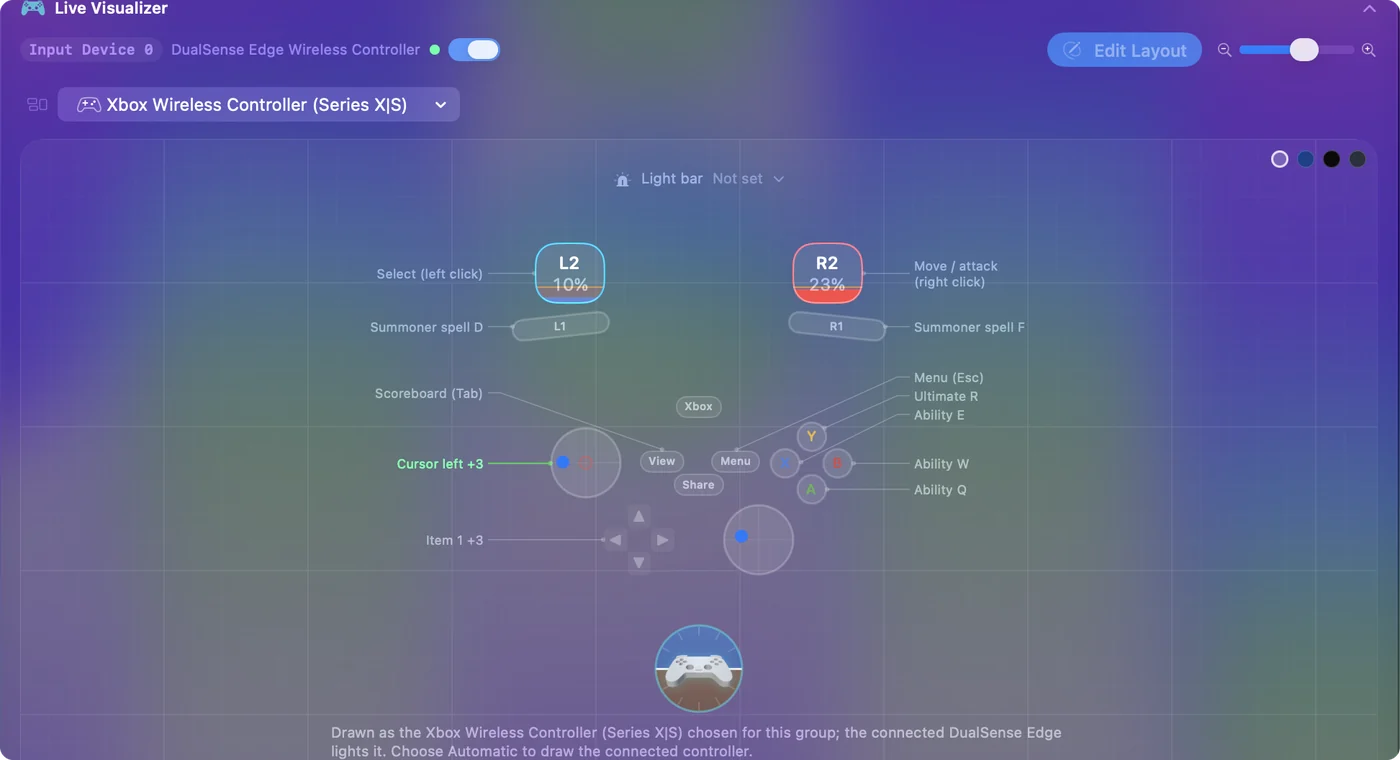
Two quick additions: a slow-pointer layer for last hits, and items 4 to 6 behind a held bumper (chords).
Walk with WASD and aim with the other stick
WASD mode also makes a mapper layout better. With the champion walking on W, A, S and D, the left stick can send those four keys, so moving is a stick push instead of a right click on the ground, and the pointer moves to the right stick, where it only has to aim.
- You: Set the four left stick rows to send W, A, S and D, and move the pointer rows to the right stick.
- InputConfig: Holds the walking keys while the stick is pushed, and moves the pointer from the right stick.
- Check: Because W now walks, your W ability needs another key. Look at League's hotkey settings and put whatever keys it shows for your abilities on the face buttons.
Make skillshots easier
For skillshots, two settings help more than raw speed:
- Variable Sensitivity with the Smooth curve. On the pointer rows, so a small push is a small move (variable sensitivity).
- Gyro pointing. On a DualSense or DualShock 4, tilting the pad moves the cursor like a laser pointer (gyro aim).
If the pad does nothing in League
Climb this ladder, smallest step first:
- Check the Mac sees it. System Settings, Game Controllers should list the pad and light up its buttons.
- Turn on WASD mode. League's own controller input only works there.
- Activate the League layout. If League still ignores the pad, InputConfig sends the mouse and keys it always reads.
- Check Accessibility. If the Live Visualizer lights up but League does not react, switch InputConfig on in System Settings, Privacy & Security, Accessibility.
What it will not do
A stick pointer is slower than a mouse for precise clicks, and League is a game of precise clicks. Expect to be slower at last-hitting and skillshots. For someone who cannot use a mouse, that trade is worth making. For everyone else, it is a novelty or a couch night.
The short version
- Try League first. WASD mode has accepted a controller since April 2026, as an accessibility feature, and that is unconfirmed on the Mac.
- Fall back to the mapper. The League of Legends layout in InputConfig works on any Mac.
- Set League up. Smart cast, attack move, camera lock.
It is playable in normals and ARAM, and I would not take it into ranked.
Questions
Does League of Legends have controller support?
Partly. Since April 2026 its WASD movement mode accepts a controller, which Riot describes as an accessibility feature rather than full controller support. A mapper such as InputConfig turns any controller into the mouse and keys League has always read.
Is it bannable to play League with a controller mapper?
A mapper sends ordinary mouse and keyboard input, the same as any accessibility tool. It does not automate play.
Does League's controller support work on a Mac?
I have not been able to confirm it for the Mac client, and the reports of the change do not mention macOS. Turn on WASD mode and press a button: if the champion moves, it works on your Mac. If not, the mapper route works on any Mac with macOS 14 or later.
Can I play League on a MacBook without a mouse?
Yes. With a controller mapped to the pointer and the keys, you do not need the trackpad or a mouse, and a DualSense's touchpad can work as a second small trackpad. It is slower than a mouse for precise clicks, which matters more in ranked than in normals.
Related
This page in other languages: 日本語, Polski, Português, Tiếng Việt
Updated