League of Legends on a Mac with a controller
 The League of Legends layout is built into InputConfig, free on the Mac App Store. You don't have to make an account, there are no subscriptions, and nothing is locked. Optimized for Apple silicon.
On a Mac: Native on macOS through the Riot client. Since April 2026 League's WASD movement mode accepts a controller, which Riot frames as accessibility support; I have not confirmed it on the Mac client. This layout sends the mouse and keys the game has always read, so it works either way.
Yes, you can play League of Legends on a Mac with a controller, and this layout works with any pad because it sends the mouse and keys the game has always read. Since April 2026, League's WASD movement mode also accepts a controller, which Riot frames as accessibility support. I have not confirmed it on the Mac client. The full answer is on can you play League with a controller on a Mac.
The people who use this layout usually have a reason: a wrist that has had enough of clicking three hundred times a minute, a hand that cannot span QWER and 1 to 6, or a long session they would rather play lying down. League rewards the click landing where you meant it, so the layout is plain and the comfort comes from tuning.
On this page: 9 sections
The layout, control by control
How the layout thinks
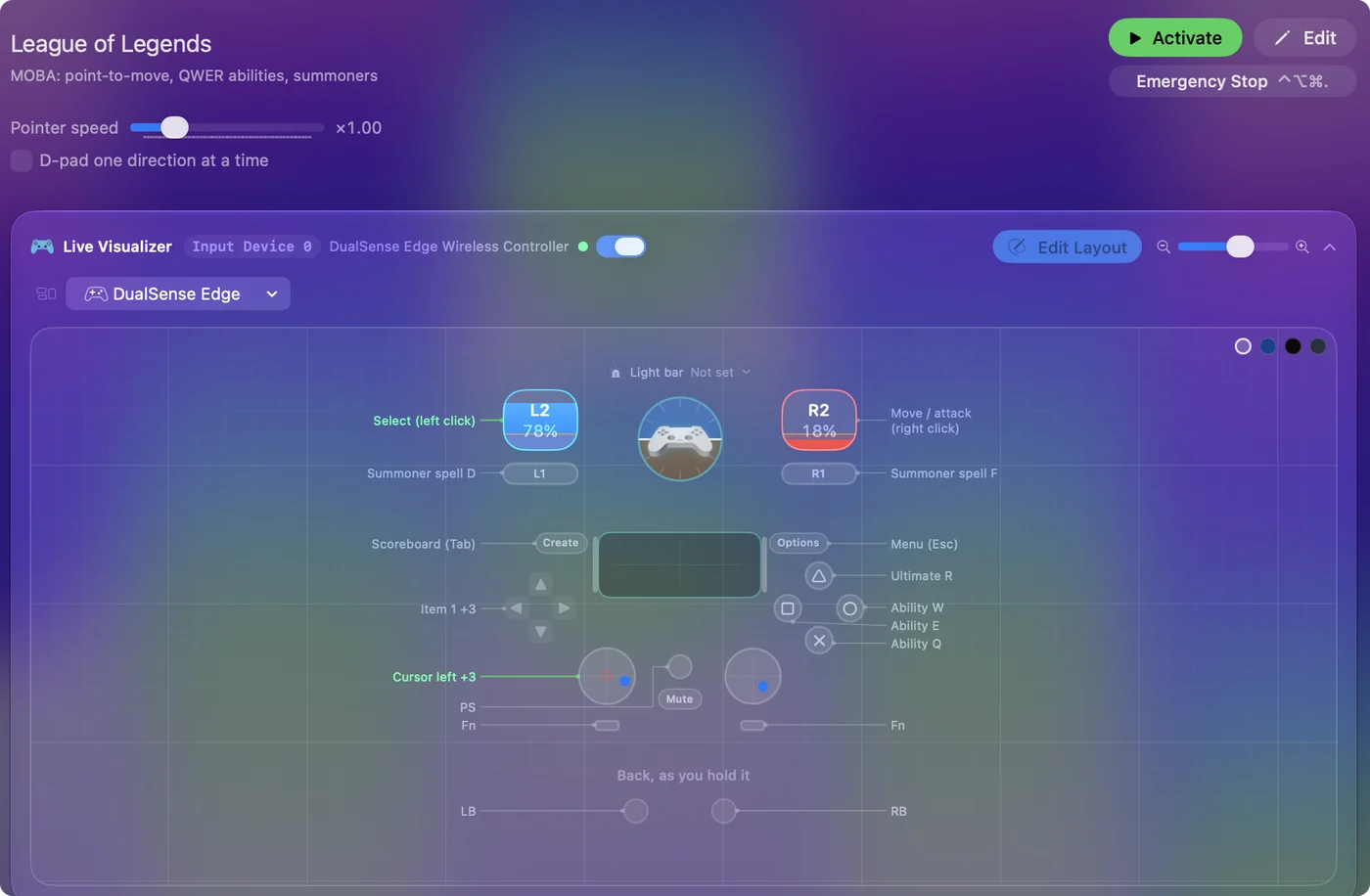
- Cursor. The left stick, at speed 16: slow enough to hit a minion, fast enough to cross the screen. The left stick, because your right hand is busy with the triggers and face buttons, so one thumb aims and the other fires, like a twin-stick game.
- Clicks. The right trigger is right click: move, attack, everything. The left trigger is left click, for selecting, shopping and confirming.
- Abilities. Q, W, E and R on the face buttons in a diamond: Q on the bottom, W on the right, E on the left, R on the top.
- Summoners and items. D and F are the bumpers. Items 1 to 3 are on the D-pad, with recall (B) on down.
- Menus. Tab for the scoreboard on Create, Escape on Options.
- Camera. Not bound. Turn on camera lock in the game's settings, or bind Space to the touchpad press for a held center on your champion. Most people on a pad end up with camera lock on.
Camera lock on, and the stick only has to aim.
Tune it to how you play
- Attack-move. It is the most important League bind for a pad. In the game, set attack move to a key (A is the default, then click), or better, turn on the quick-cast attack move on a key such as the tilde. Put that key on the left stick click and it becomes a smart attack that never misclicks a minion.
- Quick cast. Turn on quick cast for all abilities in the game, so a face button fires the skill at the cursor with no second click. The layout assumes this.
- Items 4 to 6 and the trinket. Add D-pad rows with While holding set to L1 for items 4, 5, 6 and the trinket (4 on keyboard by default). Wards from a controller, finally.
- Two cursor speeds. Add cursor rows with While holding set to R1 that send mouse motion at half speed, for skillshots.
- Pings. G plus a direction is the ping wheel, and Alt plus click pings directly. A macro on the right stick click does it: hold Alt, left click, release.
Quick cast, attack-move on the stick click, and a slow cursor layer close most of the gap for casual play.
If you play with WASD movement on
With League's WASD movement turned on, a few changed rows make the layout better.
- You: Set the left stick's four rows to W, A, S and D, and give the cursor rows to the right stick, or to gyro on a DualSense or DualShock 4. Then open League's hotkey settings, see which keys your abilities use now that W walks, and put those on the face buttons.
- InputConfig: The editor's Scan button rebinds a row the moment you touch the control, so this takes a couple of minutes.
- Check: A stick push walks your champion, the pointer only aims, and every face button casts the ability you expect.
Walking on one stick and aiming on the other is the most comfortable League on a pad.
Check Riot's rules yourself
Riot's position on input remappers is theirs to state, not mine. InputConfig produces ordinary keyboard and mouse events on your Mac, one press to one key, and never touches the game or the client. Macros that chain inputs are a setting you can use or not.
You can play ranked like this. Whether you should is a different question, because a cursor on a stick is slower than a mouse for a skillshot. Read the terms and decide for yourself.
If your controller is not working in League of Legends
When League of Legends does not react to your controller on a Mac, climb this ladder, smallest step first:
- Check that the Mac sees the controller. Open the gamepad tester and press a button. If nothing lights up there, the problem is the connection, and a controller that is connected but not working covers that first.
- Play it from keys. If League of Legends still ignores the pad, activate this layout. It sends the keyboard and mouse controls League of Legends already reads. The layout works whether or not League of Legends ever sees the controller.
Get it in two clicks
- Get InputConfig free on the Mac App Store, open it, and click Smart Preset Maker on the welcome screen.
- Search for League of Legends and pick it. The layout is created as a preset in your sidebar, named and ready.
- Press Activate. Every row can be changed afterwards: the editor's Scan button rebinds any control the moment you touch it.
To check the controller itself first, the gamepad tester shows every button and stick live in your browser.
League of Legends controls: every button and the key it sends
The Sends column is League of Legends's default keyboard and mouse controls, as this layout expects them. If you changed a key in the game's settings, change the same row in InputConfig.
| Controller | Sends | What it does |
|---|---|---|
| Left stick left | Mouse motion left (speed 16) | Cursor left |
| Left stick right | Mouse motion right (speed 16) | Cursor right |
| Left stick up | Mouse motion up (speed 16) | Cursor up |
| Left stick down | Mouse motion down (speed 16) | Cursor down |
| Right trigger | Right click | Move / attack (right click) |
| Left trigger | Left click | Select (left click) |
| A / Cross | Q | Ability Q |
| B / Circle | W | Ability W |
| X / Square | E | Ability E |
| Y / Triangle | R | Ultimate R |
| LB / L1 | D | Summoner spell D |
| RB / R1 | F | Summoner spell F |
| D-pad up | 1 | Item 1 |
| D-pad left | 2 | Item 2 |
| D-pad right | 3 | Item 3 |
| D-pad down | B | Recall (B) |
| Back / Share / Select | Tab | Scoreboard (Tab) |
| Start / Options | Escape | Menu (Esc) |
Button names follow the Xbox / PlayStation pair shown in the editor, so A / Cross is the bottom face button on either pad. On a Switch Pro Controller the bottom button is labeled B; the mapping still fires on position.
Questions
Does League of Legends have controller support on Mac?
Since April 2026 its WASD movement mode accepts a controller, as an accessibility feature. I have not confirmed it on the Mac client. This layout does not depend on it: it makes a controller into the mouse and keyboard the game has always read, with the cursor on the left stick.
Can I really play ranked like this?
You can play. Whether you should is a different question. The cursor on a stick is slower than a mouse for a skillshot. Camera lock, quick cast, attack-move on the stick click and two cursor speeds close most of the gap for casual play.
Why is the cursor on the left stick and not the right?
Because the right hand is busy with the triggers and face buttons. With the cursor on the left, one thumb aims and the other fires, like a twin-stick game.
Why is my controller not working in League of Legends on a Mac?
First check the Mac itself sees the controller, with the gamepad tester. If it does and League of Legends still ignores it, activate the League of Legends layout in InputConfig, which sends the game's keyboard and mouse controls from the controller.
Can I play League of Legends on an M1 Mac or a MacBook Air?
League of Legends has a native Mac version, and its minimum requirements are listed on its store page, so check your Mac against that list. I have not tested it on each Mac. The controller layout itself works the same on any Mac that runs InputConfig.
Related
Completely free. You don't have to make an account, there are no subscriptions, and nothing is locked. Optimized for Apple silicon. Open source on GitHub.
Updated