Dictation, zoom, and speak selection on any button
 InputConfig is completely free on the Mac App Store. You don't have to make an account, there are no subscriptions, and nothing is locked. Optimized for Apple silicon.
Start Dictation, Zoom and Speak Selection can sit on any button InputConfig reads. A mouse side button, a key you hold, a controller button, a MIDI pad, a switch on an adaptive controller or a knock on a MacBook can start dictation, magnify the screen or read the selected text aloud. macOS still does the work; InputConfig presses the button for you. Each feature needs its macOS setting switched on once, and the steps below say which. If one of them does nothing, the ladder for each feature names the missing setting.
On this page: 9 sections
Start Dictation
One press starts dictation and the next press stops it, exactly like the dictation key. InputConfig presses the Mac's own dictation key, the microphone key on F5 on recent MacBooks, so there is no shortcut to set up and your keyboard does not need that key.
- You: Switch Dictation on once in System Settings, Keyboard, then give any row the Start Dictation output.
- InputConfig: Presses the dictation key each time that control fires.
- Check: Press the control once and dictation starts listening. Press it again and it stops.
Three ready-made places for it:
- A triple knock. The built-in Tap the Mac preset, tested on M4 MacBooks; did not work on an M1 Pro in our testing; the calibrator's status chip tells you whether yours listens.
- A held Right Option. The built-in Modifier Holds preset.
- A controller's bottom face button. The Dictation Control layout.
The full walk-through, including a mouse button, is in how to start dictation from any button. Start Dictation needs no shortcut at all, only Dictation switched on.
This output drives Apple's Dictation. YapToText, my free dictation app that runs on the Mac itself, starts from any single key you choose, so a control that presses that key starts it instead.
Zoom
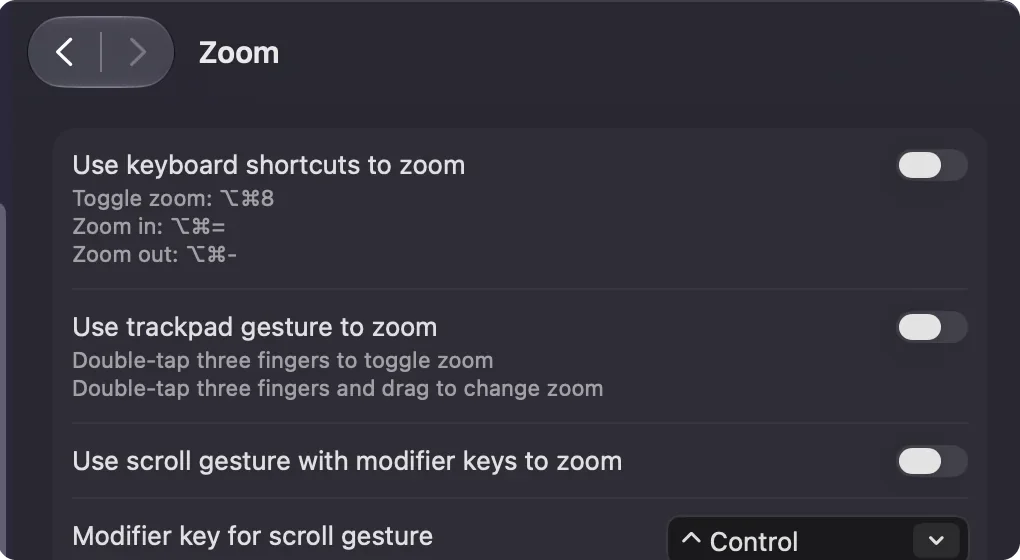
- You: Switch on System Settings, Accessibility, Zoom, Use keyboard shortcuts to zoom. Then give rows the Zoom On / Off, Zoom In and Zoom Out outputs.
- InputConfig: Sends the macOS zoom shortcuts: Option Command 8, Option Command equals, and Option Command minus.
- Check: Press Zoom In and the screen magnifies. If nothing happens, the keyboard shortcuts setting is still off.
Put Zoom In and Zoom Out on a Turn-mode knob or the two directions of a stick for a smooth magnifier.
Speak Selection
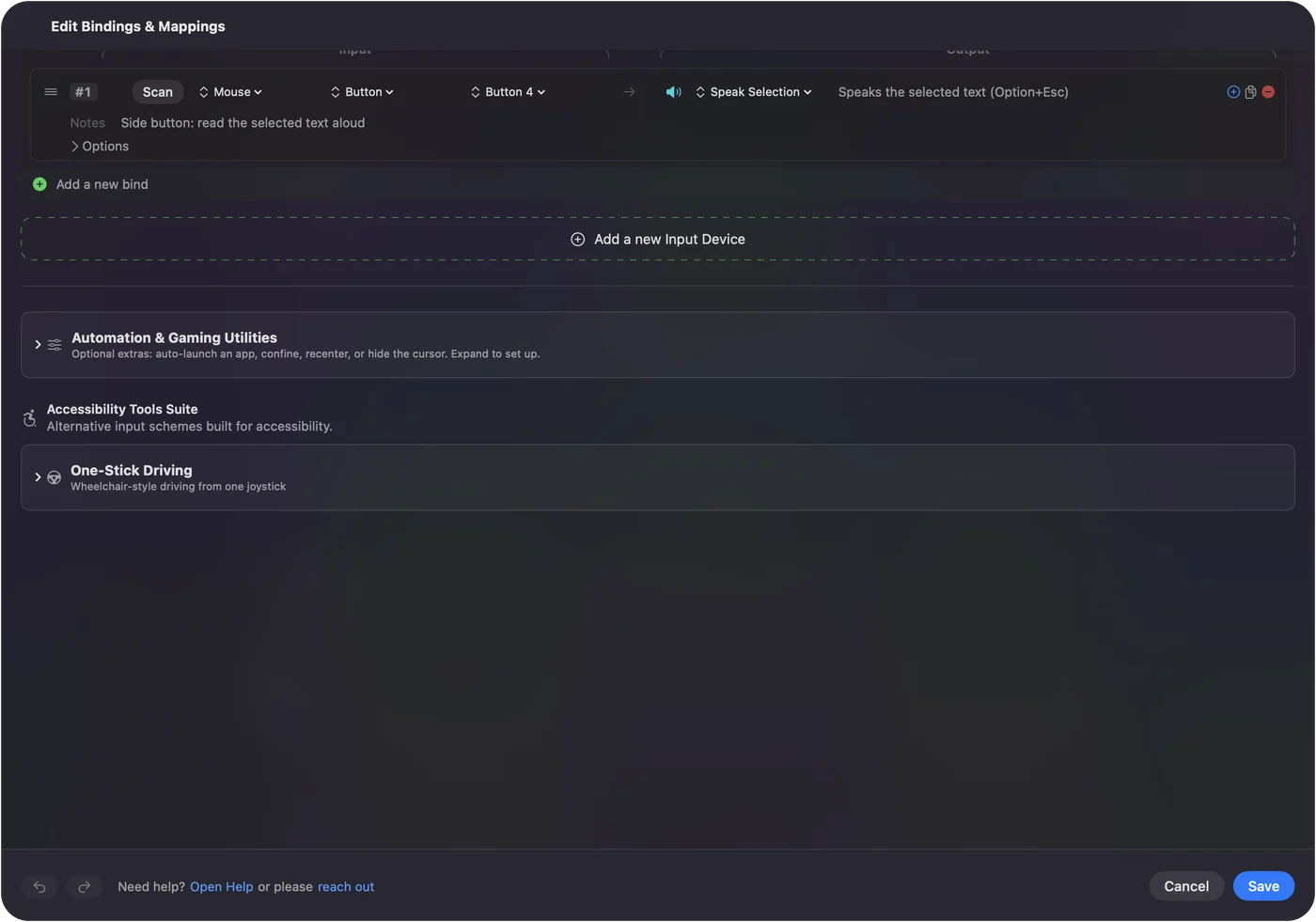
- You: Switch on System Settings, Accessibility, Spoken Content, Speak selection. Then give a row the Speak Selection output.
- InputConfig: Presses the macOS Speak selection shortcut, Option Esc.
- Check: Select some text and press the control. The Mac reads it aloud, and pressing again stops it.
If you changed the Speak selection shortcut, change it back, or bind your new combination as a Keyboard Key output instead. Speak Selection reads whatever is selected, so select first, then press.
VoiceOver
VoiceOver's commands are keyboard shortcuts, so they bind as ordinary Keyboard Key outputs. The Smart Preset Maker has a VoiceOver Navigation workflow. Any VoiceOver command can sit on a button as a Keyboard Key row.
Choose a button
Pick a control that does nothing else, because InputConfig adds a job to a button without taking its old one away.
- A mouse side button. Button 4 and Button 5 do nothing on a Mac by default, so they are ideal. See mouse side buttons.
- A key nothing uses. F13 to F19 on a full-size keyboard, or a right-hand modifier held on its own. The built-in Modifier Holds preset already does the second; see keyboard and mouse as input.
- A knock on a MacBook. Tap the Mac needs nothing in your hands. It was tested on M4 MacBooks; did not work on an M1 Pro in our testing; the calibrator's status chip tells you whether yours listens.
- A controller or adaptive switch. Any button on a gamepad, the PlayStation Access Controller, or a switch plugged into the Xbox Adaptive Controller.
- A MIDI pad or foot switch. See MIDI as input.
A hold or a double tap lets one button carry dictation as well as its everyday job. The best trigger is one you never press by accident.
If one of them does nothing
Climb this ladder, smallest step first:
- Dictation. Check that System Settings, Keyboard, Dictation is on and its shortcut is not set to Off.
- Zoom. Use keyboard shortcuts to zoom is off by default. Switch it on in System Settings, Accessibility, Zoom.
- Speak Selection. Switch on System Settings, Accessibility, Spoken Content, Speak selection, and select some text first. If you gave Speak selection a different shortcut, bind that combination instead.
macOS keeps the microphone key itself, along with Mission Control, Spotlight, Launchpad and Focus, and never hands it to an app, so the key cannot be remapped. InputConfig can press the dictation key from any other button, which is usually what people want.
What macOS already does on its own
Use these first if they suit you; they need no app.
- Dictation. It has its own shortcut in System Settings, Keyboard, Dictation: the microphone key on recent MacBooks, a double press of a modifier key, or a combination you record.
- Zoom. It can follow a modifier key and the scroll wheel or trackpad: System Settings, Accessibility, Zoom, Use scroll gesture with modifier keys to zoom.
- Speak selection. It is Option Esc once it is switched on.
InputConfig is for when those triggers are the problem: a double press is hard to time, the keyboard has no microphone key, there is no keyboard at all, or the only thing that works for you is a big button, a switch or a knock. If the Mac's own shortcut works for you, keep it.
The short version
- Switch on the macOS setting once. Dictation, Use keyboard shortcuts to zoom, or Speak selection.
- Give a row the output. Start Dictation, a Zoom output, or Speak Selection.
- Use a control nothing else uses. A side button, F13 to F19, a held modifier, a switch or a knock.
One setting in macOS and one row in InputConfig, and the feature is on a button you can reach.
Questions
Dictation does not start.
Check System Settings, Keyboard, Dictation is on and its shortcut is not set to Off.
Speak Selection does nothing.
Switch on System Settings, Accessibility, Spoken Content, Speak selection, and select some text first. The output sends Option Esc, so if you gave Speak selection a different shortcut, bind that combination instead.
Zoom In and Zoom Out do nothing.
Use keyboard shortcuts to zoom is off by default. Switch it on in System Settings, Accessibility, Zoom, and the three Zoom outputs start working.
Can I remap the microphone key itself?
No. macOS keeps the Dictation key, along with Mission Control, Spotlight, Launchpad, and Focus, to itself and never hands it to an app. InputConfig can press the dictation key from any other button, which is usually what people want.
Related
Completely free. You don't have to make an account, there are no subscriptions, and nothing is locked. Optimized for Apple silicon. Open source on GitHub.
Updated