Tap the Mac: knock on your MacBook to run a shortcut
 InputConfig is completely free on the Mac App Store. You don't have to make an account, there are no subscriptions, and nothing is locked. Optimized for Apple silicon.
InputConfig can turn a knock on a MacBook's palm rest or lid into a shortcut, using the motion sensor inside the MacBook. Taps are counted from one to five, typing is ignored on purpose, and there is no controller, cable or accessory involved. It was tested on M4 MacBooks; it did not work on an M1 Pro in our testing, and the calibrator's status chip tells you whether yours listens. Whether your MacBook can do it is shown by the calibrator.
On this page: 9 sections
Steps
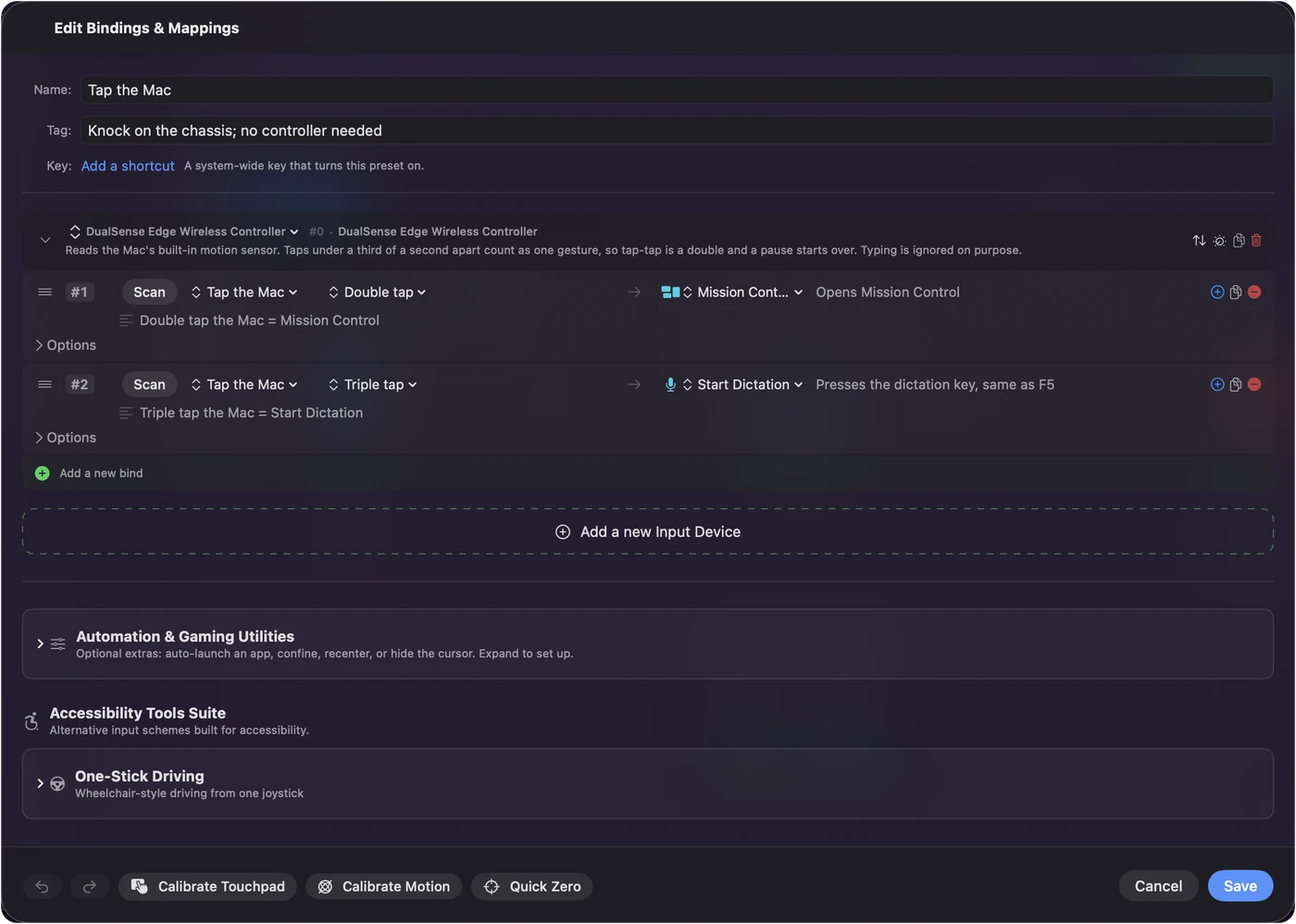
- Activate the Tap the Mac preset under Feature Showcases, or add a row with the input type Tap the Mac.
- Pick how many taps and the output.
- Knock twice on the palm rest, firmly, about as fast as a double click.
Knock in the right place
The palm rest either side of the trackpad is the most reliable. The lid works with a firmer knock. A soft surface absorbs the tap, so a desk or a lap is better than a cushion. Knock firmly, about as fast as a double click. One knock is easy to make by accident, so the built-in preset uses double and triple.
Calibrate the threshold
- You: Open a Tap the Mac row's Options and choose Calibrate Taps, then knock a few times.
- InputConfig: Draws a live trace of the sensor with the threshold across it, and marks every knock with what the detector decided.
- Check: Drag the slider until the line sits just under your own taps and above ordinary handling. Your knocks show green and handling the laptop shows gray.
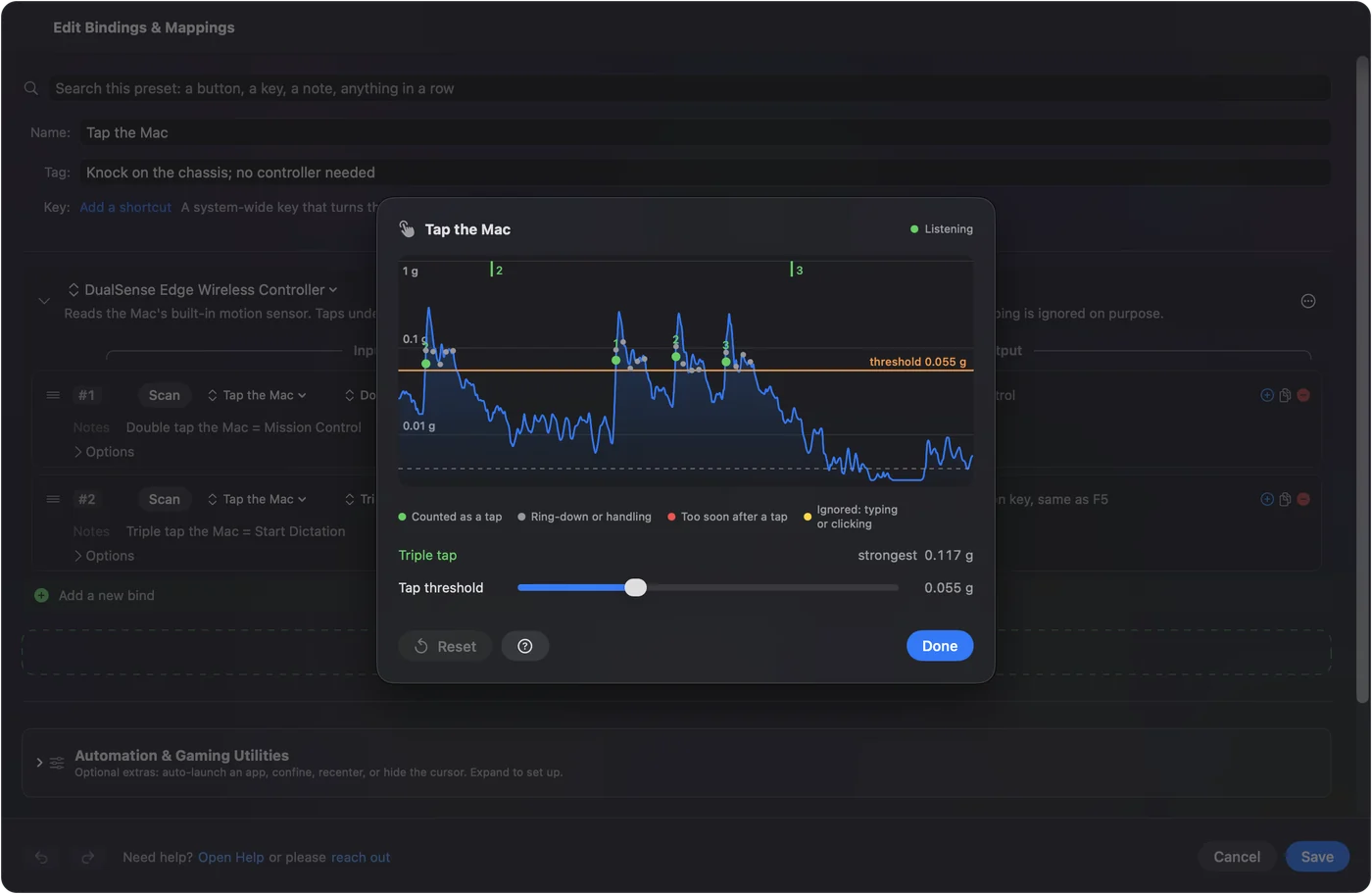
The setting is shared by every preset. When your knocks show green and handling shows gray, the setting is right.
Read the calibrator
The status chip at the top says what the sensor is doing:
- Listening, in green. The sensor is on and taps count.
- Waking sensor, or Sensor parked, waking, in orange. The app is bringing the sensor back.
- Blocked by macOS, in red. macOS refuses to switch the sensor on.
- Sensor not responding on this Mac, in red. It is there but has sent nothing.
- A reason, in red. Why the sensor could not be opened, such as no chassis accelerometer published on this Mac.
The trace below covers the last four seconds and colors each strike:
- Green. Counted as a tap.
- Gray. The ring-down of a strike, the case still vibrating from the same knock, or the laptop being lifted or tilted.
- Red. Too soon after a tap to be a new one.
- Yellow. Ignored because it landed next to typing or a click.
The status chip is the honest answer to whether your MacBook can do this.
If taps stop registering
Climb this ladder, smallest step first:
- Look at the status chip. macOS parks the sensor when the laptop sits still, and the app wakes it again whenever it goes quiet and after sleep.
- Knock on the palm rest, on a hard surface. Firmly, about as fast as a double click.
- Recalibrate. Move the threshold just under your knocks in Calibrate Taps.
- Accept what the chip says. If it says the sensor is not available, that Mac does not publish it.
Tap the Mac is tested on M4 MacBooks; it did not work on an M1 Pro in our testing, and other Apple silicon MacBooks vary, so the status chip is the way to know. Desktop Macs and Intel Macs have no motion sensor. On macOS 27 the Mac App Store sandbox does not let InputConfig switch the motion sensor on, so taps are heard only while the sensor is already on. If the chip says Listening and taps still do not count, the threshold is too high.
Pick what a tap runs
Anything a button can send: Mission Control, Start Dictation, a key combination, a Siri Shortcut, play and pause, lock screen, a macro, the next preset, or Open App to open an app. It is Back Tap for a MacBook. Tap your MacBook to run a shortcut walks through a first setup, and which MacBooks have the sensor covers the models. A knock is a button for a hand that cannot reach one.
What it cannot do
- Work on every Mac. Tested on M4 MacBooks; it did not work on an M1 Pro in our testing; desktop and Intel Macs have no sensor.
- Tell sides apart. It counts knocks, one to five, wherever they land on the case.
- Be scanned. Pressing a controller button on a desk jolts a MacBook enough to count as a tap, so Tap the Mac is picked from the input type menu, never by Scan.
- Ignore setting the laptop down. That is one bump and can count as a single tap, which is why rows on a double or triple tap are the safe choice.
The sensor is read only while something needs it: an active preset with a Tap the Mac row, or the preset editor, the calibrator or the Live Visualizer open. When nothing needs it, the app stops reading it.
The short version
- Activate Tap the Mac. Under Feature Showcases, or add a Tap the Mac row.
- Knock twice on the palm rest. Firmly, like a double click.
- Check the status chip. Calibrate Taps tells you whether your MacBook listens.
Try it on your MacBook in a minute; the status chip settles whether it will work.
Questions
Will it fire when I set the laptop down?
Setting it down is one bump, so it can count as a single tap, which is why the built-in preset uses double and triple taps. A row on a double or triple tap does not fire from it.
Why does Scan never pick up a tap?
On purpose. Pressing a controller button on a desk jolts the MacBook enough to count as a tap. Pick Tap the Mac from the input type menu.
Can I double tap my MacBook to open an app?
Bind a double tap to the Open App system function and name the app.
Is the sensor read all the time?
No. It runs only while something needs it: a preset with a Tap the Mac row is active, or the preset editor, the calibrator or the Live Visualizer is open. When nothing needs it, the app stops reading it.
Can it tell which side of the MacBook I knocked?
No. It counts knocks, one to five, wherever they land on the case. The palm rest either side of the trackpad gives the cleanest reading.
Related
Completely free. You don't have to make an account, there are no subscriptions, and nothing is locked. Optimized for Apple silicon. Open source on GitHub.
Updated