How to change the trigger deadzone
 InputConfig is completely free on the Mac App Store. You don't have to make an account, there are no subscriptions, and nothing is locked. Optimized for Apple silicon.
A trigger deadzone is the first part of an L2, R2, LT or RT pull that gets ignored, so a finger resting on the trigger does not count as a press. You change it in whatever reads the trigger: the game's own controller settings, a profile stored on a DualSense Edge or an Xbox Elite Series 2, or, for everything a Mac does with the trigger outside games, the Deadzone slider on the trigger's row in InputConfig, the free Mac app I make.
Measure first: the right number sits just above where your own trigger rests.
On this page: 11 sections
- Steps
- Know what a trigger deadzone does
- Measure the trigger before you change anything
- Change it where the game reads the trigger
- Set the trigger deadzone in InputConfig
- Use a trigger band for a deeper press
- If the trigger still fires on its own
- Tell the deadzone apart from trigger feel
- What it cannot do
- The short version
- Questions
Steps
- Pull the trigger slowly in a trigger tester, let go, and note the lowest value it reads at rest.
- If the game reads the controller itself, raise the trigger deadzone in the game's controller settings.
- On a DualSense Edge, edit a custom profile on a PS5 and set Trigger Deadzone's input range.
- For what InputConfig drives on a Mac, open Options on the trigger's row, press Adjust live and drag Deadzone just above the resting value.
- Pull the trigger again and check that a resting finger stays below the line and a light pull still counts.
Know what a trigger deadzone does
An analog trigger is an axis that moves one way, from 0 at rest to 100 percent at the end of the pull. Its deadzone is the stretch at the bottom where nothing happens. Sony's DualSense Edge page defines it as how far you can press before it counts as an input, and gives the example of a player who grips tightly and taps L2 or R2 by accident.
- Raise it when the trigger fires with no one pulling it, when a firm grip sets it off, or when a worn trigger never quite returns to 0.
- Lower it when a light pull does nothing, or a throttle in a racing game feels late to start.
- The other end. An outer setting decides where the pull counts as all the way. In InputConfig it is called Full push at, and Sony's input range has an upper end for the same job.
Every point of deadzone is travel you lose, so use the smallest one that stops the false presses. The general idea, sticks included, is in what a controller deadzone is.
Measure the trigger before you change anything
- You: Open the trigger test in a browser, press a button so the page sees the controller, then pull each trigger slowly to the end and let go.
- The page: Shows the value from 0 to 1 live, the lowest and highest it reached, and how many levels it reported.
- Check: A healthy trigger reads 0 at rest. If the lowest value stays above 0 after you let go, the trigger never fully lets go, and that resting value is the deadzone you need to clear.
InputConfig's Live Visualizer shows the same thing inside the app: an analog trigger fills from the bottom with its percentage, and a line across it marks where the preset's row starts to count.
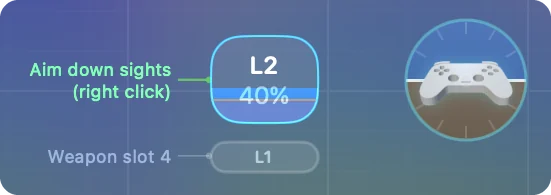
A trigger that only lights, with no percentage, is digital. ZL and ZR on a Switch Pro Controller and Joy-Cons work that way, so there is no pull to set a deadzone on. Read the resting value first, then set the deadzone a little above it.
Change it where the game reads the trigger
A deadzone only works in the program that reads the trigger, so a game with its own controller support needs the setting on its side or on the controller itself.
- The game's controller settings. Many games have a trigger deadzone or trigger threshold in their controller or input options. Not every game has one, and the names differ.
- A DualSense Edge profile. On a PS5, create or edit a custom profile and choose Trigger Deadzone. Sony's DualSense Edge setup page, which I read on October 27, 2026, describes an Input range: with 30 to 70, the pull starts to count past 30 and is full at 70. Apply same settings for left and right triggers sets both at once, and Playtest shows the range as you press. The profile lives on the controller, so its trigger deadzone reaches any game that reads the Edge directly, on a Mac too.
- An Xbox Elite Series 2 profile. Microsoft's Elite Series 2 launch post says the Xbox Accessories app adjusts the trigger dead zone. That app runs on an Xbox or a Windows PC, not on a Mac, and the Elite keeps up to three profiles inside the controller. I have not checked whether a trigger dead zone saved that way reaches a Mac game the way its button assignments do, so test it in your game.
- A game through Steam. With Steam Input on, Steam reads the controller first, so look in that game's controller layout in Steam. I have not confirmed the names of its trigger settings, so I leave them out.
The fix for a game lives in the game or in the controller, never in an app that sits beside them. DualSense Edge profiles on a Mac covers what an Edge profile carries.
Set the trigger deadzone in InputConfig
On a Mac, InputConfig turns a trigger into a click, a key, scrolling, a held modifier or a MIDI CC. Every trigger row has its own Deadzone, from 1 to 90 percent, and 25 percent unless you change it.
Step 1: Open the live view
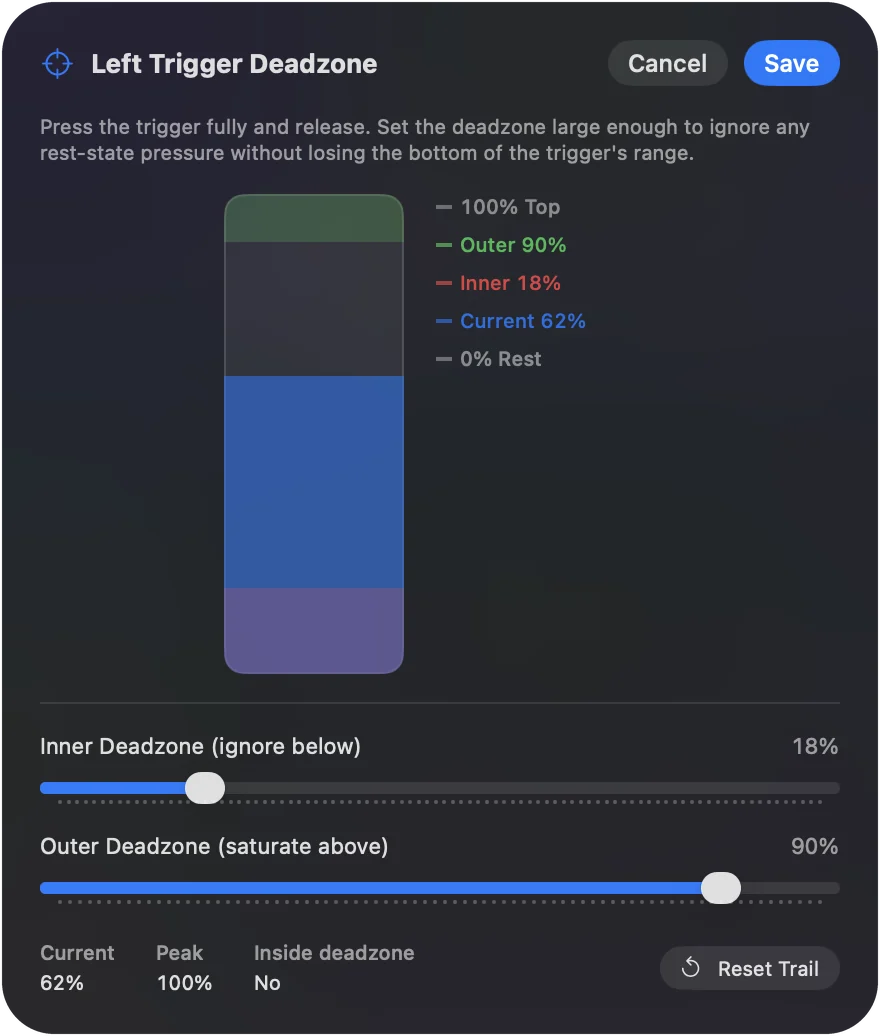
- You: Open the preset's editor, expand Options on the trigger row and press Adjust live.
- InputConfig: Draws the trigger as a bar with Deadzone and Full push at sliders, and Current, Peak and Inside deadzone readings.
- Check: Pull the trigger all the way and let go. Peak shows how far it reached, and Current shows where it rests.
Step 2: Drag the slider
- You: Rest a finger on the trigger the way you hold the controller, and drag Deadzone until Inside deadzone says Yes.
- InputConfig: Applies the new value to the row as you drag, so a running preset fires by it straight away.
- Check: A resting finger stays inside the red band, and a light, deliberate pull leaves it. Raise it a few points if the row fires when you only touch the trigger.
Step 3: Save it
- You: Click Save. Cancel puts the old value back.
- InputConfig: Shows the deadzone on the row, so you can read the number back later.
- Check: Activate the preset and grip the controller hard. Nothing should fire until you mean it.
Stick settings, in the device's menu in the editor, sets the deadzone on every axis row for that controller at once, then you fine-tune single rows. Set the deadzone just above where a resting finger sits.
Use a trigger band for a deeper press
A band is a range of the trigger's travel, such as the last third, drawn in the device's Regions card or typed as From and To in percent. A band is its own threshold, so its row has no deadzone.
- Aim, then zoom. L2 holds a right click past a 25 percent deadzone, and a band from 66 to 100 percent presses Z to zoom as well.
- A safe deep press. Put a job you never want by accident, such as a screenshot, on the last tenth of a trigger rather than on its first touch.
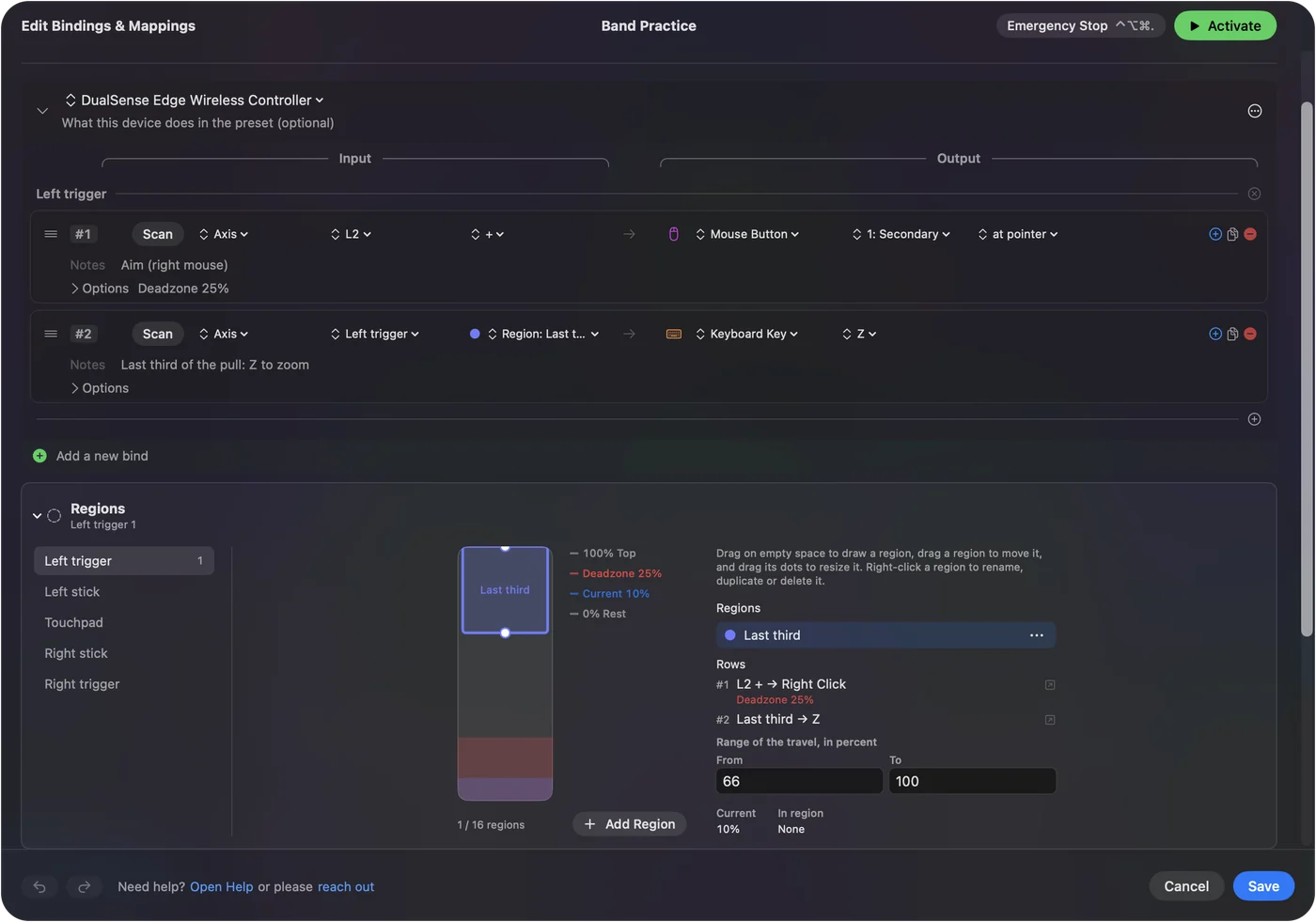
A band answers how deep, where a deadzone only answers when it starts.
If the trigger still fires on its own
Climb this ladder, smallest step first:
- Watch it at rest. Let go completely and read the value in the trigger test or the Live Visualizer. If it is 0, the trigger is fine and something else is pressing.
- Raise the deadzone a few points. Then grip the controller the way you play.
- Check who reads the trigger. A game that reads the controller itself never sees InputConfig's deadzone. If you bound the same trigger to a key as well, the game may get both, so test the game with the preset off.
- Check the switches on the back. The DualSense Edge's trigger stop sliders and the Elite's trigger locks shorten the pull. If a short pull no longer reaches the line, lower the deadzone instead.
- Suspect the hardware. A trigger whose resting value wanders or jumps is worn or dirty. A deadzone hides a steady offset, not a failing trigger.
If the value at rest is 0, no deadzone will fix it, because the trigger is not the one pressing. Controller trigger not working covers the opposite problem.
Tell the deadzone apart from trigger feel
On a DualSense or DualSense Edge, InputConfig can also set trigger feel: click L2 or R2 in the Live Visualizer and pick Off, Light, Medium or Firm. It is a steady resistance across the pull, set per trigger and per preset.
- Deadzone. Decides when a pull starts to count. It works on any analog trigger.
- Trigger feel. Decides how hard the pull is. DualSense and DualSense Edge only, over USB or Bluetooth.
They are separate settings and work together. The deadzone changes what counts, and trigger feel changes what your finger feels. DualSense adaptive triggers on a Mac has the details.
What it cannot do
- Change what a game reads. InputConfig's deadzone filters what InputConfig sends: keys, clicks, pointer movement, scrolling and MIDI. A game that reads the controller itself still sees the raw trigger.
- Add an anti-deadzone. That only makes sense for a tool that hands the game a controller, and InputConfig sends keys and mouse movement instead.
- Edit an Edge profile. InputConfig lists the four profiles stored on a DualSense Edge over USB-C, with what each one remaps, but it does not edit them. That happens on a PS5 or in PlayStation Accessories on Windows.
- Make a digital trigger analog. ZL and ZR on Switch pads only report on or off.
For a game that reads the pad directly, set the trigger deadzone in the game or in the controller's profile.
The short version
- Measure. Read the trigger's resting value in the trigger test.
- In a game. Use its controller settings, or an Edge or Elite profile on the controller.
- On the Mac. Adjust live on the trigger's row in InputConfig, Deadzone just above the rest.
- Two jobs. Give the deep part of the pull a band of its own.
Measure first, then set the smallest deadzone that keeps a resting finger quiet.
Questions
What is a trigger deadzone?
The first part of a trigger's pull that is ignored, so a resting finger or a firm grip does not count as a press. Past it, the pull starts to register.
Why does my trigger fire when I am not pressing it?
Either the trigger does not return all the way to 0, or the deadzone is too small for how you grip the controller. Check its resting value in a trigger tester, then raise the deadzone a little above it.
Is there a program that raises the trigger deadzone?
For a game, use the game's own setting or a profile on a DualSense Edge or Xbox Elite. On a Mac, InputConfig sets a deadzone on every trigger row for the keys, clicks, scrolling and MIDI it sends, but not for what a game reads directly.
Do triggers have an outer deadzone?
Yes. In InputConfig it is Full push at, where the pull counts as all the way. On a DualSense Edge, the upper end of the Trigger Deadzone input range does the same job.
Does InputConfig change what a game reads from the trigger?
No. Its deadzone filters what InputConfig sends. A game that reads the controller itself still sees the raw trigger, so use the game's own setting.
Related
This page in other languages: Deutsch, Español, Français, Italiano, 日本語, 한국어, Polski, Português, Русский, ไทย, 繁體中文, 简体中文
Completely free. You don't have to make an account, there are no subscriptions, and nothing is locked. Optimized for Apple silicon. Open source on GitHub.
Updated