Does the Razer Atheris work on a Mac?
 InputConfig is completely free on the Mac App Store. You don't have to make an account, there are no subscriptions, and nothing is locked. Optimized for Apple silicon.
Yes, as a mouse: the Razer Atheris pairs over Bluetooth or the 2.4 GHz dongle and the pointer, both main buttons and the wheel work on a Mac with nothing installed. The catch is software. The Atheris is not on the Razer Synapse for Mac list I read, so DPI and lighting-style settings are not reachable from a Mac, and Razer says its fix for reconnecting to a Mac is a firmware update that runs only on Windows. The same goes for the Basilisk V3 X HyperSpeed, the other budget Bluetooth Razer mouse people ask about.
The side buttons are the part a Mac can still give jobs to. I make InputConfig, a free Mac app that reads a mouse's extra buttons and gives each one a job. I have checked it with a Razer mouse, and its buttons scan and bind. I have not tested these two budget models myself.
On this page: 12 sections
- Steps
- See what works on a Mac with nothing installed
- Fix the Bluetooth connection on a Mac
- Find out what each button sends
- Bind the side buttons
- Run longer jobs from one button
- Add hold, double click and per-app layouts
- Ideas for people who use these two mice
- If a button does nothing
- What it cannot do
- The short version
- Questions
Steps
- Pair the mouse over Bluetooth, or plug the 2.4 GHz dongle into the Mac with a USB-C adapter if needed.
- Check Razer's Synapse for Mac list. If your model is not on it, set DPI on the mouse itself.
- Open InputConfig, add a row, press Scan and press a side button to record it.
- Choose what the button sends, such as Back, Forward, Mission Control or a shortcut.
- Click Save and Activate, then press the button in an app to check it.
See what works on a Mac with nothing installed
Both mice are standard mice to macOS, so the basics need no driver. Here is what I could confirm and where I could not:
| Mouse | What Razer lists | On a Mac |
|---|---|---|
| Razer Atheris | Five programmable buttons, Bluetooth LE and a 2.4 GHz dongle, two AA batteries, 7,200 DPI, and no onboard memory profiles | Pointer, clicks and wheel work. Not on the Synapse for Mac list I read on October 7, 2026 |
| Razer Basilisk V3 X HyperSpeed | Wireless with a replaceable AA battery, Bluetooth and a dongle | Works as a mouse. A Razer Insider post says Synapse for Mac did not support it |
The Atheris numbers come from Razer's Latin America spec sheet and a review I read on October 21, 2026. The Basilisk V3 X line comes from Razer's own Basilisk X HyperSpeed page, and a forum post that I read on the same day. The full supported list is on Razer mouse on a Mac. A budget Razer mouse is a normal Mac mouse, and the extras come from a different app.
Fix the Bluetooth connection on a Mac
Reconnecting is the complaint I found most. A Razer Insider thread has Atheris owners whose mouse would not pair with a newer MacBook Pro on macOS Catalina while a Magic Trackpad and headphones paired fine, and it was closed with no fix. Razer's support page for reconnecting an Atheris to a Mac points to a firmware update. I could not open that page directly and read it only in a search summary, so check it yourself. The summary said the updater runs only on Windows and must be run over the dongle, not Bluetooth.
- Use the dongle if Bluetooth drops. The dongle has a USB-A plug, so a MacBook with only USB-C ports needs a small adapter.
- Pair fresh. In System Settings, Bluetooth, remove the mouse, switch it off and on, and pair it again.
- Borrow a Windows PC for the firmware. That is Razer's route, and it is the one step a Mac cannot do.
If Bluetooth is flaky, the dongle is the connection I would trust first. Those Catalina reports are old, so a recent macOS may behave better, and I could not test that.
Find out what each button sends
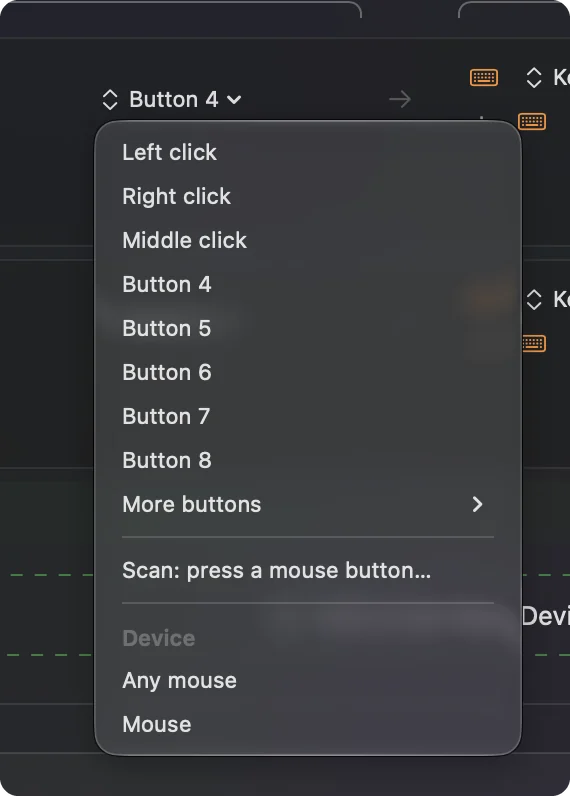
A mouse with only a few buttons is quick to check. Press Scan on a row, then click each button once and read what arrives.
| Button | What I expect | What to do |
|---|---|---|
| Left and right click | Left click and Right click | Leave them alone, a preset cannot block these two |
| Wheel click | Middle click | Bind it, and tick Block the button's own action if a browser opens links in new tabs |
| Two side buttons | Button 4 and Button 5 | The usual Back and Forward pair, so bind them |
| DPI button on top | Probably nothing the Mac sees | With no onboard profile software on a Mac, press Scan and see. If nothing arrives, the mouse handles it inside |
I say "expect" because I have not scanned these two models. Press Scan on every button and trust what arrives over this table.
Bind the side buttons
Install InputConfig from the Mac App Store and allow Accessibility in System Settings, Privacy & Security, Accessibility.
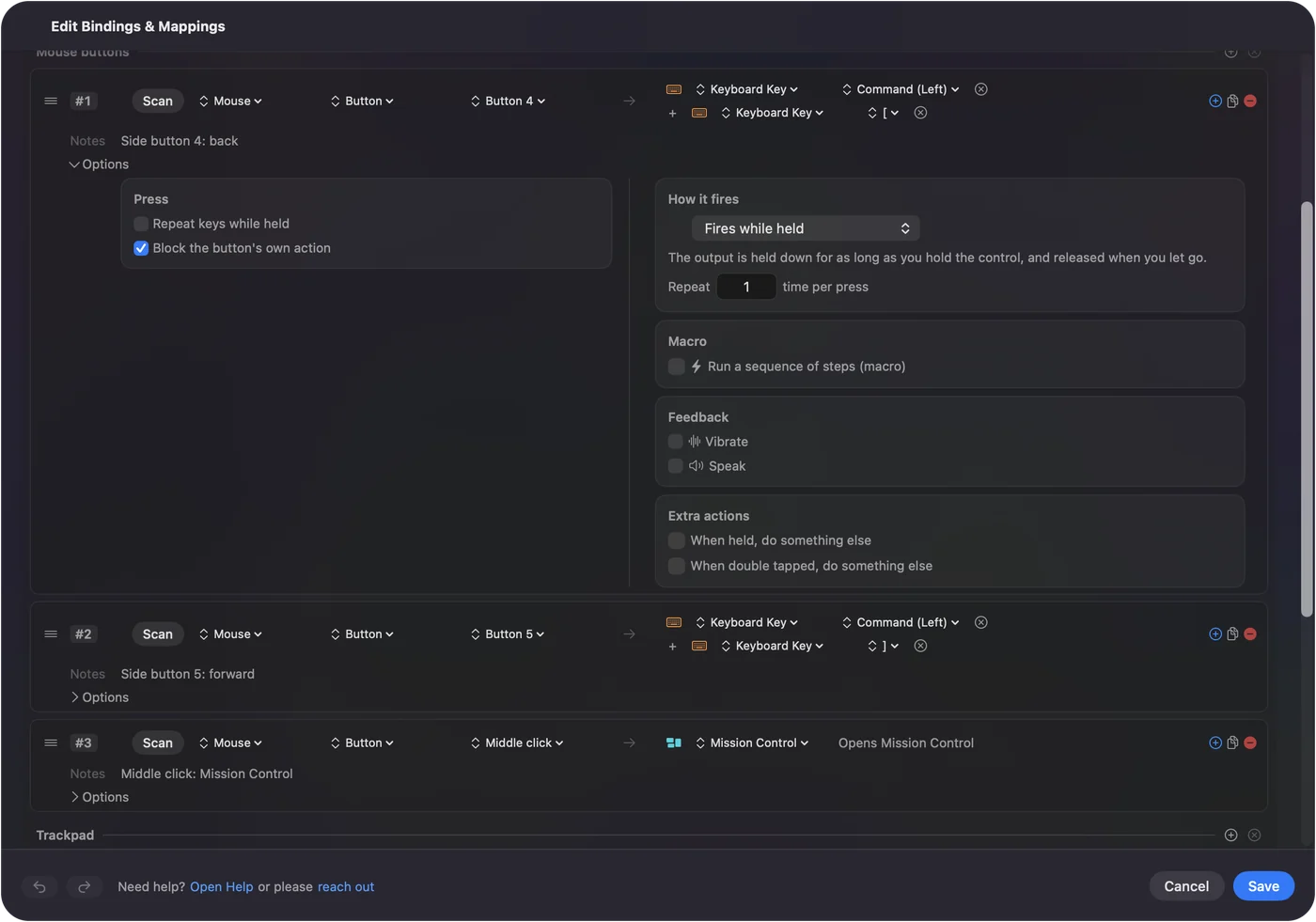
- You: Add a row, choose Mouse as the input, press Scan and click a side button. Then choose Keyboard Key and pick Command and the left bracket for Back, or Command and the right bracket for Forward.
- InputConfig: Records the button as Button 4 or Button 5 and presses the keys each time you press it.
- Check: Click Save and Activate, then open Safari, visit two pages and press the button. The browser goes back.
Many apps already treat Button 4 and Button 5 as Back and Forward. In those, the built-in Trackpad & Mouse preset already sends Command [ and ], and ticking Block the button's own action stops a double step. Put Command [ and ] on the side buttons first, because they work in more apps than a bare button does.
Run longer jobs from one button
With only a few buttons, each one should carry more. A row can run a macro: in its Options, tick Run a sequence of steps (macro) and add key, shortcut or click steps, each with a wait and a hold time.
- Copy, wait, paste. Command C, a 300 millisecond wait, then Command V on one side button, which is handy when moving text between two windows.
- Screenshot to the clipboard. One System Function row, no macro needed.
- Type a sign-off. A Type Text output puts a whole reply in your message with one press.
Macros are covered in mouse macros on a Mac. Give the button you reach for most the longest job.
Add hold, double click and per-app layouts
- Hold. Each row can have a hold action, so a tap sends Back and a hold sends Mission Control. See hold and double click actions.
- Double tap. Each row also has a double tap action, which turns two buttons into four jobs.
- Block the original action. For the wheel click and the side buttons, so an app stops seeing the raw button.
- Per app. A preset can list apps under Automation & Gaming Utilities and take over when one is in front. Safari gets Back and Forward, and Final Cut Pro gets its own keys.
Only one preset runs at a time, and Control Option Command period is the emergency stop. Different actions per app has the steps.
Ideas for people who use these two mice
The Atheris is a travel mouse, 99.7 by 62.8 by 34.1 millimeters and about 66 grams without batteries according to the review I read, so it spends its life next to a laptop. The Basilisk V3 X is a cheaper desk mouse with a wheel built for gaming.
- A laptop and a lecture. Back and Forward for slides in Keynote or PowerPoint, with the wheel click for a pointer-hide key.
- An editing session. Command Z and Shift Command Z on the side buttons, a good fit for Photos and Final Cut Pro.
- A budget gaming desk. Two side buttons can hold push to talk and a quick-save key in games that read the keyboard, though a game that reads the raw mouse may also see the button.
- A shared Mac. Every connected mouse counts as one device, so a second mouse gets the same jobs.
A five-button travel mouse can behave like a ten-button one once each button has a hold action.
If a button does nothing
Climb this ladder, smallest step first:
- Press Scan on the button. If a row records Button 4, the Mac receives it and the problem is the preset.
- Activate the preset. Rows only fire while a preset runs, and the Activate button turns green.
- Check Accessibility. System Settings, Privacy & Security, Accessibility must list InputConfig and have it on.
- Look for a second mouse app. A tool such as SteerMouse or LinearMouse may already take the button, and two tools can fight.
- Use the dongle. If Bluetooth drops mid-session, the buttons seem dead for the same reason.
If Scan sees nothing, no Mac app can read that button. Mouse back button not working goes through the causes.
What it cannot do
InputConfig does not change DPI, polling rate, lighting, pointer acceleration or scroll feel. The Atheris has no onboard profiles, so its DPI button sets the DPI inside the mouse, and a Mac has no Razer app to change the steps. It also cannot give two mice different jobs for the same button, and it cannot read a button that talks only to Razer software. Use it for what the buttons do, and the mouse itself for how it moves.
The short version
- Works. Pointer, clicks and wheel on both mice, over Bluetooth or the dongle.
- Not supported. The Atheris and Basilisk V3 X are not on the Synapse for Mac list I read.
- Bind. Scan each side button and give it Back, Forward or a macro.
If Bluetooth drops, try the dongle before you try anything else.
Questions
Does the Razer Atheris work on a Mac?
Yes, as a mouse over Bluetooth or the 2.4 GHz dongle. It is not on the Razer Synapse for Mac list I read in October 2026, so its settings are not reachable from a Mac.
Why will my Razer Atheris not connect to my MacBook?
Razer Insider threads describe pairing failures on newer MacBook Pros, and Razer points to a firmware update that runs only on Windows. Try the dongle with a USB-C adapter, or pair it again in System Settings.
Does Razer Synapse for Mac support the Basilisk X HyperSpeed?
A Razer Insider post says it did not. Check Razer's current list, which changes.
How do I use the Razer Atheris side buttons on a Mac?
Scan them in InputConfig, a free app, and give each one Back, Forward or any shortcut. I have checked it with a Razer mouse, though not these two models.
Does the Atheris remember settings on a Mac?
Razer lists no onboard memory for it, so settings live in Razer software that a Mac cannot run.
Related
This page in other languages: العربية, Čeština, Dansk, Deutsch, Español, Suomi, Français, עברית, Magyar, Bahasa Indonesia, Italiano, 日本語, 한국어, Norsk, Nederlands, Polski, Português, ไทย, 繁體中文, 简体中文
Completely free. You don't have to make an account, there are no subscriptions, and nothing is locked. Optimized for Apple silicon. Open source on GitHub.
Updated