Questions
How to auto click at random intervals on a Mac
Yes, you can auto click at random intervals on a Mac. In InputConfig, set Every to the average gap and Vary by up to to how far each gap may stray, either way. The app draws a new random gap after every click, so Every 150 ms with Vary by up to 40 clicks somewhere between 110 and 190 ms each time, and averages about 6.7 clicks a second.
The built-in Auto Clicker preset already has that row on a controller's left face button. Variation changes the rhythm and nothing more: it does not make an auto clicker allowed anywhere, and I will not promise that it hides one.
On this page: 10 sections
Steps
- Install InputConfig from the Mac App Store and allow Accessibility access.
- Activate the built-in Auto Clicker preset and press X on a controller for clicks at 150 ms, give or take 40.
- For your own row, open its Options and set How it fires to Repeats until pressed again.
- Set Every to the average gap you want, in milliseconds.
- Set Vary by up to to how many milliseconds each gap may move either way.
- Close the editor and press the row's control to start, then press it again to stop.
Set Every and Vary by up to
Both fields appear in a row's Options as soon as How it fires is set to Repeats until pressed again or Repeats while held.
- You: Type the average gap in Every and the spread in Vary by up to, which the editor labels ms either way.
- InputConfig: After each click it picks the next gap at random, anywhere from Every minus the spread to Every plus it, with every value in that range equally likely.
- Check: Start a run on something harmless and listen: the clicks should sound uneven, not like a metronome. The rate beside Every shows the average, such as (6.7 per second).
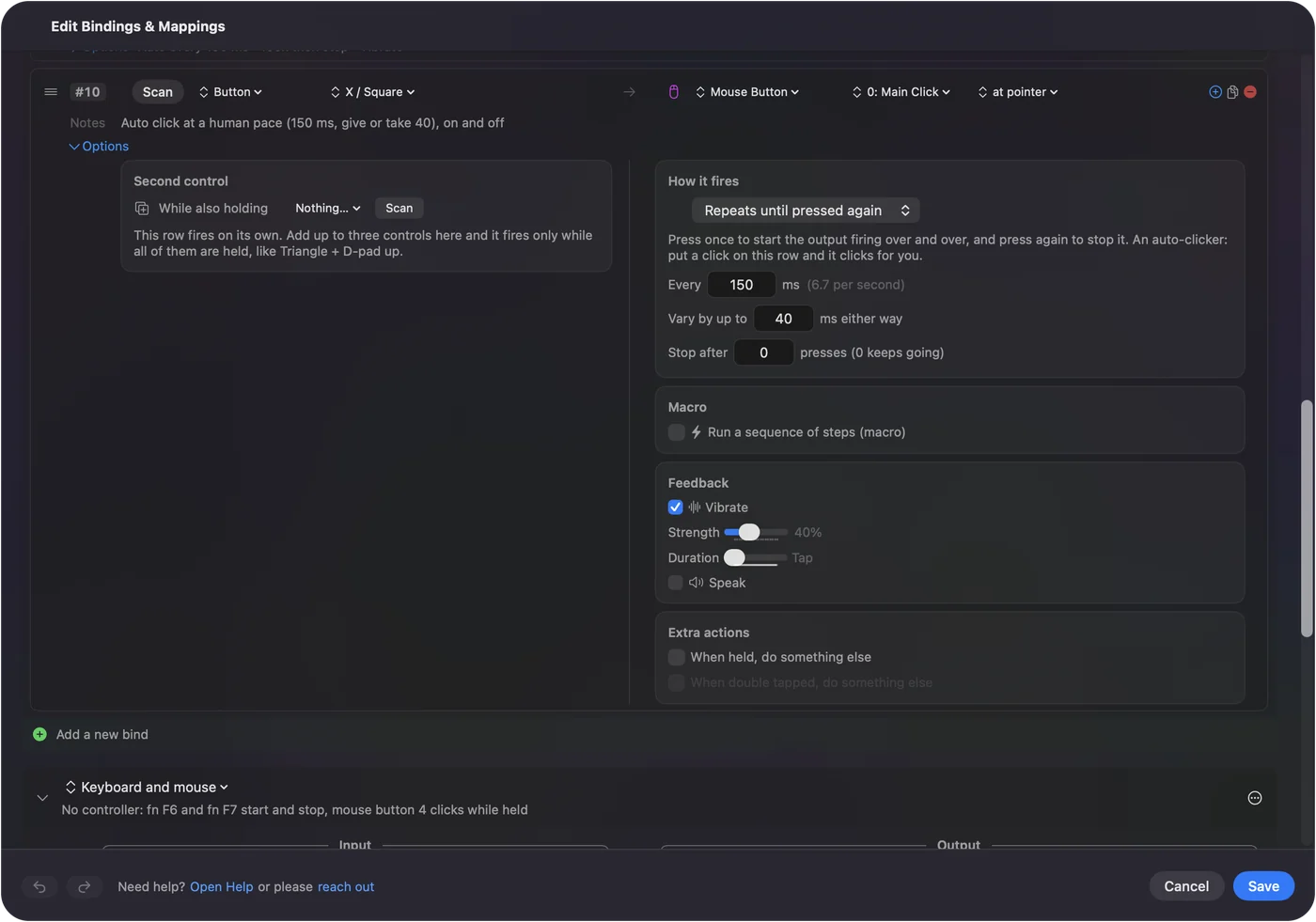
Every runs from 5 ms to 60,000 ms, a full minute. Vary by up to runs from 0 to 10,000 ms, and 0 keeps every gap exact. Every sets the average, and Vary by up to sets how uneven the clicks are around it.
 InputConfig is free on the Mac App Store. macOS 14 or later, no account, no tracking, open source.
Work out the range
The shortest gap is Every minus the spread, and the longest is Every plus it. Because a fresh gap is drawn after every click, the long ones and the short ones balance out and the average stays at Every.
| Every | Vary by up to | Gaps fall between | Average pace |
|---|---|---|---|
| 150 ms | 40 ms | 110 and 190 ms | About 6.7 a second (the preset's X row) |
| 100 ms | 20 ms | 80 and 120 ms | About 10 a second |
| 66 ms | 10 ms | 56 and 76 ms | About 15 a second |
| 500 ms | 150 ms | 350 and 650 ms | About 2 a second |
| 1,000 ms | 300 ms | 0.7 and 1.3 seconds | About 1 a second |
| 60,000 ms | 10,000 ms | 50 and 70 seconds | About 1 a minute |
The CPS calculator works out the same spread for any pair of numbers. Halfway between the shortest and the longest gap is always Every.
Keep the spread smaller than the gap
Two things stop a gap from going as short as the arithmetic says. Both matter only at the edges:
- The click's own press. Each click is held down for 40 percent of Every, at most 80 ms, and the next one never starts until that press has been let go, plus 2 ms. With Every 100 and Vary by up to 100, the shortest gaps stop at about 42 ms instead of reaching 0, so the run comes out a little slower than Every says.
- The poll. A click can only go out when InputConfig checks its controls, 120 times a second on a power adapter and 60 times on battery by default. Each click lands on a check, about 8 ms apart at 120 Hz and 17 ms apart at 60 Hz. The average still follows Every, but a spread of a few milliseconds on a short gap is lost among those steps.
Both come from how the app schedules clicks; I worked them out from the code, not by counting clicks with a meter. As a habit, I keep Vary by up to at or under a third of Every. That is a choice, not a rule. A spread up to about a third of the gap keeps the average honest and the rhythm uneven.
Use the preset's human-pace button
The built-in Auto Clicker preset puts a random-interval row on the left face button: X on an Xbox pad, Square on a PlayStation pad, the button in the same place on others. It left clicks at 150 ms, give or take 40, on and off. Pads that vibrate give a short buzz when the run starts.
- You: Activate Auto Clicker, point at something harmless and press the button once.
- InputConfig: Clicks at a new gap between 110 and 190 ms each time, until you press the button again.
- Check: Press it again and the clicks stop. To change the pace, press Edit and open the Options of the row whose note reads Auto click at a human pace.
With no controller, give the fn F6 row a Vary by up to of its own. It starts at 0, so its 10 clicks a second are exact until you change it.
Know what random timing does not do
Variation is about feel. Some people want a run that sounds like a hand rather than a machine, and that is all it gives. It is not a disguise.
- Rules come first. Many online games forbid auto clickers in their rules at any pace, random or not.
- Detection is not only timing. I do not know what any game's anti-cheat looks at, and I will not promise that a random interval gets past it.
- Single-player is your call. In an offline game or your own work, the only rules are yours.
Random timing is a feel, not a disguise.
If the clicks still sound regular
Climb this ladder, smallest step first:
- Check the field. A Vary by up to of 0 keeps every gap exact. Type a number and save.
- Restart the run. Opening the editor ends any run, so start it again once the editor is closed.
- Raise the spread. On a short gap, a spread of a few milliseconds is smaller than one poll, so it barely shows. Try at least 10 ms.
- Check the power source. On battery the default poll is 60 Hz, so clicks land on steps of about 17 ms. Settings, Advanced, Polling rate sets the battery rate on its own.
- Bring the spread below the gap. If the run sounds slower than Every promised, the spread is probably larger than the gap allows.
What it cannot do
- Other kinds of randomness. The spread is even across the range. There are no bell curves, random pauses or random bursts.
- Random positions. Each click goes where the pointer is, or to one fixed point, never to a random spot around it.
- Random press lengths. Each click is held for 40 percent of Every, at most 80 ms, every time.
- Hide an auto clicker. As what random timing does not do says, check the rules and assume a game can tell.
The short version
- The two fields. Every is the average gap, and Vary by up to is the spread either way.
- The ready-made row. The left face button in the Auto Clicker preset, 150 ms, give or take 40.
- The habit. Keep the spread at or under a third of Every.
Set the pace you want first, then add just enough spread to break the rhythm.
The complete auto clicker guide puts Vary by up to in order with every other setting.
Questions
How do I make an auto clicker click at random intervals on a Mac?
In InputConfig, set a click row to Repeats until pressed again, type the average gap in Every and a spread in Vary by up to. Each gap is drawn at random between Every minus the spread and Every plus it.
What does Vary by up to 40 ms mean?
Each gap can be up to 40 ms shorter or longer than Every. With Every at 150 ms, the gaps fall anywhere between 110 and 190 ms, and the average stays at 150.
Does a random interval stop a game from detecting an auto clicker?
I cannot promise that, and I would not rely on it. Many online games forbid auto clickers at any pace, so check the rules first.
Can it click at random positions too?
No. A click goes where the pointer is, or to one fixed point you captured.
What is a human-like clicking pace?
There is no single number. The preset's human-pace row uses 150 ms, give or take 40, about 6 or 7 clicks a second, which I picked as a steady, unhurried pace.
Related
Free. macOS 14 or later. No account, nothing leaves your Mac. Open source on GitHub.