Elden Ring on a Mac with a controller
 The Elden Ring layout is built into InputConfig, free on the Mac App Store. You don't have to make an account, there are no subscriptions, and nothing is locked. Optimized for Apple silicon.
On a Mac: There is no Mac version. It runs on Apple silicon through CrossOver, Whisky, or the Game Porting Toolkit, and it runs well. What often does not survive the trip is the controller: the game inside the Windows layer cannot see it. InputConfig sends keyboard and mouse instead, which the layer always passes through.
Yes, Elden Ring plays on a Mac with a controller, and when the controller is not detected, this layout is the fix. There is no Mac version, so the game runs through CrossOver, Whisky or the Game Porting Toolkit, and those layers often hide the pad, show it as the wrong pad, or change behavior between versions. Keyboard and mouse always get through, so InputConfig turns the controller into a keyboard and the game is happy again.
Elden Ring was designed for a pad, so this is a workaround. I would rather you did not need it, but it is a good one.
On this page: 9 sections
The layout, control by control
Match the game's keys first
The layout sends a clean set of keys, and Elden Ring's PC defaults are different. The game puts lock-on on Q, crouch on X, the skill on Shift plus right click, and jump on F. This layout sends Q for the skill, O for lock-on, V for crouch, and F for jump, so only jump agrees.
- You: Open the game's Controls and set lock-on to O, crouch to V, and the skill to Q.
- InputConfig: Sends those keys from the right stick click, the left stick click and the right bumper.
- Check: Click the right stick near an enemy and the lock-on marker appears.
The other way round works too: keep the game's defaults, and in InputConfig Scan the skill, crouch and lock-on rows to the game's keys. I change the game, because Shift plus right click is not something a controller sends well and Q is a better skill key anyway. One minute in the game's Controls saves an hour of confusion.
How the layout thinks
Once the keys agree, it plays like the console game.
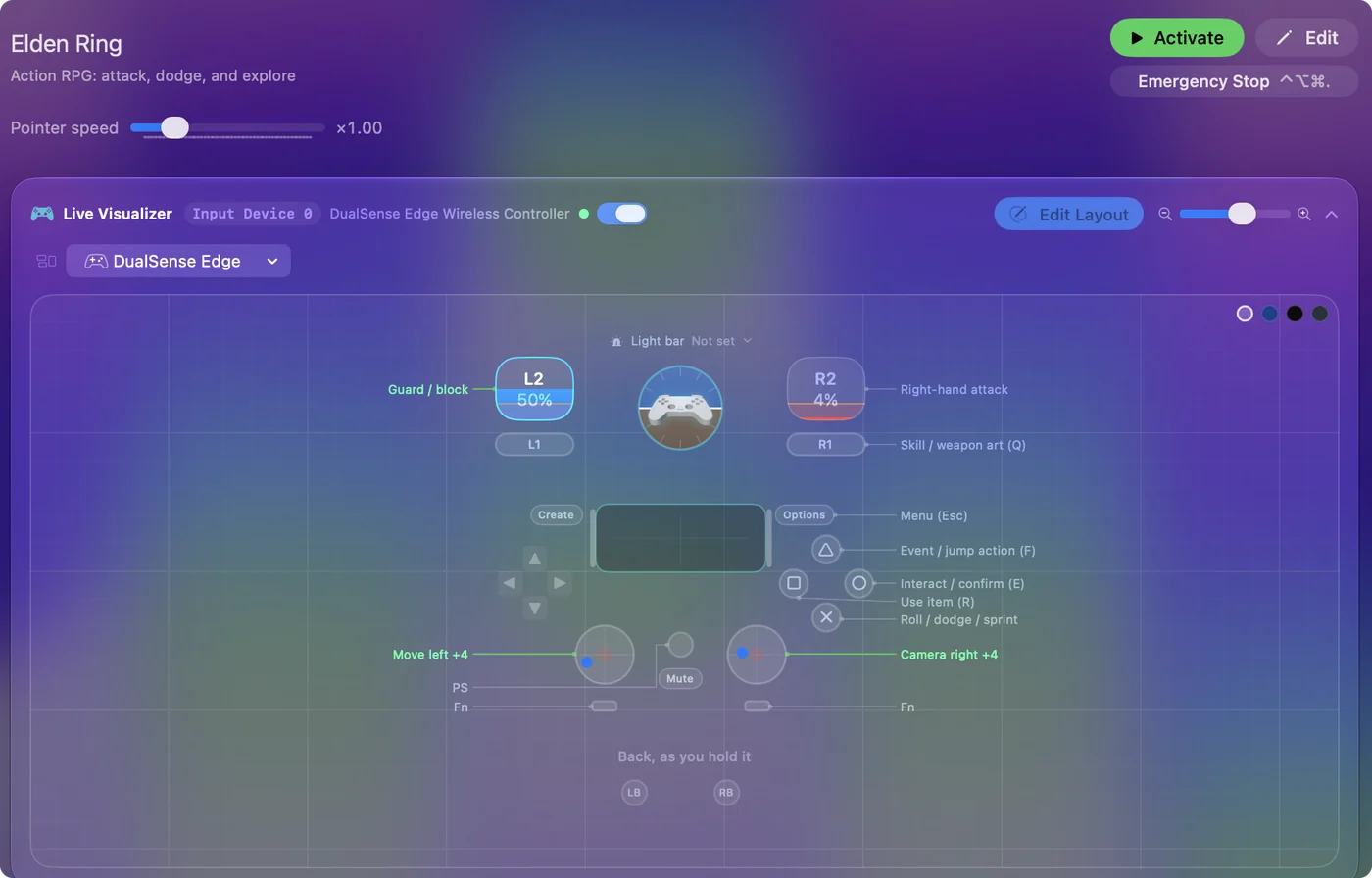
- Move and camera. The left stick moves and the right stick is the camera.
- Attack and guard. The right trigger is the right-hand attack (left click). The left trigger guards (right click), so a raised shield is a held trigger, as it should be.
- Roll, dodge and sprint. All on the bottom face button, because in Elden Ring they are all Space: tap to roll, hold to sprint.
- Face buttons. Interact (E) on the right, use item (R) on the left, jump (F) on the top.
- Skill, crouch and lock-on. The skill is the right bumper, and the sticks click for crouch and lock-on. Options is the menu.
What you lose against the native scheme is the D-pad: spells, weapons and items switch on the arrow keys in the game, and the layout does not bind them. Add four D-pad rows sending the arrow keys and you have it back.
Tune it to how you play
- Strong attacks. Shift plus left click is the heavy attack. Add a second right trigger row with While holding set to L1 that sends Shift and left click together. The plain trigger stays the light attack.
- Two-handing. That is E plus the attack button in the game. Put a macro on a spare control, such as the free touchpad press: hold E, tap left click, release.
- Lock-on that does not drift. Give the camera rows a small Deadzone in Adjust live, so a resting stick never nudges the lock.
- Pouch. The pouch items are on the number keys 1 to 4 by default. Behind a chord on the face buttons, they are one hold away.
The chord on L1 gives you heavy attacks without giving up a single button.
If the controller does work in your layer
Use it. Deactivate this preset and let the game see the pad, because the native scheme has things this one cannot: analog walking speed, and guard counter timing that feels better through the game's own code. Do not run both, because the game would get the button and the key from one press.
Keep the preset for the day an update breaks the pad again, which it will.
Elden Ring controller support: controller or keyboard
Steam's store page lists full controller support for Elden Ring, so the game was made to be played on a controller, menus included. A keyboard and mouse work as well, and the choice is yours. On a Mac, use the game's own controller support first when it sees your pad; this layout is for a pad it does not see, or for buttons it will not let you move. Full support listed means the controller is a first-class way to play Elden Ring.
From Steam's listing, checked in October 2026. Every game's listing is in Mac games with controller support.
Get it in two clicks
- Get InputConfig free on the Mac App Store, open it, and click Smart Preset Maker on the welcome screen.
- Search for Elden Ring and pick it. The layout is created as a preset in your sidebar, named and ready.
- Press Activate. Every row can be changed afterwards: the editor's Scan button rebinds any control the moment you touch it.
To check the controller itself first, the gamepad tester shows every button and stick live in your browser.
Elden Ring controls: every button and the key it sends
The Sends column is Elden Ring's default keyboard and mouse controls, as this layout expects them. If you changed a key in the game's settings, change the same row in InputConfig.
| Controller | Sends | What it does |
|---|---|---|
| Left stick left | A | Move left |
| Left stick right | D | Move right |
| Left stick up | W | Move forward |
| Left stick down | S | Move back |
| Right stick right | Mouse motion right (speed 18) | Camera right |
| Right stick left | Mouse motion left (speed 18) | Camera left |
| Right stick down | Mouse motion down (speed 14) | Camera down |
| Right stick up | Mouse motion up (speed 14) | Camera up |
| Right trigger | Left click | Right-hand attack |
| Left trigger | Right click | Guard / block |
| A / Cross | Space | Roll / dodge / sprint |
| B / Circle | E | Interact / confirm (E) |
| X / Square | R | Use item (R) |
| Y / Triangle | F | Event / jump action (F) |
| RB / R1 | Q | Skill / weapon art (Q) |
| L3 (left stick click) | V | Crouch (V) |
| R3 (right stick click) | O | Reset camera / lock-on (O) |
| Start / Options | Escape | Menu (Esc) |
Button names follow the Xbox / PlayStation pair shown in the editor, so A / Cross is the bottom face button on either pad. On a Switch Pro Controller the bottom button is labeled B; the mapping still fires on position.
Questions
Why is my controller not working in Elden Ring on Mac?
Usually because the game runs inside CrossOver, Whisky or the Game Porting Toolkit, and the layer does not pass the controller through, or passes it as the wrong pad. First check that macOS sees it: Game Controllers in the System Settings sidebar shows it when it is connected. If the Mac sees it and the game does not, activate this layout. The game then gets keyboard and mouse, which the layer passes through.
Why does the layout not match the game's default keys?
It was built around a cleaner set of keys than the game ships with. Either set lock-on to O, crouch to V and skill to Q in the game's Controls, or Scan those three rows in InputConfig to the game's defaults. Both take a minute.
Does this work with the Steam version?
Yes. The preset launches it through Steam (steam://run/1245620) if Steam is installed inside the layer, and the keys arrive whichever launcher you use.
Does Elden Ring have controller support?
Yes. Steam lists full controller support for Elden Ring, so every part of the game can be played on a controller.
Is Elden Ring better with a controller or a keyboard?
Both work. Steam lists full controller support for Elden Ring, so it was made to be played on a controller, and a keyboard and mouse work as well.
Can I play Elden Ring on an M1 Mac or a MacBook Air?
Elden Ring has no Mac version, so it runs through a wrapper such as CrossOver or the Game Porting Toolkit, and how well depends on the Mac's chip and memory. I have not tested it on each Mac.
Related
Completely free. You don't have to make an account, there are no subscriptions, and nothing is locked. Optimized for Apple silicon. Open source on GitHub.
Updated