The Witcher 3 on a Mac with a controller
 The The Witcher 3 layout is built into InputConfig, free on the Mac App Store. You don't have to make an account, there are no subscriptions, and nothing is locked. Optimized for Apple silicon.
On a Mac: No Mac build. It runs well on Apple silicon through CrossOver or the Game Porting Toolkit, and it streams on GeForce NOW. The wrapper is where a controller usually goes missing. This layout sends keyboard and mouse, which always arrive.
The Witcher 3 plays on a Mac with a controller through CrossOver, the Game Porting Toolkit or a stream, and when the translation layer hides your pad, this layout plays Geralt's keyboard binds from it. CD Projekt's pad scheme is the one to use whenever the game can see the controller. Some setups pass a DualSense perfectly. Others show the game nothing, and Geralt stands in the field waiting for a keyboard.
This is the keyboard and mouse Witcher, sent from a controller. It is not the console scheme, but it is close enough that your hands stop noticing after an hour.
On this page: 9 sections
The layout, control by control
How the layout thinks
- Move and camera. The left stick is W, A, S and D. The right stick is the camera.
- Swords. The right trigger is the fast attack (left click) and the left trigger the strong attack (right click), so the two attacks sit on the two fingers that never leave the triggers.
- Face buttons. Jump on the bottom, dodge (Alt) on the right, roll (Ctrl) on the left, interact (E) on the top.
- Signs and sprint. Cast sign (Q) is the left bumper, and it casts whichever sign is selected. Sprint is Shift on the left stick click.
- Menus. The D-pad opens inventory, journal, map and character (I, J, M, C), the four screens you open a hundred times each. Options is Escape.
Both attacks are on the triggers, so your thumbs stay on movement and camera.
Tune it to how you play
- Signs. The game selects signs with 3 to 7 or the radial menu (Tab, held). Bind Tab to the right bumper as a hold and pick with the right stick, or give the face buttons the five sign keys behind a chord and skip the wheel entirely. Chord plus the top face button is Igni, and it stays Igni.
- Witcher senses. Right click held, which is also the strong attack. Hold the left trigger with no target and Geralt looks around. If you want it separate, bind it to a key in the game and put that key on the touchpad press.
- Parry and counter. Alt is dodge, and also the parry when timed. The right face button covers both.
- Roach. X calls the horse, and the right stick click is free for it. Gallop is Shift, the sprint you already have.
- Quick items. Bombs and potions are R, and the quick slots are the arrow keys with Ctrl. A chord on the D-pad sends those.
Sign keys behind a chord mean you never open the wheel mid-fight.
If your wrapper sees the pad
Use it and turn this preset off. The native scheme has analog walking and the camera behavior the game was tuned for, and running both sends every press twice.
Keep the preset for the next update that breaks controller passthrough, because in translation layers there is always a next update.
The Witcher 3 controller support: controller or keyboard
Steam's store page lists partial controller support for The Witcher 3: it plays on a controller, but some parts, such as a launcher, text entry or a menu, still expect a keyboard or a mouse. This layout sends keys and mouse movement from the pad, which can cover the parts the game's own support leaves out. With partial support, a layout fills the gaps the game leaves.
From Steam's listing, checked in October 2026. Every game's listing is in Mac games with controller support.
If your controller is not working in The Witcher 3
When The Witcher 3 does not react to your controller on a Mac, climb this ladder, smallest step first:
- Check that the Mac sees the controller. Open the gamepad tester and press a button. If nothing lights up there, the problem is the connection, and a controller that is connected but not working covers that first.
- Press a button after the stream has started. A stream only picks up a controller that is paired with the Mac, and a browser shows a controller to a page only after a button press. Start The Witcher 3, then press any button.
- Expect less inside a wrapper. In CrossOver or the Game Porting Toolkit, Wine passes a controller to The Witcher 3 only some of the time, and the keyboard and mouse get through every time. Using a controller with CrossOver games has the checks.
- Play it from keys. If The Witcher 3 still ignores the pad, activate this layout. It sends the keyboard and mouse controls The Witcher 3 already reads. The layout works whether or not The Witcher 3 ever sees the controller.
Get it in two clicks
- Get InputConfig free on the Mac App Store, open it, and click Smart Preset Maker on the welcome screen.
- Search for The Witcher 3 and pick it. The layout is created as a preset in your sidebar, named and ready.
- Press Activate. Every row can be changed afterwards: the editor's Scan button rebinds any control the moment you touch it.
To check the controller itself first, the gamepad tester shows every button and stick live in your browser.
The Witcher 3 controls: every button and the key it sends
The Sends column is The Witcher 3's default keyboard and mouse controls, as this layout expects them. If you changed a key in the game's settings, change the same row in InputConfig.
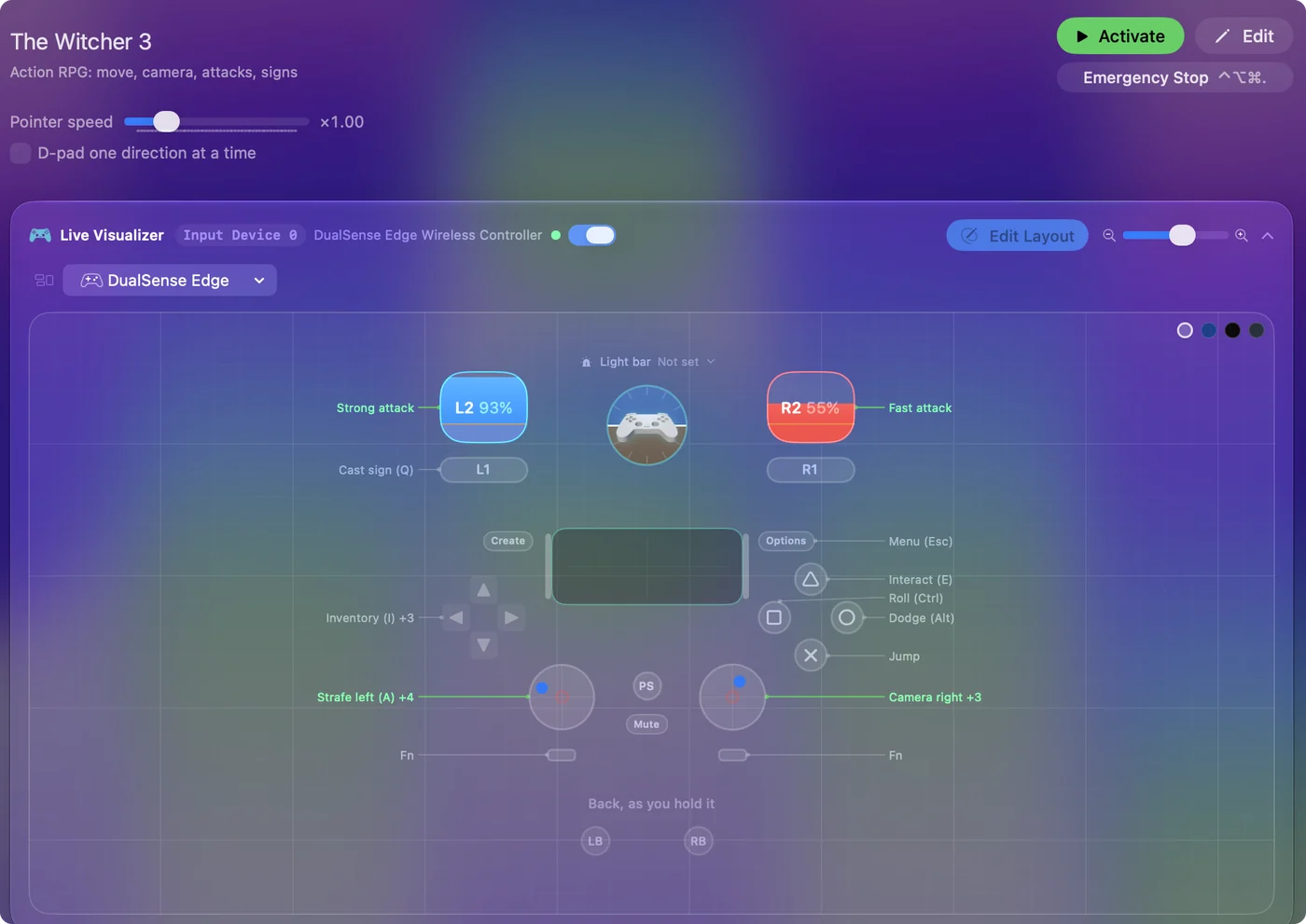
| Controller | Sends | What it does |
|---|---|---|
| Left stick left | A | Strafe left (A) |
| Left stick right | D | Strafe right (D) |
| Left stick up | W | Move forward (W) |
| Left stick down | S | Move back (S) |
| Right stick right | Mouse motion right (speed 18) | Camera right |
| Right stick left | Mouse motion left (speed 18) | Camera left |
| Right stick down | Mouse motion down (speed 12) | Camera down |
| Right stick up | Mouse motion up (speed 12) | Camera up |
| Right trigger | Left click | Fast attack |
| Left trigger | Right click | Strong attack |
| A / Cross | Space | Jump |
| B / Circle | Alt / Option (Left) | Dodge (Alt) |
| X / Square | Ctrl (Left) | Roll (Ctrl) |
| Y / Triangle | E | Interact (E) |
| LB / L1 | Q | Cast sign (Q) |
| L3 (left stick click) | Shift (Left) | Sprint (Shift) |
| D-pad up | I | Inventory (I) |
| D-pad down | J | Journal (J) |
| D-pad left | M | Map (M) |
| D-pad right | C | Character (C) |
| Start / Options | Escape | Menu (Esc) |
Button names follow the Xbox / PlayStation pair shown in the editor, so A / Cross is the bottom face button on either pad. On a Switch Pro Controller the bottom button is labeled B; the mapping still fires on position.
Questions
Does The Witcher 3 run on a Mac?
The Witcher 3 does not run natively on a Mac. It runs on Apple silicon through CrossOver, Whisky or the Game Porting Toolkit, and it streams on GeForce NOW. Controller support inside the wrappers is inconsistent, which this layout works around.
How do I cast a specific sign with a controller?
Bind the game's sign-select keys (3 to 7 by default) to the face buttons behind a chord in InputConfig, then the left bumper casts whichever you selected.
Does The Witcher 3 have controller support?
Partly. Steam lists partial controller support for The Witcher 3: it plays on a controller, but some screens still expect a keyboard or mouse.
Is The Witcher 3 better with a controller or a keyboard?
A controller works for most of it. Steam lists partial controller support for The Witcher 3, so some screens still expect a keyboard or a mouse, and a layout like this one can put those on the pad.
Why is my controller not working in The Witcher 3 on a Mac?
First check the Mac itself sees the controller, with the gamepad tester. If it does and The Witcher 3 still ignores it, activate the The Witcher 3 layout in InputConfig, which sends the game's keyboard and mouse controls from the controller.
Related
Completely free. You don't have to make an account, there are no subscriptions, and nothing is locked. Optimized for Apple silicon. Open source on GitHub.
Updated