Questions
Mac auto clickers compared
The best auto clicker for a Mac depends on how you want to start it and what you need it to do, because every app here can click on a timer. For a free App Store app that starts from a controller, a MIDI pad or any key, with per-row settings, that is InputConfig, which I make, so weigh my view with that in mind. For timed key sequences and typed text in a free App Store app, KeyAutoClicker. For one small paid app that does one job, RapidClick. Every fact below comes from the maker's own page, checked on October 3, 2026, and where a page does not say, the table says so.
On this page: 8 sections
Compare them at a glance
Where each one comes from and what it costs. Prices change, so check the store before you buy.
| App | Where you get it | Price | Source |
|---|---|---|---|
| InputConfig | Mac App Store | Free, no paid features | Open, MIT, on GitHub |
| KeyAutoClicker | Mac App Store | Free | On GitHub, CC BY-NC 4.0 |
| RapidClick | Mac App Store | $2.99, one time | Not stated |
| Autoclick (inket) | Maker's own site | Free | Open, GPL-2.0, archived |
| macOS Auto Clicker (othyn) | GitHub releases | Free | Open, MIT |
| MaClicker | GitHub releases | Free | Open, MIT |
| IO Auto Clicker | Mac App Store, per its site | 3-day trial, then a subscription or lifetime purchase | Not stated |
| Dwell | Built into macOS | Free | Apple |
What each one can do, as its maker describes it. Not stated means the maker's page does not say, not that the app cannot.
| App | Start and stop | Fixed point | Random gap | Click count |
|---|---|---|---|---|
| InputConfig | Any key, mouse button, controller button or MIDI pad | Yes | Yes | Yes |
| KeyAutoClicker | Global hotkeys, and a Stop All hotkey | Not stated | Yes | Yes |
| RapidClick | A hotkey | Not stated | Not stated | Not stated |
| Autoclick (inket) | A hotkey with a modifier; the fn key stops it | Not stated | Not stated | Not stated |
| macOS Auto Clicker (othyn) | Global keyboard shortcuts | Not stated | Not stated | Yes |
| MaClicker | An activation key, in Toggle, Hold or Lock mode | Not stated | Not stated | Yes |
| IO Auto Clicker | F6 by default | Yes | Yes | Yes |
| Dwell | Resting the pointer | No, one click per rest | No | No |
And what each one needs:
| App | macOS needed | Worth knowing |
|---|---|---|
| InputConfig | 14 or later | Also auto presses keys; one click per poll, up to 200 a second |
| KeyAutoClicker | 14.6 or later | Clicks, key presses, timed key sequences and typed text |
| RapidClick | 10.12.6 or later | Left or right click, 1 an hour to 50 a second, floats above full-screen games |
| Autoclick (inket) | 10.14 or later | Last version 2.0.5, January 2022, and no longer developed; asks for Input Monitoring too |
| macOS Auto Clicker (othyn) | 13 or later (11 for an older build) | Any mouse or keyboard button, presses per interval, a delayed start; latest release July 2025 |
| MaClicker | 10.13 or later | Left or right click, up to 100 a second, Lock mode holds the button; latest release September 2024 |
| IO Auto Clicker | 12 or later | Record and playback of clicks |
Automator, which still ships with macOS, can record clicks with Watch Me Do. I have not tested it for auto clicking, so it is not in the tables.
Pick the one that fits the job
- Click without pressing at all. Dwell, in the Mac's own Accessibility settings. It clicks once each time the pointer rests, not on a timer.
- One paid app that does one thing. RapidClick. Its maker keeps it to that one job on purpose.
- Timed key sequences and typed text. KeyAutoClicker, free on the App Store.
- Open source you can build yourself. macOS Auto Clicker or MaClicker, both MIT, or InputConfig, also MIT.
- A recorded run of clicks at several spots. IO Auto Clicker lists record and playback. InputConfig has no recorded sequence.
- A controller, a MIDI pad or a mouse button as the trigger. InputConfig. It was the only Mac auto clicker I found that starts from a controller.
- An older Mac. RapidClick or MaClicker. InputConfig needs macOS 14.
Pick by the trigger and the stop you need, because every one of them can click on a timer.
 InputConfig is free on the Mac App Store. macOS 14 or later, no account, no tracking, open source.
Where InputConfig is different
This is my app, so here is what it does that the tables cannot show, and nothing more:
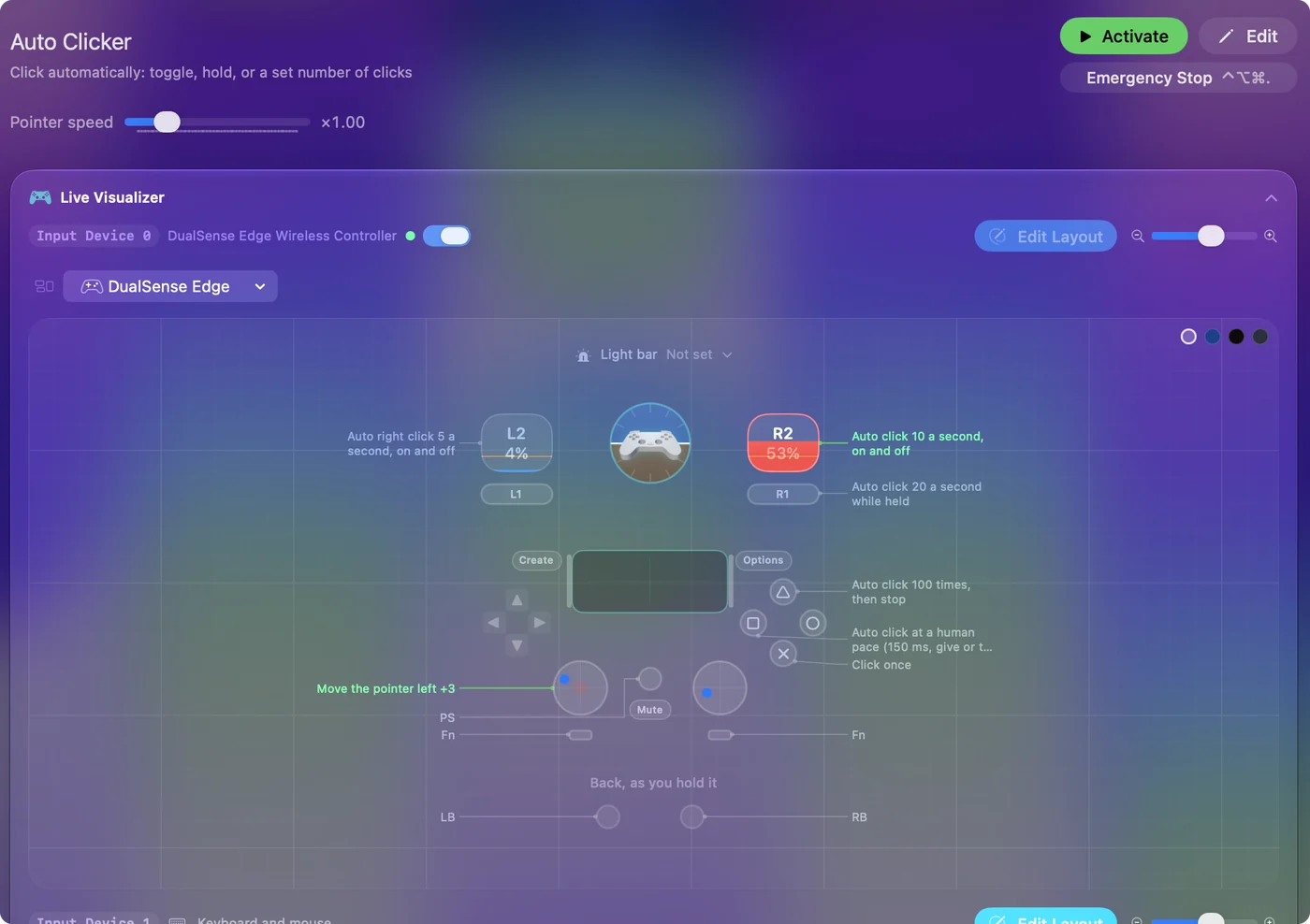
- A built-in preset. Auto Clicker, in the Desktop & Productivity folder: the right trigger toggles left clicks 10 a second, the left trigger right clicks 5 a second, the right bumper clicks 20 a second while held, Y clicks 100 times and stops, and X clicks every 150 ms, give or take 40. With no controller, fn F6 and fn F7 start and stop, and mouse button 4 clicks while held.
- A buzz. On pads that vibrate, a toggled row buzzes when a run starts.
- Per-app switching. A preset can run only while one app is in front, so leaving the game ends the run.
- One stop for everything. The emergency stop: Control Option Command period, Back and Start held for three seconds on a controller, or Emergency Stop in the menu bar.
- Single clicks. Every click in a run goes out as its own single click, so a fast run never turns into the double clicks that open files.
- An honest top speed. At most one click per poll: 120 a second on a power adapter and 60 on battery by default, and 200 a second at most. Most apps and games do not count clicks that fast anyway.
Where another app fits better
- Several spots in turn. InputConfig clicks one spot per row, and its macro steps cannot move the pointer to a point. An app with record and playback suits that job.
- Clicks faster than 200 a second. Autoclick's readme lists up to 900. I doubt many apps count that, but if you need it, InputConfig will not go there.
- Older macOS. InputConfig needs macOS 14 or later.
- The simplest possible window. InputConfig does much more than auto click, so it has more to look at. A single-purpose app has less to learn.
Check any of them before you install
Climb this ladder from the safest source down:
- The Mac App Store. Reviewed by Apple and sandboxed.
- The maker's own page or GitHub. Check the name of the maker and the date of the last release.
- Never a download portal or a cracked-software site. Get the app from where its maker publishes it.
Every one of them needs the Accessibility permission to click, and you grant it in System Settings, Privacy & Security, Accessibility. More on that, and on game rules, is in whether an auto clicker is safe on a Mac.
How I checked
- Dates. Every fact about another app is from its maker's own page, its App Store listing or its GitHub readme, read on October 3, 2026.
- Testing. I tested InputConfig. I have not tested the other apps myself.
- Corrections. If a maker's page changes, the maker's page is right and this table is out of date.
The short version
- No press. Dwell.
- Free, App Store, controller or MIDI trigger. InputConfig.
- Key sequences and text. KeyAutoClicker.
- One paid job, older Macs. RapidClick.
Whichever you choose, get it from where its maker publishes it, and learn its stop first. If you came looking for a Windows favorite, see OP Auto Clicker on a Mac.
To try InputConfig's version, the Auto Clicker preset page lists every row, and the auto clicker guide goes from install to a tuned run.
Questions
What is the best free auto clicker for Mac?
It depends on the job. InputConfig is free on the Mac App Store with no paid features and starts from a key, a mouse button or a controller; KeyAutoClicker is free there too and adds key sequences and typed text.
Is there an open-source auto clicker for Mac?
Yes. InputConfig, macOS Auto Clicker and MaClicker are open source under the MIT license, and Autoclick under GPL-2.0, though it is no longer developed.
Which Mac auto clicker is the fastest?
Autoclick's readme lists up to 900 clicks a second and MaClicker up to 100. InputConfig sends at most one click per poll, up to 200 a second. Most apps and games do not count clicks that fast.
Does macOS have a built-in auto clicker?
Not one on a timer. Dwell, in the Mac's Accessibility settings, clicks once each time the pointer rests in one place.
Can a Mac auto clicker start from a game controller?
InputConfig can: its built-in Auto Clicker preset starts and stops clicking from a controller's right trigger. It was the only Mac auto clicker I found that does.
Related
Free. macOS 14 or later. No account, nothing leaves your Mac. Open source on GitHub.