Questions
How to auto click on a Mac
To auto click on a Mac, use an app that clicks on a timer, because macOS has nothing built in that repeats a click by itself. The closest built-in tool, Dwell, clicks once when the pointer rests on a spot, which helps when pressing is hard but does not click over and over. The free route is InputConfig from the Mac App Store: its built-in Auto Clicker preset starts clicking when you press fn F6 and stops on the next press.
On this page: 10 sections
Steps
- Install InputConfig from the Mac App Store.
- Switch InputConfig on in System Settings, Privacy & Security, Accessibility when it asks.
- In InputConfig's sidebar, open Desktop & Productivity, click Auto Clicker, and press Activate.
- Point at what you want clicked and press fn F6 to start clicking 10 times a second.
- Press fn F6 again to stop, or press Control Option Command period to stop everything.
Choose the way that fits the job
There are four ways to get clicks without clicking on a Mac, and they do different jobs. Climb this ladder, from what is already on your Mac to an app built for it:
- Dwell. Built into macOS. It performs one click when the pointer rests on a spot and a countdown ends. Right for someone who cannot press a button, wrong for a hundred clicks in a row.
- Automator's Watch Me Do. Built into macOS. It records what you do and plays it back, and a Loop action can repeat the playback. I have not tested it as an auto clicker.
- A browser extension. A download, and it can only click inside web pages in that browser, never in another app.
- An app that clicks on a timer. Clicks in any app, at the gap you choose, from a key, a mouse button or a controller, and stops when you press again. InputConfig is free and has a preset ready.
If you need the same click over and over, only the last rung really does it.
 InputConfig is free on the Mac App Store. macOS 14 or later, no account, no tracking, open source.
Click without pressing, with Dwell
Dwell is Apple's tool for people who move a pointer but find pressing hard, with a head pointer, eye tracking, or a mouse they cannot click.
- You: Open System Settings, Accessibility, Keyboard, switch on Accessibility Keyboard, then open its options with the Info button and turn on the Dwell settings you want.
- macOS: When the pointer rests on an item, a countdown runs over it, and the chosen action, such as Left Click, Double Click or Right Click, happens when the countdown ends.
- Check: Rest the pointer on a button and watch the countdown finish in a click.
Apple's own steps are in control the pointer using Dwell. It is one action per countdown, so it replaces pressing, not repetition. For clicking with your head, see how to click with a head pointer on a Mac, and for sore hands, mouse alternatives for carpal tunnel.
Know what Automator and extensions can do
These are the two answers that come up for auto clicking without a download, and each has a catch.
- Automator. It still ships with macOS 27, with its Watch Me Do and Loop actions. Watch Me Do records a run of clicks and keys and replays them. I have not tested it for repeated clicking, so I cannot tell you how fast it goes or how well it holds up over a long run.
- Browser extensions. An extension works inside the pages of its own browser. It cannot click in a game app, the Finder, or the browser's own toolbar, and it is still a download.
- Without any download. Dwell and Automator are already on your Mac. Anything that clicks on a timer in every app is a download, so get it from the Mac App Store rather than from a site that asks you to click Open Anyway.
Built in, a Mac can click without pressing, but not over and over on a timer.
Turn on the free auto clicker in two clicks
InputConfig is free on the Mac App Store, open source under the MIT license, with no account and no network access. Two checked steps get it clicking:
- You: Install InputConfig and open it. When it asks, switch it on in System Settings, Privacy & Security, Accessibility.
- macOS: Lets InputConfig send clicks. Every auto clicker on a Mac needs this same permission.
- Check: InputConfig's Settings, General, Accessibility permission shows it is on.
- You: In the sidebar, open Desktop & Productivity, click Auto Clicker, press Activate, point at something harmless, and press fn F6.
- InputConfig: Clicks the left button 10 times a second where the pointer is, until you press fn F6 again.
- Check: Press fn F6 a second time and the clicking stops.
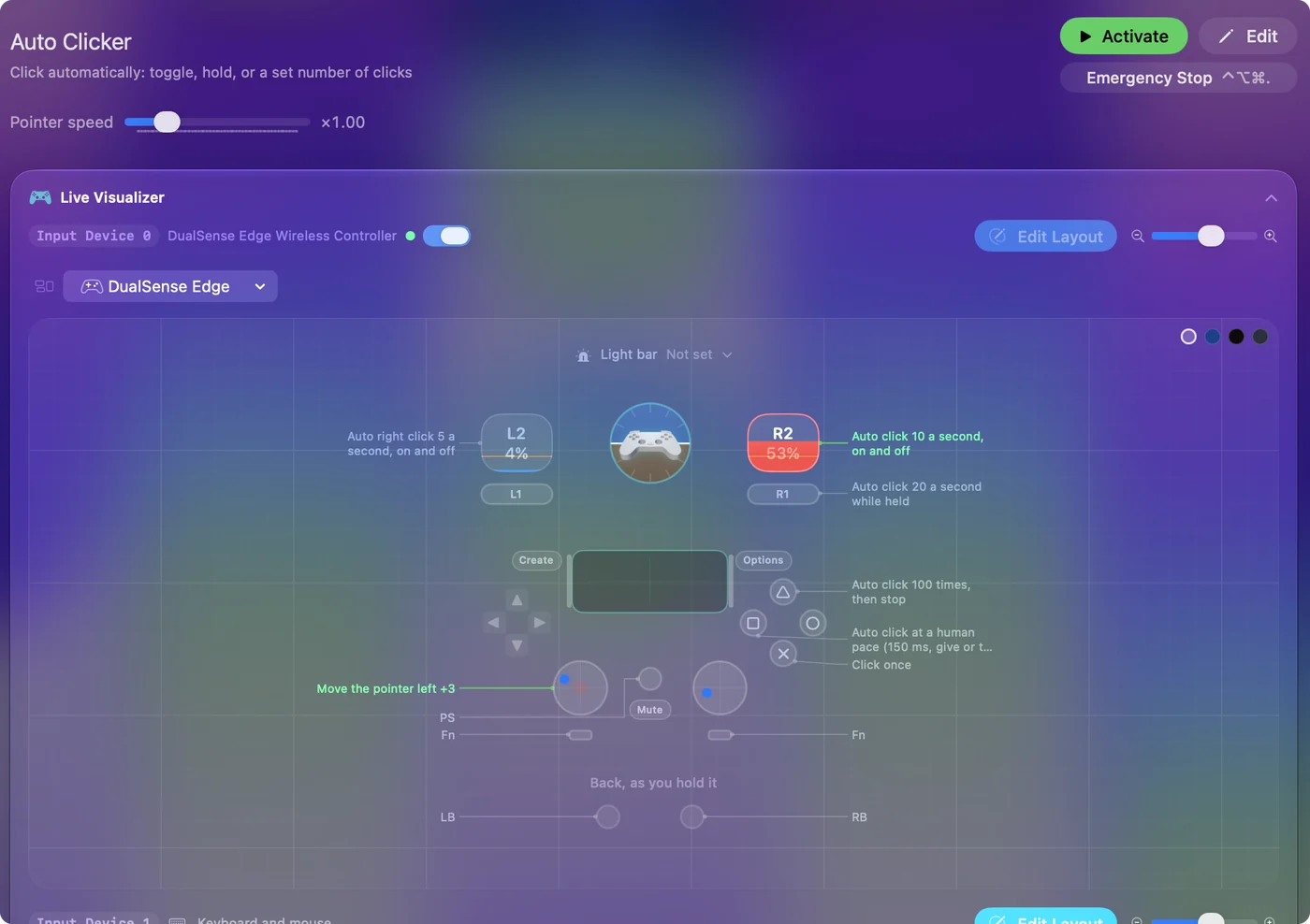
On a MacBook, hold fn: on its own, the F6 key is a system key that macOS keeps for itself, so no app sees it. The preset's other controls:
- fn F7. Right clicks, 5 a second, on and off.
- Mouse button 4. Left clicks, 15 a second, while you hold it. While the preset runs, that button no longer goes Back in a browser.
- A controller's right trigger. Left clicks, 10 a second, on and off, with a light buzz when it starts, on a controller that vibrates. The left stick moves the pointer, so you can aim without a mouse.
Every row is on the Auto Clicker preset page. Activate the preset, then one key starts the clicking and the same key stops it.
Make it click where and how you want
Each row in the preset is a normal row, so every setting is a field in its Options, under How it fires:
- Every. The gap between clicks, from 5 ms to a minute, with the rate shown beside it. The CPS to ms calculator converts any rate.
- Vary by up to. A random amount either way on each gap, for an uneven pace. See random interval clicking.
- Stop after. Ends the run after a number of clicks. See clicking a set number of times.
- A fixed point. In the click menu, At a fixed point: use the pointer's position now clicks one spot every time. See auto clicking the same spot.
- A different trigger. Press Scan on the row and press any key, mouse button, controller button or MIDI pad. See auto clicker hotkeys.
The full auto clicker guide walks through all of them with what to check. Set Stop after on any long run, so it ends even if you forget it.
If it does not click
Climb this ladder, smallest step first:
- Hold fn. On a MacBook, F6 and F7 only reach an app with fn held.
- Check the preset is active. Its button reads Deactivate while it runs.
- Close the editor. Runs stop while the preset editor is open.
- Check Accessibility. An orange menu bar icon means the running preset needs it. If InputConfig is already switched on, remove it from the list, add it back, and relaunch it.
- Check the spot. A fixed point on a display that is no longer connected is skipped, and the activity log says so.
When an auto clicker is not working goes further, and the emergency stop, Control Option Command period, ends any run that will not stop.
What it cannot do
- Run without the permission. InputConfig needs Accessibility to click, like every auto clicker, and macOS 14 or later, on Apple silicon or Intel.
- Click faster than its polling rate. It sends at most one auto click per poll: 120 a second on a power adapter and 60 on battery by default, and 200 a second at most.
- Replay a recorded tour of the screen. Each row clicks the pointer's spot or one fixed point. For a recorded sequence of clicks at different places, another app fits better.
- Promise it is allowed. Many online games forbid auto clickers in their rules and some detect them. Check the rules of whatever you use it in; I will not promise any speed is allowed or undetectable.
The short version
- Built in. Dwell clicks without pressing, once per rest. Nothing built in repeats a click on a timer.
- Free and on the App Store. InputConfig's Auto Clicker preset: Activate, then fn F6 to start and stop.
- The way out. Press the same key again, or Control Option Command period.
Use Dwell when pressing is the problem, and an auto clicker when repetition is. For the summary page, see the free auto clicker for Mac.
Questions
Does a Mac have a built-in auto clicker?
Not one that clicks on a timer. Dwell, in System Settings, Accessibility, Keyboard, clicks once each time the pointer rests on a spot, and Automator's Watch Me Do can replay recorded clicks. For repeated clicks in any app, use an app such as InputConfig, which is free on the Mac App Store.
Can I auto click on a Mac without downloading anything?
Only with what macOS already has: Dwell clicks once per rest, and Automator can replay a recording. Anything that clicks repeatedly in every app is a download, so get it from the Mac App Store.
How do I turn on an auto clicker on a Mac?
In InputConfig, open Desktop & Productivity in the sidebar, click Auto Clicker and press Activate, then press fn F6. It needs the Accessibility permission, in System Settings, Privacy & Security, Accessibility.
Does it work on M1, M2, M3 and M4 Macs?
Yes. InputConfig runs on any Mac with macOS 14 or later, Apple silicon or Intel.
Why does my auto clicker not click?
Usually the Accessibility permission is off, the preset is not active, or F6 was pressed without fn on a MacBook. Close the preset editor too, because runs stop while it is open.
Is auto clicking allowed in games?
It depends on the game. Many online games forbid auto clickers and some detect them, so check the rules first. No auto clicker can honestly promise it is allowed or undetectable.
Related
Free. macOS 14 or later. No account, nothing leaves your Mac. Open source on GitHub.