Questions
How to use a MIDI keyboard as a computer keyboard on a Mac
Yes, with an app that turns notes into keystrokes, because a MIDI keyboard types nothing on a Mac by itself. macOS treats it as a musical instrument, not a keyboard, and only music apps listen to it.
I make InputConfig, a free app on the Mac App Store that does that translation: each key or pad can press a letter, a shortcut or a whole phrase in every app. Read this knowing that, and the page says where you need nothing extra.
On this page: 9 sections
Know what macOS does on its own
For typing, nothing. Audio MIDI Setup, in Applications, Utilities, shows whether the Mac sees the keyboard at all, and GarageBand, Logic and other music apps play it. No setting in System Settings turns a note into a keystroke.
If the keyboard shows up in Audio MIDI Setup, the Mac sees it, and a mapper can use it. If you meant the opposite, playing notes from the computer keyboard, that is built into GarageBand: Window, Show Musical Typing, or Command K. The last section of this page covers that direction.
Set it up
Install InputConfig from the Mac App Store and allow Accessibility access when it asks; macOS needs that before any app can press keys for you.
Step 1: Connect the keyboard
- You: Connect the MIDI keyboard over USB, or pair it as Bluetooth MIDI. Class-compliant gear needs no driver.
- InputConfig: Reads a copy of everything it sends.
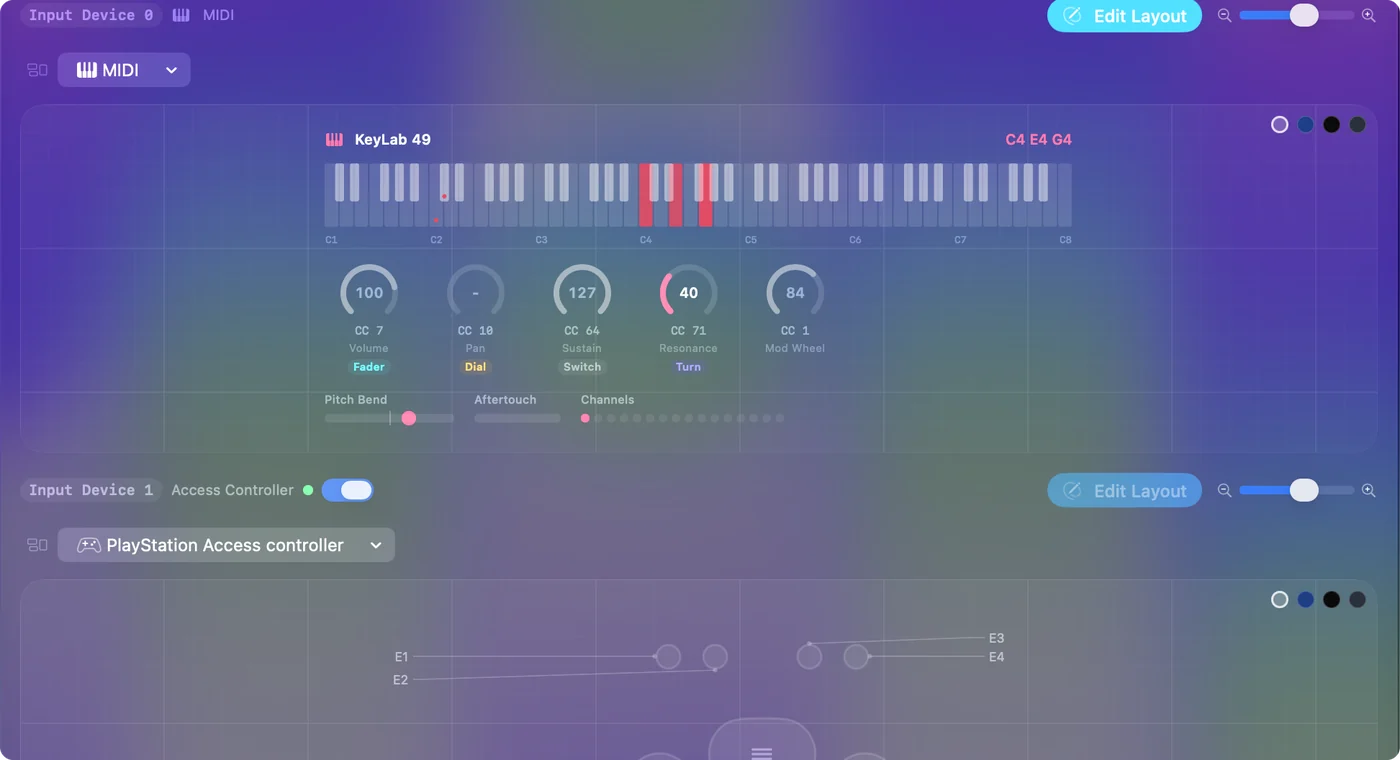
- Check: Pick MIDI in the Live Visualizer panel's menu and play a few keys. They show on the MIDI map.
Step 2: Bind a key
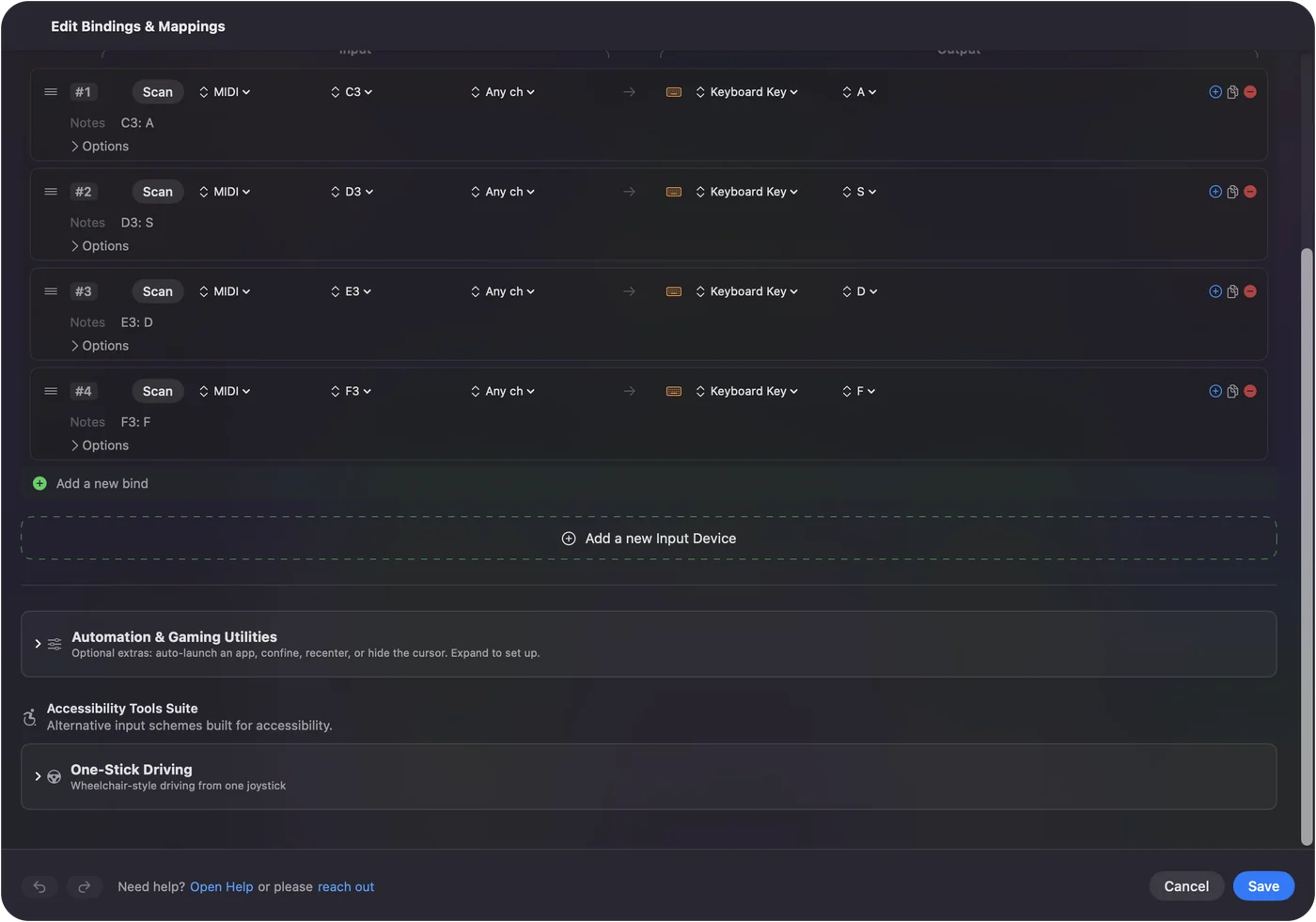
- You: Make a preset, add a row, press Scan, and play the key or pad you want. Pick the output: a letter, a key combination such as Command S, a macro, or Type Text for a whole phrase.
- InputConfig: Records the note and its channel on the row.
- Check: Activate the preset and play the key in a text field.
Do the same for each key you need. It works in every app, with no game controller connected. A key is held down for as long as you hold the note, so a note on a row that sends Shift works like holding Shift. Notes the row menu does not list are still caught by Scan.
 InputConfig is free on the Mac App Store. macOS 14 or later, no account, no tracking, open source.
Map letters for a virtual piano
Browser pianos and the pianos in some games play from the letter keys: a row of letters for the white keys, often with Shift and a letter for the black keys. Give each MIDI note a row that sends its letter, and each black key a row that sends Shift plus its letter. A chord presses several letters at once, just as it would on the computer keyboard.
Two limits to know before you build sixty rows:
- No velocity. It is not passed on, because a letter key has no way to say how hard it was pressed.
- Shared Shift. While a black key holds Shift, a white key pressed in the same instant arrives shifted too, which shows in fast passages.
I have not tested this with any particular piano site or with Roblox. Map one short phrase and try it before you map the whole keyboard.
Give it better jobs than letters
- Shortcuts on pads. Copy, paste, undo, save, a menu command.
- Type Text. A signature, an address, or a code snippet from one key.
- Big keys for small ones. Return, Escape, Tab and the arrow keys on big pads, for hands that find small keys hard. The built-in MIDI: Knob Deck preset puts Return and Escape on the two lowest pads.
- Knobs. In Dial mode a knob is the scroll wheel, faster the further you turn; in Turn mode each step presses an arrow key; bound to System Volume it is the Mac's volume fader.
- The sustain pedal. A held Shift, a click, or Space. It sends Control Change 64 and fires once it passes halfway.
- Apps and the Mac. Open App, Open URL, Run Siri Shortcut, and system functions such as Start Dictation and Mission Control.
InputConfig listens to keyboards alongside macOS and cannot stop a spare numpad's 7 from typing 7, and keys from every keyboard count as the same key. The macro deck guide compares the two. A pad types nothing on its own, which makes it a cleaner macro pad than a second computer keyboard.
Keep your music apps happy
InputConfig reads a copy of what the keyboard sends and does not take it away, so GarageBand or your DAW still hears every note.
- Armed tracks. If a track is armed, it records the keys you use as shortcuts. Disarm the track, or keep the shortcut keys on a channel or a range of notes the music app ignores.
- Two keyboards. Each row can be limited to one channel or one device from its second menu, so two keyboards can do different things.
Keep shortcut keys off armed tracks, and the music app and the shortcuts never collide.
If a key types nothing
Climb this ladder, smallest step first:
- Check Audio MIDI Setup. If the keyboard is not there, the Mac does not see it. Controllers with a DAW-specific mode should be switched to their plain MIDI mode.
- Watch the MIDI map. If the key shows there, InputConfig hears it, and the row is the question.
- Allow Accessibility. Without it no app can press keys for you.
- Check the row's channel and device. A row limited to one channel or device ignores the others.
If the note shows on the MIDI map, any row can use it.
Go the other way: the computer keyboard as a MIDI keyboard
GarageBand's Musical Typing turns the letter keys into notes, inside GarageBand only. To play notes into any music app, InputConfig can send MIDI through its own virtual port, named InputConfig, which the music app picks as an input. See MIDI output and the gamepad as a MIDI instrument guide. A computer key still types in the front app while it sends a note, so a game controller makes the cleaner instrument.
The short version
- Connect. USB or Bluetooth MIDI; check Audio MIDI Setup.
- Bind. Scan a key, pick a letter, shortcut or phrase.
- Limits. No velocity, and Shift is shared across a chord.
A few keys of shortcuts often do more than a whole keyboard of letters.
Questions
Can a MIDI keyboard type on a Mac?
Not by itself. macOS treats it as an instrument. An app such as InputConfig maps each key or pad to a letter, a shortcut, or a typed phrase, and the mapping works in every app.
Does it need a driver?
Not for class-compliant USB or Bluetooth MIDI gear. If the keyboard shows up in Audio MIDI Setup, InputConfig can read it. Controllers with a DAW-specific mode should be switched to their plain MIDI mode.
Can one key type a whole word or sentence?
Yes. Use Type Text as the row's output, or a macro for a sequence of keys and clicks with its own timing.
Which MIDI keyboards work?
Any keyboard, pad controller or knob box that appears in Audio MIDI Setup. I have not tested every model, so that is the check to make before you buy anything.
Will my DAW still hear the notes?
Yes. InputConfig reads a copy of the MIDI and does not intercept it. Keep shortcut keys off armed tracks.
Related
Free. macOS 14 or later. No account, nothing leaves your Mac. Open source on GitHub.