A macro deck from a numpad, MIDI pad, or controller
 InputConfig is completely free on the Mac App Store. You don't have to make an account, there are no subscriptions, and nothing is locked. Optimized for Apple silicon.
You can build a free macro pad on a Mac from a numpad, a MIDI pad, a game controller, or F13 to F19 keys, with no drivers, no companion app, and no subscription. InputConfig gives every key, pad or button a job: open an app, run a macro, type a phrase, start dictation.
One thing to know before you buy anything: InputConfig listens to a keyboard and does not block or remap the key itself. A numpad key still types its digit in the front app, and every keyboard reports as one synthetic device id, so the same key on any keyboard triggers the row. That makes the cleanest macro decks the devices that type nothing: a MIDI pad, a game controller, or keys nothing else uses. I cover all of them here.
On this page: 9 sections
Steps
- Pick a device that types nothing: a MIDI pad, a spare game controller, or a keyboard or pedal that sends F13 to F19.
- In InputConfig, add a row, press Scan, and press the key, pad or button.
- Pick an output: Open App, a macro, Type Text, a system function, or anything else in the output list.
- For a numpad, add the Numpad Macro Deck preset from this page, knowing each key still types its digit.
- Give each key a hold and a double press for more actions.
Choose a deck that types nothing
Climb this ladder, from the cleanest deck to the one with a catch:
- A MIDI pad. A sixteen-pad MIDI controller is the best cheap macro deck for a Mac: every pad and knob can be bound, and a MIDI note never types a letter anywhere. Knobs can drive volume or scroll. The MIDI input page covers binding, and the control surface guide builds a full deck.
- A spare game controller. Its buttons send nothing until you bind them, and they support chords.
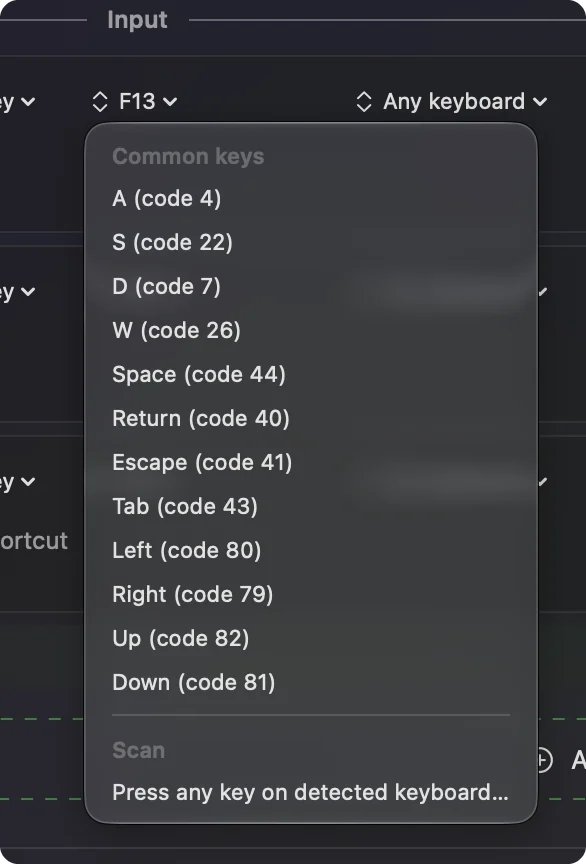
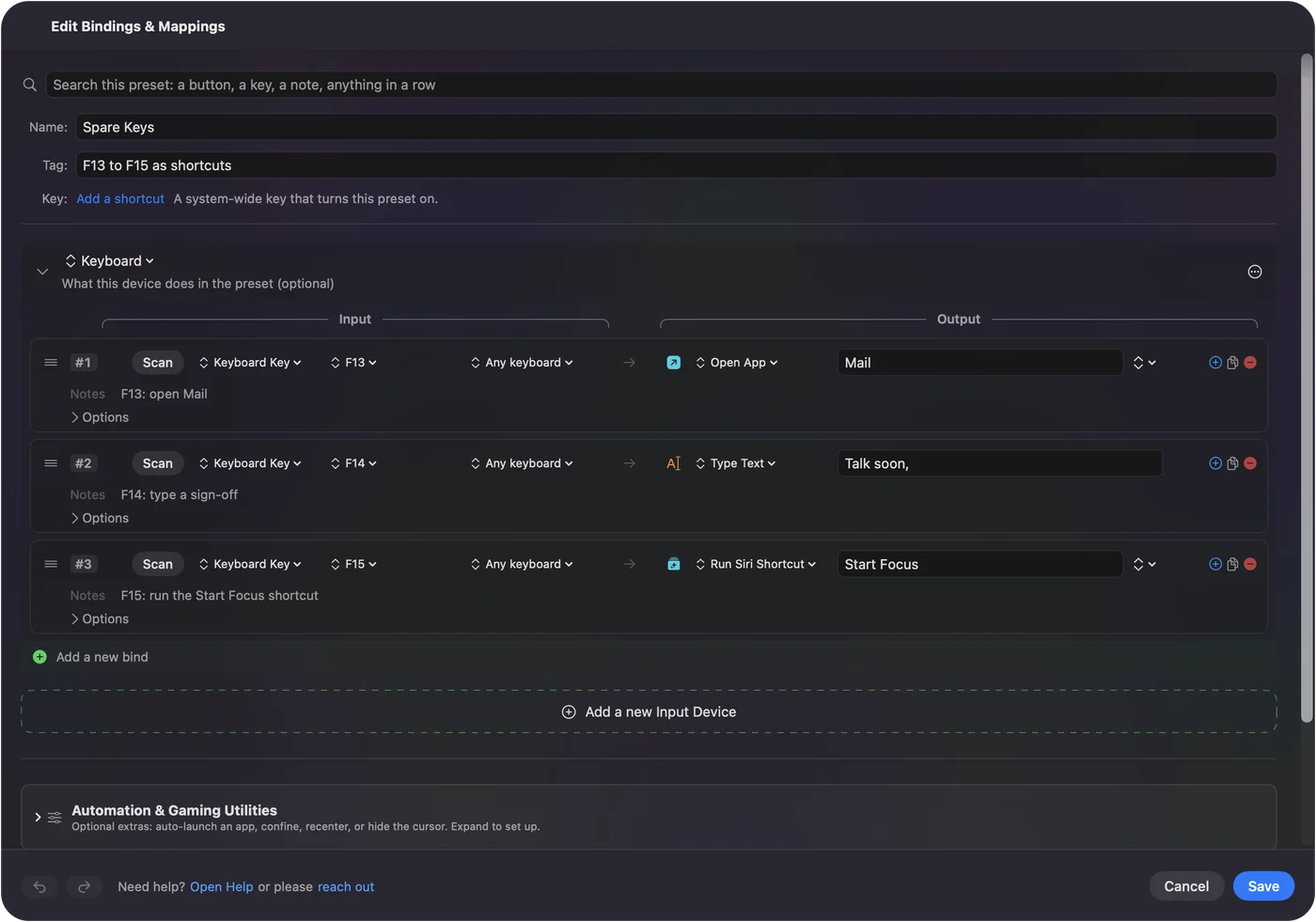
- Keys that type nothing: F13 to F19. On a keyboard that has them, or a programmable macro pad or foot pedal whose own software can send them. macOS and most apps ignore these keys.
- A numpad. Seventeen keys under one hand, but each still types its digit.
Which keyboards have F13 to F19 covers the models and what to do on a MacBook, which has none. Any keyboard macOS sees works, wired or Bluetooth. A deck that types nothing can never type into the wrong window.
Bind a key, pad or button
Every deck is set up the same way, one row at a time.
- You: In InputConfig, add a row, press Scan, and press the key, pad or button. Then pick an output: Open App, a macro, Type Text, a system function, or anything else in the output list.
- InputConfig: Records the input and fires the output each time you press it, in every app.
- Check: Press it with another app in front. The output happens, and for F13 to F19, a MIDI pad or a controller, nothing types.
InputConfig reads keys through the Accessibility permission it already has, so no extra permission is needed. The streaming deck guide uses the same F13 to F19 keys for OBS.
Use the numpad deck, knowing its catch
Numpad keys have their own key codes, so a numpad's 1 is a different key from the 1 above the letters, which is why a numpad deck works at all. Both still type a 1. The preset on this page puts the table below on the standard numpad key codes, so it suits a spot where a stray digit is harmless, or copy the same outputs onto F13 to F19 or a MIDI pad.
| Numpad key | Does |
|---|---|
| 1, 2, 3 | Open App: Mail, Safari, Calendar |
| 4, 5, 6 | Open App: Messages, Notes, Finder |
| 7 | Macro: Command C, switch app, Command V (copy to the previous app) |
| 8 | Type Text: your email address (placeholder) |
| 9 | Type Text: a sign-off (placeholder) |
| 0 | Start Dictation |
| . | Speak Selection |
| Enter | Mission Control |
| + | Volume Up |
| - | Volume Down |
| * | Play / Pause |
| / | Lock Screen |
| Numlock | Emergency Stop |
InputConfig cannot tell two keyboards apart, so a second full keyboard with letters on it is a poor fit. Karabiner-Elements can split keyboards per device if that is what you need. A numpad deck adds a job to each key, but it never takes the digit away.
Build a macro with timing
A macro is a list of steps with a delay before each and a hold time for keys. You build it step by step in the row's Options, which keeps every step and wait visible. InputConfig does not record macros. The copy-to-previous-app macro on 7 runs like this:
- Copy. Hold down Command, tap C, release Command.
- Wait. 300 ms for the app switch.
- Paste. Hold down Command, tap V, release.
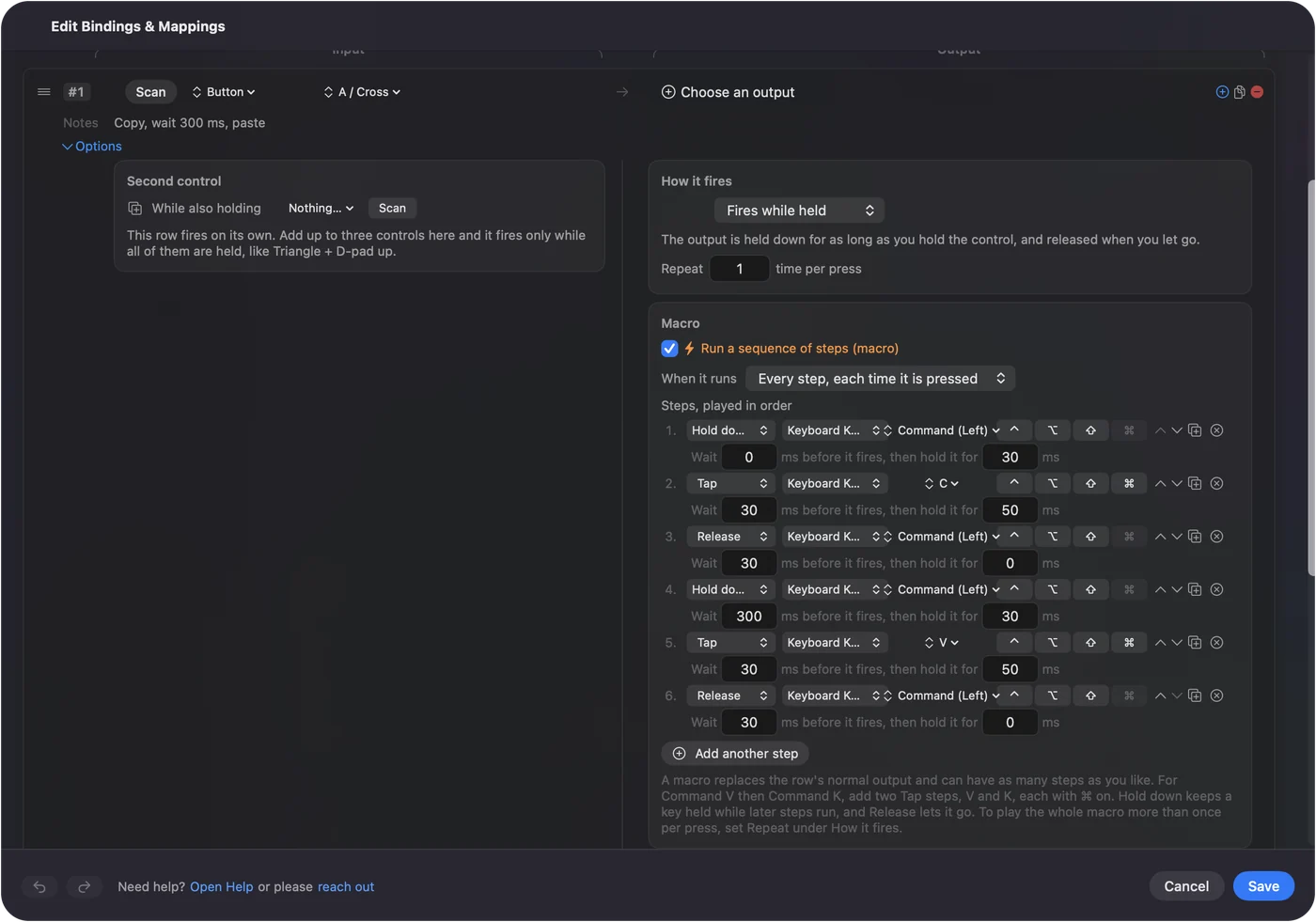
If a macro drops a step, lengthen the delay before it. App switches need 300 to 500 ms. The macro page has the details.
Get more actions per key
Two ways to multiply a small deck:
- Holds and double presses. Press 1 for Mail, hold 1 for a Mail shortcut, double press 1 for something else. Seventeen keys with a hold each is thirty-four actions. This works on keyboard, mouse and MIDI rows.
- Chords on a controller. Game controller buttons also support chords: one held button gives every other button a second job. Keyboard, mouse and MIDI rows do not have chords.
A deck has no lights, but a printed strip above the keys works, and Speak on each row announces the action while you learn it.
The short version
- Best deck. A MIDI pad or a spare controller, because they type nothing.
- Keyboard deck. Use F13 to F19, and never letters.
- Numpad deck. Works, but every key still types its digit.
- More actions. A hold and a double press on every key.
Pick hardware that types nothing on its own, and every key becomes a clean shortcut.
Download
- Numpad Macro Deck presetThe numpad table above, on the standard numpad key codes. The keys still type their digits too. 9 KB
To add a downloaded preset: drop the file on InputConfig's Dock icon, or click the … button next to any preset in the sidebar, choose Import Preset File, and pick the file. It lands in the sidebar, ready to activate or edit. Any launch target inside a preset file is cleared on import; add one yourself in the editor if you want it.
Questions
Does the numpad key still type its digit?
macOS lets InputConfig listen to keys, not remove them, so the key does its new job and still types. Use F13 to F19, a MIDI pad, or a game controller for a deck that types nothing.
Can InputConfig tell two keyboards apart?
No. A bound key triggers its row from any keyboard. Numpad keys are separate key codes from the number row, which is why a numpad deck works at all.
Bluetooth numpads?
Any keyboard macOS sees, wired or Bluetooth.
Can the deck have a light or a label?
No lights, but a printed strip above the keys works, and Speak on each row announces the action while you learn it.
Can a numpad be a Stream Deck for OBS?
It can, with one catch. Bind each numpad key to send one of F13 to F19 and set those as hotkeys in OBS. The digit still types in whatever app is in front, because InputConfig cannot take a key away, so a MIDI pad or a spare game controller makes the cleaner deck.
Can InputConfig record a macro?
No. You build a macro step by step in the row's Options, which keeps every step and wait visible. Each step is a key or a click.
Related
This page in other languages: العربية, Čeština, Dansk, Deutsch, Español, Suomi, Français, עברית, Magyar, Bahasa Indonesia, Italiano, 日本語, 한국어, Norsk, Nederlands, Polski, Português, Русский, Slovenčina, Svenska, ไทย, Türkçe, Українська, Tiếng Việt, 繁體中文, 简体中文
Completely free. You don't have to make an account, there are no subscriptions, and nothing is locked. Optimized for Apple silicon. Open source on GitHub.
Updated