Counter-Strike 2 on a Mac, from a controller
 The Counter-Strike 2 layout is built into InputConfig, free on the Mac App Store. You don't have to make an account, there are no subscriptions, and nothing is locked. Optimized for Apple silicon.
On a Mac: Valve dropped the Mac when CS:GO became Counter-Strike 2; Steam sells it for Windows and Linux only. On a Mac it plays by streaming from a Windows PC you own, or from a cloud service that carries it. The controller lives on the Mac, so InputConfig can turn it into keyboard and mouse for the stream.
You can play Counter-Strike 2 from a controller on a Mac, but only over a stream and only as keyboard and mouse. CS2 dropped the Mac build that CS:GO had, and the PC game has never had a controller scheme anyone would choose, so the setup is a stream of a Windows machine with InputConfig turning the pad into keys and a mouse. So I made it a good keyboard and mouse.
I will not sell this as competitive: nobody counter-strafes an AWP peek from a thumbstick against a mouse player with 300 hours. But Counter-Strike is also a game you play with friends at 11pm on a Wednesday, and for that a sofa and a controller are exactly right.
On this page: 9 sections
The layout, control by control
How the layout thinks
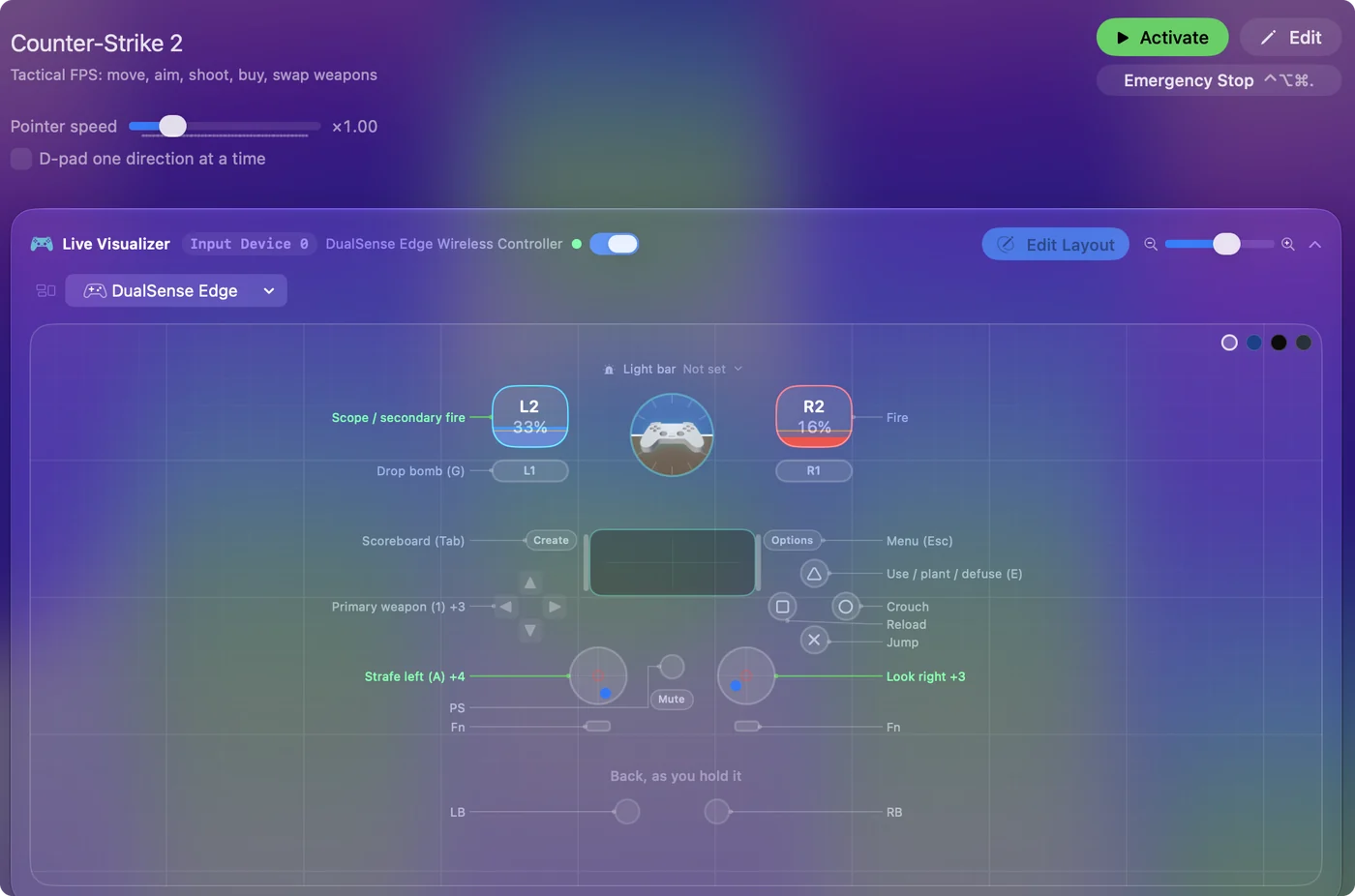
- Move. W, A, S and D on the left stick. CS has no analog walk speed, so a stick past its deadzone is a full key, and counter-strafing is a flick to the opposite side. Keep the deadzone small on those rows so the key lands the instant you flick.
- Look. The right stick is the mouse, 20 across and 14 up and down, tuned for holding head height rather than looking at the sky.
- Shoot. The right trigger fires. The left trigger is right click, which scopes the AWP and the SG, switches the FAMAS to burst, and does nothing on a rifle, so it costs nothing.
- Face buttons. Jump, crouch, reload, and E to plant, defuse and pick up.
- Bomb and walk. G on the left bumper drops the bomb. The left stick click is Shift for the silent walk.
- Weapons and menus. The D-pad is the three weapon slots and the buy menu (B). Tab and Escape are on Create and Options.
Keep the movement deadzone small, because counter-strafing lives in that first bit of stick travel.
Tune it to how you play
- Buying without the cursor. The buy menu is a grid you click. Use the game's buy binds instead: in the console, bind a key to a buy command, then give those keys to the face buttons behind a chord. One hold and a tap buys your rifle.
- Grenades on their own keys. Slot 4 cycles them, slowly. CS lets you bind each grenade to a key. Do that and put flash, smoke and molotov behind a chord on the D-pad.
- Walk that stays. Set the Shift row to Toggles on and off, for a walk you do not have to hold while you also push the stick.
- The flick. Try the Aggressive curve on the four look rows. Small corrections stay small and the last third of the stick turns fast. Streams add latency, so if it overshoots, go back to Smooth and raise the speed.
- Gyro. On a DualSense, gyro to mouse at a low speed with Pause Motion While Held on a paddle is the best aim a controller gets in this game: the stick for the turn, your wrist for the head. Gyro aim covers the setup.
CS2 console: buy an AK-47 from the keypad 5 key.
bind kp_5 "buy ak47"What happens: keypad 5 now buys the rifle, so give that key to a chord row in InputConfig.
CS2 console: put the flashbang on F.
bind f "use weapon_flashbang"What happens: F pulls out the flashbang directly. Bind smoke and molotov the same way.
Buy binds and grenade binds do more for a controller player than any curve.
What it cannot do
- It cannot remove stream latency. The stream is the real cost here, and keyboard players on a stream pay the same cost.
- It does not touch the game. InputConfig runs on the Mac and produces normal keyboard and mouse events for the stream client. Nothing runs on the Windows machine, and the game sees a keyboard.
- It is not an anti-cheat ruling. I am not going to speculate about VAC policy beyond describing what the software does.
The game sees a keyboard and a mouse, and that is all the software does.
Counter-Strike 2 controller support: controller or keyboard
Steam's store page lists no controller support for Counter-Strike 2, so it was made for a keyboard and mouse, and that is how it expects to be played. A controller still works: this layout sends the game's keys and mouse movement from the pad, so to the game you are simply typing and pointing. No controller support listed means the layout does the work, not the game.
From Steam's listing, checked in October 2026. Every game's listing is in Mac games with controller support.
If your controller is not working in Counter-Strike 2
When Counter-Strike 2 does not react to your controller on a Mac, climb this ladder, smallest step first:
- Check that the Mac sees the controller. Open the gamepad tester and press a button. If nothing lights up there, the problem is the connection, and a controller that is connected but not working covers that first.
- Press a button after the stream has started. A stream only picks up a controller that is paired with the Mac, and a browser shows a controller to a page only after a button press. Start Counter-Strike 2, then press any button. Streaming from your own PC has its own checks, in how to stream PC games to a Mac with a controller.
- Play it from keys. If Counter-Strike 2 still ignores the pad, activate this layout. It sends the keyboard and mouse controls Counter-Strike 2 already reads. The layout works whether or not Counter-Strike 2 ever sees the controller.
Get it in two clicks
- Get InputConfig free on the Mac App Store, open it, and click Smart Preset Maker on the welcome screen.
- Search for Counter-Strike 2 and pick it. The layout is created as a preset in your sidebar, named and ready.
- Press Activate. Every row can be changed afterwards: the editor's Scan button rebinds any control the moment you touch it.
To check the controller itself first, the gamepad tester shows every button and stick live in your browser.
Counter-Strike 2 controls: every button and the key it sends
The Sends column is Counter-Strike 2's default keyboard and mouse controls, as this layout expects them. If you changed a key in the game's settings, change the same row in InputConfig.
| Controller | Sends | What it does |
|---|---|---|
| Left stick left | A | Strafe left (A) |
| Left stick right | D | Strafe right (D) |
| Left stick up | W | Move forward (W) |
| Left stick down | S | Move back (S) |
| Right stick right | Mouse motion right (speed 20) | Look right |
| Right stick left | Mouse motion left (speed 20) | Look left |
| Right stick down | Mouse motion down (speed 14) | Look down |
| Right stick up | Mouse motion up (speed 14) | Look up |
| Right trigger | Left click | Fire |
| Left trigger | Right click | Scope / secondary fire |
| A / Cross | Space | Jump |
| B / Circle | Ctrl (Left) | Crouch |
| X / Square | R | Reload |
| Y / Triangle | E | Use / plant / defuse (E) |
| LB / L1 | G | Drop bomb (G) |
| L3 (left stick click) | Shift (Left) | Walk quietly (hold) |
| D-pad up | 1 | Primary weapon (1) |
| D-pad left | 2 | Secondary weapon (2) |
| D-pad down | 3 | Knife (3) |
| D-pad right | B | Buy menu (B) |
| Back / Share / Select | Tab | Scoreboard (Tab) |
| Start / Options | Escape | Menu (Esc) |
Button names follow the Xbox / PlayStation pair shown in the editor, so A / Cross is the bottom face button on either pad. On a Switch Pro Controller the bottom button is labeled B; the mapping still fires on position.
Questions
Does Counter-Strike 2 run on a Mac?
No. CS:GO had a Mac build. Counter-Strike 2 does not. On a Mac it plays by streaming a Windows PC or through a cloud service that carries it, and this layout works on the Mac side of either.
Does CS2 have controller support?
Not in any useful form on PC. The game is built for keyboard and mouse, so a controller layout has to be keyboard and mouse, which is what this is.
Can I buy weapons without the mouse?
Yes, with the game's own buy binds in the console. Bind buy commands to keys and put those keys on the controller behind a chord.
Does Counter-Strike 2 have controller support?
Not by itself. Steam lists no controller support for Counter-Strike 2. A controller still works through a layout like this one, which sends the game's keys.
Is Counter-Strike 2 better with a controller or a keyboard?
It was made for a keyboard and mouse: Steam lists no controller support for Counter-Strike 2. A controller still works through this layout, which sends the game's own keys and mouse movement.
Why is my controller not working in Counter-Strike 2 on a Mac?
First check the Mac itself sees the controller, with the gamepad tester. If it does and Counter-Strike 2 still ignores it, activate the Counter-Strike 2 layout in InputConfig, which sends the game's keyboard and mouse controls from the controller.
Can I play Counter-Strike 2 on an M1 Mac or a MacBook Air?
Yes, through a stream. Counter-Strike 2 runs on the other end, on a cloud service or your own PC, so the Mac only plays the video and sends your input. An M1 MacBook Air streams it like any other Mac.
Related
Completely free. You don't have to make an account, there are no subscriptions, and nothing is locked. Optimized for Apple silicon. Open source on GitHub.
Updated