Questions
Screenshots with the PS5 Create button on a Mac
Yes, the Create button takes screenshots on a Mac, through macOS's share gestures. macOS treats the Create button on a DualSense, the Share button on a DualShock 4 or an Xbox Series controller, and the Capture button on a Switch controller as a share button, and what its gestures do is set in System Settings, Game Controllers. Apple's own description is a screenshot or a brief video of gameplay.
The one catch is that a game or app can take the button for itself, and while it does, the screenshot gesture does nothing. InputConfig, the free mapper I make, leaves the button to macOS unless something in it needs the button.
On this page: 9 sections
Steps
- Connect the controller to the Mac.
- Open System Settings and click Game Controllers in the sidebar.
- Select the controller and choose what the share gestures do.
- Press Create the way the setting says and check that the capture appears.
Set up the share gestures
Connect the controller first. Connect a PS5 controller to a Mac has the pairing steps.
- You: Open System Settings, click Game Controllers in the sidebar (it appears once a controller has been connected), select the controller and look for the share gesture options.
- macOS: Runs the gesture you pick whenever you press Create that way.
- Check: Press Create the way the setting says, and the capture appears.
The choices, and which gesture takes a screenshot or starts a recording, have changed between macOS versions. Read the gestures on that page rather than from an old guide. The same panel lets you remap buttons for games and choose what the Home button does. The macOS controller settings page goes through all of it.
 InputConfig is free on the Mac App Store. macOS 14 or later, no account, no tracking, open source.
Why Create stops taking screenshots
Apple lets an app ask for the share button. While the app has it, presses go to the app and macOS's gesture is switched off. Games do this when they use Create for their own menu, and controller mappers do it so the button can be bound. When a screenshot gesture stops working, look first at which apps are running.
When InputConfig takes Create
Since 1.6, InputConfig leaves Share, Create and Capture to macOS unless something needs them. With no preset running, the screenshot gesture works as usual. InputConfig takes the button only in two cases:
- A row uses it. The running preset has a row on the button.
- Scan is listening. Scan is waiting for you to press a control.
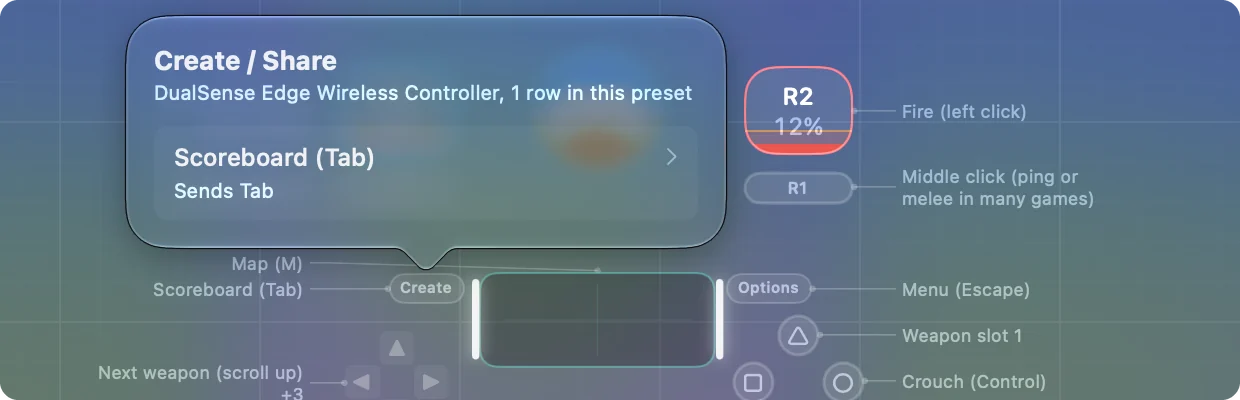
The emergency stop does not count. Its controller hold is Back and Start together, which is Create and Options on a DualSense, and InputConfig reads that hold without taking Create from macOS, so the screenshot gesture keeps working. The first case matters on PlayStation pads: many built-in presets put something on Create, and in FPS (PS5 DualSense) and Minecraft, Create presses Tab. A running preset takes Create on a PlayStation pad only when it has a row on it.
Xbox controllers are different. Their Share button is a separate button from View, so it keeps its macOS gesture while a preset runs unless a row uses Share. The Switch Capture button works the same way.
Keep the screenshot while a preset runs
Free the button from any row. The emergency stop hold can stay as it is, because it never takes Create from macOS.
Step 1: Move the row
- You: Select your preset and click Create on the controller drawing in the Live Visualizer. Click Edit, then delete that row or move it to another button.
- InputConfig: Tells you what the button does and jumps to its row when you click it.
- Check: No row is left on Create.
Step 2: Test it
- You: Activate the preset and press Create.
- macOS: Runs its share gesture again.
- Check: The screenshot appears.
More on the stop itself: emergency stop. Leave the emergency stop on; it shares Create with macOS.
Put a screenshot on any button
If you would rather keep Create for something else, any row can take the screenshot:
- Screenshot Menu. The system function presses Command Shift 5, which opens the capture toolbar with screen recording in it.
- Command Shift 3. A row that presses it captures the whole screen.
- Command Shift 4. A row that presses it captures a region.
- A ready-made layout. The Screenshot and Recording layout in the Smart Preset Maker does all of this: A captures the screen, B a region you drag with the stick, X opens the toolbar, Y copies a region to the clipboard.
These work in every app while the preset runs, whatever the share gesture is set to.
What it cannot do
The PS, Home and Xbox buttons are a separate case. While InputConfig is open it takes them from macOS so they can be bound like any other button. Whatever macOS is set to do with the Home button, such as opening the Games app, happens again once InputConfig quits.
The short version
- Set it. System Settings, Game Controllers, the controller, share gestures.
- If it stops. An app has the button. In InputConfig that is a row on Create in the running preset, or Scan waiting for a press.
- Or skip it. Put Command Shift 5 on any button.
Move the row off Create once, and Create takes screenshots again while you play.
Questions
Does the PS5 Create button take screenshots on a Mac?
Yes, through macOS's share gestures, set in System Settings, Game Controllers. Select the controller and choose what the gestures do.
Why did my Create button stop taking screenshots?
An app took the button. Games and controller mappers can ask macOS for it, and the gesture is off while they have it. In InputConfig that happens while a running preset has a row on Create, or while Scan is waiting for a press. The emergency stop hold does not take it.
Can I record gameplay with the Create button on a Mac?
macOS's share gestures include recording. The exact choices for each gesture are on the controller's page in System Settings, Game Controllers, and they differ between macOS versions.
Does the Xbox Share button work on a Mac?
Yes, the same way: it takes the share gestures set in System Settings, Game Controllers. InputConfig leaves it to macOS unless a row in the running preset uses it.
Can I use Create as a normal button instead?
Yes. In InputConfig it is button 8, labeled Create on a PlayStation pad, and binds to keys, clicks or anything else a row can send.
Related
Free. macOS 14 or later. No account, nothing leaves your Mac. Open source on GitHub.