Screenshots and recording from a game controller
 The Screenshot & Recording layout is built into InputConfig, free on the Mac App Store. You don't have to make an account, there are no subscriptions, and nothing is locked. Optimized for Apple silicon.
On a Mac: Sends the standard macOS screenshot shortcuts, so captures behave as they do from the keyboard and land where the capture toolbar's Options say.
Yes, you can take screenshots on a Mac from a game controller: whole screen, a region you drag with the stick, the capture toolbar for recording, and a region straight to the clipboard, each on one button. The keyboard versions are three or four keys pressed together, which for some hands is impossible and for everyone is fiddly. Captures behave exactly as they do from the keyboard and land where the toolbar's Options say.
The layout, control by control
How the layout thinks
- Four captures. Whole screen (Command Shift 3) on the bottom face button, a region (Command Shift 4) on the right, the capture toolbar with screen recording (Command Shift 5) on the left, a region to the clipboard (Command Control Shift 4) on the top.
- Drag the region. The left stick moves the crosshair and the right trigger clicks and drags the selection.
- Confirm or cancel. Return on Share or View confirms, Escape on Options cancels.
A note on the PlayStation Share and Create buttons: they keep their own macOS screenshot and recording shortcut unless the running preset uses them. This preset binds Share to Return, so while it runs, that button confirms instead. Hold the trigger and push the stick, and the region draws itself.
Tune it for capturing
- Capture a window. After Command Shift 4, Space switches to window mode. Put a Space row on a bumper.
- Feel the shutter. Vibrate on each capture row, since the shutter sound is often off.
- Timers and save location. Both live in the capture toolbar's Options menu. Open it with the left face button and set them once.
- From any preset. InputConfig's Screenshot Menu system function sends Command Shift 5, the same toolbar, from any button in any preset.
Start a recording from the toolbar: pick a recording mode and press Return. Stop it from the menu bar. Put Screenshot Menu in your other presets and every capture is one button away.
The short version
- Bottom button for the screen. The right button captures a region.
- Left button for recording. It opens the toolbar, and Return starts the recording.
- Captures go to the desktop. They go wherever the toolbar's Options point, if you changed it.
Set the save location once and forget it. Four buttons replace every screenshot shortcut on the Mac.
Get it in two clicks
- Get InputConfig free on the Mac App Store, open it, and click Smart Preset Maker on the welcome screen.
- Search for Screenshot & Recording and pick it. The layout is created as a preset in your sidebar, named and ready.
- Press Activate. Every row can be changed afterwards: the editor's Scan button rebinds any control the moment you touch it.
Every binding, as a table
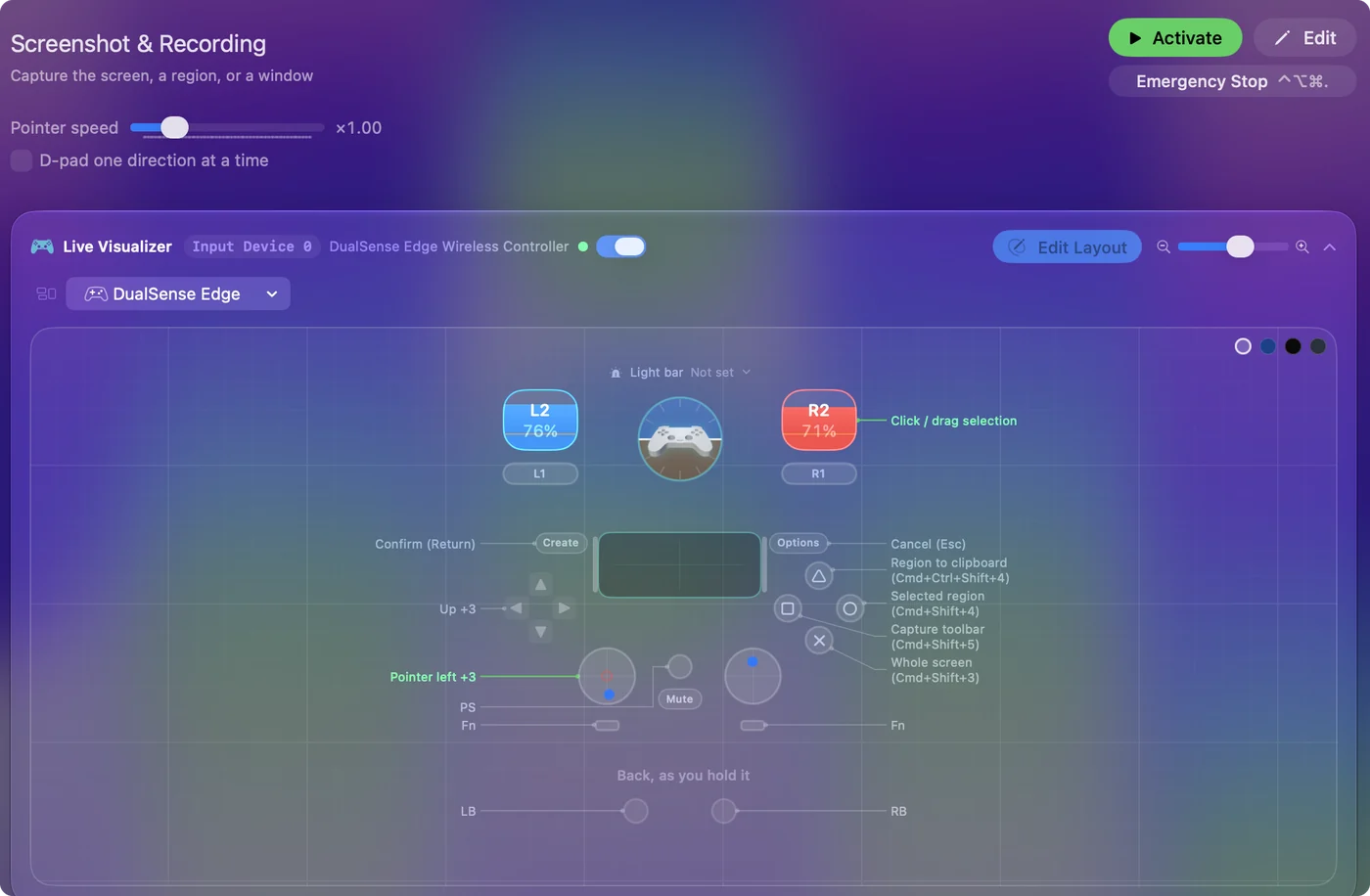
| Controller | Sends | What it does |
|---|---|---|
| Left stick left | Mouse motion left (speed 16) | Pointer left |
| Left stick right | Mouse motion right (speed 16) | Pointer right |
| Left stick up | Mouse motion up (speed 16) | Pointer up |
| Left stick down | Mouse motion down (speed 16) | Pointer down |
| Right trigger | Left click | Click / drag selection |
| A / Cross | Command (Left), Shift (Left), 3 | Whole screen (Cmd+Shift+3) |
| B / Circle | Command (Left), Shift (Left), 4 | Selected region (Cmd+Shift+4) |
| X / Square | Command (Left), Shift (Left), 5 | Capture toolbar (Cmd+Shift+5) |
| Y / Triangle | Command (Left), Ctrl (Left), Shift (Left), 4 | Region to clipboard (Cmd+Ctrl+Shift+4) |
| Start / Options | Escape | Cancel (Esc) |
| Back / Share / Select | Return | Confirm (Return) |
| D-pad up | Up | Up |
| D-pad down | Down | Down |
| D-pad left | Left | Left |
| D-pad right | Right | Right |
Button names follow the Xbox / PlayStation pair shown in the editor, so A / Cross is the bottom face button on either pad. On a Switch Pro Controller the bottom button is labeled B; the mapping still fires on position.
Questions
Where do the screenshots go?
They go to the desktop, or wherever the capture toolbar's Options point.
Can a controller start a screen recording?
Yes. The left face button opens the capture toolbar. Pick a recording mode and press Return to start. Stop it from the menu bar.
Related
Completely free. You don't have to make an account, there are no subscriptions, and nothing is locked. Optimized for Apple silicon. Open source on GitHub.
Updated