Spotlight from a game controller
 The Spotlight Search layout is built into InputConfig, free on the Mac App Store. You don't have to make an account, there are no subscriptions, and nothing is locked. Optimized for Apple silicon.
On a Mac: Spotlight is part of macOS and opens on Command Space in any app. If you moved Spotlight to another key in System Settings, Scan the row.
Yes, you can open Spotlight from a game controller on a Mac, step through results on the D-pad, and open one or reveal it in Finder. Spotlight is the best launcher on the Mac and it is one key, which makes it one button. Add dictation and any app or file is three presses away: open, say it, Return.
The layout, control by control
How the layout thinks
- Open and close. Open Spotlight (Command Space) on the bottom face button, close (Escape) on the left.
- Choose a result. D-pad up and down move through results.
- Act on it. Open the result (Return) on the right, reveal in Finder (Command Return) on the top.
- Edit the search text. D-pad left and right, and the two bumpers, move the cursor in the search field.
- Point. The left stick is a pointer and the right trigger clicks.
Spotlight opens on Command Space in any app. If you moved it to another key in System Settings, Scan the row. Open, step, Return: Spotlight was always one key, and now it is one button.
Search without typing
- Dictation. Add a Start Dictation row and the search is spoken. Open, dictate, Return: three buttons to any app or file.
- Sums and conversions. Spotlight answers "what is 15 percent of 240" if you say it.
- The Spotlight output. InputConfig also has a System Function called Spotlight Search, which sends Command Space from any row. The built-in Easy Browse preset uses it on Start and the touchpad press.
- A slower pointer. For clicking a result instead of using the D-pad, lower the Pointer speed slider on the preset's page.
For longer text than a name, the on-screen keyboard page covers the other options. A dictation row turns Spotlight into a launcher you talk to.
The short version
- Add dictation. That is the missing piece.
- Put Spotlight in every preset. Copy the row, or use the Spotlight Search system function on a spare button.
- Use the D-pad for results. It is faster than aiming.
One button for Spotlight in every layout is worth the minute it takes. With Spotlight and dictation on buttons, the whole Mac is a few presses away.
Get it in two clicks
- Get InputConfig free on the Mac App Store, open it, and click Smart Preset Maker on the welcome screen.
- Search for Spotlight Search and pick it. The layout is created as a preset in your sidebar, named and ready.
- Press Activate. Every row can be changed afterwards: the editor's Scan button rebinds any control the moment you touch it.
Every binding, as a table
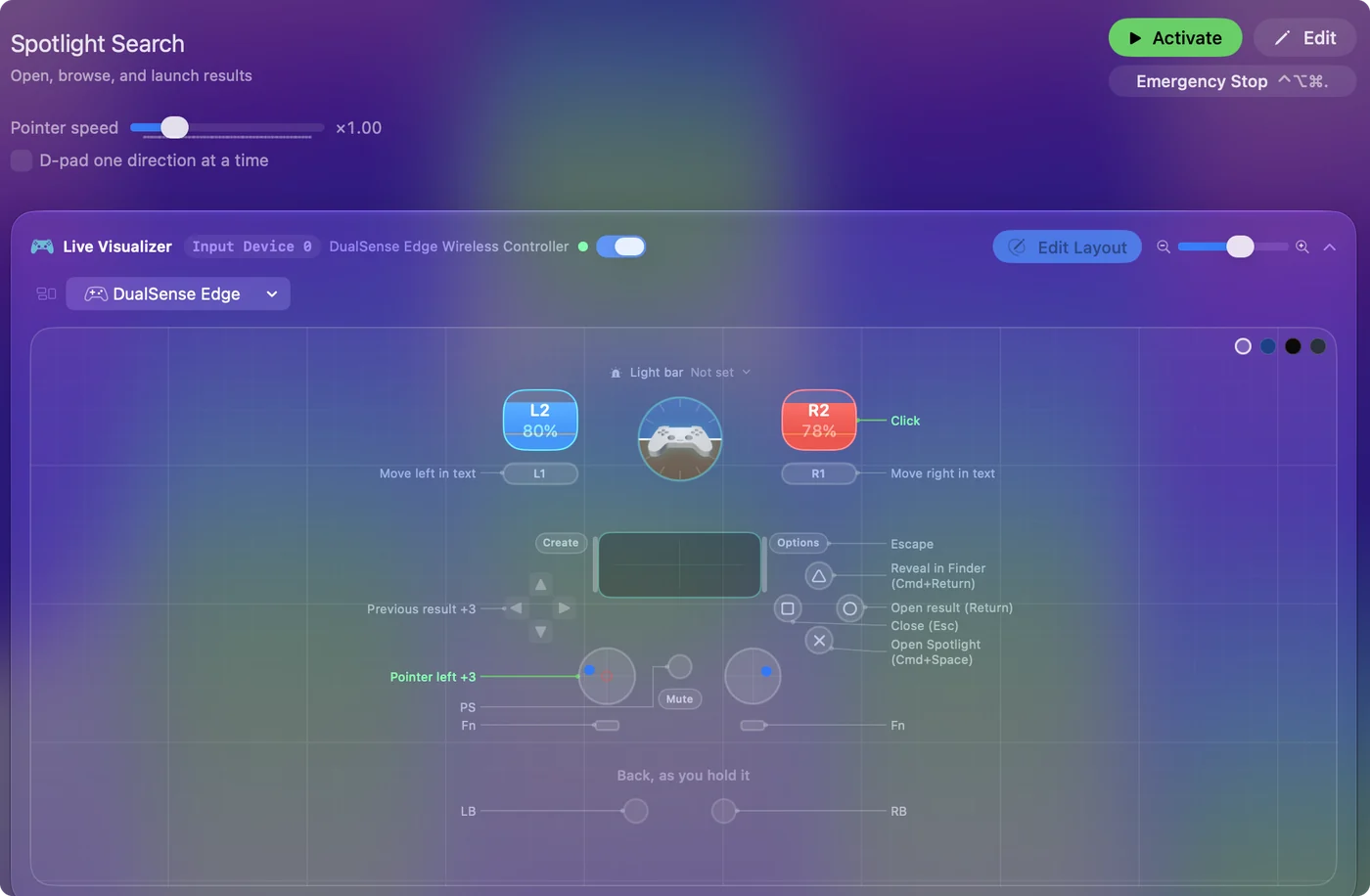
| Controller | Sends | What it does |
|---|---|---|
| Left stick left | Mouse motion left (speed 16) | Pointer left |
| Left stick right | Mouse motion right (speed 16) | Pointer right |
| Left stick up | Mouse motion up (speed 16) | Pointer up |
| Left stick down | Mouse motion down (speed 16) | Pointer down |
| Right trigger | Left click | Click |
| A / Cross | Command (Left), Space | Open Spotlight (Cmd+Space) |
| B / Circle | Return | Open result (Return) |
| X / Square | Escape | Close (Esc) |
| Y / Triangle | Command (Left), Return | Reveal in Finder (Cmd+Return) |
| LB / L1 | Left | Move left in text |
| RB / R1 | Right | Move right in text |
| Start / Options | Escape | Escape |
| D-pad up | Up | Previous result |
| D-pad down | Down | Next result |
| D-pad left | Left | Left |
| D-pad right | Right | Right |
Button names follow the Xbox / PlayStation pair shown in the editor, so A / Cross is the bottom face button on either pad. On a Switch Pro Controller the bottom button is labeled B; the mapping still fires on position.
Questions
How do I type the search with a controller?
Put dictation on a button and say the app or file name. For longer text, the on-screen keyboard page covers the other options.
Can one button open Spotlight in every preset?
Yes. Copy the Spotlight row into each preset, or use the Spotlight Search system function on a spare button in each.
Related
Completely free. You don't have to make an account, there are no subscriptions, and nothing is locked. Optimized for Apple silicon. Open source on GitHub.
Updated