MIDI messages cheat sheet: every type, status byte and range
 InputConfig is completely free on the Mac App Store. You don't have to make an account, there are no subscriptions, and nothing is locked. Optimized for Apple silicon.
A MIDI 1.0 message is a status byte, which says what the message is, followed by zero, one or two data bytes. There are seven channel messages, from Note Off at 80 hex to Pitch Bend at E0, each carrying its channel in the last digit, and a set of system messages from F0 to FF that have no channel at all. The tables below cover every one of them, with the ranges each data byte takes, and each row links to the page on this site that explains that message in depth.
The values come from the MIDI Association's own summary of MIDI 1.0 messages and its Control Change list, which I read on October 27, 2026. I make InputConfig, a free Mac app that reads and sends MIDI, so one table says which of these messages it handles.
On this page: 11 sections
Steps
- Read the first byte of the message in hex.
- If it is 80 to EF, the first digit names the message and the second digit is the channel, 0 for channel 1 up to F for channel 16.
- If it is F0 to FF, it is a system message with no channel, so look it up in the system table.
- Read the data bytes that follow, each from 0 to 127, using the channel table.
- For a Control Change, look the controller number up in the CC table.
Tell a status byte from a data byte
Every byte in MIDI 1.0 is either a status byte or a data byte, and the top bit decides which. In the MIDI Association's table, every status byte is written starting with a 1 in binary and every data byte with a 0.
- Status bytes. 80 to FF hex, 128 to 255. They start a message.
- Data bytes. 00 to 7F hex, 0 to 127. That is why almost every value in MIDI stops at 127.
- The channel. In a channel message the second hex digit is the channel, 0 to F, which apps show as channels 1 to 16. So 90 is Note On on channel 1 and 9F is Note On on channel 16.
- 14-bit values. When 128 steps are not enough, two data bytes join: the fine half, the LSB, and the coarse half, the MSB. Together they run from 0 to 16383, and Pitch Bend puts its center at 8192, 2000 hex.
A byte of 128 or more starts a message, and a byte under 128 carries a value. MIDI channels and MSB and LSB go further on both.
Read the channel messages
These seven carry the music: notes, pressure, knobs, patch changes and the pitch wheel. The status column is hex, with the low digit set by the channel.
| Message | Status (hex) | Data byte 1 | Data byte 2 | More |
|---|---|---|---|---|
| Note Off | 80 to 8F | Note number, 0 to 127 | Release velocity, 0 to 127 | note numbers |
| Note On | 90 to 9F | Note number, 0 to 127 | Velocity, 0 to 127 (0 acts as Note Off) | velocity |
| Polyphonic key pressure | A0 to AF | Note number, 0 to 127 | Pressure, 0 to 127 | aftertouch |
| Control Change | B0 to BF | Controller, 0 to 119 | Value, 0 to 127 | CC list |
| Program Change | C0 to CF | Program, 0 to 127 | None | program change |
| Channel pressure | D0 to DF | Pressure, 0 to 127 | None | aftertouch |
| Pitch Bend | E0 to EF | Fine half (LSB), 0 to 127 | Coarse half (MSB), 0 to 127 | pitch bend |
A Note On with a velocity of 0 counts as a Note Off, which the MIDI Association's own Arduino guide uses to end a note. The Control Change controller number stops at 119 because 120 to 127 are taken by the channel mode messages below. Pitch Bend's range in semitones is not in the message at all: the receiver decides it, and the MIDI table notes it can be set with RPN 0. Program Change and channel pressure carry one data byte, and the other five carry two.
Know the channel mode messages
Channel mode messages use the Control Change status byte, B0 to BF, with controller numbers 120 to 127. They change how the channel behaves rather than how it sounds.
| Controller | Name | What it does |
|---|---|---|
| 120 | All Sound Off | Silences every voice at once |
| 121 | Reset All Controllers | Puts controllers back to their default state |
| 122 | Local Control | 0 is off, 127 is on: whether the keys play the synth's own sound |
| 123 | All Notes Off | Releases every held note |
| 124 and 125 | Omni Mode Off and On | Whether the device listens on one channel or all of them |
| 126 and 127 | Mono Mode On and Poly Mode On | One note per channel, or chords |
The MIDI Association's list notes that 124 to 127 also turn all notes off. A panic button is mostly CC 123 and CC 120 sent on all 16 channels. MIDI panic lists the exact bytes.
Read the system messages
System messages start with F and carry no channel, so every device on the cable may read them. F0 to F7 are system common messages and F8 to FF are real-time ones, the only messages allowed in the middle of a SysEx message.
| Status (hex) | Message | Data | More |
|---|---|---|---|
| F0 | System Exclusive | Maker ID, then any number of data bytes, until F7 | SysEx |
| F1 | MIDI Time Code quarter frame | One byte: a piece of the time code | |
| F2 | Song Position Pointer | Two bytes: a 14-bit count of beats from the start, where a beat is 6 clocks | |
| F3 | Song Select | One byte: which song or sequence | |
| F6 | Tune Request | None. Asks analog synths to tune their oscillators | |
| F7 | End of Exclusive | None. Ends a SysEx message | |
| F8 | Timing Clock | None. Sent 24 times per quarter note | MIDI clock |
| FA, FB, FC | Start, Continue, Stop | None | MIDI clock |
| FE | Active Sensing | None. Optional, at least every 300 ms once a device starts sending it | |
| FF | Reset | None. Puts receivers back to their power-up state |
F4, F5, F9 and FD are undefined. Clock, Start and Stop are system messages, so they never carry a channel. For SysEx dumps and the apps that send them, see the SysEx librarian for Mac page.
Look up the CC numbers worth knowing
Many of the 120 Control Change numbers are left undefined, but a few have names in the MIDI standard that synths and apps follow. These are from the MIDI Association's Control Change list.
| CC | Name | More |
|---|---|---|
| 0 and 32 | Bank Select, MSB and LSB | MSB and LSB |
| 1 | Modulation wheel | CC list |
| 2 | Breath controller | |
| 4 | Foot controller | |
| 6 and 38 | Data Entry, MSB and LSB | NRPN and RPN |
| 7 | Channel Volume | |
| 10 | Pan | |
| 11 | Expression | |
| 64 | Sustain (damper) pedal: 0 to 63 off, 64 to 127 on | sustain pedal |
| 65, 66, 67 | Portamento, Sostenuto and Soft pedal, on or off | |
| 98 and 99 | NRPN number, LSB and MSB | NRPN and RPN |
| 100 and 101 | RPN number, LSB and MSB | NRPN and RPN |
Controllers 32 to 63 are the fine halves, the LSBs, of controllers 0 to 31, which is how Bank Select becomes CC 0 plus CC 32. CC 64 is a switch, so any value from 64 up means the pedal is down. The MIDI CC list lists every number.
See what InputConfig reads and sends
InputConfig turns MIDI from a keyboard, pad controller or DAW into keys, clicks, the Mac's volume and more, and it sends MIDI from a game controller or a keyboard through a virtual port named InputConfig. Here is the honest list, message by message.
| Message | Bind as an input | Send as an output |
|---|---|---|
| Note On and Off | Yes, as a held button | Yes, at the velocity set in the row |
| Control Change | Yes, as a switch, a dial or a turn | Yes, a fixed value or a stick or trigger position |
| Pitch Bend | Yes, plus and minus like a stick | Yes, from a stick axis or a button |
| Aftertouch | Yes | No |
| Program Change | Yes, and it can activate a preset | Yes |
| Start, Continue, Stop | Yes | Yes |
| Timing Clock | No | No |
| System Exclusive | No | No |
| NRPN and RPN | No | No, it sends single messages |
Two details trip people up. Buttons are not velocity sensitive, so each MIDI Note output plays at the velocity set in its row, from 1 to 127, and a trigger on CC 11 is the way to get dynamics. And a knob in Switch mode fires once the value passes halfway, which turns a sustain pedal into an on and off switch.
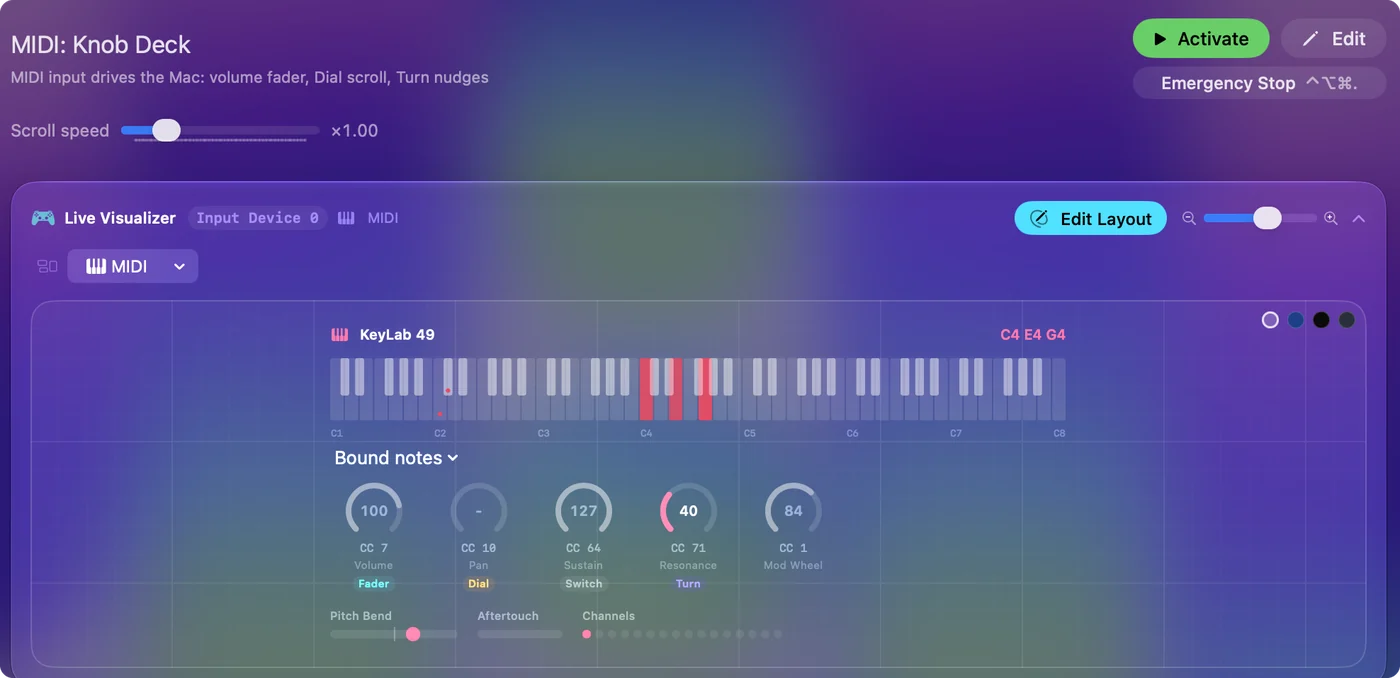
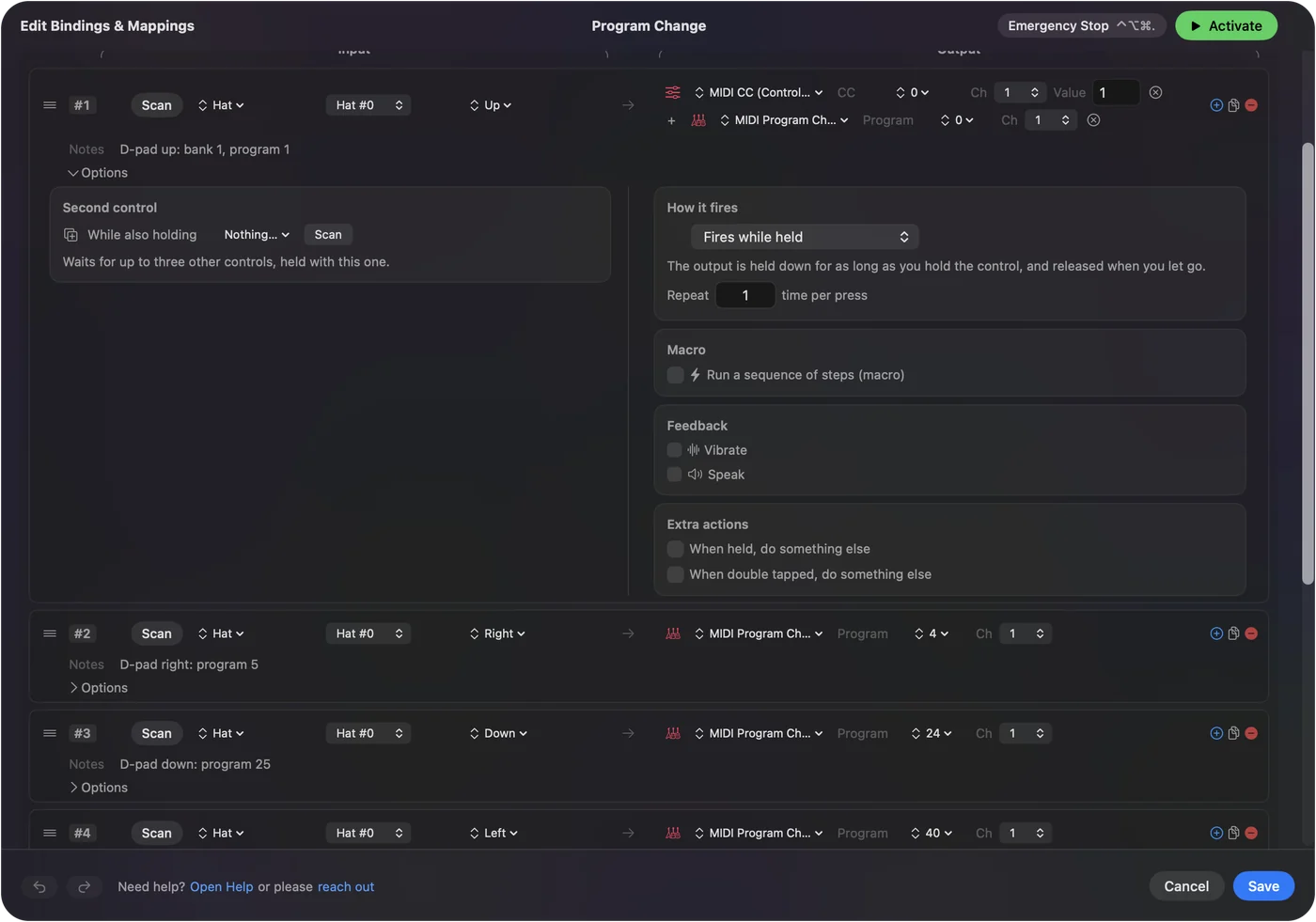
If a control sends a note, a CC, pitch bend or a Program Change, InputConfig can bind it. MIDI to keystroke and MIDI output cover the setup.
If a message is not what you expected
Most surprises come from numbering, not from broken gear. Climb this ladder, smallest step first:
- Check the channel count. The byte says 0 to 15 and the app says 1 to 16. A device on channel 10 sends 99 for a Note On.
- Check the program count. The message carries 0 to 127, and many patch lists show 1 to 128, so patch 1 is sent as 0.
- Check for a hidden Note Off. A Note On with velocity 0 ends the note, so a log full of Note Ons can still be releasing keys.
- Decode the raw bytes. Paste them into the MIDI message decoder, or watch them arrive in the MIDI tester.
Off by one is the most common MIDI bug there is.
Go deeper on one message
- Notes. Velocity, note numbers and the General MIDI drum map.
- Pressure. Channel and polyphonic aftertouch.
- Controllers. The sustain pedal, MSB and LSB, NRPN and RPN and MIDI learn.
- Patches. Program Change.
- Pitch. Pitch Bend.
- Timing and safety. MIDI clock, MIDI panic and MIDI Thru.
- Data. SysEx.
Each page here takes one row of the tables and explains it with examples. If you are new to all of it, start with what MIDI is.
The short version
- Status first. A byte of 80 hex or more starts a message, and the bytes after it are values from 0 to 127.
- Channel messages. 80 to EF, with the channel in the last digit.
- System messages. F0 to FF, with no channel: SysEx, clock, Start, Stop and the rest.
- Big numbers. Two data bytes make 0 to 16383, as in Pitch Bend.
Read the first digit of the status byte and you know what kind of message it is.
Questions
How many MIDI message types are there?
MIDI 1.0 has seven channel messages (Note Off, Note On, polyphonic pressure, Control Change, Program Change, channel pressure and Pitch Bend), the channel mode messages on CC 120 to 127, and the system messages from F0 to FF.
What is a MIDI status byte?
The first byte of a message, from 80 to FF hex. It says what the message is and, for channel messages, which of the 16 channels it is on.
What is the difference between CC and NRPN?
A CC is one message with a controller number and a value from 0 to 127. An NRPN picks a parameter with CC 99 and 98 and sets it with Data Entry on CC 6 and 38, so one change takes three or four messages.
Which MIDI messages does InputConfig support?
It binds notes, Control Change, pitch bend, aftertouch, Program Change and Start, Continue and Stop, and sends notes, Control Change, pitch bend, Program Change and the transport. It does not handle clock, SysEx or NRPN.
Is MIDI clock a channel message?
No. Timing Clock, F8, is a system real-time message with no channel, sent 24 times per quarter note.
Related
This page in other languages: Deutsch, Español, Français, Italiano, 日本語, 한국어, Polski, Português, Русский, ไทย, 繁體中文, 简体中文
Completely free. You don't have to make an account, there are no subscriptions, and nothing is locked. Optimized for Apple silicon. Open source on GitHub.
Updated