World of Warcraft on a Mac with a controller
 The World of Warcraft layout is built into InputConfig, free on the Mac App Store. You don't have to make an account, there are no subscriptions, and nothing is locked. Optimized for Apple silicon.
On a Mac: Native Mac client. Blizzard's own gamepad support has been in the game since 2020 but stays off until you type /console GamePadEnable 1, and the full controller interface most people use is the ConsolePort addon. This layout needs neither: it sends keyboard and mouse.
Yes, you can play World of Warcraft on a Mac with a controller, and this layout is the small way to do it: no addon and no hidden setting. It puts six action bar slots on the buttons you reach without looking, targeting on the triggers, and the camera on the right stick. That is enough for questing, dungeons on a familiar class, and fishing from the sofa. The longer answer on the game's own support is can you play WoW with a controller on a Mac.
On this page: 9 sections
The layout, control by control
How the layout thinks
- Move. The left stick walks on W, A, S and D.
- Camera. The right stick moves the mouse at speed 16. WoW only turns the view while a mouse button is held, so hold the right trigger (left button) as you push it to look around, or the left trigger (right button) to steer your character with it.
- Target. The right trigger targets (left click). The left trigger acts on the target (right click).
- Action bar. Slots 1 to 4 on the face buttons: bottom 1, left 2, top 3, right 4. Slot 5 on the right bumper, 6 on the left, and slot 0 on D-pad up.
- Jump and run. Jump on the left stick click (Space). Auto-run on the right stick click (middle click) and on D-pad down (R).
- Windows. D-pad left sends I, D-pad right M for the map, Back C for the character, and Start Escape for the menu.
Two rows need a decision, because WoW's own defaults differ: bags are B, auto-run is Num Lock, I opens the Group Finder and R replies to a whisper. Either give inventory and auto-run the keys I and R in WoW's Keybindings, or change these rows to B and Num Lock. It works the same in retail and Classic, because the game only sees keys and clicks.
Tune it
- More slots. Add chord rows on the face buttons for 7 to 0, held with a button that has nothing else to do, such as a paddle or the touchpad press. A held button keeps its own job, so a trigger would click as well.
- Tab target. Put Tab on a face button if you prefer it to clicking.
- Camera speed. Lowering the four camera rows to around 12 feels like a console MMO.
A second bar behind one spare button doubles what the pad can cast.
A camera that turns without holding a trigger
The one thing a pad misses in WoW is a camera that turns on its own. A latched right mouse button gives it back.
- You: Put right click on a spare button, a paddle or the DualSense touchpad press, and set that row to Toggles on and off in its Options.
- InputConfig: One press latches the right button down, so the right stick steers you and the camera together. The next press lets go.
- Check: While it is latched, pulling the right trigger holds both buttons, which WoW treats as run forward. Let go of the latch before you click a target or loot.
Toggle is explained on macros, turbo and toggle. A latched right button is the free camera a pad otherwise lacks.
WoW's own gamepad mode and ConsolePort
Blizzard added gamepad support to WoW in 2020 and leaves it off by default. You turn it on from the chat box.
WoW chat: Turn on the game's own gamepad mode.
/console GamePadEnable 1What happens: The game reads the controller directly, and you bind its buttons in the normal Keybindings screen.
On its own that mode is bare: no radial menus and no controller-first interface. ConsolePort is the addon that builds that interface on top, and it is what most people mean by playing WoW on a controller.
- ConsolePort. If WoW on your Mac picks up your pad, ConsolePort is the deeper tool for a full raid rotation.
- This layout. For a pad the game does not see, a Mac where you would rather not run addons, an adaptive controller, or one controller shared with other games through per-app auto-switch.
Do not run both at once: with the game reading the pad and this layout sending keys, one press does two things.
If your controller is not working in World of Warcraft
When World of Warcraft does not react to your controller on a Mac, climb this ladder, smallest step first:
- Check that the Mac sees the controller. Open the gamepad tester and press a button. If nothing lights up there, the problem is the connection, and a controller that is connected but not working covers that first.
- Play it from keys. If World of Warcraft still ignores the pad, activate this layout. It sends the keyboard and mouse controls World of Warcraft already reads. Turn the game's own controller option off while it runs, or a press can arrive twice. The layout works whether or not World of Warcraft ever sees the controller.
Get it in two clicks
- Get InputConfig free on the Mac App Store, open it, and click Smart Preset Maker on the welcome screen.
- Search for World of Warcraft and pick it. The layout is created as a preset in your sidebar, named and ready.
- Press Activate. Every row can be changed afterwards: the editor's Scan button rebinds any control the moment you touch it.
To check the controller itself first, the gamepad tester shows every button and stick live in your browser.
World of Warcraft controls: every button and the key it sends
The Sends column is World of Warcraft's default keyboard and mouse controls, as this layout expects them. If you changed a key in the game's settings, change the same row in InputConfig.
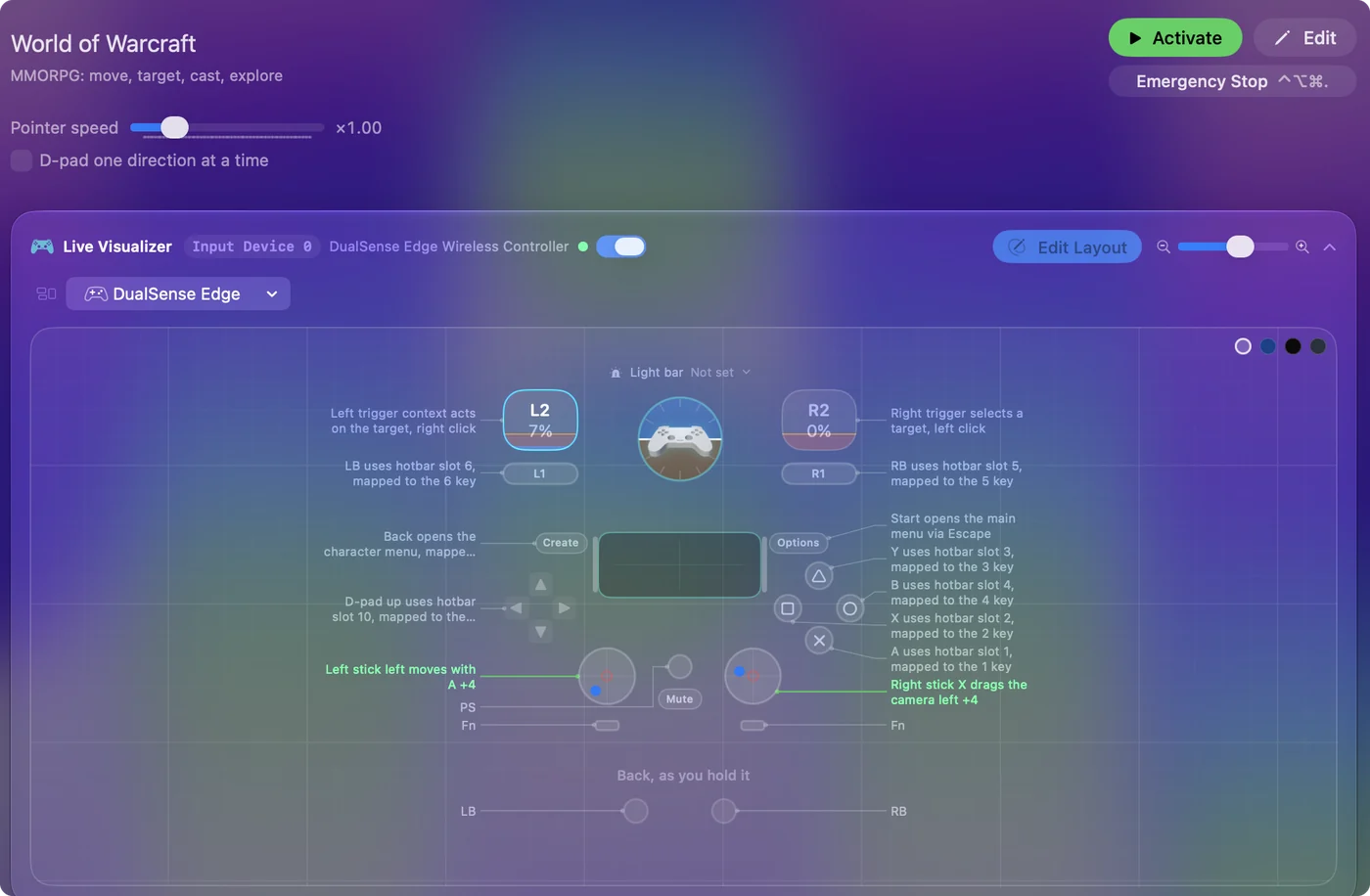
| Controller | Sends | What it does |
|---|---|---|
| Left stick left | A | Left stick left moves with A |
| Left stick right | D | Left stick right moves with D |
| Left stick up | W | Left stick up moves forward with W |
| Left stick down | S | Left stick down moves back with S |
| Right stick left | Mouse motion left (speed 16) | Right stick X drags the camera left |
| Right stick right | Mouse motion right (speed 16) | Right stick X drags the camera right |
| Right stick up | Mouse motion up (speed 16) | Right stick Y drags the camera up |
| Right stick down | Mouse motion down (speed 16) | Right stick Y drags the camera down |
| A / Cross | 1 | A uses hotbar slot 1, mapped to the 1 key |
| X / Square | 2 | X uses hotbar slot 2, mapped to the 2 key |
| Y / Triangle | 3 | Y uses hotbar slot 3, mapped to the 3 key |
| B / Circle | 4 | B uses hotbar slot 4, mapped to the 4 key |
| RB / R1 | 5 | RB uses hotbar slot 5, mapped to the 5 key |
| LB / L1 | 6 | LB uses hotbar slot 6, mapped to the 6 key |
| Right trigger | Left click | Right trigger selects a target, left click |
| Left trigger | Right click | Left trigger context acts on the target, right click |
| L3 (left stick click) | Space | L3 jumps, mapped to Space |
| R3 (right stick click) | Middle click | R3 sets auto-run, mapped to the mouse wheel click |
| D-pad up | 0 | D-pad up uses hotbar slot 10, mapped to the 0 key |
| D-pad down | R | D-pad down toggles auto-run, mapped to R |
| D-pad left | I | D-pad left opens inventory, mapped to I |
| D-pad right | M | D-pad right opens the map, mapped to M |
| Start / Options | Escape | Start opens the main menu via Escape |
| Back / Share / Select | C | Back opens the character menu, mapped to C |
Button names follow the Xbox / PlayStation pair shown in the editor, so A / Cross is the bottom face button on either pad. On a Switch Pro Controller the bottom button is labeled B; the mapping still fires on position.
Questions
Does this replace ConsolePort?
For questing and casual dungeons, yes. For a full raid rotation, ConsolePort's radial menus are still the deeper tool.
Does WoW have controller support on Mac?
Partly. The game has a gamepad mode, off by default and turned on with /console GamePadEnable 1, and the ConsolePort addon builds a full controller interface on it. This layout skips both and sends the keys and clicks WoW already reads, so it works with any controller macOS sees.
Can I use a PS5 or Xbox controller for WoW on a Mac?
Yes, with this layout: a DualSense, DualShock 4, Xbox or Switch Pro controller all work, because the game only receives keyboard and mouse input. Pair the controller with the Mac first. It should appear under Game Controllers in the System Settings sidebar.
Does this work in WoW Classic?
Yes. It sends keys and clicks, so it works in retail, Classic and any other client that uses the same keybinds. If a Classic key differs, change that row or the game's keybind.
Why is my controller not working in World of Warcraft on a Mac?
First check the Mac itself sees the controller, with the gamepad tester. If it does and World of Warcraft still ignores it, activate the World of Warcraft layout in InputConfig, which sends the game's keyboard and mouse controls from the controller.
Can I play World of Warcraft on an M1 Mac or a MacBook Air?
World of Warcraft has a native Mac version, and its minimum requirements are listed on its store page, so check your Mac against that list. I have not tested it on each Mac. The controller layout itself works the same on any Mac that runs InputConfig.
Related
Completely free. You don't have to make an account, there are no subscriptions, and nothing is locked. Optimized for Apple silicon. Open source on GitHub.
Updated