Lies of P on a Mac with a controller
 The Lies of P layout is built into InputConfig, free on the Mac App Store. You don't have to make an account, there are no subscriptions, and nothing is locked. Optimized for Apple silicon.
On a Mac: Native on Apple silicon through Steam (macOS 13 or later) and the Mac App Store, and Steam lists full controller support, DualSense included.
Yes, Lies of P runs on a Mac and supports controllers on its own, so try the game's own scheme first. It was one of the first big games built for Apple silicon, and as a soulslike it was made for a pad. Perfect Guard is easier to learn on the game's scheme than on anything I can build. This layout is for the pad the game does not see, such as a generic USB pad, an 8BitDo in the wrong mode, or a controller connected after the game started.
On this page: 8 sections
The layout, control by control
How the layout thinks
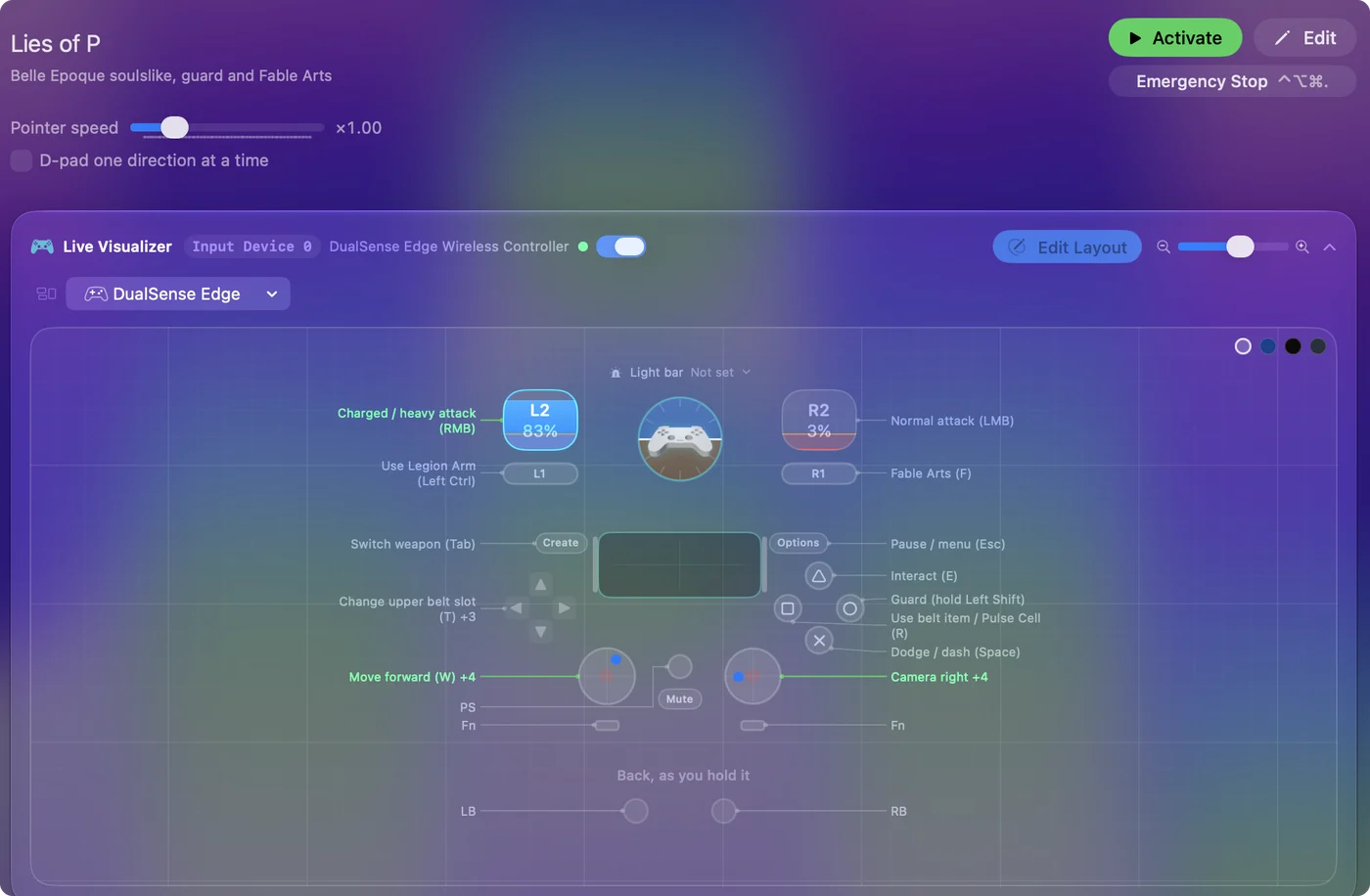
- Move and look. The left stick moves and the right stick is the camera, at Speed 20 across and 14 up and down.
- Fight. The right trigger is a normal attack (left click) and the left trigger the charged attack (right click). Fable Arts (F) is the right bumper, and the Legion Arm (Left Control) the left bumper, held as long as the arm needs.
- Defend and heal. Dodge (Space) is the bottom face button, guard (held Left Shift) the right, the belt item and Pulse Cell (R) the left, and interact (E) the top.
- Switch gear. Lock-on is the right stick click. The left stick click and D-pad right switch the Legion Arm (X), Create and D-pad left switch weapons (Tab), and D-pad up and down change the upper and lower belt slots (T and G).
- Menu. Options opens it.
Guard is a held key on a face button, so it goes down the instant you press.
Tune it
- Guard on a trigger. Many players guard with a trigger. Scan the guard row to the left trigger and the charged attack row to the right face button. It takes two clicks each.
- Perfect Guard. It is a tap of guard just before a hit. Leave the guard row on Fires while held, with no ramp or delay.
- Back paddles. On a DualSense Edge, put dodge on a paddle and you can dodge without taking your thumb off the camera.
- Camera drift. A soulslike camera that creeps is maddening. Open Adjust live on a right stick row, let go of the stick, and set the deadzone just above where it rests.
Fix camera drift before anything else, because a creeping camera costs more fights than a slow guard.
If the game ignores your controller
Climb this ladder, smallest step first:
- Connect first. Connect the pad before you launch the game.
- Check the Mac sees it. It should be listed under Game Controllers in the System Settings sidebar.
- Flip Steam Input. On the Steam copy, change the Steam Input override in the game's Properties, Controller, and relaunch each way.
- Switch to this layout. If the game still ignores the pad, activate the layout and play the keyboard game from it. Controller connected but not working has the longer checklist.
Use the layout instead of the game's pad support, never alongside it, or every press lands twice.
Lies of P controller support: controller or keyboard
Steam's store page lists full controller support for Lies of P, so the game was made to be played on a controller, menus included. A keyboard and mouse work as well, and the choice is yours. On a Mac, use the game's own controller support first when it sees your pad; this layout is for a pad it does not see, or for buttons it will not let you move. Full support listed means the controller is a first-class way to play Lies of P.
From Steam's listing, checked in October 2026. Every game's listing is in Mac games with controller support.
Get it in two clicks
- Get InputConfig free on the Mac App Store, open it, and click Smart Preset Maker on the welcome screen.
- Search for Lies of P and pick it. The layout is created as a preset in your sidebar, named and ready.
- Press Activate. Every row can be changed afterwards: the editor's Scan button rebinds any control the moment you touch it.
To check the controller itself first, the gamepad tester shows every button and stick live in your browser.
Lies of P controls: every button and the key it sends
The Sends column is Lies of P's default keyboard and mouse controls, as this layout expects them. If you changed a key in the game's settings, change the same row in InputConfig.
| Controller | Sends | What it does |
|---|---|---|
| Left stick up | W | Move forward (W) |
| Left stick down | S | Move back (S) |
| Left stick left | A | Move left (A) |
| Left stick right | D | Move right (D) |
| Right stick right | Mouse motion right (speed 20) | Camera right |
| Right stick left | Mouse motion left (speed 20) | Camera left |
| Right stick down | Mouse motion down (speed 14) | Camera down |
| Right stick up | Mouse motion up (speed 14) | Camera up |
| A / Cross | Space | Dodge / dash (Space) |
| B / Circle | Shift (Left) | Guard (hold Left Shift) |
| X / Square | R | Use belt item / Pulse Cell (R) |
| Y / Triangle | E | Interact (E) |
| Right trigger | Left click | Normal attack (LMB) |
| Left trigger | Right click | Charged / heavy attack (RMB) |
| RB / R1 | F | Fable Arts (F) |
| LB / L1 | Ctrl (Left) | Use Legion Arm (Left Ctrl) |
| R3 (right stick click) | Middle click | Lock on (Middle Mouse) |
| L3 (left stick click) | X | Switch Legion Arm (X) |
| Back / Share / Select | Tab | Switch weapon (Tab) |
| Start / Options | Escape | Pause / menu (Esc) |
| D-pad up | T | Change upper belt slot (T) |
| D-pad down | G | Change lower belt slot (G) |
| D-pad left | Tab | Switch weapon (Tab) |
| D-pad right | X | Switch Legion Arm (X) |
Button names follow the Xbox / PlayStation pair shown in the editor, so A / Cross is the bottom face button on either pad. On a Switch Pro Controller the bottom button is labeled B; the mapping still fires on position.
Questions
Does Lies of P on Mac support controllers?
Yes. Steam lists full controller support for the Mac version, including DualSense support. This layout is for a pad the game does not detect.
Lies of P controller not working on a Mac?
Connect the controller before launching, confirm it shows under Game Controllers in System Settings, and on Steam flip the game's Steam Input override. If the game still ignores it, activate this layout and play the keyboard game from the pad.
Does Lies of P run on an Intel Mac?
No. Steam's Mac requirements ask for an Apple silicon Mac and macOS Ventura 13 or later.
Does Lies of P have controller support?
Yes. Steam lists full controller support for Lies of P, so every part of the game can be played on a controller.
Is Lies of P better with a controller or a keyboard?
Both work. Steam lists full controller support for Lies of P, so it was made to be played on a controller, and a keyboard and mouse work as well.
Related
Completely free. You don't have to make an account, there are no subscriptions, and nothing is locked. Optimized for Apple silicon. Open source on GitHub.
Updated