Hades on a Mac with a controller
 The Hades layout is built into InputConfig, free on the Mac App Store. You don't have to make an account, there are no subscriptions, and nothing is locked. Optimized for Apple silicon.
On a Mac: Native on macOS with excellent gamepad support built in. Use the game's own support first. This layout is for controllers the game does not detect and for accessibility remaps beyond its options.
Hades supports controllers fully on the Mac, with every button remappable in the game and rumble, so if your controller shows up in the options, use that. I would rather say so than waste your evening.
This layout is for the pad that does not show up, which on macOS is more common than it should be: a Bluetooth pad the game's library does not know, a Steam Controller, an 8BitDo in the wrong mode, a PlayStation Access Controller. It is also for hands that need what the game's remapping cannot give: a dash on repeat, an attack that latches, a one-handed Underworld. God Mode already helps a lot. This helps with the buttons. If your pad is ignored, go straight to the detection checks.
On this page: 8 sections
The layout, control by control
How the layout thinks
- Move and aim. The left stick moves Zagreus. The right stick moves the mouse, and Hades aims your attacks at the mouse, so you strafe with one stick and point with the other, twin-stick style.
- Attack and Special. Attack on the right trigger and Special on the left. You press those hundreds of times a run, and a trigger is the least tiring button to hammer.
- Dash. The bottom face button, Space, and the button that matters most.
- Cast, Call, interact. Cast (Q) on the left face button, Call (E) on the right, interact and gift (F) on the top, and the hammer or contextual use (R) on the right bumper. Those are the game's defaults, so nothing changes in the game.
- Menu. Options pauses.
It feels closer to the console game than you would expect, because the right stick is your aim.
Go past the game's own options
- Attack on turbo. For weapons that reward mashing, such as the fists and the sword, set the right trigger row to Repeats while held at a moderate rate, and a held trigger attacks at that rhythm. Aspect of Gilgamesh players know why.
- Dash that repeats. Repeats while held on the dash row is one of the more useful accessibility remaps in the app: a held button dashes again every so many milliseconds, and the dash-strike chain becomes a hold instead of a drum solo.
- Latched Special. Set the left trigger to Toggles on and off for the bow's and the rail's specials, which are charges: one pull starts the charge, the next releases it.
- Everything on one side. Move on the D-pad, dash on a bumper, attack and special on the triggers of the same hand, and let the game aim at the nearest enemy while the mouse is still. The one-handed guide walks through it.
- Faster aim. The stick moves the cursor at a set speed rather than jumping to a spot. Raise the speed and use the Aggressive curve for a faster point.
A repeating dash turns the hardest rhythm in the game into a held button.
If Hades does not recognize your controller
Supergiant's pad support is complete, so a controller that does nothing is a detection problem. The same checks apply to Hades II. Climb this ladder, smallest step first:
- Check the Mac. Open System Settings, click Game Controllers in the sidebar, and press a button. If the pad is missing or nothing lights, pair it again: pairing steps.
- Relaunch with the pad awake. A pad that fell asleep while the game was open may not be picked up until the next start.
- Change Steam Input. In Steam, right-click Hades, open Properties, then Controller, and change the override. Relaunch after each try. More on Steam Input.
- Send keys. For a pad macOS does not treat as a gamepad at all, such as a Steam Controller or a PlayStation Access Controller, skip straight here: InputConfig reads those directly. Pick Hades in the Smart Preset Maker and press Activate.
Leave the game's own pad support out of it while the layout runs, so one press does one thing.
Hades controller support: controller or keyboard
Steam's store page lists full controller support for Hades, so the game was made to be played on a controller, menus included. A keyboard and mouse work as well, and the choice is yours. On a Mac, use the game's own controller support first when it sees your pad; this layout is for a pad it does not see, or for buttons it will not let you move. Full support listed means the controller is a first-class way to play Hades.
From Steam's listing, checked in October 2026. Every game's listing is in Mac games with controller support.
Get it in two clicks
- Get InputConfig free on the Mac App Store, open it, and click Smart Preset Maker on the welcome screen.
- Search for Hades and pick it. The layout is created as a preset in your sidebar, named and ready.
- Press Activate. Every row can be changed afterwards: the editor's Scan button rebinds any control the moment you touch it.
To check the controller itself first, the gamepad tester shows every button and stick live in your browser.
Hades controls: every button and the key it sends
The Sends column is Hades's default keyboard and mouse controls, as this layout expects them. If you changed a key in the game's settings, change the same row in InputConfig.
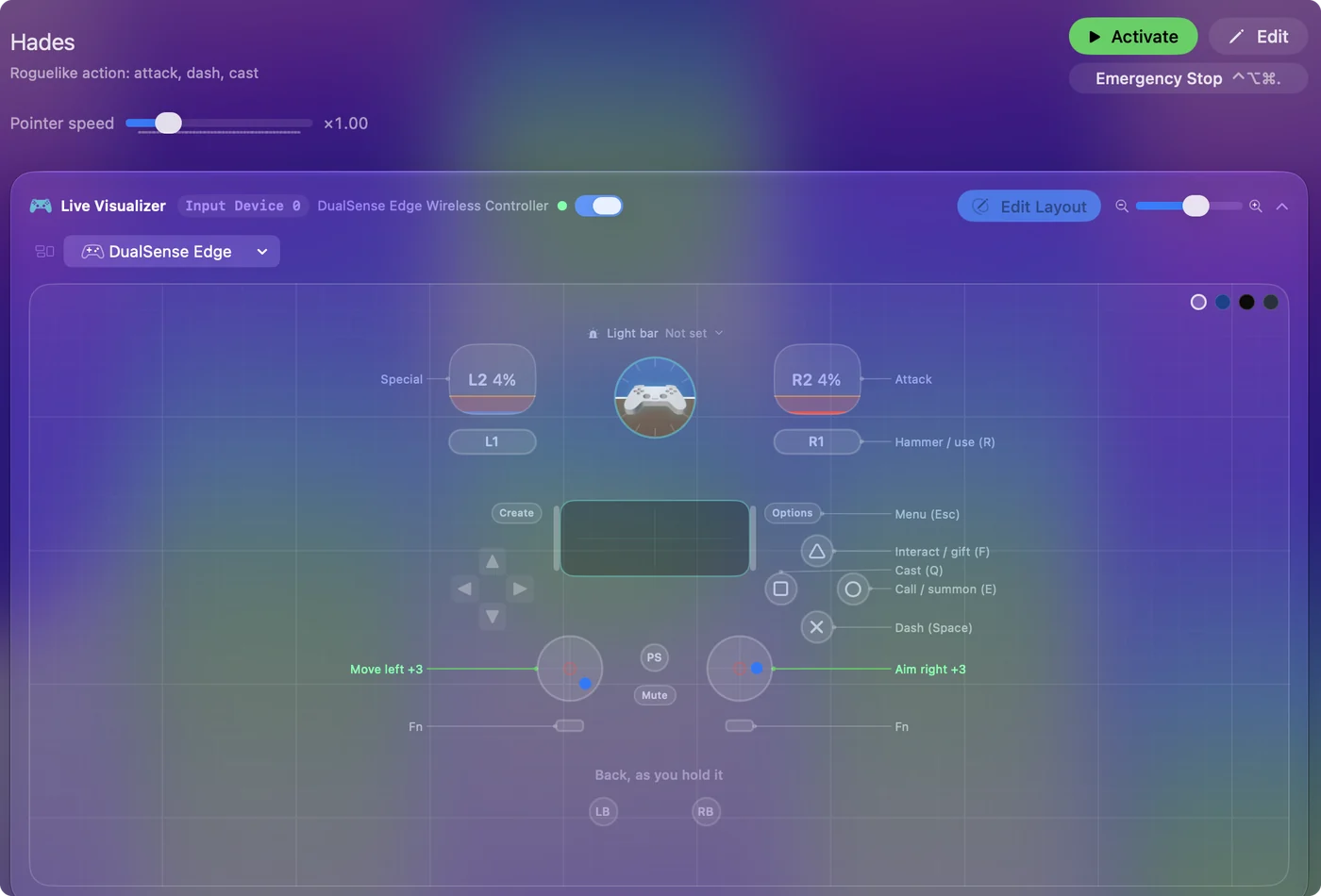
| Controller | Sends | What it does |
|---|---|---|
| Left stick left | A | Move left |
| Left stick right | D | Move right |
| Left stick up | W | Move up |
| Left stick down | S | Move down |
| Right stick right | Mouse motion right (speed 18) | Aim right |
| Right stick left | Mouse motion left (speed 18) | Aim left |
| Right stick down | Mouse motion down (speed 14) | Aim down |
| Right stick up | Mouse motion up (speed 14) | Aim up |
| A / Cross | Space | Dash (Space) |
| Right trigger | Left click | Attack |
| Left trigger | Right click | Special |
| X / Square | Q | Cast (Q) |
| B / Circle | E | Call / summon (E) |
| Y / Triangle | F | Interact / gift (F) |
| RB / R1 | R | Hammer / use (R) |
| Start / Options | Escape | Menu (Esc) |
Button names follow the Xbox / PlayStation pair shown in the editor, so A / Cross is the bottom face button on either pad. On a Switch Pro Controller the bottom button is labeled B; the mapping still fires on position.
Questions
Why is my controller not working in Hades on Mac?
Usually one of three things: the Mac has not paired it (check System Settings, Game Controllers), the game was open before the pad woke up (relaunch it), or Steam Input is set the wrong way for Hades (change it in Properties, Controller). If none of those helps, map the pad to the keyboard game with this free layout.
Does this work for Hades II?
Hades II has its own Smart Preset Maker entry with the sprint and the Omega moves accounted for. The two games share most keys, so this layout mostly works there too.
Is aiming with the right stick as good as with a mouse?
It is different. The stick moves the cursor at a set speed rather than jumping to a spot. Raise the speed and use the Aggressive curve for a faster point, and remember Hades aims at the nearest enemy when the cursor is not moving.
Does Hades have controller support?
Yes. Steam lists full controller support for Hades, so every part of the game can be played on a controller.
Is Hades better with a controller or a keyboard?
Both work. Steam lists full controller support for Hades, so it was made to be played on a controller, and a keyboard and mouse work as well.
Can I play Hades on an M1 Mac or a MacBook Air?
Hades has a native Mac version, and its minimum requirements are listed on its Steam store page, so check your Mac against that list. I have not tested it on each Mac. The controller layout itself works the same on any Mac that runs InputConfig.
Related
Completely free. You don't have to make an account, there are no subscriptions, and nothing is locked. Optimized for Apple silicon. Open source on GitHub.
Updated