Does the TourBox work on a Mac?
 InputConfig is completely free on the Mac App Store. You don't have to make an account, there are no subscriptions, and nothing is locked. Optimized for Apple silicon.
Yes. TourBox Console is the Mac app that makes the Neo, the Elite and the Lite do anything, and it installs from a package file on TourBox's Mac download page. The device is a left-hand controller with buttons, a knob, a scroll wheel and a dial, and Console decides what each control sends. What it cannot do is hold a second job on a key, run a macro with waits or type a sentence, and that is where InputConfig, the free Mac app I make, can sit beside it.
The install and permission details are from TourBox's Mac download page and the model details from reviews and store pages, all of which I read on October 21, 2026. I have not tested a TourBox, so this page tells you how to check what yours sends. If you want a TourBox without buying one, the TourBox alternative page uses a game controller.
On this page: 11 sections
Steps
- Download TourBox Console for Mac and install the package.
- Open Console and give it Accessibility permission, plus Bluetooth for an Elite and Automation for System Events.
- Set each TourBox control to a shortcut in Console.
- For jobs Console cannot do, set a control to F13 to F20 and bind that key in InputConfig.
Install TourBox Console on a Mac
Console is the only way to program a TourBox, and the Mac version asks for three permissions. TourBox's page lists them as follows:
- Accessibility. Turn on TourBox Console, in System Settings, Privacy & Security.
- Bluetooth. Needed only for the Elite, which is the Bluetooth model.
- Automation. Under TourBox Console, turn on the System Events switch.
The installer is a package file, and TourBox says to upgrade by replacing the old Console with the new one, with no need to reinstall the driver. Each permission change asks for Touch ID or your password. The page also says to export your preset list first if you are upgrading from version 1.0. If a control does nothing, a missing permission is the first thing to check.
Know which TourBox you have
| Model | Connection | Mac notes |
|---|---|---|
| TourBox Neo | Wired | Works with macOS and Windows, with Console on both |
| TourBox Elite | Bluetooth, and it can pair with two computers | Console needs the extra Bluetooth permission |
| TourBox Lite | A cheaper model | Listed as working with macOS on a store page, which I could not confirm on TourBox's own site |
Reviews also describe an Elite Plus that adds iPad support, and say the other three do not support iPadOS or Android. I could not confirm button counts for the Lite, so I leave them out. All three are Mac devices, and only the Elite needs the Bluetooth permission.
Find out what each control sends
What TourBox Console does is turn a knob turn or a button press into a shortcut, which reaches the Mac as ordinary keys. Press Scan to confirm what yours does.
- You: Open InputConfig, add a row, set the input to Keyboard Key, press Scan, and press a TourBox button or turn the knob.
- InputConfig: Names the key that arrived.
- Check: If a key name appears, InputConfig can bind it. If nothing appears, Console is keeping that control, or it sends through a way InputConfig does not hear.
I did not test whether a TourBox shows up in Scan without Console running. Because the knob, the scroll wheel and the dial are rotary, each turn arrives as a key per click, a left key and a right key, if Console is set that way. The only way to know is to Scan each control once.
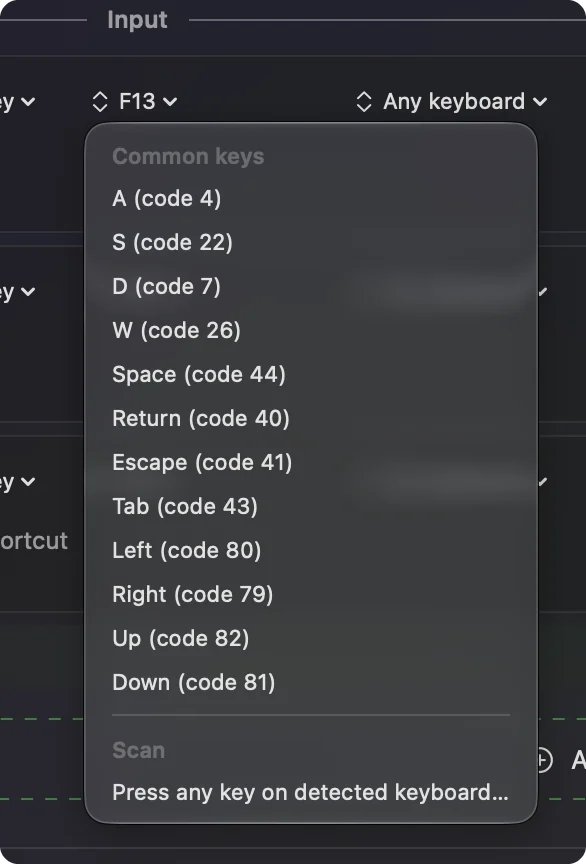
Give every control a key nothing else uses
InputConfig listens to keys alongside macOS and does not block them, so a control that Console sends as Command Z still undoes in the app, and any second job added in InputConfig runs on top. The way out is the one for any key-sending device: in Console, set the controls you want to add to to F13 through F20, which macOS passes to apps and gives no job. F21 to F24 are not passed on. Whether Console's shortcut box accepts those keys is something I could not confirm, so try F13 first.
- You: In Console, pick a control and assign the key F13.
- InputConfig: Nothing yet.
- Check: Press the control in a text field. Nothing is typed.
The F13 to F19 page explains why these keys are the best spare ones.
Bind them in InputConfig
- You: Add a new bind, set the input to Keyboard Key, press Scan, press the TourBox control, then choose an output.
- InputConfig: Shows the row as F13 and runs the output you chose.
- Check: Press Save and Activate, then press the control. The output runs once.
Outputs a Mac app can add are a macro with waits between steps, Type Text, Open App and Open URL, a Siri Shortcut, mouse clicks, MIDI out, and media keys. A row can also have a hold action and a double tap action, so one TourBox button does three jobs. Console sends the shortcut and InputConfig adds everything a shortcut cannot do.
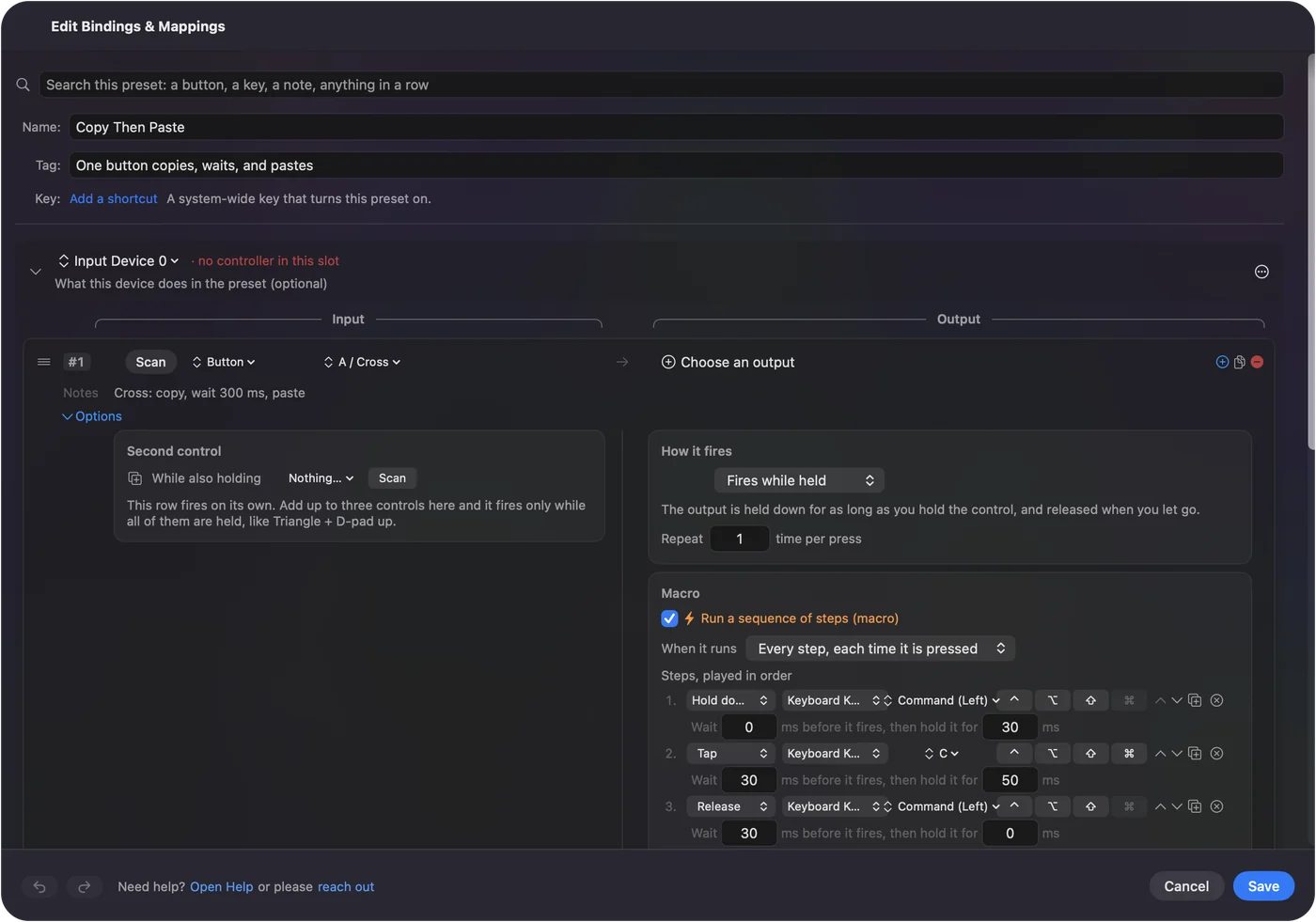
Ideas for the people who buy a TourBox
- Photo editors. A knob for exposure is Console's work. InputConfig adds a button that exports, then opens a folder.
- Video editors. Hold a button to jog, double tap to cut. The video editing shuttle guide has a similar layout.
- Illustrators. Per-app presets, so the same button is undo in one app and brush size in another.
- Anyone with one working hand. The TourBox is made for a left hand, and with a hold and a double tap on each button, one hand does a keyboard's worth.
Per-app auto switch explains how the layout follows the app in front.
If the TourBox does nothing
Climb this ladder, smallest step first:
- Check Console is open. Console has to be running for the device to send anything.
- Check the permissions. Accessibility, then Bluetooth for an Elite, then Automation for System Events.
- Reconnect. Unplug the cable, or pair the Elite again in System Settings, Bluetooth.
- Press Scan. If a name appears the control is readable.
- Check InputConfig. It needs Accessibility too, and a preset must be active. Control Option Command period is the emergency stop.
What it cannot do
- Replace Console. Console programs the device. InputConfig only reads what arrives.
- Block a shortcut. It does not block keys, so a control left on a Console shortcut sends that shortcut as well.
- Use the knob as an analog value. A knob that sends keys gives a key per click, nothing finer.
- Tell two keyboards apart. Every keyboard counts as one device.
The short version
- Console first. Install it, give it its permissions, and program the device.
- Function keys next. Set the controls you want to extend to F13 to F20.
- InputConfig last. Bind them to macros, text, apps and holds.
Treat Console as the part that talks to the hardware and InputConfig as the part that decides what happens next.
Questions
Is there TourBox software for Mac?
Yes. TourBox Console installs from a package file on TourBox's Mac download page and needs Accessibility, and Bluetooth for the Elite.
Does the TourBox Lite work on a Mac?
A store listing I read says so, and I could not confirm it on TourBox's own site. Check TourBox's page before buying.
What permissions does TourBox Console need on a Mac?
Accessibility, Bluetooth for the Elite only, and Automation for System Events.
Can I use a TourBox with InputConfig?
Set its controls to F13 to F20 in TourBox Console, then bind those keys in InputConfig. I have not tested a TourBox myself, so press Scan to check.
Is there a free TourBox alternative for Mac?
Yes, a game controller with InputConfig. The TourBox alternative page on this site has the layout.
Related
This page in other languages: العربية, Čeština, Dansk, Deutsch, Español, Suomi, Français, עברית, Magyar, Bahasa Indonesia, Italiano, 日本語, 한국어, Norsk, Nederlands, Polski, Português, ไทย, 繁體中文, 简体中文
Completely free. You don't have to make an account, there are no subscriptions, and nothing is locked. Optimized for Apple silicon. Open source on GitHub.
Updated