Questions
Does the Logitech G923 work on a Mac?
It depends on which G923 you have. Logitech sells two: one for PlayStation and PC, and one for Xbox and PC. The PlayStation and PC model reaches the Mac as an ordinary USB device, and InputConfig, the free app I make, reads its wheel, pedals and buttons in full.
The Xbox and PC model starts in Xbox mode, which is not a standard USB device, and InputConfig cannot read it. The hub tells you which one you have.
On this page: 8 sections
Steps
- Check the hub: PlayStation buttons mean the model the Mac can read.
- Plug the pedals into the wheel base, then connect power and USB.
- Turn the wheel and press each pedal in InputConfig's Live Visualizer.
- Turn on One-Stick Driving with Steer axis 0 and Throttle axis 5, and lower the deadzone.
- Put the brake and the buttons on rows of their own with Scan.
Find out which G923 you have
Look at the hub. The PlayStation and PC model has the PlayStation buttons, Cross, Circle, Square and Triangle, and shares its rim and hub layout with the older G29. The Xbox and PC model has A, B, X and Y and the Xbox button. The box and the label under the base say the same thing.
| Model | What the Mac sees | InputConfig |
|---|---|---|
| G923 for PlayStation and PC | A standard USB HID device, no driver | Read in full: steering, three pedals, every button, the shifter |
| G923 for Xbox and PC | A wheel in Xbox mode, not a HID device | Not read |
The Logitech G920 is in the same position as the Xbox G923: it starts in Xbox mode, and InputConfig does not read it. PlayStation buttons on the hub mean the Mac can read it.
 InputConfig is free on the Mac App Store. macOS 14 or later, no account, no tracking, open source.
Connect the PlayStation and PC model
- You: Plug the pedals into the wheel base, then connect the power supply and the USB cable, with a USB-C adapter on a MacBook.
- macOS: Reads it with no driver and lists it under USB in System Information.
- Check: It is listed there. It does not appear under Game Controllers in System Settings, which only lists gamepads.
InputConfig 1.6 reads it on the same plan as the G29, which is how open-source wheel drivers read it too:
- Steering. Across 900 degrees, at full resolution.
- Gas, brake and clutch. On separate axes, each 0 released and 1 floored.
- Buttons and shifter. Every button on the hub by its printed name, the paddles, the red dial as one press per click, and the Driving Force Shifter's gears when it is plugged into the base.
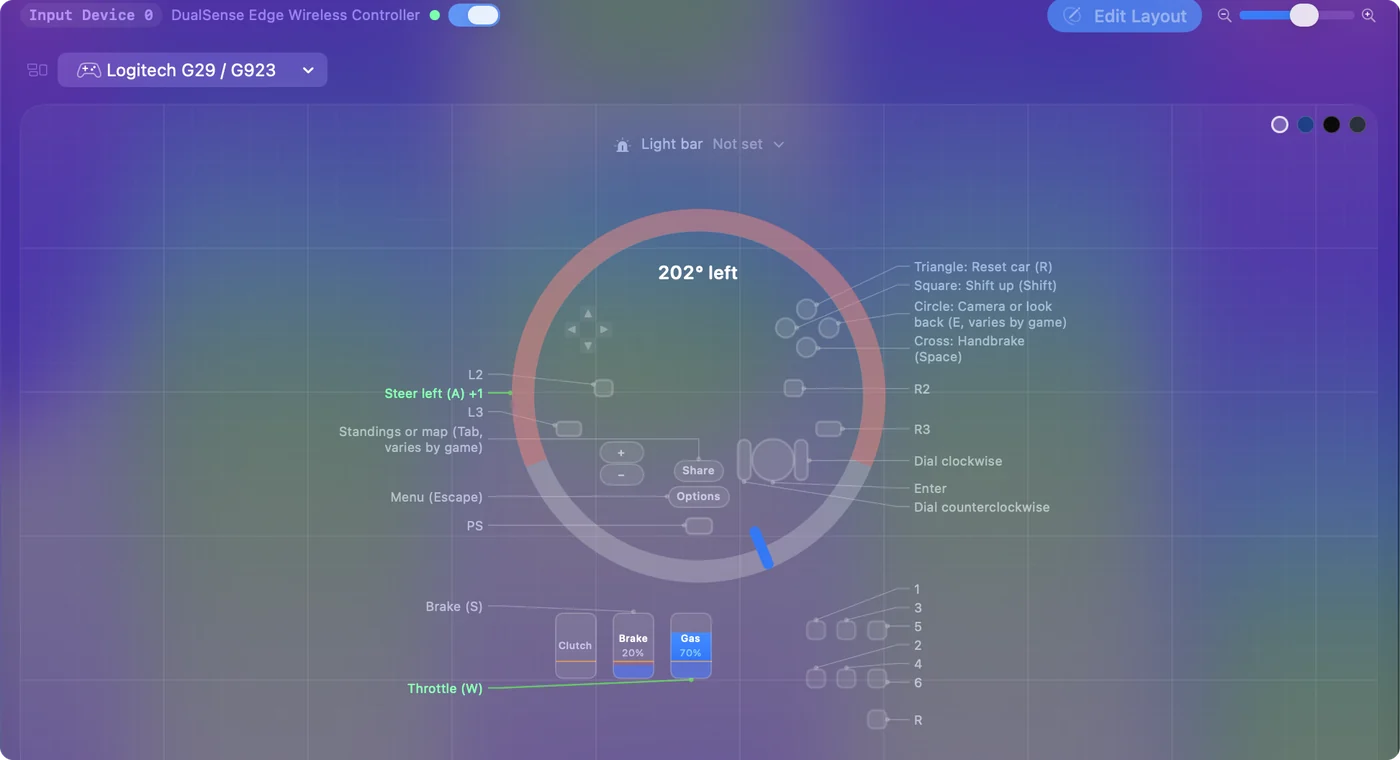
I have not checked every button against a real G923. Press each one in the Live Visualizer before you rely on it. The visualizer draws the wheel, pedals and shifter, labeled G923 for PlayStation and PC, and shows how far the wheel is turned in degrees.
Set it up to drive
The setup is the same as for a G29, and the G29 page walks through it step by step. In short:
- Throttle and steering. In a preset, turn on One-Stick Driving, choose Custom, set Steer axis 0 and Throttle axis 5, and turn on Throttle axis is a trigger (rests at one end).
- Deadzone. Bring it down to a few percent so the car steers within the first few degrees of a 900 degree wheel.
- Brake. Put axis 4 on its own row with Scan.
- Paddles and buttons. On rows of their own.
Logitech's G HUB app has a Mac version. Nothing here needs it, but check Logitech's page for your model if you want its own settings. The low deadzone is what makes a 900 degree wheel feel right.
What the Xbox and PC model can do
A wheel in Xbox mode speaks Microsoft's own protocol, not standard HID, so apps that read USB devices directly, InputConfig included, do not see it.
- Apple's wheel support. Apple named the G920 when it added racing wheel support in macOS 13, so a Mac game written for that support may read a G920. Apple did not name the G923 in that announcement.
- The games. Check a game's supported wheels before you count on either model.
If you are buying a wheel to map to keys on a Mac, the PlayStation and PC model is the one that works with InputConfig.
What it cannot do
- TRUEFORCE and force feedback. Not driven. InputConfig sends keys and mouse movement, so with the wheel mapped to keys the motor gives no resistance.
- The Xbox model. Not read at all, and I know of no way to switch it to a mode the Mac can read.
Force feedback on a Mac only comes from a game that drives the wheel itself.
The short version
- PlayStation buttons. It works: plug in, check the Live Visualizer, set up One-Stick Driving.
- Xbox buttons. InputConfig cannot read it. Only a game written for Apple's wheel support might.
Look at the hub before anything else; it decides the whole answer.
Questions
Does the G923 work on a Mac?
The PlayStation and PC model does: the Mac reads it with no driver, and InputConfig reads its wheel, pedals and buttons. The Xbox and PC model starts in Xbox mode, which InputConfig cannot read.
Does TRUEFORCE work on a Mac?
Only if a game drives it. InputConfig does not drive force feedback of any kind.
Is the G923 the same as the G29 on a Mac?
The PlayStation and PC G923 shares the G29's rim and hub layout, and InputConfig reads it on the same plan. The Xbox G923 is a different case.
Can I switch an Xbox G923 to a mode the Mac can read?
Not that I know of. It starts in Xbox mode, and InputConfig never reads it. A Mac game written for Apple's racing wheel support is the only route, and only if the game supports it.
Related
Free. macOS 14 or later. No account, nothing leaves your Mac. Open source on GitHub.