Reason from a game controller
 The Reason layout is built into InputConfig, free on the Mac App Store. You don't have to make an account, there are no subscriptions, and nothing is locked. Optimized for Apple silicon.
On a Mac: Reason reads keys from this layout and takes InputConfig's virtual MIDI port as a control surface input. Three rows come from the Ableton layout and need Reason's keys.
Yes, Reason runs from a game controller on a Mac: the transport on the face buttons, undo and save on the bumpers, and MIDI CC from the sticks to any device in the rack. The rack itself is pointer work. Three rows come from the Ableton layout and need Reason's own keys.
The layout, control by control
How the layout thinks
- Transport. Play and stop (Space) on the bottom face button works as shipped.
- Keep your work. Undo and Save on the bumpers.
- Move a selection. The D-pad sends the arrow keys, and the right stick scrolls.
- Ableton leftovers. The right, left and top face buttons send F9, Tab and Return.
Give three buttons Reason's keys
In Reason, Tab flips the rack around to show the cables, which is useful but not a view switch, and record and loop have their own keys.
- You: Open Reason's shortcut list and set the right, left and top face buttons to its record and loop keys, and to Tab if you want the cable view on a button.
- InputConfig: Sends those keys from the next press.
- Check: Press the right face button with Reason in front. The record button lights.
Play already works, so record is the one to fix first.
Turn the sticks into knobs
- Add the port. In Reason's Control Surfaces settings, add InputConfig as a MIDI control keyboard.
- Map a stick. Give it a MIDI CC row, then use Reason's remote override on a knob and move the stick. A stick reaches the full 0 to 127 range past its deadzone.
- A ready set. The built-in MIDI: CC Dials preset turns both sticks and both triggers into knobs.
Reason maps a CC to a knob in seconds, so the sticks are the best part of this layout.
Get it in two clicks
- Get InputConfig free on the Mac App Store, open it, and click Smart Preset Maker on the welcome screen.
- Search for Reason and pick it. The layout is created as a preset in your sidebar, named and ready.
- Press Activate. Every row can be changed afterwards: the editor's Scan button rebinds any control the moment you touch it.
Every binding, as a table
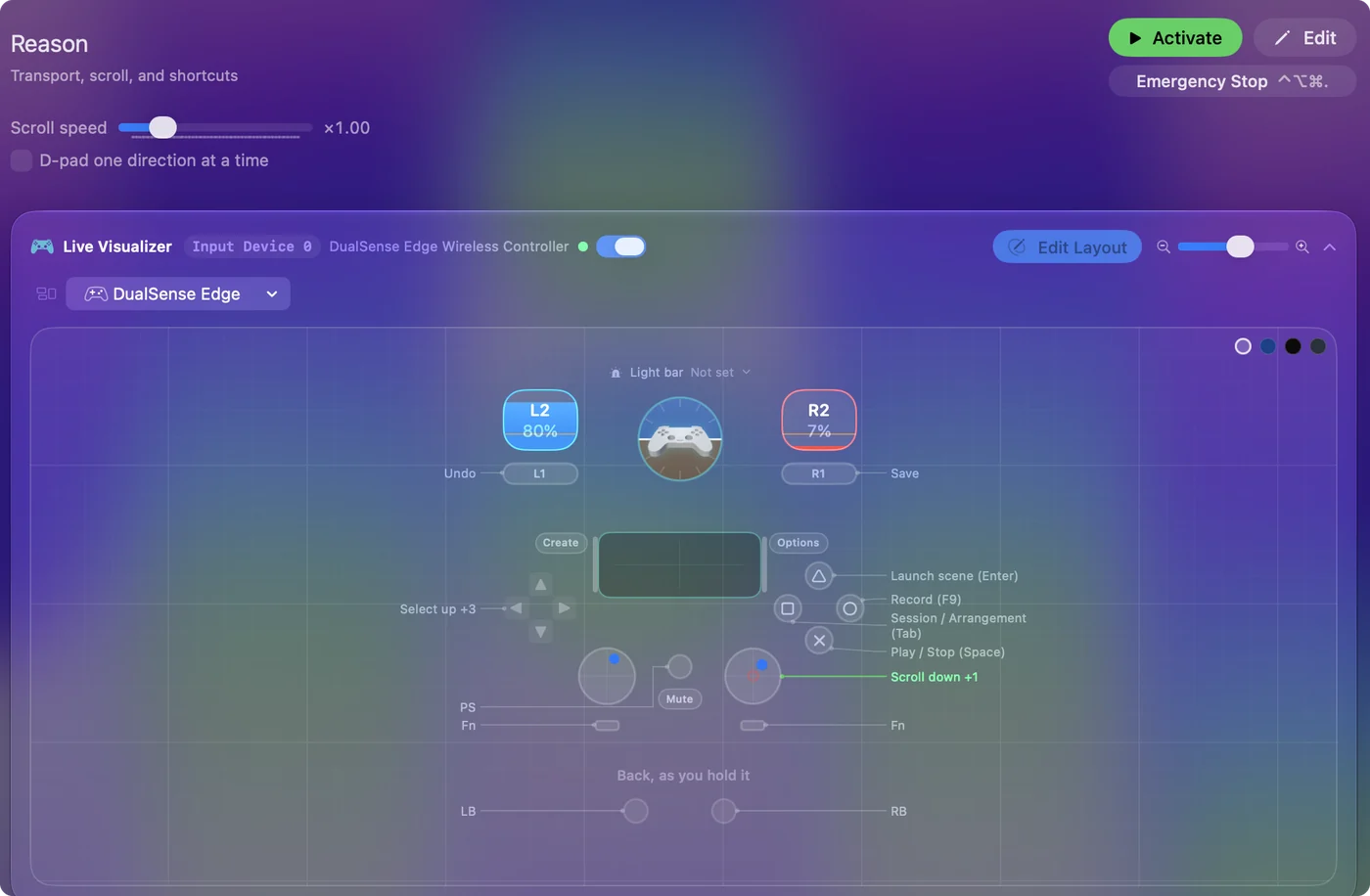
| Controller | Sends | What it does |
|---|---|---|
| A / Cross | Space | Play / Stop (Space) |
| B / Circle | F9 | Record (F9) |
| X / Square | Tab | Session / Arrangement (Tab) |
| Y / Triangle | Return | Launch scene (Enter) |
| D-pad up | Up | Select up |
| D-pad down | Down | Select down |
| D-pad left | Left | Select left |
| D-pad right | Right | Select right |
| LB / L1 | Command (Left), Z | Undo |
| RB / R1 | Command (Left), S | Save |
| Right stick down | Scroll down | Scroll down |
| Right stick up | Scroll up | Scroll up |
Button names follow the Xbox / PlayStation pair shown in the editor, so A / Cross is the bottom face button on either pad. On a Switch Pro Controller the bottom button is labeled B; the mapping still fires on position.
Questions
Can I control Reason's devices from the pad?
Yes, through InputConfig's virtual MIDI port. Reason maps a CC per knob with remote override.
Related
Completely free. You don't have to make an account, there are no subscriptions, and nothing is locked. Optimized for Apple silicon. Open source on GitHub.
Updated