FL Studio from a game controller
 The FL Studio layout is built into InputConfig, free on the Mac App Store. You don't have to make an account, there are no subscriptions, and nothing is locked. Optimized for Apple silicon.
On a Mac: FL Studio for Mac uses Command where the Windows version uses Control, and this layout sends the Mac keys. Its MIDI settings accept InputConfig's virtual port for notes.
Yes, you can run FL Studio on a Mac from a game controller. FL is four windows you flip between, and the D-pad flips them: playlist, channel rack, piano roll, mixer. The pad can also play FL through InputConfig's virtual MIDI port.
On this page: 7 sections
The layout, control by control
How the layout thinks
- Flip windows. D-pad up, down, left and right open the playlist (F5), channel rack (F6), piano roll (F7) and mixer (F9).
- Draw and delete notes. Left click to draw a note on the bottom face button, right click to delete on the right.
- Transport. Play and stop (Space) on the left face button, record (R) on the top.
- Modes and browser. Song and pattern mode (L) on the right bumper, the browser (Option F8) on the left.
- Point and scroll. The right stick is the pointer, the left stick scrolls, the right stick click is the middle button for panning, and the left trigger holds Command for FL's Command-click actions.
- Undo and save. Undo on Share or View, Save on Options.
FL for Mac uses Command where the Windows version uses Control, and this layout sends the Mac keys. Four windows on the D-pad is how FL wants to be driven.
If undo seems to go the wrong way
In FL Studio, Command Z flips between undoing and redoing the last edit, and Command Option Z steps further back through the history. The left stick click sends Command Option Z, so it goes back another step, not forward.
- Use Command Z for one step. It toggles the last edit back and forth.
- Use the left stick click to go further back. Each press is one more step through the history.
- Add a redo. Check the Edit menu in your version of FL for its redo key and put it on a spare button.
This is FL's design, not a broken row. Command Z toggles the last edit, and the stick click walks further back.
Play and control FL from the pad
- A drum pad. InputConfig's MIDI output into FL's input turns the face buttons into pads. Enable the InputConfig input in FL's MIDI settings. The gamepad as a MIDI instrument guide has a ready preset.
- A stick on any knob. Give the stick a CC row, then use FL's Link to controller on the knob and move the stick.
- Metronome. Its key from FL's shortcut list on a stick click.
The port is named InputConfig and exists whenever the app runs. Enable the InputConfig input in FL's MIDI settings, and the pad plays.
Get it in two clicks
- Get InputConfig free on the Mac App Store, open it, and click Smart Preset Maker on the welcome screen.
- Search for FL Studio and pick it. The layout is created as a preset in your sidebar, named and ready.
- Press Activate. Every row can be changed afterwards: the editor's Scan button rebinds any control the moment you touch it.
Every binding, as a table
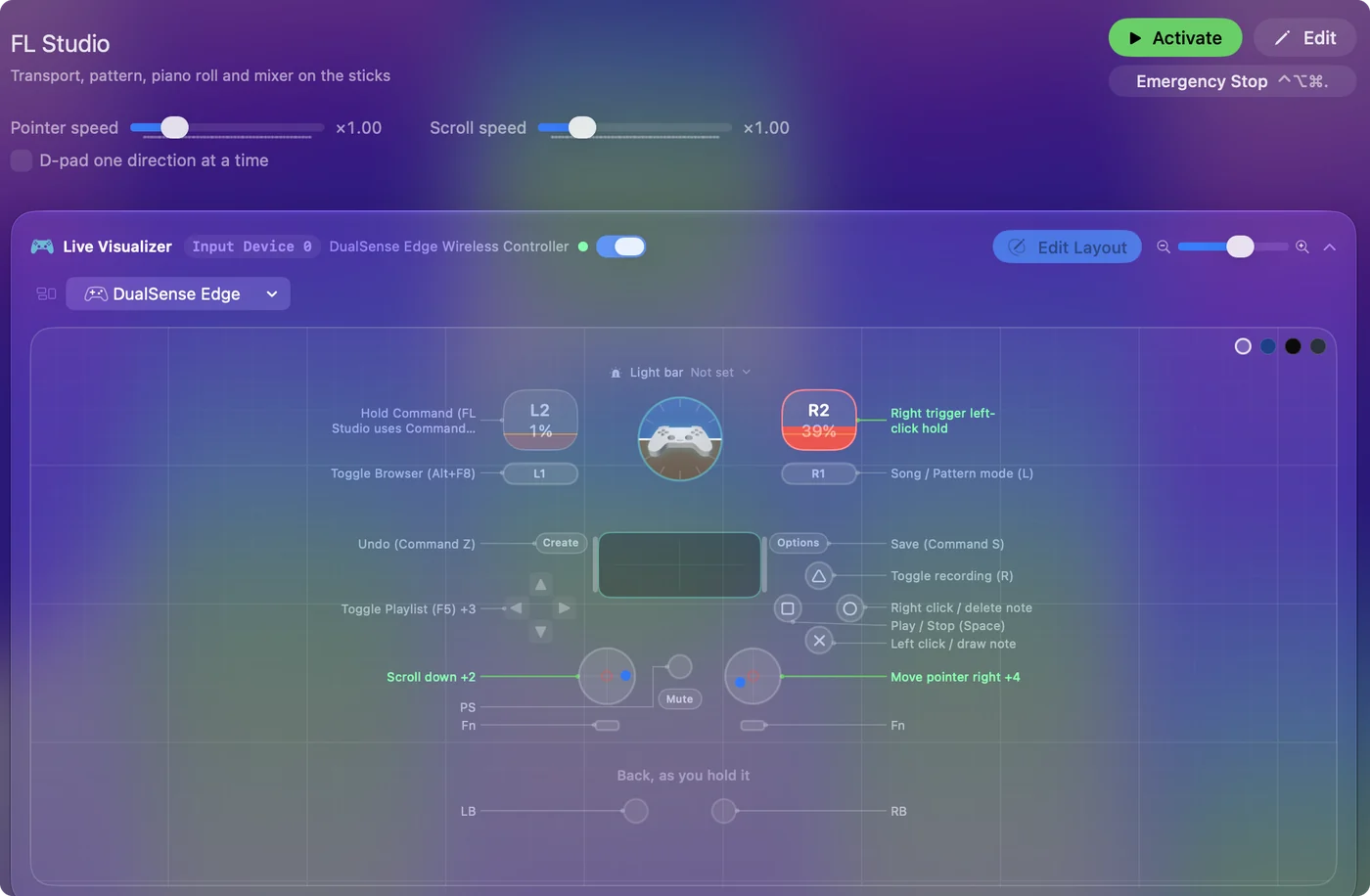
| Controller | Sends | What it does |
|---|---|---|
| Right stick right | Mouse motion right (speed 16) | Move pointer right |
| Right stick left | Mouse motion left (speed 16) | Move pointer left |
| Right stick down | Mouse motion down (speed 16) | Move pointer down |
| Right stick up | Mouse motion up (speed 16) | Move pointer up |
| Left stick down | Scroll down | Scroll down |
| Left stick up | Scroll up | Scroll up |
| A / Cross | Left click | Left click / draw note |
| B / Circle | Right click | Right click / delete note |
| X / Square | Space | Play / Stop (Space) |
| Y / Triangle | R | Toggle recording (R) |
| RB / R1 | L | Song / Pattern mode (L) |
| D-pad up | F5 | Toggle Playlist (F5) |
| D-pad down | F6 | Toggle Step Sequencer (F6) |
| D-pad left | F7 | Toggle Piano Roll (F7) |
| D-pad right | F9 | Toggle Mixer (F9) |
| LB / L1 | Alt / Option (Left), F8 | Toggle Browser (Alt+F8) |
| Back / Share / Select | Command (Left), Z | Undo (Command Z) |
| Start / Options | Command (Left), S | Save (Command S) |
| L3 (left stick click) | Command (Left), Alt / Option (Left), Z | Redo (Command Option Z) |
| R3 (right stick click) | Middle click | Middle click / pan view |
| Right trigger | Left click | Right trigger left-click hold |
| Left trigger | Command (Left) | Hold Command (FL Studio uses Command where Windows uses Ctrl) |
Button names follow the Xbox / PlayStation pair shown in the editor, so A / Cross is the bottom face button on either pad. On a Switch Pro Controller the bottom button is labeled B; the mapping still fires on position.
Questions
Can I play notes into FL Studio with a game controller?
Yes, through InputConfig's virtual MIDI port, named InputConfig. Enable it as an input in FL's MIDI settings.
Why does the redo button go further back?
FL Studio's Command Option Z is step-by-step undo. Command Z alone toggles the last edit.
Related
Completely free. You don't have to make an account, there are no subscriptions, and nothing is locked. Optimized for Apple silicon. Open source on GitHub.
Updated