Bitwig Studio from a game controller
 The Bitwig Studio layout is built into InputConfig, free on the Mac App Store. You don't have to make an account, there are no subscriptions, and nothing is locked. Optimized for Apple silicon.
On a Mac: Bitwig reads key presses from this layout and takes InputConfig's virtual MIDI port as a controller input. Some rows follow Ableton's keys, so check them against Bitwig's shortcut list.
Yes, Bitwig Studio runs from a game controller on a Mac in two ways at once. Key presses drive the transport and walk the clip launcher with the D-pad, and InputConfig's virtual MIDI port turns the same pad into notes and CC that Bitwig can map to anything. Two rows follow Ableton's keys, so check them first.
The layout, control by control
How the layout thinks
- Transport. Play and stop (Space) on the bottom face button, record (F9) on the right.
- Walk the grid. The D-pad sends the arrow keys to move the selection, Return on the top face button launches it, and Tab on the left switches views.
- Keep your work. Undo on the left bumper, Save on the right.
- Scroll. The right stick scrolls the panel under the pointer.
Check the two rows that came from Ableton
This layout shares its keys with the Ableton Live one, and Bitwig's defaults differ in places, record and view switching in particular.
- You: Open Bitwig's Settings, Shortcuts, and look up the record key and the view keys for your version.
- InputConfig: Keeps sending F9 and Tab until you change those two rows' outputs to Bitwig's keys.
- Check: Press the right face button with Bitwig in front. If the record button does not light, change that row and press it again.
Bitwig's own shortcut list is the reference, and it lets you change any key there too.
Play notes and move knobs from the pad
- Notes. Give face buttons MIDI Note outputs and add InputConfig as a generic MIDI keyboard in Bitwig's Controllers settings.
- Sticks as knobs. Put MIDI CC rows on the sticks and let Bitwig's mapping mode learn them. A stick reaches the full 0 to 127 range past its deadzone.
- Transport from hardware. InputConfig can take MIDI Start, Continue and Stop as inputs, so a drum machine's play button can fire any shortcut.
The MIDI control surface guide walks through the setup. One pad can be your transport and your modulator at the same time.
Get it in two clicks
- Get InputConfig free on the Mac App Store, open it, and click Smart Preset Maker on the welcome screen.
- Search for Bitwig Studio and pick it. The layout is created as a preset in your sidebar, named and ready.
- Press Activate. Every row can be changed afterwards: the editor's Scan button rebinds any control the moment you touch it.
Every binding, as a table
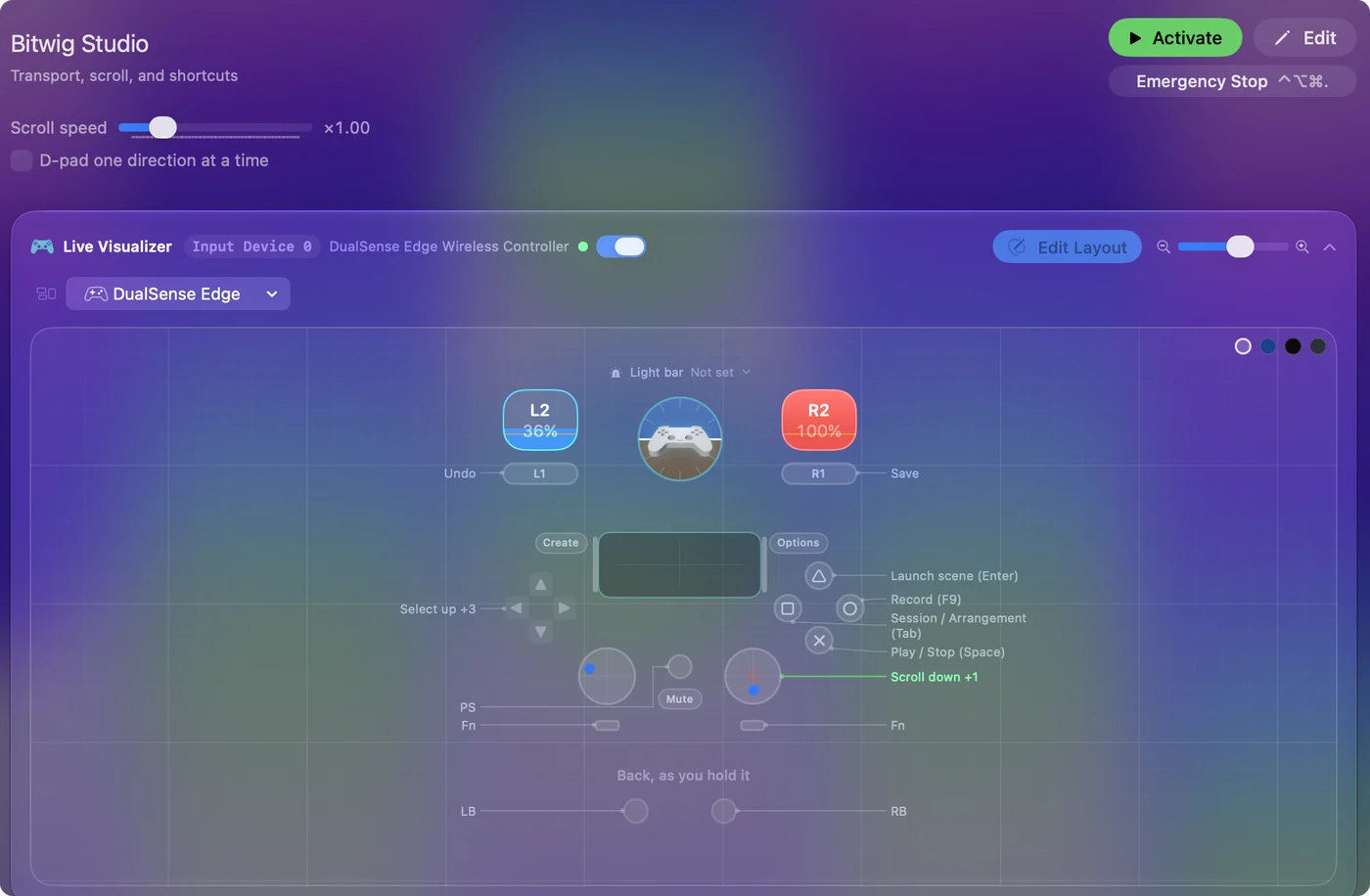
| Controller | Sends | What it does |
|---|---|---|
| A / Cross | Space | Play / Stop (Space) |
| B / Circle | F9 | Record (F9) |
| X / Square | Tab | Session / Arrangement (Tab) |
| Y / Triangle | Return | Launch scene (Enter) |
| D-pad up | Up | Select up |
| D-pad down | Down | Select down |
| D-pad left | Left | Select left |
| D-pad right | Right | Select right |
| LB / L1 | Command (Left), Z | Undo |
| RB / R1 | Command (Left), S | Save |
| Right stick down | Scroll down | Scroll down |
| Right stick up | Scroll up | Scroll up |
Button names follow the Xbox / PlayStation pair shown in the editor, so A / Cross is the bottom face button on either pad. On a Switch Pro Controller the bottom button is labeled B; the mapping still fires on position.
Questions
Can I play instruments in Bitwig from a controller?
Yes, through InputConfig's virtual MIDI port. The MIDI control surface guide and the gamepad as a MIDI instrument guide cover it.
Why does the record button do something else in Bitwig?
The row sends F9, the key from the Ableton layout. Look up Bitwig's record key under Settings, Shortcuts and change the row's output to match.
Related
Completely free. You don't have to make an account, there are no subscriptions, and nothing is locked. Optimized for Apple silicon. Open source on GitHub.
Updated