A numeric keypad on a game controller
 The Numeric Keypad layout is built into InputConfig, free on the Mac App Store. You don't have to make an account, there are no subscriptions, and nothing is locked. Optimized for Apple silicon.
On a Mac: Sends the numeric keypad's own key codes, so apps that treat the keypad differently from the top-row digits, such as Blender and Pro Tools, see a real numpad.
Yes, a game controller can be the numeric keypad your MacBook lacks: it types real keypad digits 0 to 9, plus, minus, the decimal point and Enter. It sends the keypad's own key codes, so apps that treat the keypad differently, such as Blender and Pro Tools, see a real numpad. The pattern takes an afternoon to learn, and it is a real accessibility tool for one-handed data entry.
The layout, control by control
How the layout thinks
- The face buttons. 0 on the bottom, 1 on the left, 3 on the right, 5 on the top.
- The D-pad. 2, 4, 6 and 8 on down, left, right and up, the same cross they make on a keypad.
- The bumpers. 7 on the left, 9 on the right.
- Math. Plus on the left stick click, minus on the right, the decimal point on Back, Share or View.
- Finish and fix. Enter on the right trigger, Backspace on the left, Escape on Start.
Tune it for entering numbers without looking
- Hear each digit. Turn on Speak a phrase in each row's Options, under Feedback, and the Mac says the digit as you press it. Pick a DualSense in System Settings, Sound, Output and the speech plays near your hands. A low Vibrate works too.
- One direction at a time. On the preset's page, turn on D-pad one direction at a time so a slightly angled press cannot type 6 when you meant 8.
- Spreadsheets. Add these rows to the Excel or Numbers layout behind a chord, so one held button turns the D-pad from cell moves into digits.
- Blender and Pro Tools. Both read the keypad separately from the number row, and these rows send real keypad keys.
Turn on one direction at a time first, because it removes the only common mistake.
Get it in two clicks
- Get InputConfig free on the Mac App Store, open it, and click Smart Preset Maker on the welcome screen.
- Search for Numeric Keypad and pick it. The layout is created as a preset in your sidebar, named and ready.
- Press Activate. Every row can be changed afterwards: the editor's Scan button rebinds any control the moment you touch it.
Every binding, as a table
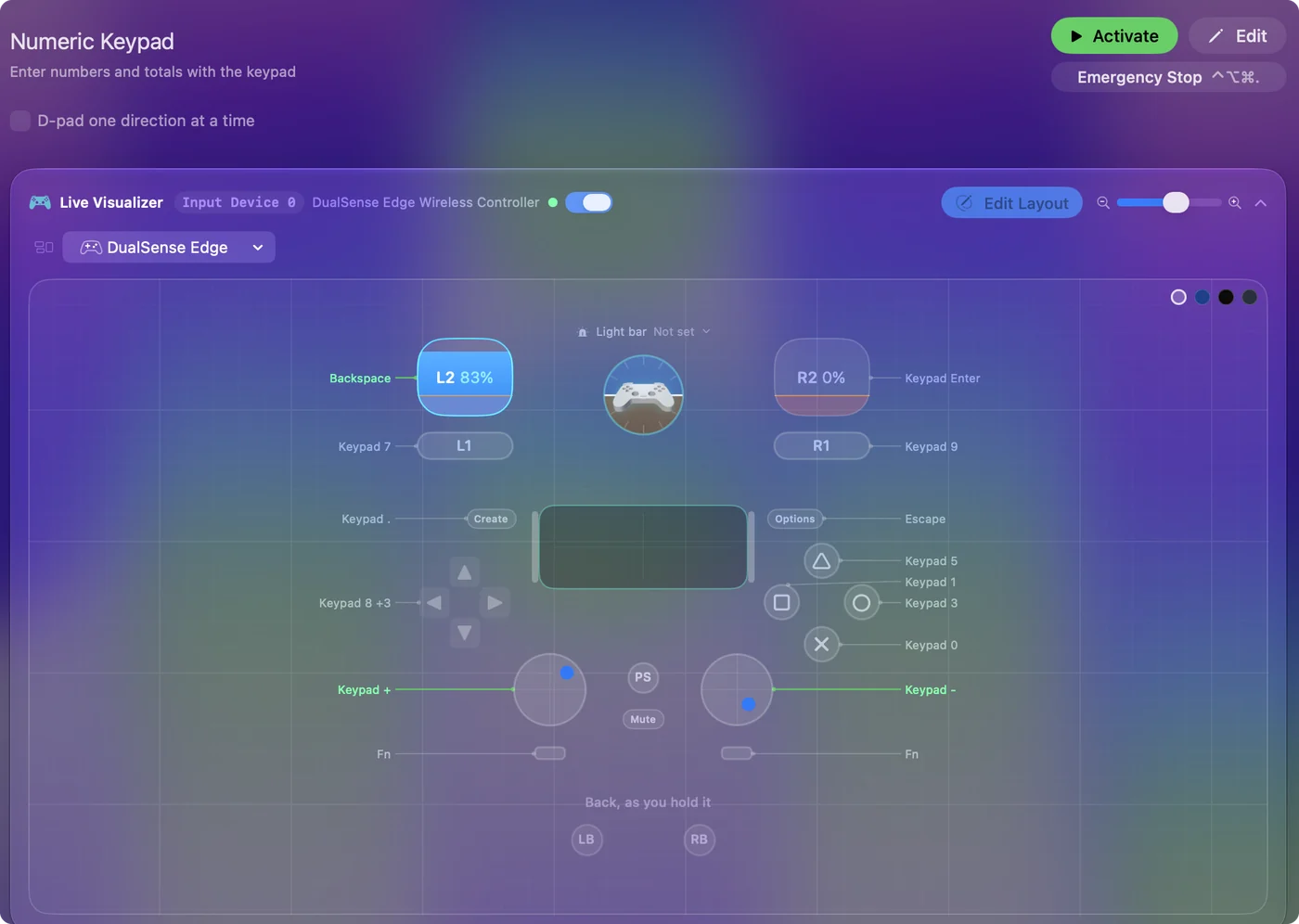
| Controller | Sends | What it does |
|---|---|---|
| D-pad up | Keypad 8 | Keypad 8 |
| D-pad down | Keypad 2 | Keypad 2 |
| D-pad left | Keypad 4 | Keypad 4 |
| D-pad right | Keypad 6 | Keypad 6 |
| A / Cross | Keypad 0 | Keypad 0 |
| B / Circle | Keypad 3 | Keypad 3 |
| X / Square | Keypad 1 | Keypad 1 |
| Y / Triangle | Keypad 5 | Keypad 5 |
| LB / L1 | Keypad 7 | Keypad 7 |
| RB / R1 | Keypad 9 | Keypad 9 |
| L3 (left stick click) | Keypad + | Keypad + |
| R3 (right stick click) | Keypad - | Keypad - |
| Right trigger | Keypad Enter | Keypad Enter |
| Left trigger | Backspace | Backspace |
| Back / Share / Select | Keypad . | Keypad . |
| Start / Options | Escape | Escape |
Button names follow the Xbox / PlayStation pair shown in the editor, so A / Cross is the bottom face button on either pad. On a Switch Pro Controller the bottom button is labeled B; the mapping still fires on position.
Questions
Is this faster than a keyboard?
Not for a touch typist. For one hand or a wheelchair mount, it is often faster than anything else.
Does it work for Blender's numpad views?
Yes. The rows send real keypad keys, so 1, 3 and 7 give front, side and top views and 5 toggles perspective.
Related
Completely free. You don't have to make an account, there are no subscriptions, and nothing is locked. Optimized for Apple silicon. Open source on GitHub.
Updated