Delta Force on a Mac with a controller
 The Delta Force layout is built into InputConfig, free on the Mac App Store. You don't have to make an account, there are no subscriptions, and nothing is locked. Optimized for Apple silicon.
On a Mac: No Mac version. It streams to a Mac from a Windows PC you own. The stream normally passes a controller to the game's native scheme. This layout is for streams that do not see the pad.
Delta Force has no Mac version, but you can play it on a Mac with a controller by streaming it from a Windows PC you own. The stream normally passes the controller to the game's own scheme, so this layout is for a stream that does not see the pad. The extraction and the warfare modes share it.
On this page: 9 sections
The layout, control by control
How the layout thinks
- Move and look. The left stick moves (W, A, S, D), the right stick looks, the left stick click holds sprint.
- Fight. The right trigger fires, the left aims. Reload on the left face button, melee on D-pad down.
- Throw. The lethal grenade on the left bumper, the tactical on the right.
- Move your body. Jump and mantle on the bottom face button, crouch and slide on the right, use on the top.
- Weapons and map. Primary on D-pad up, secondary on left, ping and map on right. The map and inventory on Back, the menu on Start.
Tune it
- Loot. In the extraction mode the loot screen is pointer work. Add a slow pointer behind a chord for it.
- Aim. Set the right stick rows to the Smooth curve for precision near the center, and use Pointer speed on the preset's page for the overall look speed.
- Feel the grenade. Tick Vibrate under Feedback in the grenade rows' Options.
In warfare it plays like Battlefield, and in extraction the slow pointer chord is the row that matters.
If the stream sees the pad
Most PC streams pass the controller to the game's own scheme. If yours does, deactivate this preset, because a running preset sends a key as well as the game's own controller input, and every press counts twice. Give the stream one try with the pad alone, and press Activate only if Delta Force stands still.
Delta Force controller support: controller or keyboard
Steam's store page lists full controller support for Delta Force, so the game was made to be played on a controller, menus included. A keyboard and mouse work as well, and the choice is yours. On a Mac, use the game's own controller support first when it sees your pad; this layout is for a pad it does not see, or for buttons it will not let you move. Full support listed means the controller is a first-class way to play Delta Force.
From Steam's listing, checked in October 2026. Every game's listing is in Mac games with controller support.
If your controller is not working in Delta Force
When Delta Force does not react to your controller on a Mac, climb this ladder, smallest step first:
- Check that the Mac sees the controller. Open the gamepad tester and press a button. If nothing lights up there, the problem is the connection, and a controller that is connected but not working covers that first.
- Press a button after the stream has started. A stream only picks up a controller that is paired with the Mac, and a browser shows a controller to a page only after a button press. Start Delta Force, then press any button. Streaming from your own PC has its own checks, in how to stream PC games to a Mac with a controller.
- Play it from keys. If Delta Force still ignores the pad, activate this layout. It sends the keyboard and mouse controls Delta Force already reads. Turn the game's own controller option off while it runs, or a press can arrive twice. The layout works whether or not Delta Force ever sees the controller.
Get it in two clicks
- Get InputConfig free on the Mac App Store, open it, and click Smart Preset Maker on the welcome screen.
- Search for Delta Force and pick it. The layout is created as a preset in your sidebar, named and ready.
- Press Activate. Every row can be changed afterwards: the editor's Scan button rebinds any control the moment you touch it.
To check the controller itself first, the gamepad tester shows every button and stick live in your browser.
Delta Force controls: every button and the key it sends
The Sends column is Delta Force's default keyboard and mouse controls, as this layout expects them. If you changed a key in the game's settings, change the same row in InputConfig.
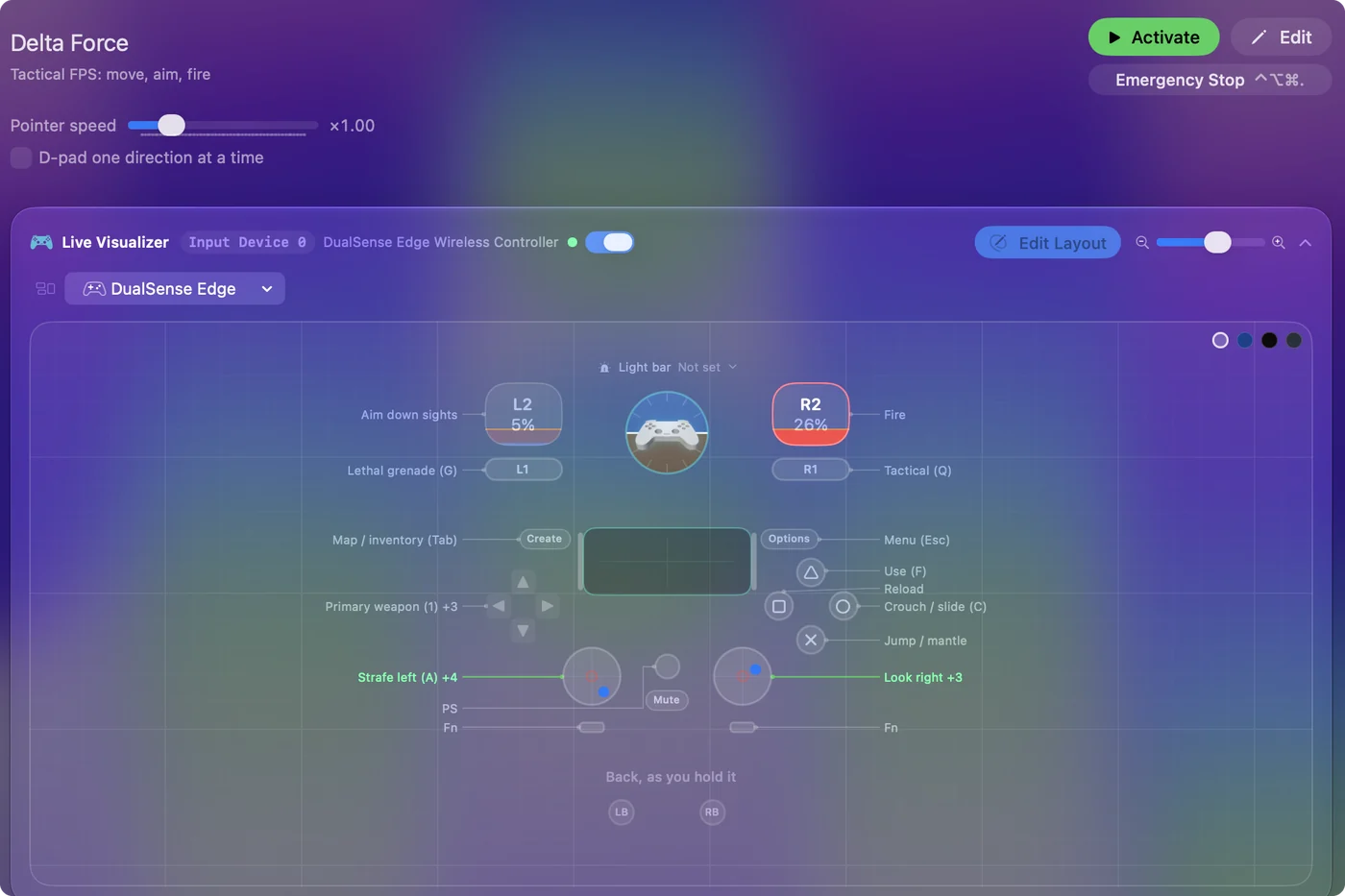
| Controller | Sends | What it does |
|---|---|---|
| Left stick left | A | Strafe left (A) |
| Left stick right | D | Strafe right (D) |
| Left stick up | W | Move forward (W) |
| Left stick down | S | Move back (S) |
| Right stick right | Mouse motion right (speed 20) | Look right |
| Right stick left | Mouse motion left (speed 20) | Look left |
| Right stick down | Mouse motion down (speed 14) | Look down |
| Right stick up | Mouse motion up (speed 14) | Look up |
| Right trigger | Left click | Fire |
| Left trigger | Right click | Aim down sights |
| A / Cross | Space | Jump / mantle |
| B / Circle | C | Crouch / slide (C) |
| X / Square | R | Reload |
| Y / Triangle | F | Use (F) |
| LB / L1 | G | Lethal grenade (G) |
| RB / R1 | Q | Tactical (Q) |
| L3 (left stick click) | Shift (Left) | Sprint (hold) |
| D-pad up | 1 | Primary weapon (1) |
| D-pad left | 2 | Secondary weapon (2) |
| D-pad down | V | Melee (V) |
| D-pad right | M | Ping / map (M) |
| Back / Share / Select | Tab | Map / inventory (Tab) |
| Start / Options | Escape | Menu (Esc) |
Button names follow the Xbox / PlayStation pair shown in the editor, so A / Cross is the bottom face button on either pad. On a Switch Pro Controller the bottom button is labeled B; the mapping still fires on position.
Questions
Does Delta Force run on a Mac?
Delta Force does not run natively on a Mac. A PC stream carries it, usually with the controller passed through. This layout covers streams that do not see the pad.
Does Delta Force have controller support?
Yes. Steam lists full controller support for Delta Force, so every part of the game can be played on a controller.
Is Delta Force better with a controller or a keyboard?
Both work. Steam lists full controller support for Delta Force, so it was made to be played on a controller, and a keyboard and mouse work as well.
Why is my controller not working in Delta Force on a Mac?
First check the Mac itself sees the controller, with the gamepad tester. If it does and Delta Force still ignores it, activate the Delta Force layout in InputConfig, which sends the game's keyboard and mouse controls from the controller.
Can I play Delta Force on an M1 Mac or a MacBook Air?
Yes, through a stream. Delta Force runs on the other end, on a cloud service or your own PC, so the Mac only plays the video and sends your input. An M1 MacBook Air streams it like any other Mac.
Related
Completely free. You don't have to make an account, there are no subscriptions, and nothing is locked. Optimized for Apple silicon. Open source on GitHub.
Updated