Cinema 4D from a game controller
 The Maxon Cinema 4D layout is built into InputConfig, free on the Mac App Store. You don't have to make an account, there are no subscriptions, and nothing is locked. Optimized for Apple silicon.
On a Mac: Cinema 4D for Mac navigates with Option and a mouse button, which this layout holds for you. It also supports 3D mice through their own driver, separately.
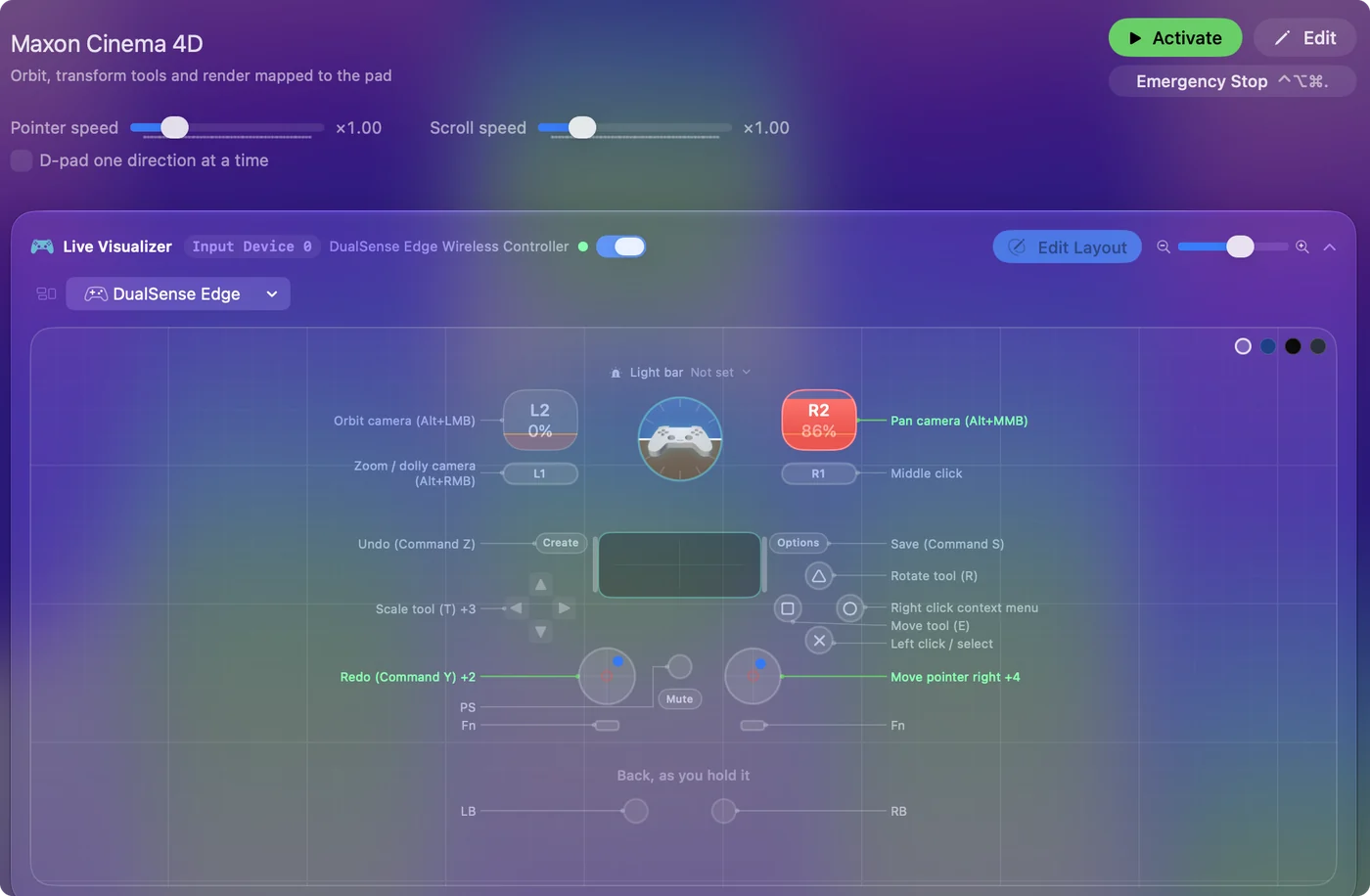
Yes, you can navigate Cinema 4D on a Mac from a game controller. Cinema 4D's camera is a modifier plus a mouse button, which is a held trigger plus a stick: hold the left trigger and the right stick orbits, hold the right trigger and it pans. The transform tools are on the face buttons and render is on the D-pad.
On this page: 7 sections
The layout, control by control
How the layout thinks
- Move the camera. The right stick moves the pointer. The left trigger holds Option and the left mouse button, which orbits; the right trigger holds Option and the middle button, which pans; the left bumper holds Option and the right button, which dollies.
- Select. Left click on the bottom face button, right click on the right.
- Transform. Move (E) on the left face button, Rotate (R) on the top, Scale (T) on D-pad up, Live Selection (9) on D-pad left.
- Render. D-pad right renders the viewport (Command R), down renders to the Picture Viewer (Shift Command R).
- The rest. The right bumper is a plain middle click, the left stick scrolls, the right stick click frames the selection (S), and Undo, Redo and Save are on Share, the left stick click and Options.
Cinema 4D also supports 3D mice through their own driver, separately. Hold a trigger, push the stick, and the camera moves the way Option and a mouse button move it.
Tune it for camera moves
- Speed. The Pointer speed slider on the preset's page scales the orbit speed along with everything else.
- The screen edge. An orbit ends when the pointer reaches the edge of the screen. Release, recenter, hold again.
- More on this idea. The 3D mouse page sets up the same trick for Blender, Fusion, SketchUp and Maya.
Cinema 4D has no controller setting for viewport navigation. This uses the mouse-and-Option navigation it already has. For long orbits, release at the screen edge and hold again.
The short version
- Navigation and tools on the pad. Points and fine work stay with a mouse or pen in the other hand.
- Slow it down if it swings. It is one slider on the preset's page.
- Render is one press. D-pad right renders the viewport.
It is a camera rig, not a modeling tool. Orbit, pan and dolly on held buttons, the tools on the face buttons.
Get it in two clicks
- Get InputConfig free on the Mac App Store, open it, and click Smart Preset Maker on the welcome screen.
- Search for Maxon Cinema 4D and pick it. The layout is created as a preset in your sidebar, named and ready.
- Press Activate. Every row can be changed afterwards: the editor's Scan button rebinds any control the moment you touch it.
Every binding, as a table
| Controller | Sends | What it does |
|---|---|---|
| Right stick right | Mouse motion right (speed 18) | Move pointer right |
| Right stick left | Mouse motion left (speed 18) | Move pointer left |
| Right stick down | Mouse motion down (speed 18) | Move pointer down |
| Right stick up | Mouse motion up (speed 18) | Move pointer up |
| A / Cross | Left click | Left click / select |
| B / Circle | Right click | Right click context menu |
| Left trigger | Alt / Option (Left), Left click | Orbit camera (Alt+LMB) |
| Right trigger | Alt / Option (Left), Middle click | Pan camera (Alt+MMB) |
| LB / L1 | Alt / Option (Left), Right click | Zoom / dolly camera (Alt+RMB) |
| RB / R1 | Middle click | Middle click |
| X / Square | E | Move tool (E) |
| Y / Triangle | R | Rotate tool (R) |
| D-pad up | T | Scale tool (T) |
| D-pad left | 9 | Live Selection tool (9) |
| D-pad right | Command (Left), R | Render viewport (Command R) |
| D-pad down | Shift (Left), Command (Left), R | Render to Picture Viewer (Shift Command R) |
| L3 (left stick click) | Command (Left), Y | Redo (Command Y) |
| Back / Share / Select | Command (Left), Z | Undo (Command Z) |
| Start / Options | Command (Left), S | Save (Command S) |
| Left stick down | Scroll down | Scroll / zoom down |
| Left stick up | Scroll up | Scroll / zoom up |
| R3 (right stick click) | S | Frame selected (S) |
Button names follow the Xbox / PlayStation pair shown in the editor, so A / Cross is the bottom face button on either pad. On a Switch Pro Controller the bottom button is labeled B; the mapping still fires on position.
Questions
Is the pointer precise enough for modeling?
For navigation and tool switching, yes. A mouse or pen in the other hand does the points.
Does Cinema 4D support game controllers?
Not for viewport navigation. This layout uses the mouse-and-Option navigation Cinema 4D already has.
Related
Completely free. You don't have to make an account, there are no subscriptions, and nothing is locked. Optimized for Apple silicon. Open source on GitHub.
Updated