Questions
A game controller as a 3D mouse on a Mac
Yes, for orbit, pan and zoom one at a time: a controller can hold the middle mouse button while its stick moves the pointer, which is the drag 3D apps navigate with. It cannot move a model in six directions at once the way a 3Dconnexion SpaceMouse does through its own driver, but it does the job most people buy a 3D mouse for, without the three-button mouse drags that wear out a wrist.
I make InputConfig, a free Mac app, and this page is how I set a controller up for that in Blender, Fusion, SketchUp, Maya and Cinema 4D, with the limits stated.
On this page: 8 sections
Steps
- Make the left stick the pointer, or start from Desktop Navigation.
- Add a row on a button with the output Mouse Button: Middle click.
- Add a second row with a modifier key and Middle click together, for pan or orbit.
- Put the right stick on Mouse Wheel up and down for zoom.
- Hold the button and push the stick in your 3D app.
Hold a button and move the stick
3D apps orbit and pan when you drag with the middle mouse button, sometimes with Shift or Option held. InputConfig can hold a mouse button for as long as you hold a controller button, and the left stick moves the pointer.
Step 1: A pointer on the left stick
- You: Start from the built-in Desktop Navigation preset, or the Blender and SketchUp layouts in the Smart Preset Maker, which already make the left stick the pointer.
- InputConfig: Moves the pointer with the stick.
- Check: The pointer follows the stick.
Step 2: A held middle button
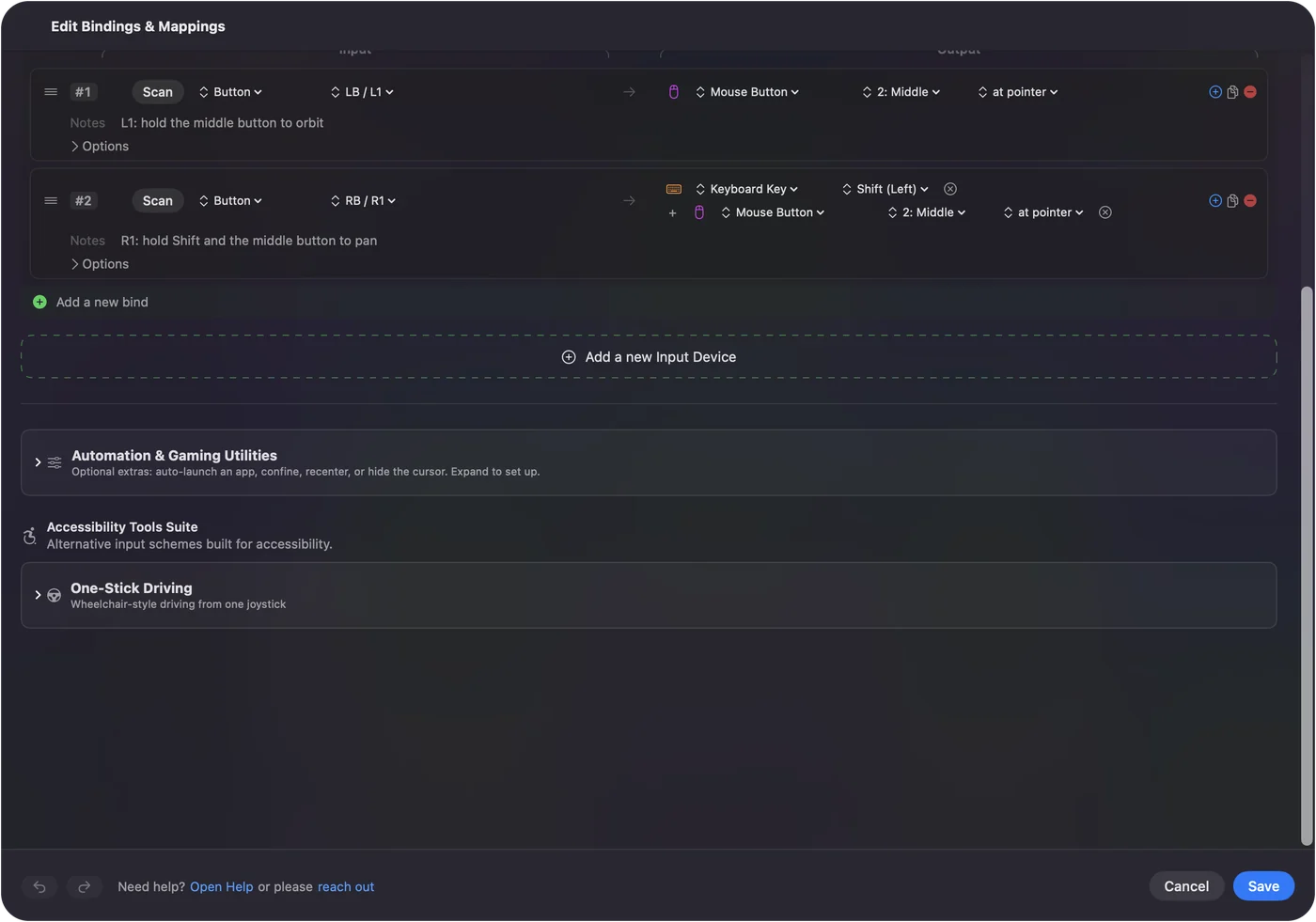
- You: Add a row on a button, say B or Circle, with the output Mouse Button: Middle click. For pan or orbit with a modifier, add a second row on another button with two outputs, the modifier key and Middle click.
- InputConfig: Holds the middle button while your thumb does, because a plain row fires while held. Outputs on one row fire together and are held together.
- Check: Hold the button, push the stick, and the model turns.
Step 3: Zoom on the right stick
- You: Put the right stick on Mouse Wheel, up and down.
- InputConfig: Scrolls, which is zoom in these apps.
- Check: Push the right stick up and the view zooms.
Hold the button, push the stick, and the app sees a middle-button drag.
 InputConfig is free on the Mac App Store. macOS 14 or later, no account, no tracking, open source.
Match the buttons to your app
| App | Orbit | Pan | Zoom |
|---|---|---|---|
| Blender | Middle drag | Shift + middle drag | Scroll, or Control + middle drag |
| Autodesk Fusion | Shift + middle drag | Middle drag | Scroll |
| SketchUp | Middle drag | Shift + middle drag | Scroll |
| Autodesk Maya | Option + left drag | Option + middle drag | Option + right drag, or scroll |
| Cinema 4D | Option + left drag | Option + middle drag | Option + right drag, or scroll |
These are each app's default navigation. Fusion, Blender and SketchUp let you change it in their preferences, so if you picked another style, copy the mouse buttons you actually use. Blender also has Emulate 3 Button Mouse in Preferences, Input, but a held Middle click row is simpler.
Make the view move smoothly
- Speed. The Pointer speed slider on the preset's page scales every pointer row at once. Slower makes orbiting precise.
- A gentle start. Ramp-up, in a pointer row's options, starts the pointer slow and brings it up to speed over the time you set, which keeps small corrections small.
- Deadzone. If the view creeps with the stick at rest, set the deadzone with Adjust live in the row's Stick or Trigger options while you watch the stick.
- Tilt instead of the stick. On a DualSense or DualShock 4, gyro aim moves the pointer too, so holding the orbit button and tilting the controller orbits the model.
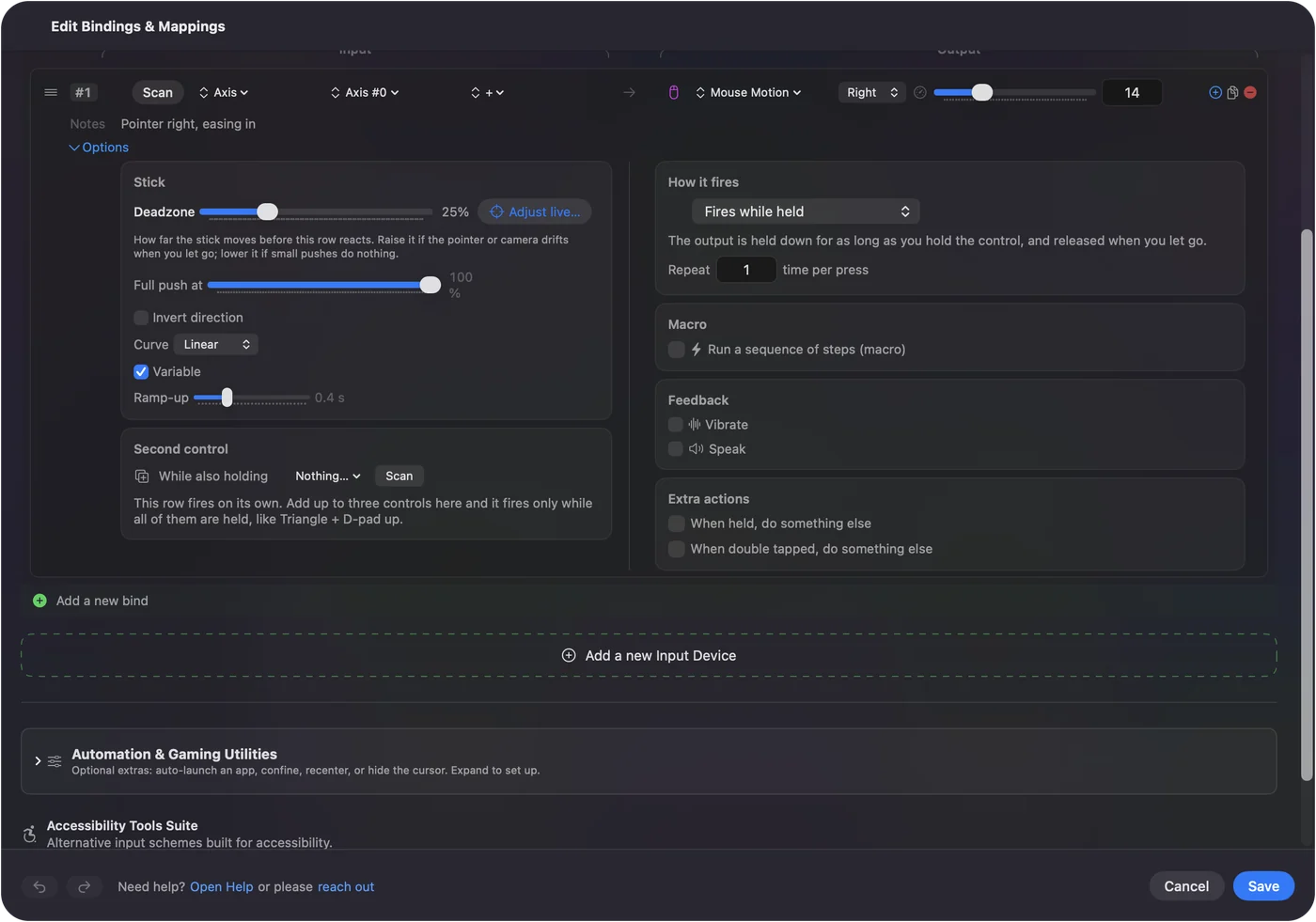
Slow the pointer and add Ramp-up, and orbiting feels deliberate instead of twitchy.
If orbiting stops partway
A drag ends when the pointer reaches the edge of the screen. Let go, move the pointer back toward the middle, and hold again. Turning the model a long way takes two or three strokes, which a real 3D mouse does not need.
Know where a real 3D mouse is still better
A 3D mouse orbits, pans and zooms at once, with the app's own support, and never runs into the edge of the screen. A controller does one motion at a time through ordinary mouse events.
- Modeling all day. A 3D mouse is worth the money.
- Resting your mouse hand, or a pad already on the desk. This costs nothing, and the same pad also carries the app's shortcuts: Blender's G, R and S, Fusion's tools, SketchUp's tool keys.
Blender and Fusion both support 3Dconnexion devices directly, so you can add one later without changing anything here.
The short version
- Orbit and pan. A held Middle click row, with a modifier where the app wants one.
- Zoom. Mouse Wheel on the right stick.
- Feel. Lower Pointer speed, add Ramp-up.
Not a SpaceMouse, but a free way to give your wrist a break.
Questions
Can a PS5 or Xbox controller replace a SpaceMouse?
For orbit, pan and zoom one at a time, yes. It sends ordinary middle-button drags and scrolling, so it works in any app that navigates with the mouse. It does not move in six directions at once.
Does Blender support game controllers for viewport navigation?
Not on its own. Blender supports 3D mice through its NDOF settings; a game controller works through a mapper that turns its buttons into mouse drags and keys.
Why does orbiting stop partway?
The pointer reached the edge of the screen and the drag ended. Release the button, bring the pointer back, and hold again.
Does this work in Fusion's browser-based or Windows version?
This page is about the Mac app. InputConfig runs on the Mac and sends Mac mouse and keyboard events to whatever app is in front.
Related
Free. macOS 14 or later. No account, nothing leaves your Mac. Open source on GitHub.