Godot from a game controller
 The Godot Engine layout is built into InputConfig, free on the Mac App Store. You don't have to make an account, there are no subscriptions, and nothing is locked. Optimized for Apple silicon.
On a Mac: The Godot editor reads its mouse navigation and tool keys from this layout. Its run keys differ on macOS, so four D-pad rows need changing, below.
Yes, you can drive the Godot editor on a Mac from a game controller, once four D-pad rows get the macOS run keys. The viewport orbits on a held trigger and the stick, and the gizmo tools are the face buttons. Godot is where a lot of controller games get made by one person on a Mac, and testing one with the controller in your hands is the reason for this layout.
On this page: 7 sections
The layout, control by control
How the layout thinks
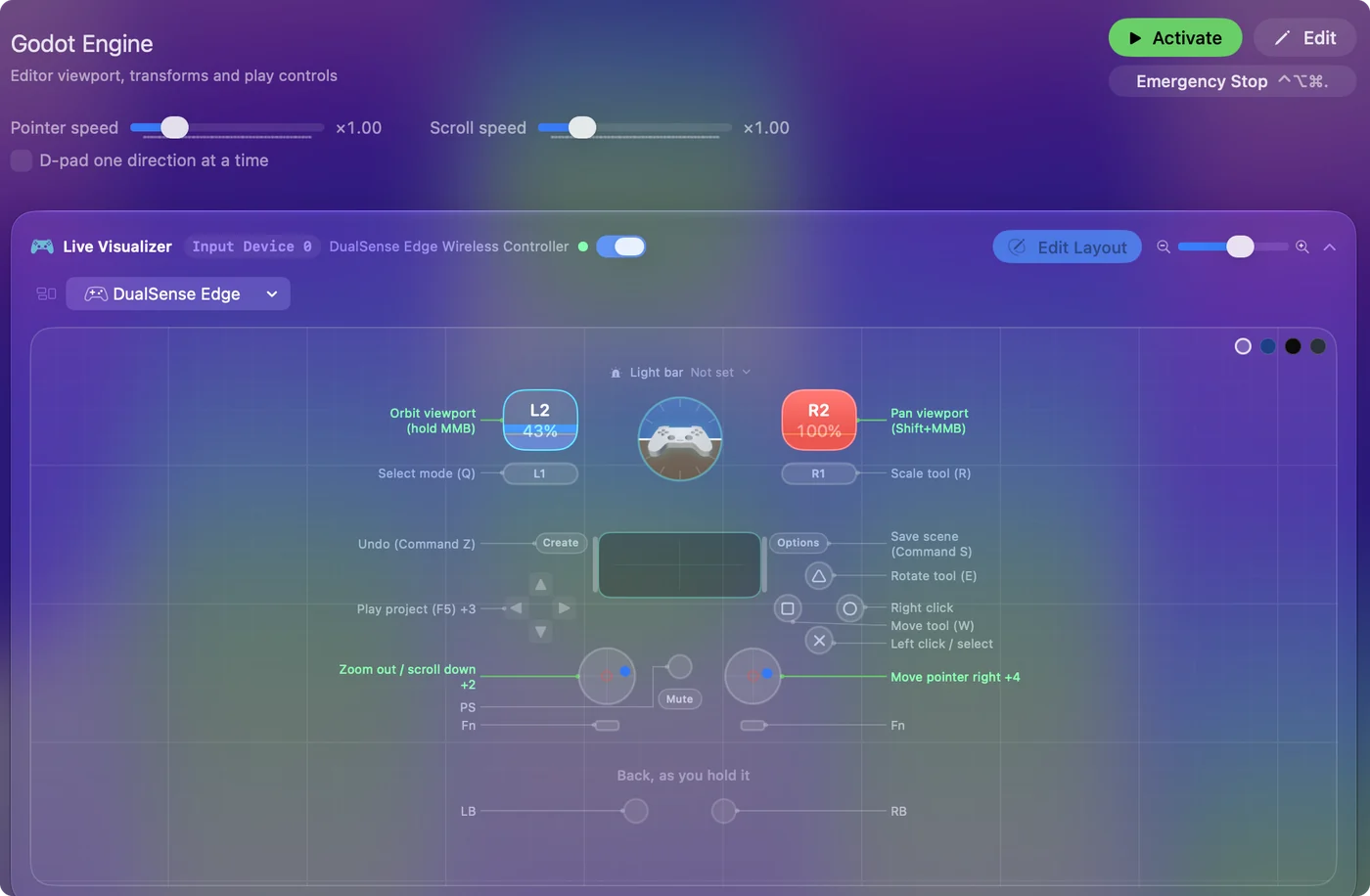
- Move the view. The right stick moves the pointer. Hold the left trigger to orbit (middle button held) or the right trigger to pan (Shift and middle button held). The left stick zooms and scrolls.
- Select. Left click on the bottom face button, right click on the right.
- Transform. Move (W) on the left face button, Rotate (E) on the top, Select mode (Q) on the left bumper, Scale (R) on the right.
- Focus. Focus selection (F) on the left stick click.
- Undo, redo, save. Undo and Save on Share and Options, Redo on the right stick click.
The D-pad is meant for running the game, and it needs the fix below first. Orbit and pan on held triggers, tools on the face buttons.
Change the run keys for macOS
The D-pad sends F5 to F8: run the project, run the current scene, pause and stop. Those are Godot's keys on Windows and Linux. On macOS, Godot 4's defaults as I know them are Command B to run the project, Command R to run the current scene, Command Y to pause and Command Period to stop.
- You: Open Editor Settings, Shortcuts to confirm what your version uses, then record those keys on the four D-pad rows.
- InputConfig: Sends Godot's macOS run keys from the D-pad.
- Check: Press D-pad up and the project runs.
I have listed the defaults from memory of Godot 4, so the Shortcuts list is the authority. On a Mac, Godot runs on Command B, not F5.
Editor on, game off: auto-switch
The running game reads the controller directly, so with this preset on, its keys would land in the game too.
- You: List the Godot editor under Activate when these apps are in front and turn on automatic switching in Settings, Advanced.
- InputConfig: Steps aside when your running game's window comes to the front, and returns when you go back to the editor.
- Check: Run the game and press a face button. Only the game reacts.
Set it once per project machine and forget it. A running preset doubles every press in a game that reads the pad, so let auto-switch hand it over.
Get it in two clicks
- Get InputConfig free on the Mac App Store, open it, and click Smart Preset Maker on the welcome screen.
- Search for Godot Engine and pick it. The layout is created as a preset in your sidebar, named and ready.
- Press Activate. Every row can be changed afterwards: the editor's Scan button rebinds any control the moment you touch it.
Every binding, as a table
| Controller | Sends | What it does |
|---|---|---|
| Right stick right | Mouse motion right (speed 18) | Move pointer right |
| Right stick left | Mouse motion left (speed 18) | Move pointer left |
| Right stick down | Mouse motion down (speed 18) | Move pointer down |
| Right stick up | Mouse motion up (speed 18) | Move pointer up |
| A / Cross | Left click | Left click / select |
| B / Circle | Right click | Right click |
| Left trigger | Middle click | Orbit viewport (hold MMB) |
| Right trigger | Shift (Left), Middle click | Pan viewport (Shift+MMB) |
| Left stick down | Scroll down | Zoom out / scroll down |
| Left stick up | Scroll up | Zoom in / scroll up |
| X / Square | W | Move tool (W) |
| Y / Triangle | E | Rotate tool (E) |
| RB / R1 | R | Scale tool (R) |
| LB / L1 | Q | Select mode (Q) |
| L3 (left stick click) | F | Focus selection (F) |
| D-pad up | F5 | Play project (F5) |
| D-pad right | F6 | Play current scene (F6) |
| D-pad down | F7 | Pause running project (F7) |
| D-pad left | F8 | Stop running project (F8) |
| Back / Share / Select | Command (Left), Z | Undo (Command Z) |
| Start / Options | Command (Left), S | Save scene (Command S) |
| R3 (right stick click) | Command (Left), Shift (Left), Z | Redo (Command Shift Z) |
Button names follow the Xbox / PlayStation pair shown in the editor, so A / Cross is the bottom face button on either pad. On a Switch Pro Controller the bottom button is labeled B; the mapping still fires on position.
Questions
Will the running game see the pad?
Yes. The game reads the controller directly. Turn the preset off for the game's window with auto-switch so its keys do not land in the game too.
Why does D-pad up not run my project?
It sends F5, the Windows and Linux key. Godot on a Mac runs the project with Command B by default. Editor Settings, Shortcuts shows yours.
Related
Completely free. You don't have to make an account, there are no subscriptions, and nothing is locked. Optimized for Apple silicon. Open source on GitHub.
Updated