Audacity from a game controller
 The Audacity layout is built into InputConfig, free on the Mac App Store. You don't have to make an account, there are no subscriptions, and nothing is locked. Optimized for Apple silicon.
On a Mac: Native on the Mac. The layout sends Audacity's default shortcuts, with nothing to enable.
Yes, you can record and edit in Audacity from a game controller on a Mac. Audacity is where most people record a voice for the first time, and a controller makes the first take easier: record on one button, stop on another, and the keyboard nowhere near the microphone. The editing keys are on the pad too, for the trims you make afterward.
The layout, control by control
How the layout thinks
- Record and play. Play and stop (Space) is the bottom face button, record (R) the right, and pause (P) the top.
- Edit. Cut is the left face button. Undo and redo are the bumpers, copy is Create, and paste is Options.
- Move around. The D-pad moves the cursor and steps through tracks. The left stick nudges the cursor and the right stick scrolls.
- Zoom. The triggers zoom in and out, and the left stick click fits the project in the window.
Record and stop under one thumb make a nervous first take easier.
Tune it
- Select all. Command A on the right stick click, which is free.
- Silence and trim. Put Command L and Command T on chords.
- A buzz on record. Tick Vibrate on the record row. You feel it start, and the keyboard's click is not on the recording.
A controller's press makes no click on the recording, which is half the reason to use one.
The short version
- Activate it. Audacity reads the keys with no setup.
- Record from across the room. The pad works away from the desk and the microphone.
Keep the keyboard away from the microphone and the controller in your hand.
Get it in two clicks
- Get InputConfig free on the Mac App Store, open it, and click Smart Preset Maker on the welcome screen.
- Search for Audacity and pick it. The layout is created as a preset in your sidebar, named and ready.
- Press Activate. Every row can be changed afterwards: the editor's Scan button rebinds any control the moment you touch it.
Every binding, as a table
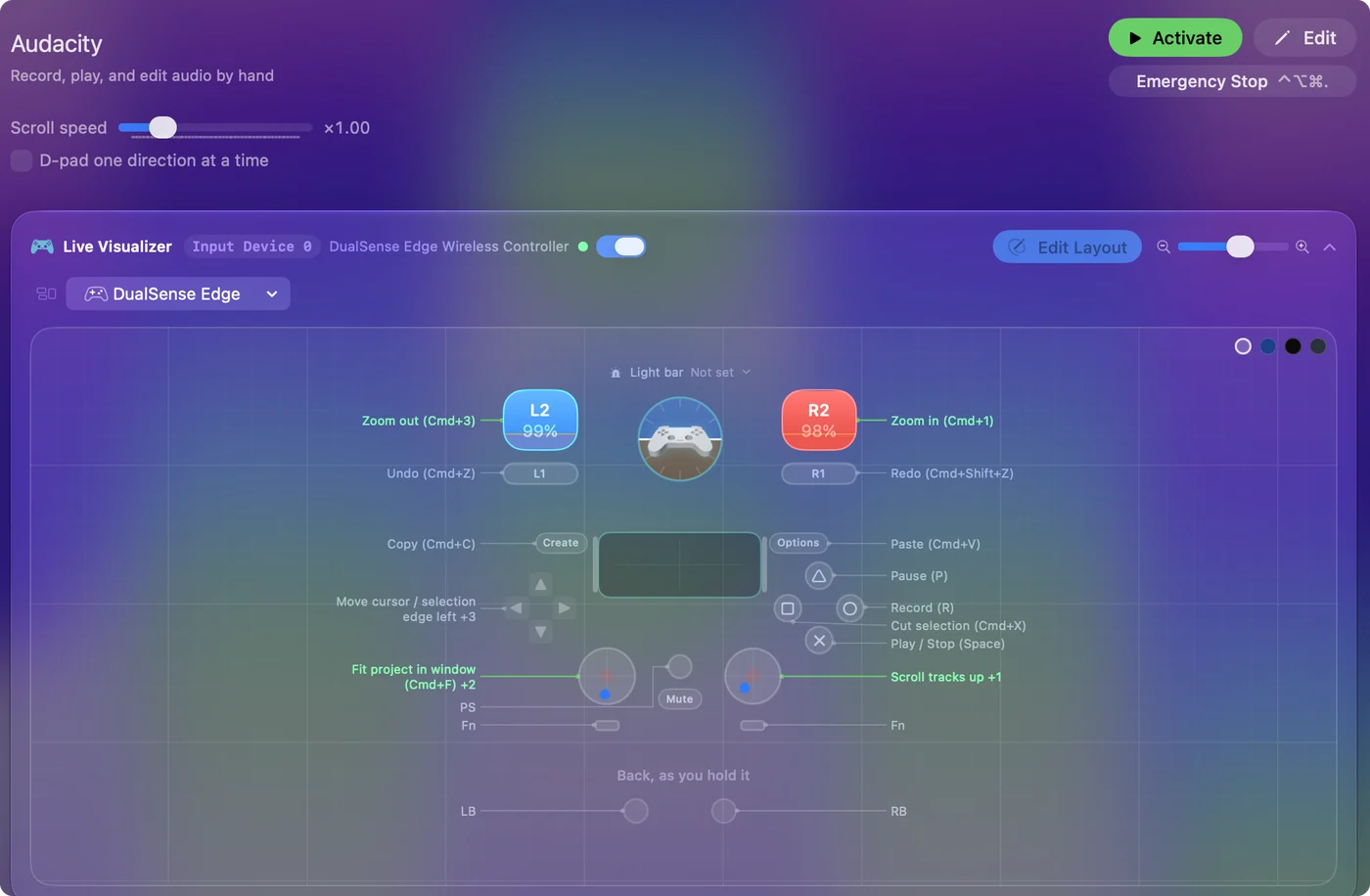
| Controller | Sends | What it does |
|---|---|---|
| A / Cross | Space | Play / Stop (Space) |
| B / Circle | R | Record (R) |
| Y / Triangle | P | Pause (P) |
| X / Square | Command (Left), X | Cut selection (Cmd+X) |
| LB / L1 | Command (Left), Z | Undo (Cmd+Z) |
| RB / R1 | Command (Left), Shift (Left), Z | Redo (Cmd+Shift+Z) |
| Start / Options | Command (Left), V | Paste (Cmd+V) |
| Back / Share / Select | Command (Left), C | Copy (Cmd+C) |
| L3 (left stick click) | Command (Left), F | Fit project in window (Cmd+F) |
| D-pad left | Left | Move cursor / selection edge left |
| D-pad right | Right | Move cursor / selection edge right |
| D-pad up | Up | Move focus to previous track (Up) |
| D-pad down | Down | Move focus to next track (Down) |
| Left stick left | Left | Nudge cursor left |
| Left stick right | Right | Nudge cursor right |
| Right stick up | Scroll up | Scroll tracks up |
| Right stick down | Scroll down | Scroll tracks down |
| Right trigger | Command (Left), 1 | Zoom in (Cmd+1) |
| Left trigger | Command (Left), 3 | Zoom out (Cmd+3) |
Button names follow the Xbox / PlayStation pair shown in the editor, so A / Cross is the bottom face button on either pad. On a Switch Pro Controller the bottom button is labeled B; the mapping still fires on position.
Questions
Why a controller for Audacity?
Because a keyboard click at the start of a take is on the recording, and a controller's is not; and because record and stop under one thumb makes a nervous first take easier.
Can I control Audacity with a MIDI controller?
Audacity plays MIDI files but does not take commands from a MIDI controller. InputConfig does the translating: add a MIDI input row, press Scan, hit a pad, and give the row Audacity's key, R to record or Space to play. The pads and knobs then run Audacity the way this controller layout does.
Related
Completely free. You don't have to make an account, there are no subscriptions, and nothing is locked. Optimized for Apple silicon. Open source on GitHub.
Updated