How to play Genshin Impact on a Mac with a controller
 InputConfig is completely free on the Mac App Store. You don't have to make an account, there are no subscriptions, and nothing is locked. Optimized for Apple silicon.
There is no Mac version of Genshin Impact, so playing it on a Mac means running another version: the iPad build through PlayCover, the Windows build through a Wine launcher, or a cloud stream. A controller works natively in the first, sometimes in the second, and through the browser in the third.
PlayCover: the iPad build on Apple silicon
PlayCover runs the iPad version natively on an M-series Mac, and the iOS build of Genshin has real controller support, so a paired PS5, Xbox or Switch pad works inside it the way it does on an iPad. This is the smoothest route for controller play. The setup is fiddly and unofficial, and HoYoverse's terms do not cover it.
A Wine launcher: the Windows build
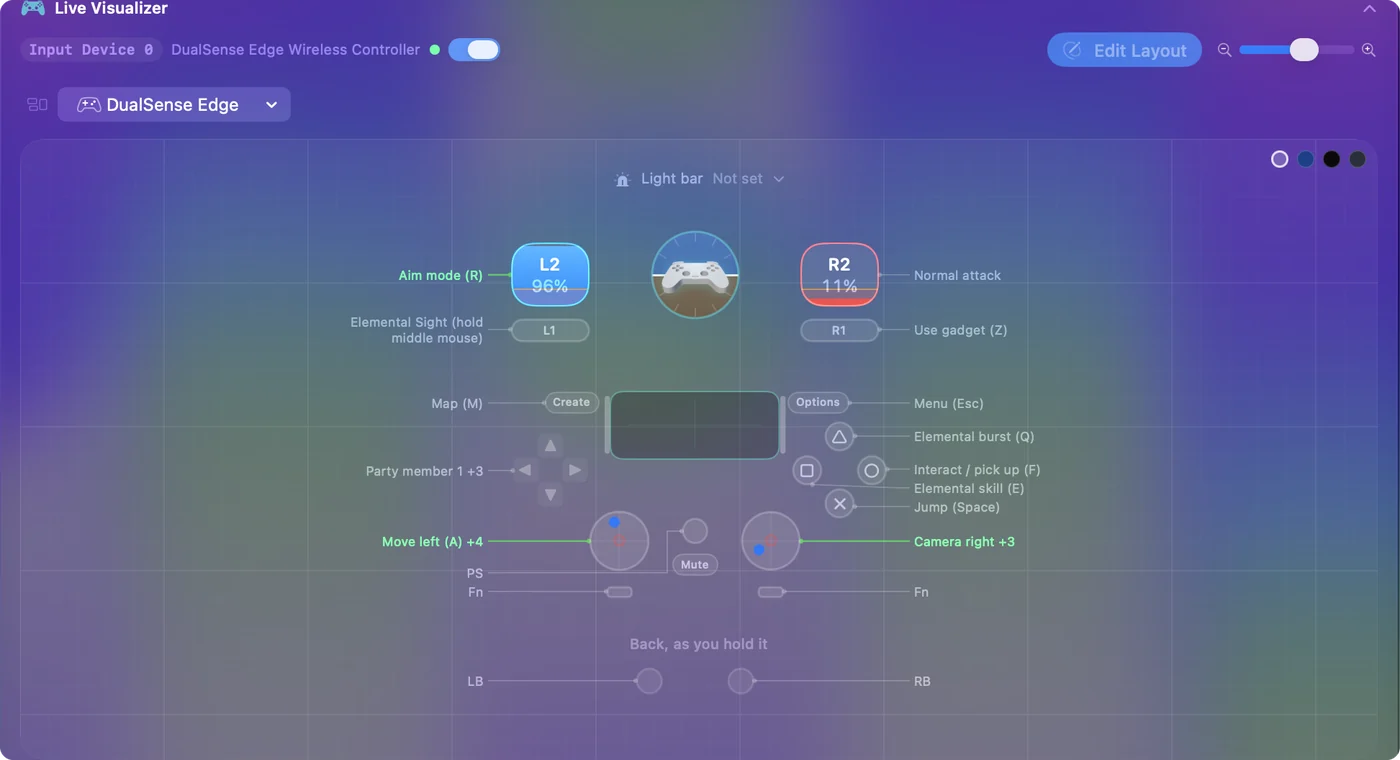
Wine launchers such as CrossOver run the Windows client on a Mac (controllers in CrossOver). The Windows build supports controllers, but the translation layer does not always pass them through. When it does not, InputConfig maps the controller to the keyboard and mouse, and the game sees a keyboard player. The Genshin Impact layout:
- Move and look. Left stick to W, A, S and D, right stick to mouse look.
- Fight. Elemental skill and burst on X and Y.
- Party. Character swaps on the D-pad.
Set the stick deadzone
Where InputConfig maps the pad, as with the Wine launcher, the deadzone is a row setting. Press Adjust live in a stick row's Options, rest your thumb, and drag the inner deadzone past the dot. The device's menu has Stick settings, which sets the deadzone on every axis row at once. Where the game reads the pad itself, as in PlayCover, the game sees the raw stick, so set the deadzone in Genshin's own settings instead. InputConfig's deadzone filters what it sends, and it cannot reach a game that reads the controller directly.
Stream it in a browser
Where Genshin's own cloud service is offered, it runs in a browser and takes a controller through the browser's Gamepad API. If the stream does not see the pad, press a button with the tab in front, then reload. The keyboard route above is the fallback.
The short version
- Apple silicon Mac. PlayCover and the iPad build, where the controller works natively.
- Windows build. A Wine launcher, with InputConfig's layout when the pad does not pass through.
- No install. Use a cloud stream in the browser.
Pick the route by your Mac first, because only an Apple silicon Mac runs the iPad build.
Questions
Is Genshin Impact available on Mac?
No. There is no native Mac client. Mac players run the iOS build through PlayCover, the Windows build through a Wine launcher, or stream it.
Does a controller work with Genshin on a Mac?
In PlayCover, yes, natively. In a Wine launcher, sometimes. InputConfig maps it to the keyboard when the launcher does not pass it through.
Is PlayCover official?
No. PlayCover is unofficial, and HoYoverse's terms do not cover running the iPad build this way. It is the smoothest route for a controller, so weigh that yourself.
How do I set the stick deadzone for Genshin Impact on a Mac?
In a Wine launcher with InputConfig, press Adjust live in the stick row's Options and drag the inner deadzone past the resting dot, or use the device menu's Stick settings to set every axis row at once. In PlayCover the game reads the stick itself, so use Genshin's own setting.
Related
This page in other languages: Deutsch, Français, Bahasa Indonesia, 日本語, Polski, Português, Русский, Tiếng Việt
Updated