How to keep the mouse cursor inside a game on a Mac, and hide it
 InputConfig is completely free on the Mac App Store. You don't have to make an account, there are no subscriptions, and nothing is locked. Optimized for Apple silicon.
When a controller stick moves the mouse in a game, the pointer can hit the edge of the screen and the camera stops turning, or the cursor shows on top of the game. A preset in InputConfig has three switches for that: Confine cursor, Auto-recenter and Hide cursor. Game presets from the Smart Preset Maker turn them on for you.
I make InputConfig, a free Mac app that lets you play keyboard and mouse games with a controller.
Steps
- Open the game's preset in InputConfig and click Edit.
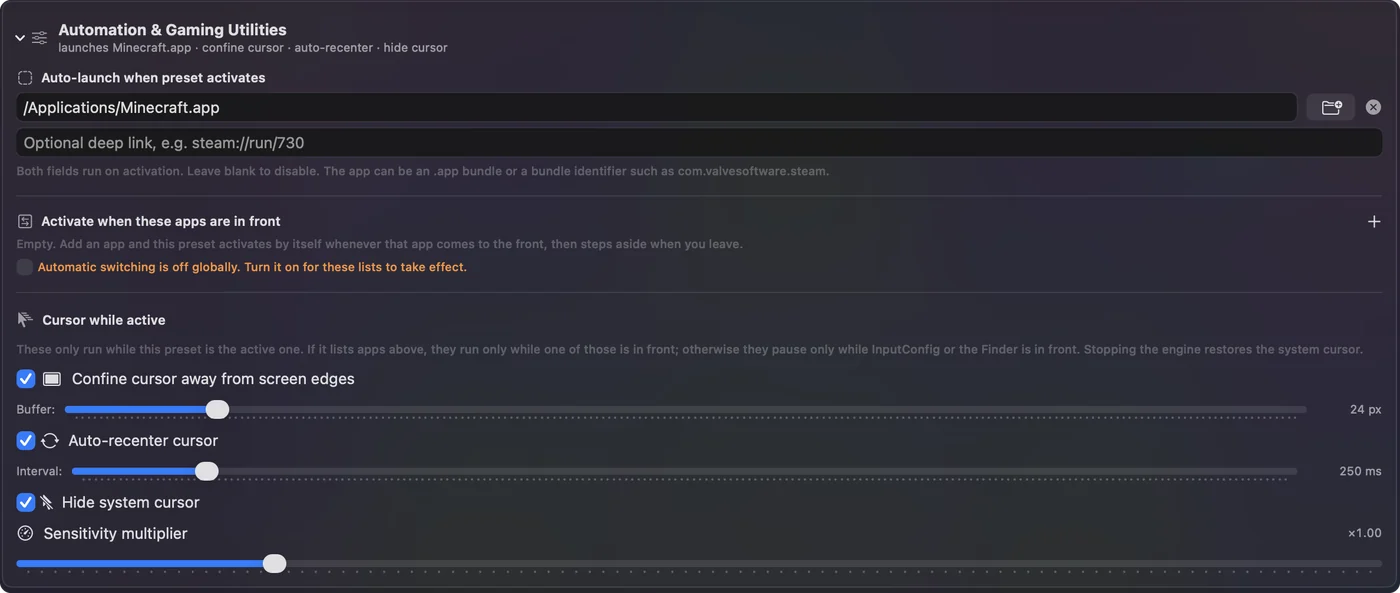
- Expand Automation & Gaming Utilities.
- Turn on Confine cursor away from screen edges.
- Turn on Hide system cursor, and Auto-recenter cursor if the camera stops turning.
- Click Save and start the game.
Turn on the three switches
- You: Click Edit on the preset and expand Automation & Gaming Utilities at the bottom of the editor. Turn on the switches you need.
- InputConfig: Guards the pointer while the preset runs.
- Check: In the game, hold the look stick to one side. The camera keeps turning and no cursor shows.
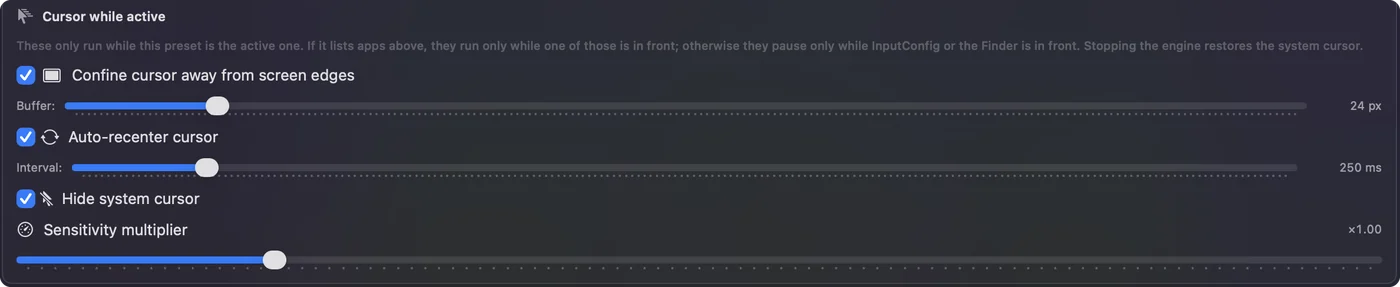
- Confine cursor. It keeps the pointer a set distance from the edges of the screen, so a stick never pushes it out of a full-screen game.
- Auto-recenter. It moves the pointer back to the middle at an interval, for games that read mouse movement to turn the camera.
- Hide cursor. It hides the pointer while the preset runs.
Confine plus hide is what makes a stick behave in a mouse-look game.
Keep them out of your other apps
You do not want a hidden, confined pointer on the desktop. List the game under Activate when these apps are in front, and the three switches act only while the game is in front. Without a list, they pause while InputConfig or the Finder is in front.
If the pointer still escapes
Climb this ladder, smallest step first:
- Check the preset is running. The switches do nothing until you click Activate.
- Check which app is in front. With an app list, they act only in those apps.
- Turn on Auto-recenter. Some games need the pointer near the middle to keep reading movement.
- Use full screen. A windowed game leaves more room for the pointer to wander.
What it cannot do
These switches manage the Mac's pointer. They do not change a game's own cursor drawn inside the game. They apply while the preset runs, and they are off the moment it stops or the emergency stop fires.
The short version
- Camera stops at the edge. Confine cursor, and Auto-recenter if needed.
- Cursor on top of the game. Hide cursor.
- Only in the game. Add the game to the app list.
Questions
Why does my camera stop turning when I use a controller as a mouse?
The pointer reached the edge of the screen, so the game gets no more movement. Turn on Confine cursor, and Auto-recenter cursor, in the preset's Automation section in InputConfig.
How do I hide the mouse cursor in a Mac game?
Turn on Hide system cursor in the preset's Automation section. List the game under Activate when these apps are in front so the pointer is hidden only there.
Do I have to set this up for every game?
Game presets made by the Smart Preset Maker turn confine, recenter and hide on for you. For a preset you built yourself, turn them on once.
Related
Completely free. You don't have to make an account, there are no subscriptions, and nothing is locked. Optimized for Apple silicon. Open source on GitHub.
Updated