How to control Mac volume with a controller or a knob
 InputConfig is completely free on the Mac App Store. You don't have to make an account, there are no subscriptions, and nothing is locked. Optimized for Apple silicon.
Give a button the Volume Up, Volume Down or Mute system function in InputConfig, and it changes the Mac's volume in every app. A trigger, a MIDI knob or a wheel can go one better: with the System Volume output, the volume follows how far you turn or pull it.
I make InputConfig, a free Mac app that maps controllers, MIDI gear, mice and keys to anything on a Mac. This is the way to get a volume control where your hand already is.
Steps
- Open a preset in InputConfig and click Edit.
- Add a row and press Scan, then press the button you want.
- Set the output type to System Function and pick Volume Up.
- Add rows for Volume Down and Mute the same way.
- Click Save, then Activate.
Put volume on buttons
- You: Add a row, press Scan and press a button. Set its output type to System Function and pick Volume Up. Do the same for Volume Down and Mute.
- InputConfig: Sends the Mac's own volume control, so it works in every app.
- Check: Press the button. The volume overlay appears and the sound changes.
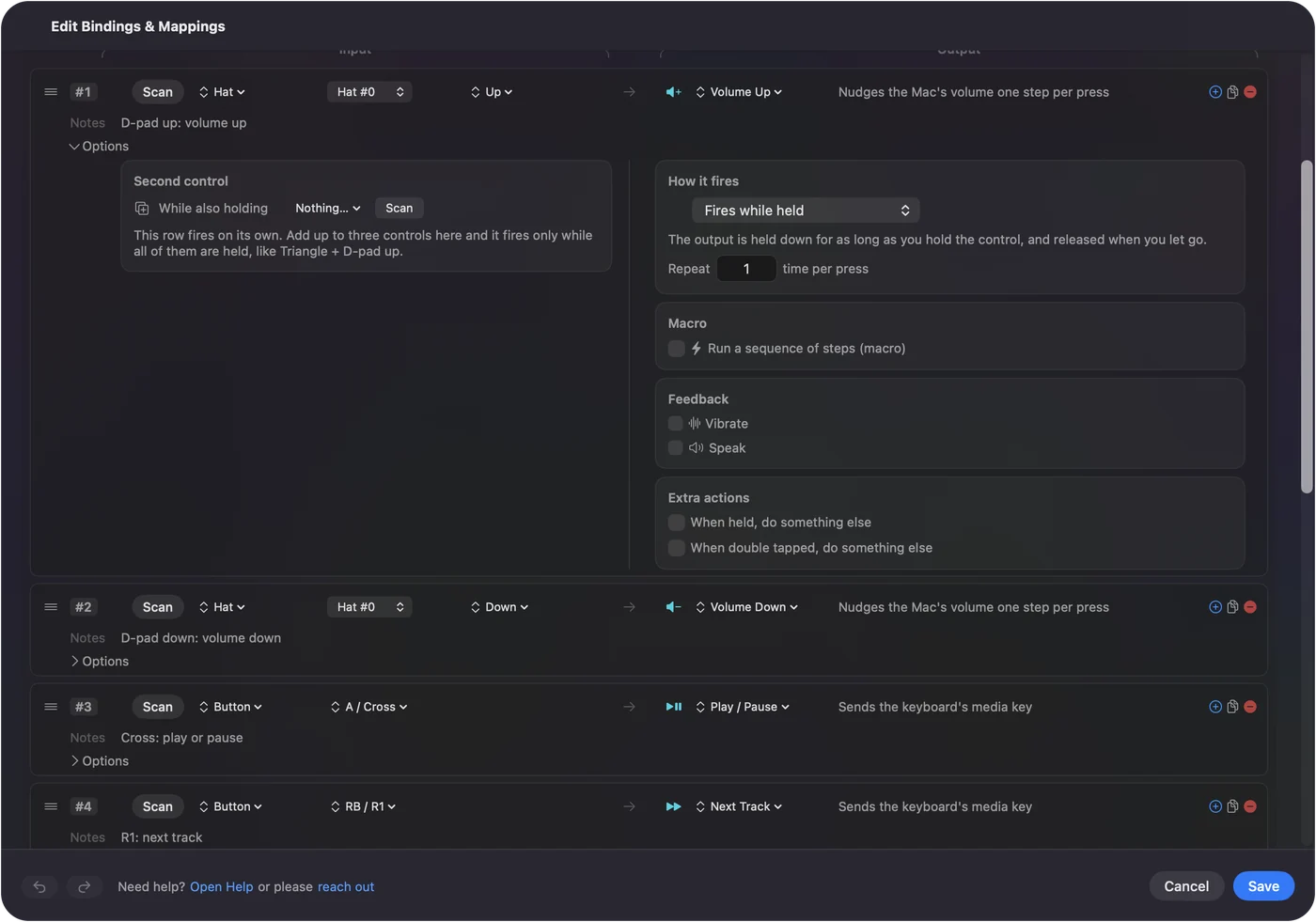
System Functions are the Mac's own controls, so they do not depend on which app is in front.
Make a knob or a trigger the volume
System Volume is a separate output from the three buttons. It is not a press. The Mac's volume follows the position of the control: turn a MIDI knob halfway and the volume sits at half, pull a trigger further and it gets louder.
- A MIDI knob. Use this for a desk volume knob that always shows where the volume is.
- A trigger. Use this when you want the volume up only while you squeeze.
- A wheel. A mouse wheel or a jog wheel can do the same job.
Pick a good place for it
On a game controller, the D-pad is a natural spot: up and down for volume, and a press of a stick for Mute. On a mouse, two side buttons work well if you do not need back and forward. On a MIDI controller, one knob and one pad cover everything.
What it cannot do
These outputs change the Mac's main volume. They do not set the volume of one app on its own, because macOS has no per-app volume for an app like InputConfig to reach. If Volume Up does nothing, check that the sound output is one whose volume the Mac can change, since some displays and audio interfaces fix it.
The short version
- Buttons. System Function, then Volume Up, Volume Down or Mute.
- A knob or trigger. The System Volume output, which follows the control.
Buttons step the volume. A knob sets it.
Questions
Can I change Mac volume with an Xbox or PS5 controller?
Yes. In InputConfig, give a button the System Function output and pick Volume Up, Volume Down or Mute. It works in every app while the preset runs.
Can a MIDI knob control the Mac's volume?
Yes. Use the System Volume output on the knob's row. The Mac's volume then follows the knob's position.
Can I set the volume of one app with a controller?
Not with InputConfig. Its volume outputs change the Mac's main volume. macOS does not offer a per-app volume control for it to use.
Related
Completely free. You don't have to make an account, there are no subscriptions, and nothing is locked. Optimized for Apple silicon. Open source on GitHub.
Updated