Safari from a game controller
 The Safari layout is built into InputConfig, free on the Mac App Store. You don't have to make an account, there are no subscriptions, and nothing is locked. Optimized for Apple silicon.
On a Mac: Safari is built into macOS and takes this layout's keys and clicks directly. Safari only hands controllers to web games, not to browsing, so this fills the gap.
Yes, you can browse Safari on a Mac with a game controller, and Reader makes it the best browser for it. The layout is the Chrome one, since the two share most shortcuts, with pointer and scroll on the sticks and back, forward, reload and new tab on the face buttons. Safari is a good browser to use from a sofa, because Reader turns any article into a big, quiet page that a controller scrolls well.
On this page: 8 sections
The layout, control by control
How the layout thinks
- Point, scroll, click. The left stick is the pointer, the right stick scrolls, the right trigger clicks and the left trigger right-clicks.
- Move through pages. Back, Forward, Reload and New Tab on the face buttons, bottom, right, left and top.
- Handle tabs. Close tab on the left bumper, the address bar on the right. D-pad left and right send Command Option and the arrows to step through tabs.
- Get out of things. Options is Escape.
Safari only hands controllers to web games, not to browsing, so this fills the gap. Everything Safari does with a mouse and its shortcuts, the pad now does from across the room.
If the tab rows do nothing
Apple lists Control Tab and Control Shift Tab as Safari's next and previous tab keys. If the two D-pad rows do nothing in your Safari, switch them to those.
- You: Open the preset in the editor, find the D-pad right row, and record Control Tab as its output. Give D-pad left Control Shift Tab.
- InputConfig: Sends Safari's own tab keys from then on.
- Check: With two tabs open, press D-pad right. The next tab comes to the front.
The same check works for any row: press it once with Safari in front and watch. Control Tab is the tab key Safari always understands.
Tune it for reading
- Reader. It is Command Shift R. Put it on the touchpad press and every article becomes readable from across the room.
- Bigger text. Put Command Plus on the right stick click and Command Minus on the left.
- Speak the page. Select All, then the Speak Selection system function, and the page reads itself: two buttons, or one macro row. Speak selection has to be on in System Settings, Accessibility, Spoken Content.
- Dictation. Add a Start Dictation row for searches and forms.
- A slower pointer. The Pointer speed slider on the preset's page changes all four pointer rows together, the quickest fix for small links on a TV.
Reader plus a slower pointer is most of the comfort. Put Reader on a button before anything else.
The short version
- Pair the controller and activate the layout. There is nothing to enable in Safari.
- Fix the tab rows if needed. They should send Control Tab and Control Shift Tab.
- Add Reader and dictation. One is for reading and one is for searching.
On a Mac connected to a TV, put Safari in full screen and sit back. Safari, Reader and a controller make the calmest way to read on a Mac from a sofa.
Get it in two clicks
- Get InputConfig free on the Mac App Store, open it, and click Smart Preset Maker on the welcome screen.
- Search for Safari and pick it. The layout is created as a preset in your sidebar, named and ready.
- Press Activate. Every row can be changed afterwards: the editor's Scan button rebinds any control the moment you touch it.
Every binding, as a table
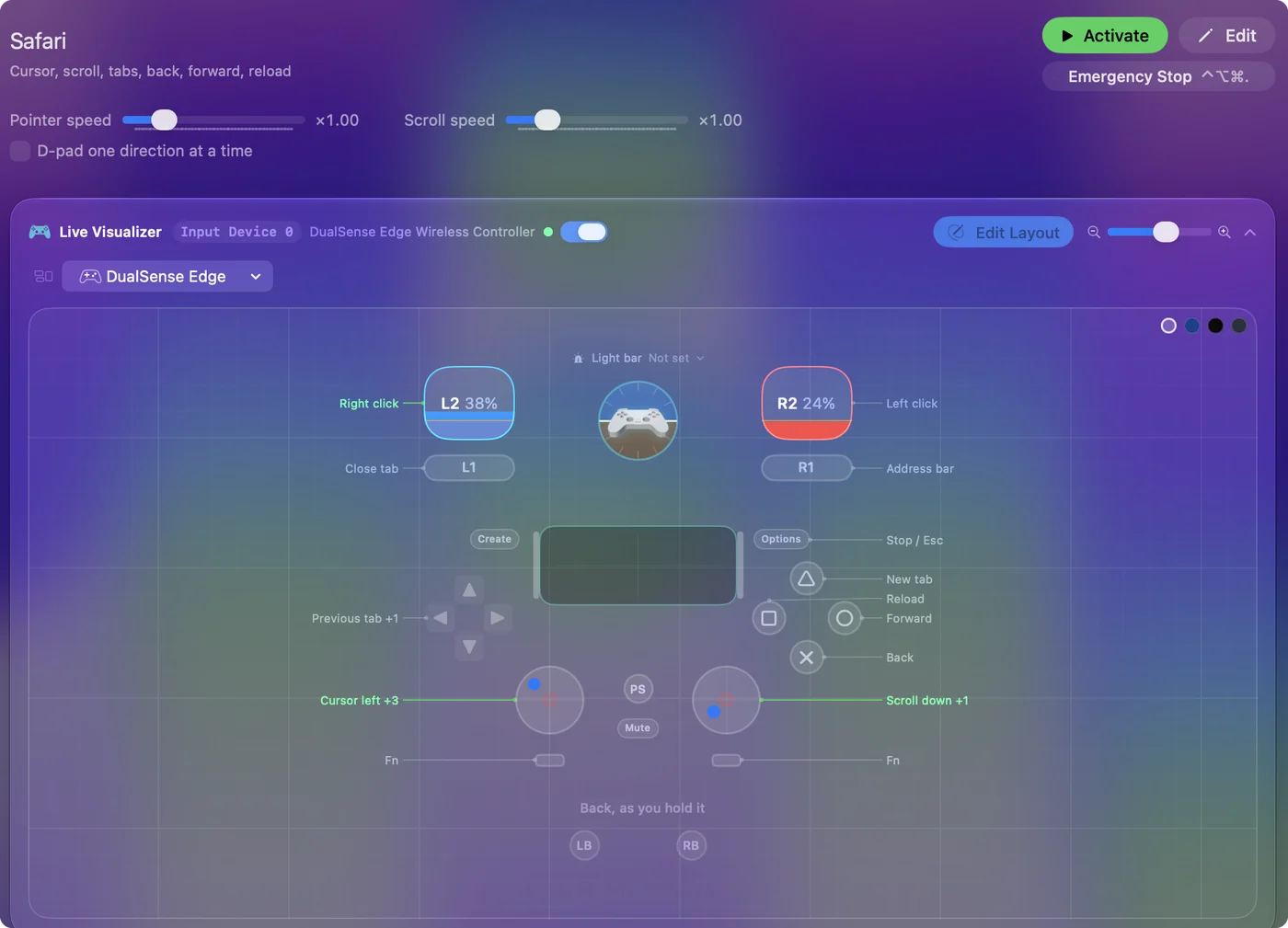
| Controller | Sends | What it does |
|---|---|---|
| Left stick left | Mouse motion left (speed 16) | Cursor left |
| Left stick right | Mouse motion right (speed 16) | Cursor right |
| Left stick up | Mouse motion up (speed 16) | Cursor up |
| Left stick down | Mouse motion down (speed 16) | Cursor down |
| Right stick down | Scroll down | Scroll down |
| Right stick up | Scroll up | Scroll up |
| Right trigger | Left click | Left click |
| Left trigger | Right click | Right click |
| A / Cross | Command (Left), Left | Back |
| B / Circle | Command (Left), Right | Forward |
| X / Square | Command (Left), R | Reload |
| Y / Triangle | Command (Left), T | New tab |
| LB / L1 | Command (Left), W | Close tab |
| RB / R1 | Command (Left), L | Address bar |
| D-pad left | Command (Left), Alt / Option (Left), Left | Previous tab |
| D-pad right | Command (Left), Alt / Option (Left), Right | Next tab |
| Start / Options | Escape | Stop / Esc |
Button names follow the Xbox / PlayStation pair shown in the editor, so A / Cross is the bottom face button on either pad. On a Switch Pro Controller the bottom button is labeled B; the mapping still fires on position.
Questions
Is there anything Safari-specific I should know?
Reader is the big one. It makes controller browsing pleasant. If D-pad tab switching does nothing, use Control Tab and Control Shift Tab on those rows.
Can I use this on a Mac connected to a TV?
That is the best case for it. Pair the controller over Bluetooth, put Safari in full screen, and the sticks and triggers do the rest. The Mac mini on a TV page covers the setup around it.
Related
Completely free. You don't have to make an account, there are no subscriptions, and nothing is locked. Optimized for Apple silicon. Open source on GitHub.
Updated