Microsoft Edge from a game controller
 The Microsoft Edge layout is built into InputConfig, free on the Mac App Store. You don't have to make an account, there are no subscriptions, and nothing is locked. Optimized for Apple silicon.
On a Mac: Edge for Mac shares Chrome's Command shortcuts. Two rows in this layout send Option and the arrows for back and forward, a Windows habit. The fix is below.
Yes, you can browse Microsoft Edge on a Mac with a game controller, after fixing the two back and forward rows. Edge is built on the same engine as Chrome and its Mac shortcuts match: Command for a new tab, close tab, the address bar, reload and find. Edge's best feature from a sofa is Read Aloud, and it is worth a button.
On this page: 7 sections
The layout, control by control
How the layout thinks
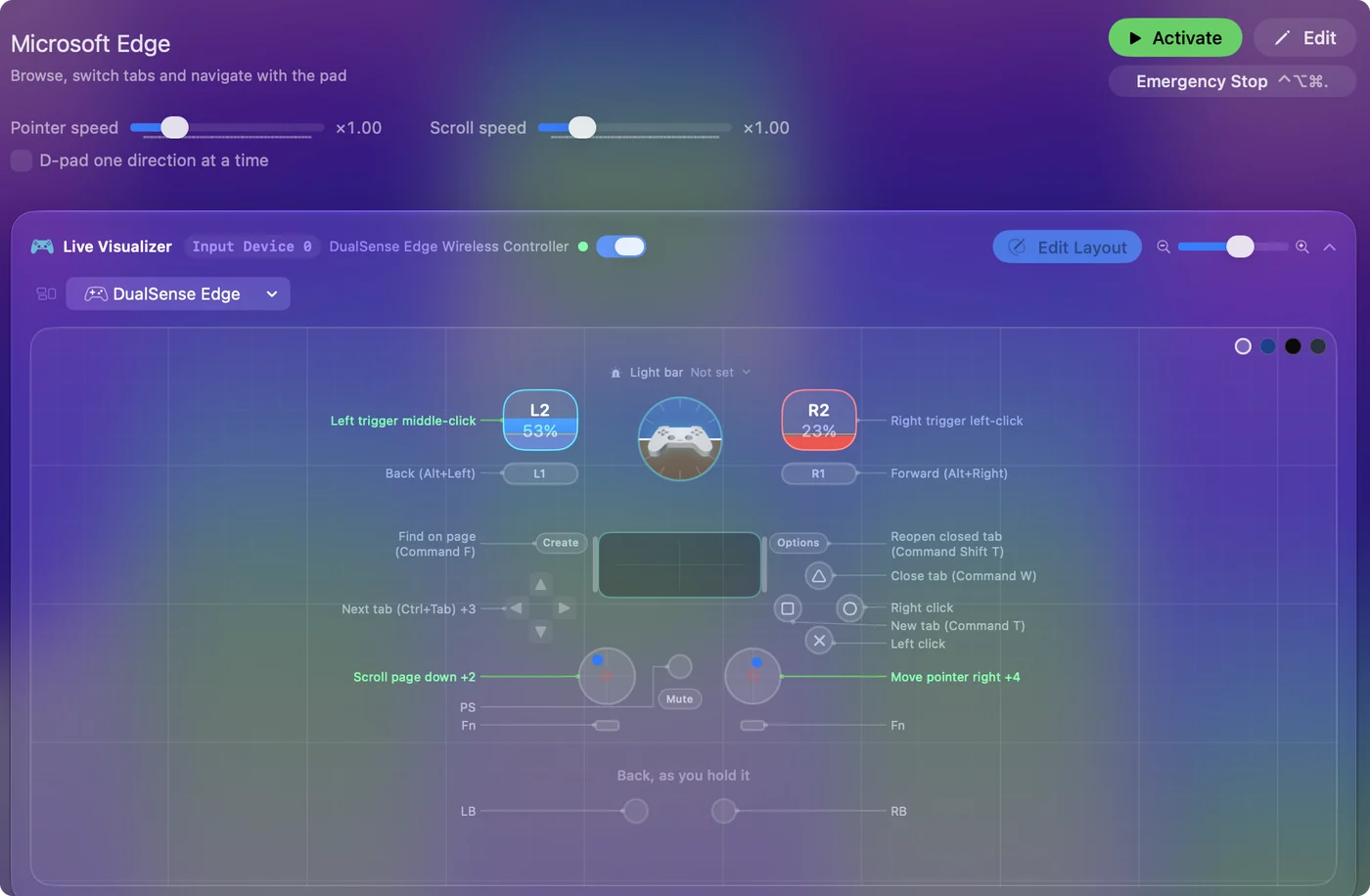
- Click. Click and right click on the bottom and right face buttons. The right trigger clicks and the left trigger middle-clicks, which opens a link in a new tab.
- Tabs. New Tab on the left face button, Close Tab on the top, D-pad left and right switch tabs (Control Shift Tab and Control Tab), and the stick clicks jump to the first and last tab.
- Address and reload. D-pad up focuses the address bar, down reloads.
- Find and reopen. Find on Share or View, Reopen Closed Tab on Options.
- Point and scroll. The right stick is the pointer and the left stick scrolls.
Everything here works as shipped except the bumpers. Edge keeps Chrome's Mac shortcuts, so the Chrome preset works in it unchanged.
Fix back and forward for the Mac
The bumpers send Option Left Arrow and Option Right Arrow, which is Alt and the arrows on Windows. On a Mac, Edge goes back and forward with Command Left Bracket and Command Right Bracket.
- You: Open the left bumper row's output and record Command Left Bracket. Give the right bumper Command Right Bracket.
- InputConfig: Sends Edge's Mac back and forward keys.
- Check: Open a link, press the left bumper, and Edge goes back a page.
Two rows, a minute of work. Option and the arrows are the Windows back keys, but on a Mac Edge uses Command and the brackets.
Tune it for Edge
- Read Aloud. Put Edge's Read Aloud key, from its own menu, on a spare button, for long articles.
- Dictation. Press the address bar button, then Start Dictation.
- Mouse side buttons. If you also use a mouse with side buttons, the row option Block the button's own action stops a bound side button from also going Back.
Brave, Arc and Vivaldi have their own entries too. Read Aloud on a button turns Edge into a reader you can listen to from across the room.
Get it in two clicks
- Get InputConfig free on the Mac App Store, open it, and click Smart Preset Maker on the welcome screen.
- Search for Microsoft Edge and pick it. The layout is created as a preset in your sidebar, named and ready.
- Press Activate. Every row can be changed afterwards: the editor's Scan button rebinds any control the moment you touch it.
Every binding, as a table
| Controller | Sends | What it does |
|---|---|---|
| Right stick right | Mouse motion right (speed 18) | Move pointer right |
| Right stick left | Mouse motion left (speed 18) | Move pointer left |
| Right stick down | Mouse motion down (speed 18) | Move pointer down |
| Right stick up | Mouse motion up (speed 18) | Move pointer up |
| Left stick down | Scroll down | Scroll page down |
| Left stick up | Scroll up | Scroll page up |
| A / Cross | Left click | Left click |
| B / Circle | Right click | Right click |
| X / Square | Command (Left), T | New tab (Command T) |
| Y / Triangle | Command (Left), W | Close tab (Command W) |
| LB / L1 | Alt / Option (Left), Left | Back (Alt+Left) |
| RB / R1 | Alt / Option (Left), Right | Forward (Alt+Right) |
| D-pad right | Ctrl (Left), Tab | Next tab (Ctrl+Tab) |
| D-pad left | Ctrl (Left), Shift (Left), Tab | Previous tab (Ctrl+Shift+Tab) |
| D-pad up | Command (Left), L | Address bar (Command L) |
| D-pad down | Command (Left), R | Reload page (Command R) |
| Back / Share / Select | Command (Left), F | Find on page (Command F) |
| Start / Options | Command (Left), Shift (Left), T | Reopen closed tab (Command Shift T) |
| L3 (left stick click) | Command (Left), 1 | Jump to first tab (Command 1) |
| R3 (right stick click) | Command (Left), 9 | Jump to last tab (Command 9) |
| Right trigger | Left click | Right trigger left-click |
| Left trigger | Middle click | Left trigger middle-click |
Button names follow the Xbox / PlayStation pair shown in the editor, so A / Cross is the bottom face button on either pad. On a Switch Pro Controller the bottom button is labeled B; the mapping still fires on position.
Questions
Why do the bumpers not go back?
They send Option and the arrows, the Windows keys. Change them to Command Left Bracket and Command Right Bracket.
Does the Chrome layout work in Edge?
Yes. Edge keeps Chrome's Mac shortcuts, so the Chrome preset works unchanged.
Related
Completely free. You don't have to make an account, there are no subscriptions, and nothing is locked. Optimized for Apple silicon. Open source on GitHub.
Updated