Microsoft Outlook from a game controller
 The Microsoft Outlook layout is built into InputConfig, free on the Mac App Store. You don't have to make an account, there are no subscriptions, and nothing is locked. Optimized for Apple silicon.
On a Mac: Outlook for Mac reads these shortcuts from any keyboard source. Nothing to enable in Outlook, in the new Outlook or the legacy one.
Yes, you can get through email in Outlook on a Mac with a game controller. Email is mostly reading and deleting, and both are one button: D-pad down is the next message, the top face button deletes it, and an inbox of two hundred becomes a rhythm. The words in a reply come from dictation, one Start Dictation row away.
The layout, control by control
How the layout thinks
- Walk the inbox. D-pad up and down move between messages.
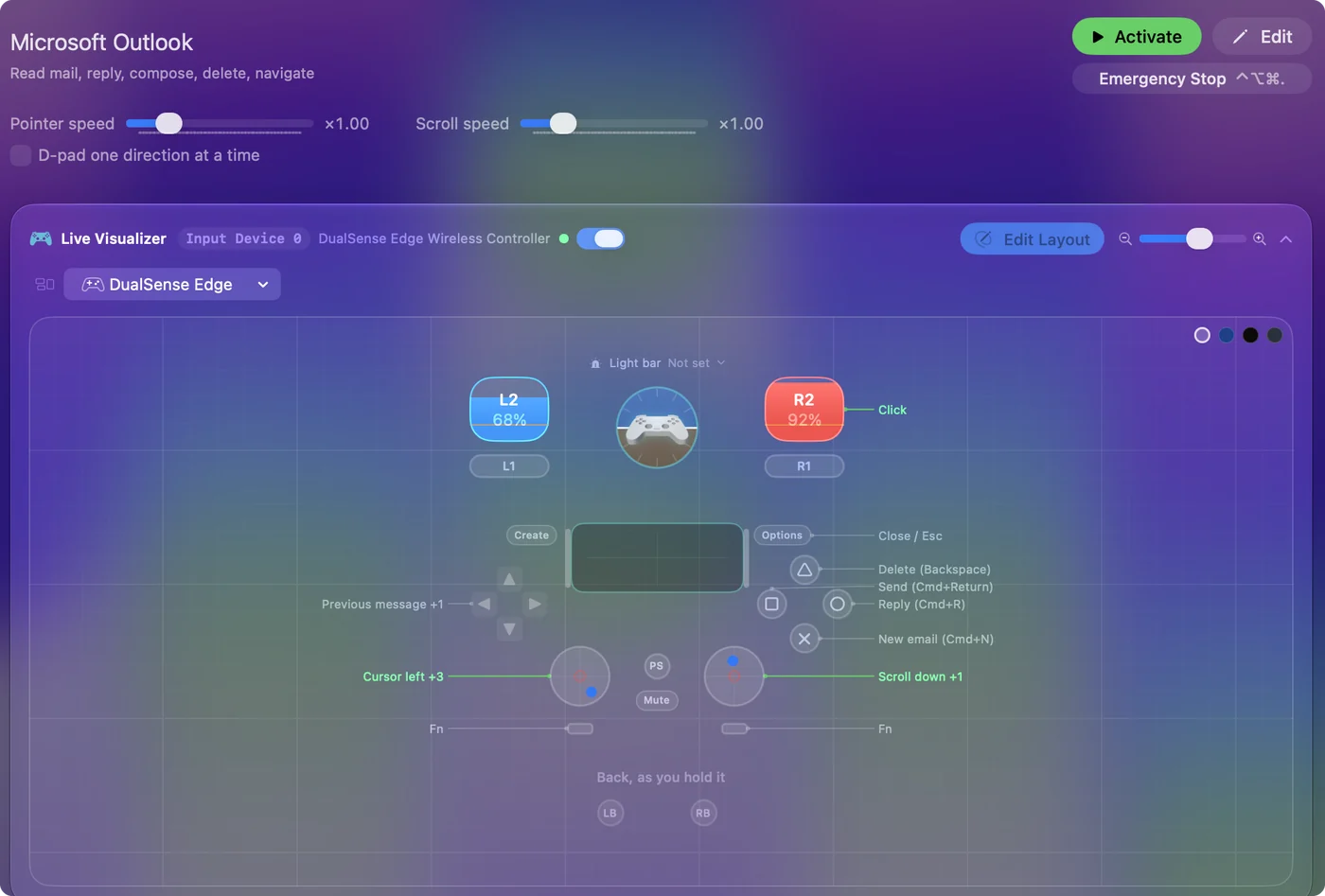
- Act on a message. New email (Command N) on the bottom face button, reply (Command R) on the right, send (Command Return) on the left, delete on the top.
- Read and point. The left stick is a pointer, the right stick scrolls the reading pane, and the right trigger clicks.
- Close things. Escape on Options closes whatever is open.
Send and delete sit on opposite sides of the button diamond on purpose. Triage is the D-pad and one delete button, over and over.
Make send a deliberate press
If you would rather not risk sending by reflex, make Send a hold.
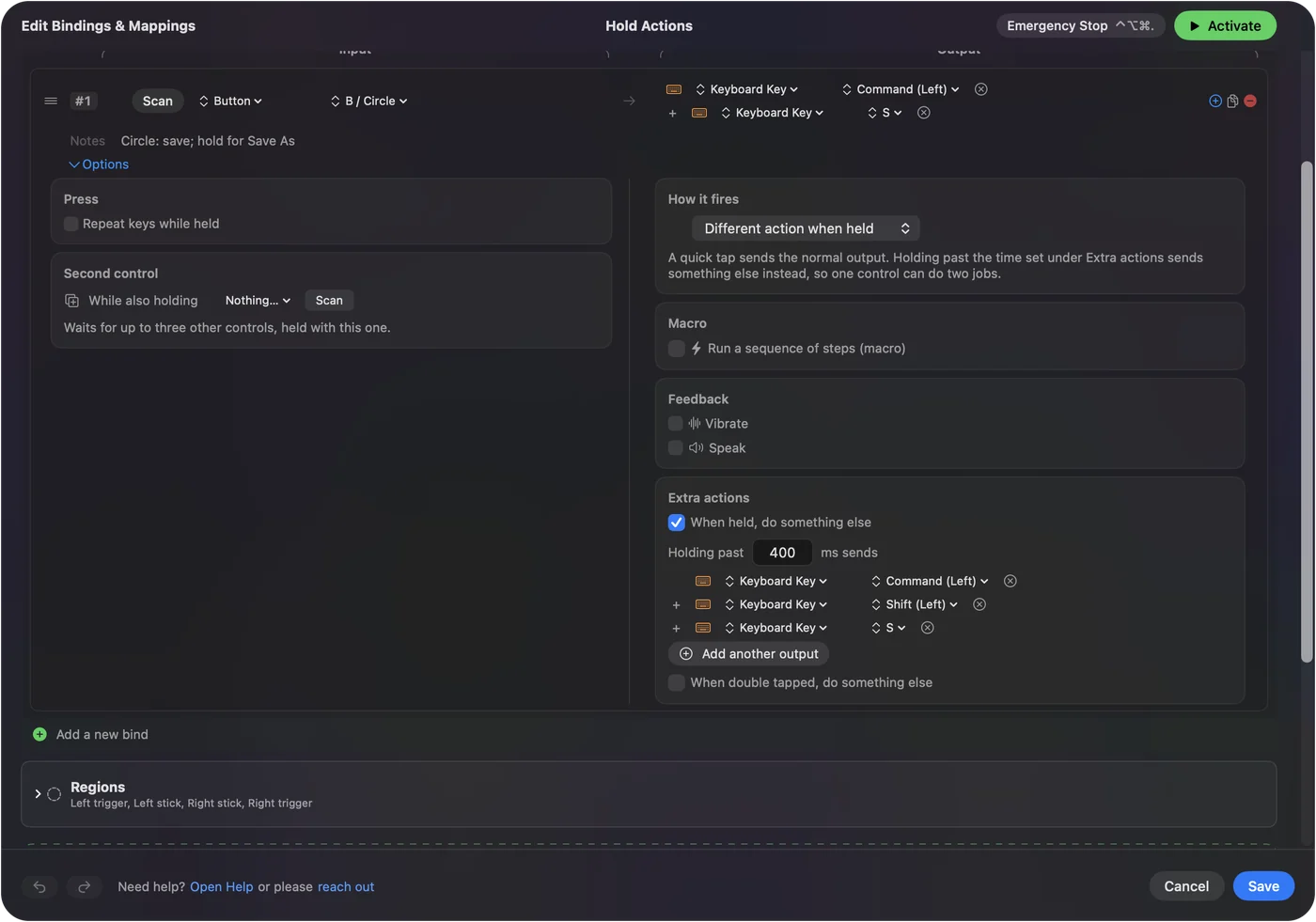
- You: In the send row's Options, under How it fires, choose Different action when held. Put Command Return on the held action, and give the quick press a key Outlook ignores, such as F13.
- InputConfig: Sends Command Return only when the button is held past the hold time.
- Check: Tap the button on a draft and nothing happens. Hold it and the message goes.
Keep the hold short enough that it does not feel like waiting. A held send is the cheapest insurance in the whole layout.
Tune it for Outlook
- Dictation. Add a Start Dictation row on a bumper. Reply, speak, send: three buttons.
- Reply all and forward. Put Command Shift R and Command J behind a chord.
- Archive. Most people archive more than they delete. Outlook's archive key is in its Help menu under keyboard shortcuts. Put it on the left bumper.
- Read it to me. Select All in the message, then Speak Selection, and a long email reads itself. Speak selection has to be on in System Settings, Accessibility, Spoken Content.
- Feel the send. Vibrate on the send row, set under Feedback.
It works the same in the new Outlook and the legacy one. With dictation on a bumper, replying is reply, speak, send.
Get it in two clicks
- Get InputConfig free on the Mac App Store, open it, and click Smart Preset Maker on the welcome screen.
- Search for Microsoft Outlook and pick it. The layout is created as a preset in your sidebar, named and ready.
- Press Activate. Every row can be changed afterwards: the editor's Scan button rebinds any control the moment you touch it.
Every binding, as a table
| Controller | Sends | What it does |
|---|---|---|
| Left stick left | Mouse motion left (speed 16) | Cursor left |
| Left stick right | Mouse motion right (speed 16) | Cursor right |
| Left stick up | Mouse motion up (speed 16) | Cursor up |
| Left stick down | Mouse motion down (speed 16) | Cursor down |
| Right stick down | Scroll down | Scroll down |
| Right stick up | Scroll up | Scroll up |
| Right trigger | Left click | Click |
| D-pad up | Up | Previous message |
| D-pad down | Down | Next message |
| A / Cross | Command (Left), N | New email (Cmd+N) |
| B / Circle | Command (Left), R | Reply (Cmd+R) |
| X / Square | Command (Left), Return | Send (Cmd+Return) |
| Y / Triangle | Backspace | Delete (Backspace) |
| Start / Options | Escape | Close / Esc |
Button names follow the Xbox / PlayStation pair shown in the editor, so A / Cross is the bottom face button on either pad. On a Switch Pro Controller the bottom button is labeled B; the mapping still fires on position.
Questions
Can I write emails with a game controller?
With dictation for the text, yes. The controller opens, reaches the address field with the pointer and sends. The words are spoken.
Does this work in Apple Mail too?
Mail has its own entry. Its keys differ in one important place: send is Command Shift D.
Related
Completely free. You don't have to make an account, there are no subscriptions, and nothing is locked. Optimized for Apple silicon. Open source on GitHub.
Updated