Apple Mail from a game controller
 The Apple Mail layout is built into InputConfig, free on the Mac App Store. You don't have to make an account, there are no subscriptions, and nothing is locked. Optimized for Apple silicon.
On a Mac: Mail is built into macOS and reads its own shortcuts from this layout. Nothing to enable in Mail.
Yes, you can read and answer email in Apple Mail from a game controller on a Mac. Next message is on the D-pad, delete on the top button, and Send is Command Shift D on the left face button, away from anything you press by reflex. The words come from dictation. It is the same idea as the Outlook layout, with Mail's keys.
The layout, control by control
How the layout thinks
- Walk the inbox. D-pad up and down move between messages.
- Act on a message. New message (Command N) on the bottom face button, reply (Command R) on the right, send (Command Shift D) on the left, delete on the top.
- Read and point. The left stick is a pointer, the right stick scrolls the message, and the right trigger clicks.
- Close things. Escape on Options closes a draft window's sheet or a search.
Mail is built into macOS and reads its own shortcuts from this layout, so there is nothing to enable. Send is Command Shift D in Mail, which is why it has a button to itself.
Tune it for Mail
- Dictation. Add a Start Dictation row on a bumper. Reply, speak, send.
- Archive. Put Control Command A on the left bumper.
- Unread and flag. Put Command Shift U and Command Shift L on the stick clicks.
- Speak the message. Select All, then Speak Selection, and a long email reads itself aloud, once Speak selection is on in System Settings, Accessibility, Spoken Content.
Archive on a bumper changes the rhythm more than any other row. Archive and delete on two buttons empty an inbox fastest.
The short version
- Use it as is for reading. It already has the D-pad, delete and reply.
- Add dictation and archive. Then replying and filing need no keyboard.
- One layout for the whole Mac. If Mail is one app among many, the built-in Easy Browse preset handles the pointer, scrolling, dictation and read-aloud everywhere, and this Mail preset can take over only while Mail is in front.
Auto-switch does the handover when you list Mail under Activate when these apps are in front. Easy Browse for the Mac, this layout for Mail, and auto-switch between them.
Get it in two clicks
- Get InputConfig free on the Mac App Store, open it, and click Smart Preset Maker on the welcome screen.
- Search for Apple Mail and pick it. The layout is created as a preset in your sidebar, named and ready.
- Press Activate. Every row can be changed afterwards: the editor's Scan button rebinds any control the moment you touch it.
Every binding, as a table
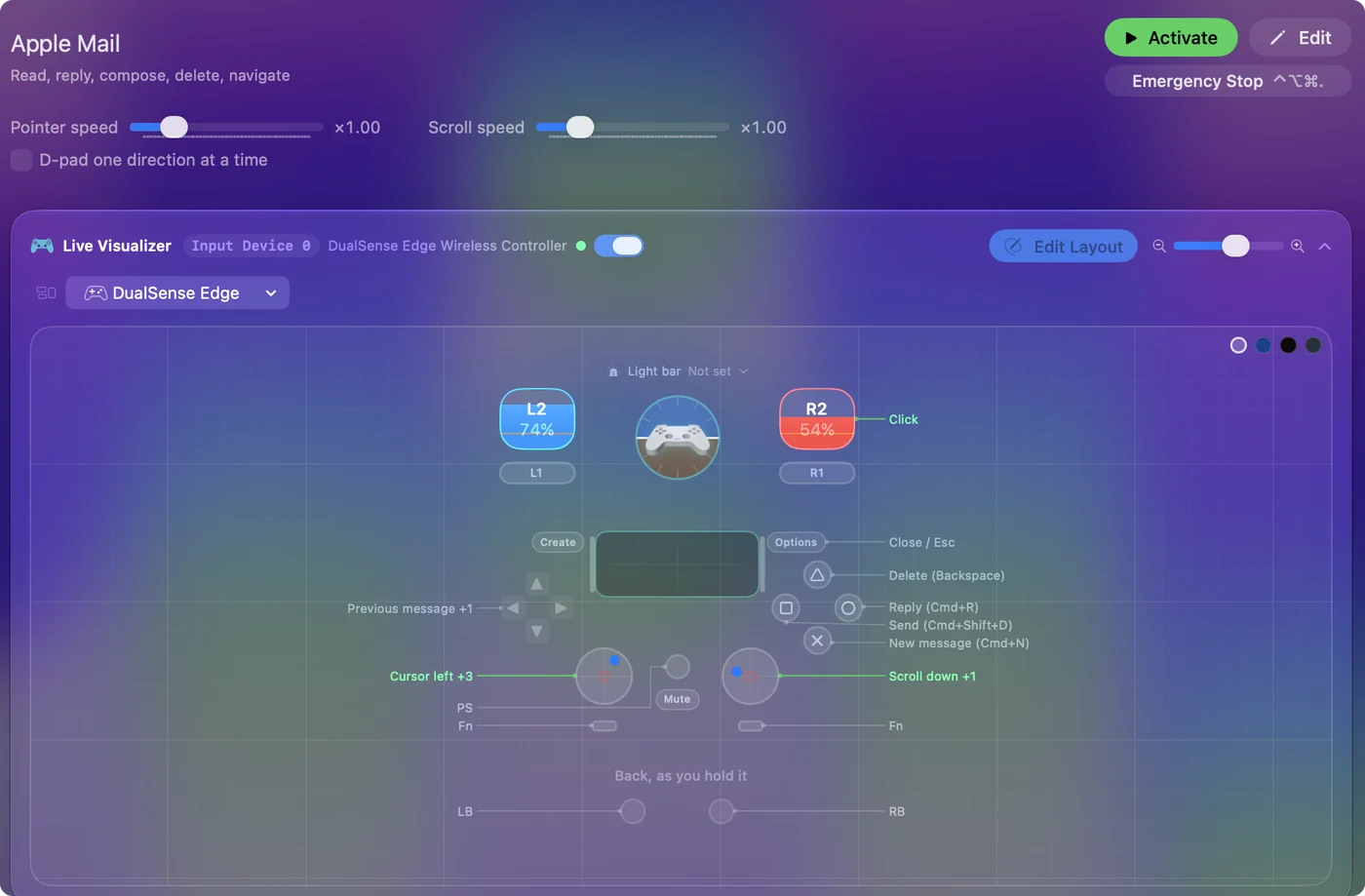
| Controller | Sends | What it does |
|---|---|---|
| Left stick left | Mouse motion left (speed 16) | Cursor left |
| Left stick right | Mouse motion right (speed 16) | Cursor right |
| Left stick up | Mouse motion up (speed 16) | Cursor up |
| Left stick down | Mouse motion down (speed 16) | Cursor down |
| Right stick down | Scroll down | Scroll down |
| Right stick up | Scroll up | Scroll up |
| Right trigger | Left click | Click |
| D-pad up | Up | Previous message |
| D-pad down | Down | Next message |
| A / Cross | Command (Left), N | New message (Cmd+N) |
| B / Circle | Command (Left), R | Reply (Cmd+R) |
| X / Square | Command (Left), Shift (Left), D | Send (Cmd+Shift+D) |
| Y / Triangle | Backspace | Delete (Backspace) |
| Start / Options | Escape | Close / Esc |
Button names follow the Xbox / PlayStation pair shown in the editor, so A / Cross is the bottom face button on either pad. On a Switch Pro Controller the bottom button is labeled B; the mapping still fires on position.
Questions
Can I write emails with this?
With dictation for the words, yes. Reply, press the dictation button, speak, and press the send button.
Why is send on Command Shift D?
That is Mail's own shortcut for Send. Outlook uses Command Return, so the two layouts differ on that one row.
Related
Completely free. You don't have to make an account, there are no subscriptions, and nothing is locked. Optimized for Apple silicon. Open source on GitHub.
Updated