Thunderbird from a game controller
 The Thunderbird layout is built into InputConfig, free on the Mac App Store. You don't have to make an account, there are no subscriptions, and nothing is locked. Optimized for Apple silicon.
On a Mac: Thunderbird reads keys from this layout like a keyboard. The send row ships with Apple Mail's key, so change it to Thunderbird's Command Return.
Yes, you can triage mail in Thunderbird on a Mac from a game controller: next message on the D-pad, new, reply and delete on the face buttons. Mail triage is a D-pad job: next message, read, delete or reply, next message. One row ships with Apple Mail's send key, so change it before you send anything.
The layout, control by control
How the layout thinks
- Move through mail. Previous and next message on D-pad up and down.
- Act on a message. New message (Command N) on the bottom face button, reply (Command R) on the right, delete on the top.
- Point and scroll. The left stick is the pointer, the right stick scrolls, the right trigger clicks, Escape is on Start.
Fix the send row
- You: Change the left face button's output from Command Shift D to Command Return.
- InputConfig: Sends Thunderbird's Send Now key instead of Apple Mail's send key.
- Check: Write a test message to yourself and press the left face button. It sends.
Test the send row on a message to yourself before you trust it.
Tune it
- Archive. Put A on a stick click.
- Dictation. A Start Dictation row on a bumper writes the reply.
- Feel the delete. Tick Vibrate under Feedback in the delete row's Options, so a delete never goes unnoticed.
An inbox goes down faster when every message is one thumb press.
Get it in two clicks
- Get InputConfig free on the Mac App Store, open it, and click Smart Preset Maker on the welcome screen.
- Search for Thunderbird and pick it. The layout is created as a preset in your sidebar, named and ready.
- Press Activate. Every row can be changed afterwards: the editor's Scan button rebinds any control the moment you touch it.
Every binding, as a table
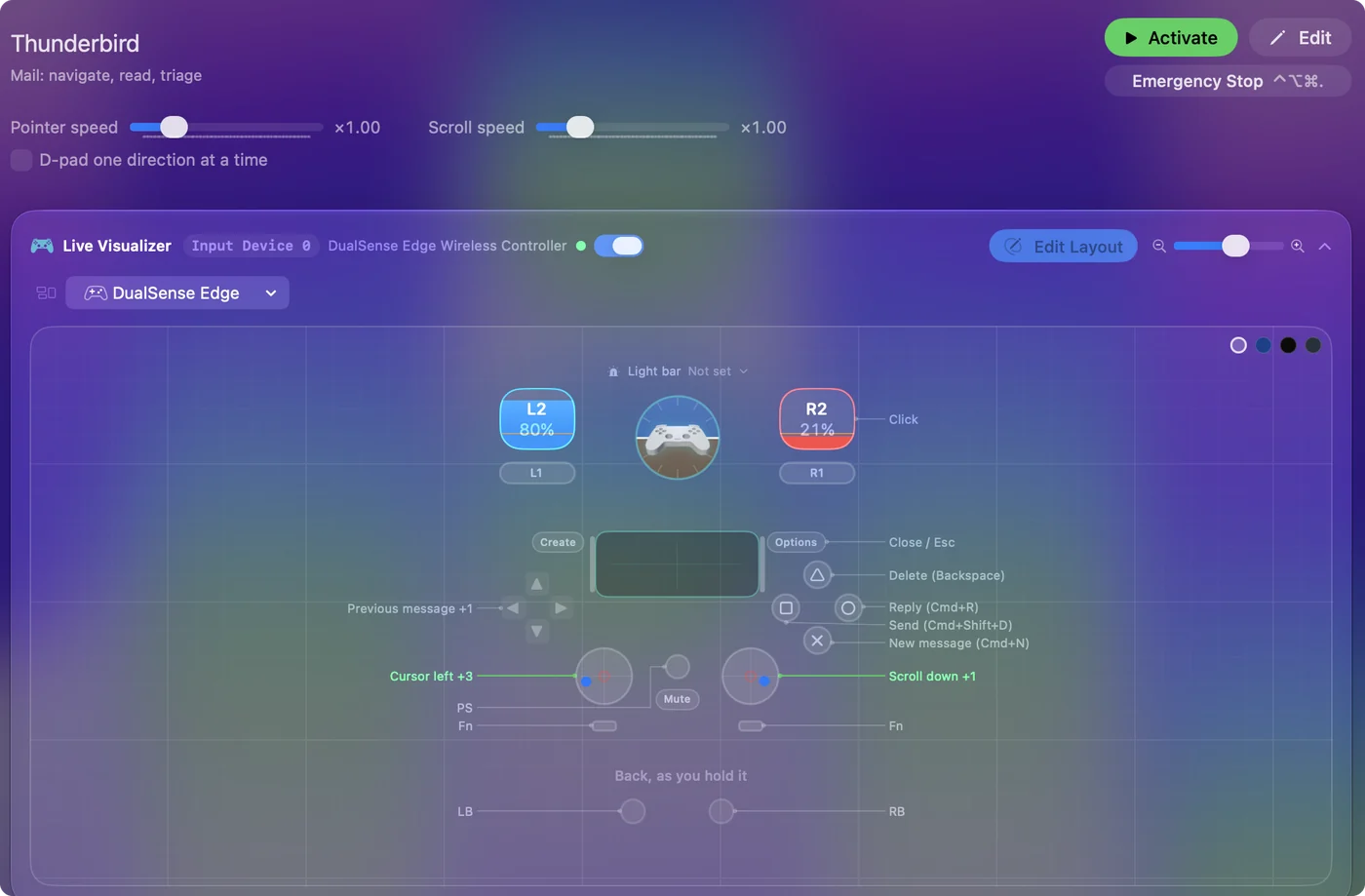
| Controller | Sends | What it does |
|---|---|---|
| Left stick left | Mouse motion left (speed 16) | Cursor left |
| Left stick right | Mouse motion right (speed 16) | Cursor right |
| Left stick up | Mouse motion up (speed 16) | Cursor up |
| Left stick down | Mouse motion down (speed 16) | Cursor down |
| Right stick down | Scroll down | Scroll down |
| Right stick up | Scroll up | Scroll up |
| Right trigger | Left click | Click |
| D-pad up | Up | Previous message |
| D-pad down | Down | Next message |
| A / Cross | Command (Left), N | New message (Cmd+N) |
| B / Circle | Command (Left), R | Reply (Cmd+R) |
| X / Square | Command (Left), Shift (Left), D | Send (Cmd+Shift+D) |
| Y / Triangle | Backspace | Delete (Backspace) |
| Start / Options | Escape | Close / Esc |
Button names follow the Xbox / PlayStation pair shown in the editor, so A / Cross is the bottom face button on either pad. On a Switch Pro Controller the bottom button is labeled B; the mapping still fires on position.
Questions
Does this match the Apple Mail layout?
Yes, it has the same shape as the Apple Mail layout. Thunderbird's send key, Command Return, is the difference.
Related
Completely free. You don't have to make an account, there are no subscriptions, and nothing is locked. Optimized for Apple silicon. Open source on GitHub.
Updated